
Litematica
Modby masady
A modern schematic mod written for Fabric (and LiteLoader on 1.12.x), with extra features for Creative mode work
Type
Mod
CurseForge Downloads
13,558,924
CurseForge ID
308892
Modrinth Downloads
21,148,586
Modrinth ID
bEpr0Arc
Last Updated
Jul 27, 2026
Description
See this about MC 1.20.5 and later versions
TL;DR; I won't maintain the 1.20.5+ versions myself anymore, at least for now. There are ports by Sakura-Ryoko. They will be here once they are more stable, see the post for the links and details before then.
Description:
Litematica is a new schematic mod written from scratch, and it is primarily targeting light mod loaders like LiteLoader on 1.12.x, Rift on 1.13.x and Fabric on 1.14+. There is also a Forge version for 1.12.2, but not yet for 1.14.4+ (but Forge ports for 1.14.4+ are also planned, see below).
It has all the features of the old Schematica mod except for the printer (which is not planned for Litematica itself, but instead is left to extension mods), plus a bunch more.
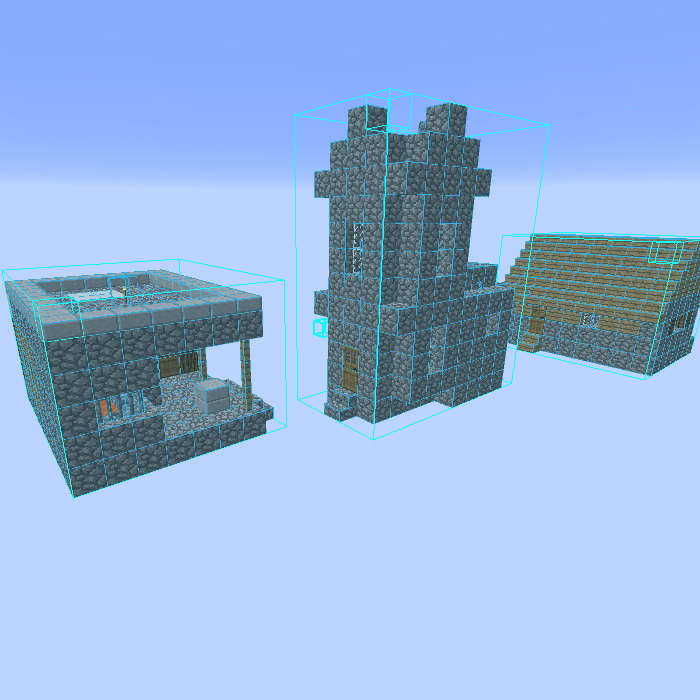
- The main feature of a schematic mod is to display a "hologram" version of a structure, which shows you exactly how to build the structure and where to place the blocks. It also includes a (configurable) overlay to highlight missing, extra or wrongly placed blocks.
- Litematica also includes a nice Material List, including a Material List HUD, to help you collect the materials needed for the build.
- There is also a Schematic Verifier feature, including an overlay, which you can use to scan the entire schematic area and look for any mistakes. This can be extremely useful especially with technical/redstone builds, where tiny mistakes can break everything.
- There are also several Creative-mode-only helper features, such as Fill, Replace, Delete and also a Paste mode for "pasting" schematics into the world (immediate/direct in single player, using /setblock commands in multiplayer).
NOTE: Litematica also requires the MaLiLib library mod:
https://www.curseforge.com/minecraft/mc-mods/malilib
WARNING: The Easy Place mode feature may get you banned on some servers!
The Easy Place feature will always be clicking on the target position's air block, and this can easily be detected by anti-cheat systems. So this can result in at least two things: The block placement will just be rejected and you just get client-side ghost blocks, or some anti-cheat system flags that as cheating and auto-bans you from the server. So before using Easy Place, find out of it's allowed on the server!
About Forge ports for 1.14.4+
Forge versions for 1.14.4 and later are planned.
Still no ETA for the "official port", which will only be done from the still being worked on new development code. But ZacSharp already ported the current 1.16.4 Fabric version to 1.16.5 Forge. That port is available here: https://legacy.curseforge.com/minecraft/mc-mods/litematica-forge
Some more info and discussion about the Forge port/builds is here: https://github.com/maruohon/litematica/issues/234
There are also at least a couple of other 3rd party Forge ports on GitHub and at least one on Modrinth. I haven't tested those myself, so I can't say anything about how well they work.
The default hotkey to open the in-game config GUI is M + C. If you are for example on AZERTY keyboard layout instead, then the keys are different, and M + C becomes , + C instead, etc.
If you have Optifine installed, then there are some options that you most likely will need to disable in Optifine, or otherwise it will break the schematic rendering:
- If you get glitchy weird triangles, then in 1.16+ first try updating to the latest Litematica version. If that doesn't work, then set shaders to OFF (not Internal) and restart the game.
- Render Regions probably needs to be disabled to prevent weird rendering issues (the schematic (partially?) rendering in weird places)
- Fast Render might also need to be disabled if there are still some weird HUD/GUI rendering issues
Snapshot versions and latest development builds
There are sometimes newer "development" or snapshot versions of my mods available here: https://masa.dy.fi/mcmods/client_mods/
Lately I've stopped making releases for MC snapshots, as it's mostly a waste of my limited modding time and energy. Snapshot releases maye start again at some point, if I ever get the elusive but often mentioned "new code versions" of the mods actually released to the public first. I geuss time will tell.
FAQ - please read first if you have questions
- Q: The main menu and the config menu don't open with M and M + C
- A: 1.) Check that the mod is installed and working: check if you see the orange Litematica text on the F3 screen.
2.) If you are on a non-QWERTY keyboard layout, then the default hotkeys are different. For example on AZERTY the M key is , (comma) instead, so the config menu hotkey for example is , + C. I'm looking for a solution to this issue. - Q: How do I rotate a schematic (placement)?
- A: In the Placement configuration GUI. You can open it (for the currently selected Placement) with a hotkey, or you can go via the Main menu -> Schematic Placements -> Configure.
- Q: How do I only render one layer at a time
- A: You can control the rendered layers on the Render Layers tab inside the in-game config menu (via the Main menu -> Configuration Menu, or the default hotkey M + C
- Q: How do I change blocks in the schematic? Is there a /schematicaReplace command?
- A: There is no command, but there is the Schematic Rebuild mode (should be called Schematic Edit mode...). See the wiki here for more details: https://github.com/maruohon/litematica/wiki/schematic_editing
- Q: Is there a printer like in Schematica?
- A: 1.) There is no printer for survival, and it's not planned for Litematica itself. There are at least two separate extension mods to add a printer. See: https://github.com/aria1th/litematica-printer or https://github.com/aleksilassila/litematica-printer
2.) For Creative mode there is the Paste Schematic in world tool mode, which places the entire schematic at once in a single player world, or using setblock commands in multiplayer. - Q: I get an error "Failed to load schematic" when trying to load a '*.schematic' file in 1.13+.
- A: 1.) The 1.13 - 1.16 versions of Litematica can't currently load the Sponge schematic format yet. That format is used for example by World Edit in 1.13+. Although those schematics should preferably be named with the *.schem file name extension, many web sites use the *.schematic extension, which makes them hard to tell apart from the old, completely different MCEdit/Schematica format, which Litematica can already load. Full support for the Sponge format exists in the main development version in 1.12.2, and a "quick hax" temporary support for just loading that format also exists in the 1.17+ mod versions. It will also come to the other versions with the next bigger update.
2.) Currently the way to load Sponge schematics with Litematica is:
- Create a temporary (flat) world.
- Place the schematic there using World Edit (quick guide: https://old.reddit.com/r/Minecraft/comments/kt2znv/convert_schem_file_to_litematic_file/gilwla8/)
- Make a new Litematica schematic from the placed structure from that world
The mod is still under development, and some of the planned "extra" features (for example some of the "tool modes") haven't yet been implemented fully or at all.
Here is a Reddit post that explains the very basics of the mod:
https://old.reddit.com/r/Minecraft/comments/cqdmkk/anyone_can_help_me_how_do_i_make_schematics_with/exeug78/
Here are some tutorial videos for the basics of the mod. A more detailed, "official" tutorial video is planned after I finish some changes and still missing features I'm still working on for the mod.
A short, quick tutorial of the basics of the mod:
Another, a bit longer tutorial that also covers some other things like the Rebuild mode:
A couple of more tutorials:
If you have questions or need help with something, the best/fastest way to get answers is on my Discord server.

Screenshots
Similar Mods
Xaero's Minimap
Displays the nearby world terrain, players, mobs, entities in the corner of your screen. Lets you create waypoints which...

Sodium
The fastest and most compatible rendering optimization mod for Minecraft. Now available for both NeoForge and Fabric!
Waystones
Teleport back to activated waystones. For Survival, Adventure or Servers.

Curios API (Forge/NeoForge)
A flexible and expandable accessory/equipment API for users and developers.
Placebo
A library mod

Patchouli
Accessible, Data-Driven, Dependency-Free Documentation for Minecraft Modders and Pack Makers
Included in Modpacks
 Batoon's Modpacks: Building Utility's
 Building Blocks
 AsguhoClient
 SuperSMP Pack
 Convenient Optimization
 Esentiale
 Sneykor's Cobblemon online
 Fast and Better Vanilla
 Vanilla Enhanced
 Sodium Plus
 Vanilla Perfected
 红石生电优化【Redstone Survival Optimization】
 orifu's modpack
 Kart's Chaotic Kit
 PacPack Voxydized
 Dark's simple QoL
 RedstoneToolkit
 Enchant.cz
 Helix Modpack
 Qearioz's Optimized PvP & SMP
 Vanilla Perfected (Curseforge Edition!)
 CivOptimized
 Fidelity
 Yet Another Vanilla But Better (YAVBB)
 Icabu 4 modpack
 Adaptive
 PulseNode
 Mytocrafted
 Eshkere-modpack
 Destiny's Kitchen Sink
 CRETANIA
 Pibblecraft
 ContentCreatorsTool
 Mazite
 asphyxia mods
 JouTak
 Cobblemon: Unbound
 Ultra Distant Horizons
 Remade And Remastered
![Dreamcraft [FABRIC]](https://media.forgecdn.net/avatars/578/913/637943586710882910.png) Dreamcraft [FABRIC]
Dreamcraft [FABRIC]
 LFY Experience
 Electricity Generation Integration Package
 Simply Vanilla
 Turtle's Auxiliar Modpack
 Wxrlds's Optimisations
 XPlus PerioTable Modpack (Fabric)
 Kryeit Gold
 Usefully Optimized
 Builder's QOL
 NYLE RP inspiré de PokéRayou & Cobblemon Academy 2.0
 Realistic Craft Better
 Fajita's Enhanced Minecraft
 vanilla experience : the best client-side modpack
 Tomato Performance Pack
 The Intergalactic Squirrels
 Mihuco's Modpack
 Banana Sandwich Optimized Modpack
 Bhored's Banana Sandwich Modpack
 vilmiComfort
 Java & Stuff
 Core Enhancements
 CraftAttack-like Client Mods
 Sosaland
 CARCHcraft
 Simple Survival Immersion - SSI
 kxpack
 SkyForge (Member Edition)
 Nightfall SMP Modpack
 Conquest of the Bleak Isles
 EMF
EMF
 Starlight
 QuikPak
 Just QoL
 secret's pack
 Vanilla QOL Improved
 红石生电极速版【Redstone speed version】
 Vanilla Reimagined
 Mister Experience
 Technically Enhanced
 Client Optimized
 Spade's Vanilla+
 Guild Adventures
 Path of the Ascended
 MI:Foundation
 FemCraft Client
 LinusMinus
 LS - Smooth View
 Myth&Kingdom - Rise of Fantasy
 Divide & Conquer
 Xisuma's Hermitcraft Enhancements
 Crackmatica
 Endo Vanilla
 SteinCraft RPG
 New Life SMP
 schematic
 Create: Gearworks
 Chronicles of Arda
 EwMedieval Modpack
 Nolini135's Vanilla
 GoldenApple Optimized
 T.MOD
T.MOD
![Redstone Witch [Lite]](https://cdn.modrinth.com/data/sFA4kyET/be528d560ef1b56de7490ea97d88365c86dff043_96.webp) Redstone Witch [Lite]
Redstone Witch [Lite]
 Aetheris QoL
 Bambam Modpack
 Jotunheimr
 Survival Project Pack
 Optimized Vanilla Extra (OVE)
 UNIPACK
 EndlessPixel-Modpack
 Хрєкотрон
 OCSMP
OCSMP
 Lumen Packs
 Yucataland
 Vanilla Optimised
 Cookie Pack(e4mc)
 Essential Optimized
 pseudofred's Vanilla+
 emad modpack
 FDMPack
 VIRISMP
 medieval smp S4
 Cobble Lemon
XenCraft
Cobble Lemon
XenCraft
 KnopiaPack
 Diamond Age
 Palladium SuperHeroes Server
 The True Vanilla
 Optimal Optimization
 Etar Experience
 Krümelchencraft
![Better MC [ PACK ]](https://cdn.modrinth.com/data/pJXOXg2a/8e6276e82b1412f2dcb5bf205c6b69c49926c60d_96.webp) Better MC [ PACK ]
Better MC [ PACK ]
 EMPIRES BUT NOT???
The Fourth Wall SMP Modpack
EMPIRES BUT NOT???
The Fourth Wall SMP Modpack
 V-Civilization V-Island (Unofficial)
 Lucpack Survival
 Explorer's Feast | 探索者的盛宴
 Hydro Vanilla SMP Mods
 Soulspark
 Survival Mode Tweaks
 GenPlus
 Client+
 SkullClient
 Salbox's Technical MC
![[OUTDATED] Cobbleland+ (Unofficial)](https://media.forgecdn.net/avatars/1275/82/638829465291251508.png) [OUTDATED] Cobbleland+ (Unofficial)
[OUTDATED] Cobbleland+ (Unofficial)
 Just Vanilla Things
 Vanilla Peak
 Minemon -- A cobbleverse spinoff
 TABSMP Modpack
 Steve Fans
 Harmonia Series
 VanillaReborn
 Vanilla Odyssey
 All the Mods Fabric - ATMF
 VanillaEnhancedCraft
 Just a Random Vanilla Adventure
 PotaTOE QOL
 Terra Nexus
 EW optimized
 Pocket SMP
 Fast & Fine
 Pokeheros 2
 Nybblecraft
 Cozy
Cozy
 Builtechraft Client Mods
 Gobba's Crystal PVP Modpack
 Craft Complimentary
 Cobblemon Champions
 DesignDream: Spawnproofing, Schematics, Shaders
 Better Aeternium
 Ludo's Modpack
 Beacoland
 Cobble Moon
 Croissant Pack
 Friendly Adventures
 Stoneworks Immersion Pack (S.I.P)
 luseban
 Client S ( Fps Boost )
 Useful Client-Side Tweaks
 Shewolf's Origins
 сборка OV3RN
 Tales
Tales
 Cloth and Armor
 Projekt 2025
 Better Cobblemon Adventure with friends
 Azelie
 Create Baked Architecture
 Our Story - Earth 2 (soon)
 Ultra Distant Horizons LITE
 Cobblemon EngineMc
 Optimized Utilities
 Proximity Optimized Vanilla
 My Hero Legacy
 Create SMP Marrdoxx
 云游轻量生存整合包【YunGames Lite Survival Optimization】
 Client Essentials
 Ekaii Plus
 A Toca da Coruja
 The Stoned Golem Pack
 PDZ Craft
 Fabric Boosted
 The Last Ring Bearer
 Buildering
 Craft and Conquer
 Redstone Engineers Dream
 Billabong Frontiers
 Vox Terrae (O Recomeco)
 DanilDrem3 Vanila Optimized(FPS BOOSTER)
 Origins/Botania SMP
 Wisp Optimised
 BanderCraft.com Optimize+comfort Modpack
 CaptnJason's Server Pack
Tempel der Schwizer Punchy-mische
CaptnJason's Server Pack
Tempel der Schwizer Punchy-mische
 Velocity
 AnstorePack
 Renice Cubed
 Era do Panado II
 RE:mix
 Golden Hearth
 The Builder's Paradise
 HypeCraft - Saison 3
 DittoLand Cobblemon
 DonutSMP Ultimate Modpack
 Vanilla Pack
 AgalarMC Vanilla
 The Ultimate Experience
 Legitipack
 ITR 整合包
 Eclipse Client
 Vanilla Reloaded
 Semarina
 Smooth Journey
 Among Stars
 Mazened SMP Voicechat
 Holiday blocks
 Recording Client for Locals MC Server
 The Incy Experience
![Better Creative [FABRIC]](https://media.forgecdn.net/avatars/776/265/638118190415731577.png) Better Creative [FABRIC]
Better Creative [FABRIC]
 team pkb pack
 Fellas Exploration
 Cozmic's Vanilla Enhanced
 VPatchcraft
 Thumbnailing
 Shah Optimization
 oOZelephOo's Modpack
 TchicX Modpack
 MarchewkaSMP
 Server-Modpack-Pvp
 Cookies&Cream Modpack LITE
 LAHORI_PLAYZ
 Almost Pure Vanilla
 Lumora
 Bud Du Bud
 Pocky's Vanilla
 Complimentary Vanilla
 Jordan's Modpack
 Vanilla Optimized Plus
 Kool Optimized Studio (BBS)
 Vanilla+ Game
 Vanilla Boosted
 Flynn's Modpack
 ChaMods
 GeekMon Modpack
![[FMCS-H] fps X media X crystal x survival Optimized HIGH](https://cdn.modrinth.com/data/XfzNjXtG/78a204af016980428d930b31e72f9c8daef922d9_96.webp) [FMCS-H] fps X media X crystal x survival Optimized HIGH
[FMCS-H] fps X media X crystal x survival Optimized HIGH
![[FMCS-M] fps X media X crystal x survival Optimized MEDIUM](https://cdn.modrinth.com/data/IQ4tssSp/7f90dee82e769db707a0012f235d28d2eee369b8_96.webp) [FMCS-M] fps X media X crystal x survival Optimized MEDIUM
[FMCS-M] fps X media X crystal x survival Optimized MEDIUM
 andrzejczakpack
 BEBOU
BEBOU
 Maniac's Adventure
 Opinionatedly Optimized
 FPS+
FPS+
 ScenicCraft
 Angels PvP Pack
 Serenor
New Eden
Serenor
New Eden
 Cherry
 Youtubers Essentials
 Dutch Pet Shelter
 Suzeren Optimization
 Astral Project
 Purely Optimised
 kringles ModPack
 CivPack
 Schleichi's Mods
 PvP x Performance
 Nirvanium
 Cobblemon Unbound
 Skyblock essentials (SE)
 Venstone Modpack
 MC23s Modpack
 Just Essential Survival modpack
 POKEPURAM-SMP
 Inazuma Cobblemon
 shah bid
 I Like Vanilla+
 Spade's Creator Pack
 Beyond Vanilla+
 Vanilla Fine Tuned +
 Lemon pack
 PoeheeSMP
![[SUC]Surival Useful Circuit生电全家桶](https://cdn.modrinth.com/data/w0JeKLaY/0fb7d629ac3fe63e2c0a0f9b60e4442eaa7be0bf_96.webp) [SUC]Surival Useful Circuit生电全家桶
[SUC]Surival Useful Circuit生电全家桶
 Foreverworld Essentials
![Masivo SMP - Farfadox Server [Fan Made]](https://media.forgecdn.net/avatars/1794/137/639136622570736641.png) Masivo SMP - Farfadox Server [Fan Made]
Masivo SMP - Farfadox Server [Fan Made]
 Pinktsune Hardcore+
 Sky's Vanilla
 Lush Lands
 AWAWA'S Clan
 MonyaPack
 ctrlverge optimize
 LowVanilla
 Optim
Optim
 Starbounded SMP Lite
 Zoey's Survival Modpack
 363帆的原版美化
 SimplyCraft
Core PvP
SimplyCraft
Core PvP
 Vanilla & Voyage
 En+anced Plus
 动作优化
动作优化
 fWhips Fwabulous Modpack
 NM modpack
 Piksus Perfected
 More Than Optimized
 KPBSPM - SPm Edition
 iAstra17's Vision
 Optimal Survival
 Fairly Optimized
 WhiteWorld Modpack
 SeasonCraft Client-Side Modpack
 The HB Modpack
 Minetlan
 Renderium Optimized
 ReFabricated
 mods for lucky block race
 Vanilla Rewired
 WGame
WGame
 luckeY's modpack
 UnitedUnion
 MinefurIV FPS+
 VictoriaCraft
 Iceberg Summer
 Perfect Java
 Better MC
 BlazeCraft Infinite
 Miksu's Vanilla+
 Anything is Possible Reborn (AIPr)
 DonutPvPway
 World-Editor+
 Rise of the Ancients
 Flamee Pack
 Kingdomity's Vanilla+
 EarlyExit
 KindredCraft
 FreshYoz
 Vanilla Boosted
 Vanilla+ by yoroff
 Kitty Pack
 Keo Vanilla
 HeyJoshiii Community Modpack
 Minimal.
 Cobblemon Nebula
 XG's OptiQoL
 Zecoar Modpack
 Mystic Mods
 AwACraft Client Side Pack
 SkullShade
 THE SAME MINE
 OutBlocks: Simply Build
![[JWN] Just what is needed](https://cdn.modrinth.com/data/X5iEI6XL/165d180407a21b10fd0ec7659a9f793014d24507_96.webp) [JWN] Just what is needed
[JWN] Just what is needed
 Vanilla Extension
 Simple Survival X
 AVE - Amethyst Vanilla Extended
 Cherry Vanilla
 简约生电优化 Simplicity Survival Optimization
 Kryeit++
 Incy PLUS
 Immersive Vanilla
 Ultimate Client
 Maxed Optimized
 Fermium
 DragLed Optimized
 Unstable Unfathon - MODPACK
 NSmp
Survival Discovered for minecraft
NSmp
Survival Discovered for minecraft
 RomixerX
![Considerable original [co1]](https://cdn.modrinth.com/data/Y7nLFfn1/fb98482cc30a520a04a942847205d4a2f7ab3523_96.webp) Considerable original [co1]
Considerable original [co1]
 GSZYpack
 Optimization Plus
 PepeBright
 PepeLite
 GloveCraft Cobblemon Tycoon
 Essential CivMC Pack
 SurShield Everyone
 oshpack
 StellarMC Enhanced
 BiFrost
 Magit's Vanilla Modpack
 PMI SMP
 The Better Pokeblocks Modpack
 Sandstorm SMP
 Better Vanilla Optimized
 Vanilla Enhanced
 Ignacia SMP
 Pixel Craft Modpack
 A Lll Modpark
 LunarFox
 Optimus
 Simply Rudimentary
 Hermit Crab
 Vanilla's Finest
 My Ice Boat Racing Modpack
 BeaconCraft