
![Lazy Utilities [Deprecated] logo](https://media.forgecdn.net/avatars/1174/843/638746976743325551.png)
Lazy Utilities [Deprecated]
Modby Sleys
My little Toolbox for my mods
Type
Mod
CurseForge Downloads
967,944
CurseForge ID
1196825
Last Updated
Sep 10, 2026
Description
Lazy Utilities
This small and extremely simple mod adds a few utilities here and there: damage devices, damage interactions, damage/element reactions, and general utilities.
Although, aside from the modules mentioned below, the mod also adds a few things that fall into the general category.
🔽 Developer comments
Hello! Due to several issues, and because this project previously handled too many systems within a single mod, I’ve decided to split it into six separate mods. This change is intended to reduce overhead, resource consumption, and potential bugs or instability.
⚠️ Important:
Previously, all of these systems were bundled into a single mod.
They are now distributed as independent mods, which must be downloaded separately depending on the features you want to use.
Additionally, you may have noticed that the NeoForge version (v3.4) has been ahead of the Forge version (v2.9.7). This restructuring will resolve that discrepancy. The split will be implemented primarily for Minecraft 1.21.1, and then gradually backported to 1.20.1.
🔹 Naming Changes
Modules previously known as "LZM: X" have now been renamed to "SLM: X".
- SLM stands for SL Modules, indicating that these are modular extensions built on top of SL Library.
- This reflects the new architecture, where SL Library acts as the core, and all other mods function as optional modules.
🔹 Core Modules
The central system will be unified with LZM: Runner, becoming:
- SL Library → Handles utilities, synchronization, and core systems. It is aligned with its NeoForge version, which includes more advanced features.
- SL Data-Driven → Responsible for accessing data from external folders or directly from JAR files during early loading stages.
🔹 Content Modules
- SLM: Shaders: Previously built-in shader content has been separated into its own module. Minor bugs have also been fixed.
- SLM: Codex: Now a standalone module. Forge and NeoForge versions are fully synchronized (such as support for curios APIs, for example), and Codex entries can be added via JSON as datapacks.
- SLM: Elements: Formerly LZM: Elements. Expanded from 5 to 8 elements, adding: Aero, Lumen, and Umbra. Naming has been updated and the system fully refactored.
- SLM: Epic Fight: Formerly LZM: Epic Fight. Forge and NeoForge versions now behave consistently across both platforms.
- SLM: Combat: Formerly LZM: Better Combat. No longer depends on Better Combat. It is now a standalone system providing utilities for abilities and item-based event handling.
🎯 Goals of This Change
- Reduce overall load and resource usage
- Provide a fully modular system (install only what you need)
- Improve stability and reduce bugs
- Synchronize Forge and NeoForge versions
- Enable better long-term scalability
Thank you for your support!
Commands:
- /lazy-utilities reload mod <modid>
Allows you to reload a mod's repositories, preserving its position in the repository chain, avoiding errors or overlapping with other mods or dependencies. It is identical to the /reload command but focused. - /lazy-utilities reload mod-list <modid modid modid ...>
Like the previous command, it allows you to reload multiple mods or just one at a time. If the list only contains one, the previous command will be executed (lazy-utilities reload mod <modid>); otherwise, this one will be used. - /lazy-utilities reload mod-tree <modid>
This command allows you to reload the target modid and all its "fruits," that is, all the things that depend on it. - /lazy-utilities reload mod-root <modid>
This command allows you to reload the target modid and all its "roots," that is, all the things it uses as dependencies to function.
Forge Events:
CameraControllerEvent:
Adds an event that allows you to control the camera by registering a "packet" on it. You can configure the offset, in-out time, and hold time of the effect on the camera.
Packagers:
Network packers for particles, cooldowns, focal or non-focal tags, STC and CTS
Add Resourcepacks and Global Datapacks as In-Built:
In the .minecraft/lazy_utilities/global folder, you will find two folders, datapacks and resourcepacks. There you can put your assets that behave like built-in and your Datapacks that will do the same, both with the advantage of being global.
Resourcepack example: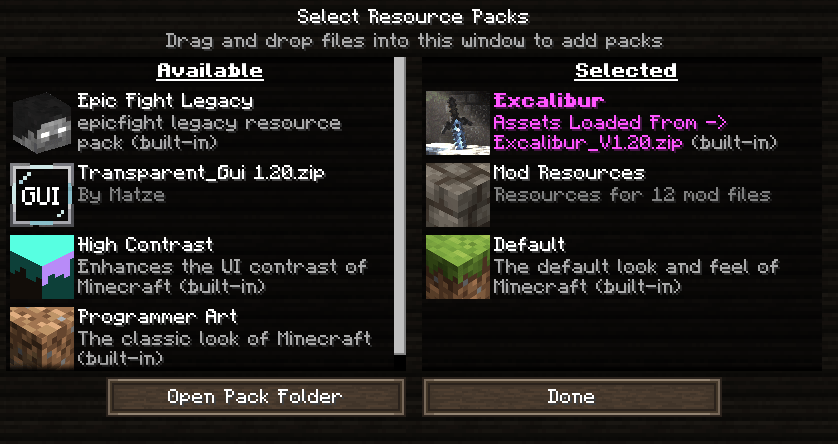
Datapacks example:
Armor Codex:
A new codex has been added for items, allowing you to add data to weapons and armor (and perhaps later, if I consider it valid, items), adding space to display their passives, actives, descriptions, attributes, or innate abilities.
This is useful if the amount of text to be added becomes too much for the normal tooltip.
Armor Codex: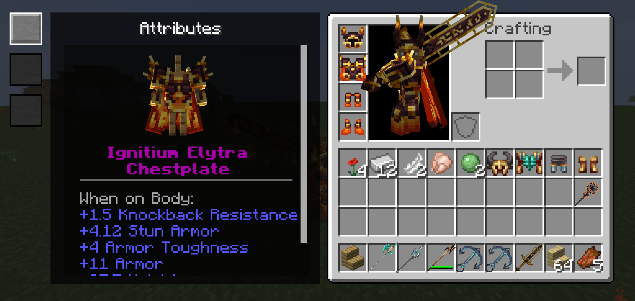
In this example from the Cataclysmic Arsenal mod, the codex for armor is displayed.
1) Attributes
2) Passives
3) Actives
Both are displayed on the left like those buttons; the armor rotates.
You can configure whether or not to display the armor stand.
Weapon Codex:
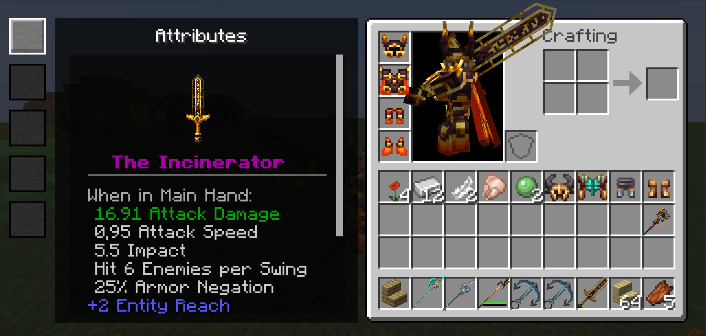
In this example from the Cataclysmic Arsenal mod, the codex for weapon is displayed.
1) Attributes
2) Description
3) Internal Skill
4) Passive Skill
5) Innate Skill
Both are displayed on the left like those buttons; the weapon rotates.
Codex Tooltip:
The codex is accessed if the item implements its interface. Likewise, if you transfer the innate skill to the codex, it will no longer be possible to display it with the EF button, but with the codex button, usually X.
The description of what will be displayed when pressing X varies depending on the implementation data. Currently, codex can only be added to items through code, but I will evaluate whether it is possible to do so with .json.
LZM: Epic Fight
This module is responsible for adding utilities to Epicfight, helping you build tooltips, managing models, adding files, and some events.
This module will naturally be "isolated" from your game unless you have Epicfight installed, except for a few options that will always be active.
Packer:
The reading, writing, and indexing system prior to Lazy Utilities 2.5 has been removed.
Files are now mounted directly, and each file is used differently depending on its type. Additionally, a dynamic resource bundle will no longer be generated.
The destination folder has been moved from
mods/Lazy Utilities/epicfight -> (to) -> lazy_utilities/epicfight
Example
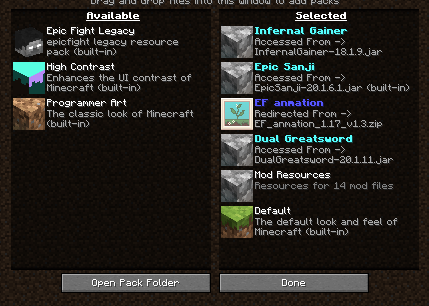
Zip files within the folder will be redirected, while .Jar files will retain their original namespaces.
Namespaces are determined by the .toml file, and failing that, by the assets folder, and only one modid can be registered. The Minecraft namespace is excluded. Therefore, DON'T USE THIS as a Global Datapack or Resourcepack.
Model utilities:
Adds utilities to be used on the player model, such as obtaining coordinates, emitting particles based on the model or its surroundings, etc.
This is why it's useful for the functionality of "Particles on the Blades" and "Cataclysmic Arsenal."
Skills Utilities:
Allows you to add virtual functions such as "OnIni", "OnRemove", "Update Container", "onFail", etc. to objects, in this case for example armor. This is useful for example for "Cataclysmic Arsenal" when adding abilities to armor when holding a weapon.
Forge Events:
PlayerAttackEvent:
It runs on the player and analyzes each phase of the attack during an animation. This automatically creates an interface for weapons. It's useful for replacing the vanilla attack system when crafting or modifying items.
This means, for example, that weapons like the "Ancient Spear" from Cataclysm, which launches sandstorms when attacking, stop working when in combat mode. Implementing this in the item solves the problem, as seen in Cataclysmic Arsenal.
RegisterBladeModelConfig:
Allows you to record weapon sizes, positions, etc. It is used to record the size of the weapons so that the "Particles On The Blades" mod, for example, can generate its particles on the weapons and model.
LZM: Elements
Module responsible for adding elements, damage types, properties, configurable text particles, combat methods, etc.
This module is naturally "isolated" from your game; nothing here is accessible unless you configure it via a configuration file or access it externally.
Damage Types:
- Direct Damage: Elemental direct damage is a type of damage that causes knockback when applied to an entity, this type of damage scales in most cases with the damage of the player's weapon to a great extent, and for directed type reactions (depending on external conditions) will reduce the damage nerf of said reaction, this type of damage is also what occurs when imbuing a weapon with an element, this method being a way to translate the damage into 100%.
- Tick Damage: Tick damage is a utility/support damage type added by reactions of the same type, this damage type scales slightly and as your weapon damage rises the damage increase will be reduced, this damage type has a flattening function over time until it becomes flat, preventing the attack from scaling, this damage type does not pose knockback, and ignores 100% of the enemy's armor, despite using the same elemental damage parameters, which means that for example, OnTick Electro damage will still scale with the target entity's armor, but ignoring it will still result in "True" damage, this applies to all OnTick damage types.
Elements and their effects:
- Pyro: Applies Pyro Tick, a burn effect that deals 1 damage per tick. It scales with armor: more effective against low armor. It doesn't apply if the target is already on fire.
- Hydro: No additional effect (for now).
- Geo: No additional effect.
- Cryo: Reduces movement speed and slows down natural regeneration (increases food consumption).
- Electro: Reduces total experience gained by the player.
Elemental Damage Types:
- Pyro: Scales with the target’s armor. Lower armor = more damage (up to +30%). No bonus at 20 armor (Netherite), and damage can decrease up to -10% at 30 armor.
- Hydro: Scales with the target’s max health. Lower max HP = more damage (up to +25%). If the target’s current HP is low, damage is reduced (up to -10%). Deals +10% extra damage to flying entities.
- Geo: Deals +20% more damage if the target is grounded, -10% if flying or airborne. If the target is affected by "Rooted", damage increases by an additional +25%.
- Cryo: Scales with the target’s max health. Higher max HP = more damage (up to +50%). Not affected by any other status or reactions.
- Electro: Scales with the target’s armor. More armor = more damage (up to +75% at 30 armor). Damage increases by an additional +30% if the target is affected by "Conductor".
ERCS – Entity Reactions Cooldown Shield:
The Entity Reaction Cooldown System (ERCS) introduces individual cooldowns for reactions triggered by entities, preventing them from being triggered too aggressively or in rapid succession.
Each reaction has a specific cooldown period that varies depending on whether the reaction is Direct, Reverse, or Static:
- Direct: The reaction where the initiating element is dominant, and the result allows continued or chained reactions.
- Reverse: The inverse order of elements, typically causing maximum damage but consuming both elements in the process.
- Static: The reaction behaves the same regardless of the element order, as it follows no logical dependency.
Importantly, cooldowns are not shared between reactions. For example, Vaporized (Pyro + Hydro) has a different cooldown than Vaporized (Hydro + Pyro).
Reaction Direct Reverse Static Melt 850 925 – Overload – – 420 Vaporized 580 605 – Frozen – – 1200 Electrocharged – – 300 Cooled 315 380 – Burning 315 335 – Conductor – – 335 Superconductor – – 530 Rooted – – 335
ERGCS – Entity Reactions Global Cooldown Shield:
The Entity Reaction Global Cooldown System (ERGCS) introduces a global shield mechanic that prevents an entity from triggering any elemental reactions while active.
This system uses a reaction intensity counter (or "shield value"). The more destructive a reaction is, the higher its intensity value, which fills the shield more quickly. While the shield is active, the entity becomes temporarily immune to any further reactions.
The shield decays over time:
- It is reduced by 1 point per hit received.
- It also decays passively every 2 ticks.
Once the shield is fully depleted, the entity can once again be affected by reactions.
This system only applies to high-health entities that are likely to trigger multiple reactions. Lower-health or high-resistance entities will typically die or resist before the shield activates.
Reaction Intensity (Direct) Intensity (Reverse) Intensity (Static) Melt 13 17 – Overload – – 8 Vaporized 10 12 – Frozen – – 25 Electrocharged – – 3 Cooled 4 6 – Burning 4 5 – Conductor – – 6 Superconductor – – 10 Rooted – – 6
Reaction Intensity Rules:
- Direct: The initiating element is dominant and can lead to repeated or chained reactions.
- Reverse: Reactions that cause maximum damage by consuming both elements.
- Static: Reactions unaffected by element order or logical dependency.
ICD – Internal Cooldown Dealer:
The Internal Cooldown Dealer (ICD) introduces a cooldown mechanism between successive elemental infusions or transfers. It ensures that elemental application does not occur too frequently from regular attacks, maintaining balance between basic attacks and special abilities.
When a weapon is infused with an element (e.g. Pyro), it can only apply or transfer that element to a target once every 2.5 seconds, or after 3–4 consecutive hits. This restriction applies to normal attacks only.
Special abilities bypass this limitation and always apply their element.
The ICD behavior is dynamic and depends on:
- The source entity’s characteristics.
- The weapon’s properties.
- Whether the interaction is through basic attack or skill.
Elemental Transfer:
When an element is transferred via ICD, additional data is passed from the Source Entity to the Target Entity. This includes metadata to determine reaction damage scaling, which depends on the source’s weapon stats and base damage.
Reaction damage is categorized into two main types (not detailed here).
Elemental Durations (in Ticks):
Element Duration Pyro 120 ticks (~6s) Hydro 105 ticks (~5.25s) Geo 140 ticks (~7s) Electro 80 ticks (~4s) Cryo 105 ticks (~5.25s)
Each item when transferred has a life expectancy determined in the table above, keep this in mind!
Elemental Tracking:
Only if in "./config/lazy_utilities/LZM_Elements.toml", "allowElementsInEnvironment" was assigned as true
- Hydro: Activated by swimming, standing on a water block, being in the rain, or receiving a mundane potion (basically water).
- Pyro: Activated by swimming in lava, standing on a magma block, being attacked by a Blaze or magmacube, or being on fire.
- Geo: Activated by being in a desert or similar biome for a long time, being underground for a long time, or being trapped in a block while suffocating.
- Electro: Activated by being struck by lightning.
- Cryo: Activated by being in a snowstorm, in a frozen biome for a long time or at high altitude, or being trapped in powder snow.
Okay, now that we understand the type of damage, its characteristics and some functions, let's move on to the reactions...
Only if in "./config/lazy_utilities/LZM_Elements.toml", "allowReactions" was assigned as true
All information that will be provided to you is subject to changes in balance, order, or may be modified if more elements are added in the future.
Instant Reactions:
"Instant" reactions are those triggered and fully resolved in a single tick. They are categorized into two subgroups
Undetermined Reactions: These reactions are independent of the target and instead derive their damage, behavior, and execution data entirely from the entity that triggers them.
Overload
- Inherits 100% of the executing weapon’s base damage.
- On activation, it deals 125% of the weapon’s damage to the target.
- Triggers an explosion effect causing 75% of the same damage in an area of effect (AoE).
- Causes knockback to the target.
- PvP Consideration: Players are only affected by the direct reaction damage, not the AoE explosion (if PvP is enabled).
Vaporized
- Inherits 100% of the executing weapon’s damage.
- Deals 145% weapon damage in a standard reaction.
- In reverse reactions (Hydro first, then Pyro), the damage is boosted to 170%.
Melt
- Inherits 100% of the executing weapon’s damage.
- Standard Melt reaction deals 165% damage.
- In reverse reactions (Pyro-based), the damage increases to 170%.
- If double Pyro is used (implied stacking), the reaction can deal 200% damage.
Damage Type Note: The last element applied defines the final damage type of the reaction.
Example: If Hydro is applied first, then Pyro, the reaction is Pyro-type.
Determined Reactions: These reactions depend primarily on the target, with scaling mechanics influenced by the source weapon’s characteristics but limited in scope.
Frozen
- Damage scales based on the weapon's base damage, with diminishing returns:
- 40 damage → no nerf (0%).
- 20 damage → 35% damage reduction.
- 0 damage → 70% damage reduction.Reaction damage equals
- 14% of the target's max health.
- Against high-health targets, Cryo-based Frozen damage can be increased by up to +50%.
- Damage Cap: Base reaction damage is capped at 175. With the Cryo bonus applied at max, the cap increases to 262.5.
On-Tick Elemental Reactions:
These reactions apply damage over time (DoT) rather than instantly. The affected reactions include:
- Electrocharged
- Cold
- Burn
Characteristics:
- Ignores 100% of the target's armor.
- Does not cause knockback.
- Scales dynamically based on the caster's weapon damage, rather than a fixed value.
This damage type is classified as "Poison-style" (i.e., consistent periodic output).
Reverse Reaction Scaling:
Certain On-Tick reactions benefit from reverse reaction bonuses when a specific element acts as the base:
- Cold Reaction: If Geo is the base element, total damage is increased by +15%.
- Burn Reaction: If Geo is the base element, total damage is increased by +18%.
Note: These reactions also interact with the elemental damage scaling system introduced earlier. They are fully influenced by elemental amplification, resistances, and reaction modifiers.
Utilitie Reactions:
Utility reactions modify how an entity interacts with elemental damage and control effects. They do not deal damage directly, but instead amplify other effects or alter attributes of the affected entity.
Conductor
- Effect: Increases Electro damage taken by the entity by +30%.
- Secondary Effect: Every 3 seconds, there is a 10% chance the entity will be struck by lightning (consumes the reaction upon success).
Superconductor
- Effect: Reduces the entity's all-type resistance by 20%.
- Fallback: If resistance cannot be reduced, the entity takes +10% damage from all sources instead.
Rooted
- Effect: Increases Geo damage taken by the entity by +25%.
- Movement Penalty: Reduces movement speed by 15%.
Reaction table:
Base \ + Pyro Hydro Geo Cryo Electro Pyro — Vaporized Burn Melted Overload Hydro Vaporized — Rooted Frozen Electrocharged Geo Burn Rooted — Cold Conductor Cryo Melted Frozen Cold — Superconductor Electro Overload Electrocharged Conductor Superconductor —
Other features:
It also adds a new particle type, this particle is of type "text", you will normally see it when applying an element on an entity or when performing an elemental reaction, reactions require (some) access to the ICD, if they don't have the data when trying to apply a "reaction" as an effect via /effect it will simply fail.
...
Recommended Gear
AffiliateHardware and extras that pair well with this mod.

As an Amazon Associate I earn from qualifying purchases.
Similar Mods

Aquamirae (Fabric)
Ship graveyard with terrible deep sea creatures

Armor Statues
Unlock the potential of armor stands! Works on servers with the Vanilla Tweaks data pack.
No Telemetry
Disable the telemetry introduced in 21w38a

Awesome Dungeon Ocean edition - Forge
This mod adds dungeons to your ocean. (🆕 NEW Structure added 3 boat)

Comforts (Fabric 1.16.5 - 1.19.2)
Adds sleeping bags and hammocks for, respectively, portability and turning day to night, without setting new spawns. Com...
Cobblemon Raid Dens
Introduces raid dens to Cobblemon!
Included in Modpacks (22)
Most downloaded Soulrend - Dark Fantasy RPG Soulslike
 Beyond Ascension
 Mystic Horizons
 A Journey's End - RPG
![Medieval Dark Fantasy Craft [Rpg]](https://media.forgecdn.net/avatars/1032/972/638556292800544352.png) Medieval Dark Fantasy Craft [Rpg]
Medieval Dark Fantasy Craft [Rpg]
 Ultimate Heroes
 Horyzen
 Chronost Incorporated
 MVM - Enhanced survival with Epic Fight
 Fritz's RPG
 Fantasia Reborn
 Meow to Exile 2 Custom By Seraphina
 RuneCraft(RPG)
 Vtuber Village Building
 Above Infinity
 The Last Province zombie apocalypse
 AetherFall - Echos of Vilorian
 HTTYD x Epic Fight
 Willow's Random RPG
 Project Heroes