

Chatglot - Chat Translation
ModTranslate Minecraft chat messages in real time with multiple providers and optional auto-translate.
Type
Mod
Modrinth Downloads
4,679
Modrinth ID
f3EHsCRL
Last Updated
Sep 12, 2026
Description
Chatglot
 Chatglot is a Fabric client-side mod that translates Minecraft chat messages on the fly.
A translate button (✍ by default) is added to each chat message. Click it, or let auto-translate handle it, and the translated result is shown in chat either as a new line or by replacing the original message.
Client-side only. No server installation is required.
Features
- Translate button appended to every chat message (configurable label)
- Click-to-translate or automatic chat translation
- Result shown as a new line or replaces the original chat message
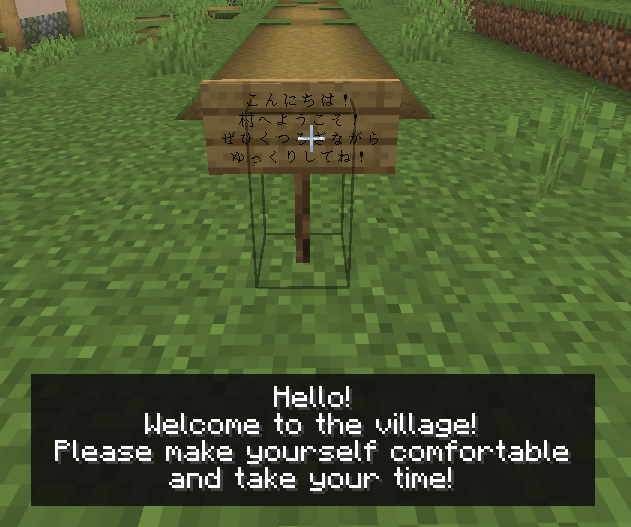
- Sign and hanging sign translation
- Look at a sign and press G to translate its text
- Open the settings screen with F8 or /chatglot config
- Translate a specific chat message with /chatglot translate <id>
Translation Providers
Chatglot supports multiple translation backends. Switch between them in the settings screen.
Provider Requires default Nothing. Uses an author-operated free GAS endpoint. Rate-limited, and auto-translate is unavailable. gas Your own Google Apps Script web app URL deepl DeepL API key google Google Cloud Translation API key openai OpenAI API key gemini Gemini API key anthropic Anthropic API key azure Azure Translator API key + region codex Browser OAuth (one-time, token stored locally) translategemma_local Windows only. Downloads llama.cpp + a TranslateGemma GGUF model, then runs a local backend over localhostRecommended Providers
- GAS: Good if you want a free setup with your own Google account. Google Apps Script documents up to 5,000 Translate calls per day for consumer accounts, though quotas can change. See Apps Script quotas.
- Codex: Recommended if you already subscribe to ChatGPT. OpenAI states that Codex is included with ChatGPT Plus, Pro, Business, Edu, and Enterprise plans, with plan-based limits. See Using Codex with your ChatGPT plan.
- Azure: A good option if you want an official API with a free tier. Azure Translator F0 includes 2 million characters free per month according to Microsoft's pricing page. See Azure Translator pricing.
- TranslateGemma: A strong option if your PC has enough headroom for local inference. After setup, it runs locally over localhost, can be fast, and does not require a paid API for each request. It does require downloading the llama.cpp runtime and a TranslateGemma GGUF model.
Requirements
- Fabric Loader
- Fabric API
- Cloth Config (required for in-game settings)
- ModMenu (optional, recommended)
Configuration
The config file is located at config/chatglot/chatglot.json.
Key settings:
- enabled — Enable or disable the mod entirely
- autoTranslateEnabled — Toggle automatic translation
- targetLanguage — e.g. JA, EN, EN-US, ZH-HANS (defaults to your Minecraft language)
- provider — Choose your translation backend
- overwriteOriginalWithTranslation — Replace original message instead of adding a new line
- appendTranslateButton — Show or hide the ✍ button
- translateButtonLabel — Customize the button label
- showTranslationPrefix — Show or hide the translated-message prefix
- requestTimeoutSeconds — Network timeout (5-240 seconds)
- maxConcurrentTranslations — Max parallel translation requests (1-16)
- useSharedAppDataSettings — Share API keys, model settings, and local backend settings through %LOCALAPPDATA%
TranslateGemma Local Backend
translategemma_local is a Windows-only local translation option. It does not run inference inside the Minecraft JVM. Instead, it uses a separate local backend process over 127.0.0.1 / localhost.
When you use the TranslateGemma setup buttons in the config screen, Chatglot:
- Downloads a prebuilt llama.cpp Windows runtime
- Downloads a TranslateGemma GGUF model file
- Starts llama-server.exe locally and sends translation requests to that local server
The default model is mradermacher/translategemma-4b-it-GGUF using translategemma-4b-it.Q4_K_M.gguf.
By default, Chatglot stores the local backend runtime, model, logs, and state inside:
- config/chatglot/local-backend/ when shared AppData settings are disabled
- %LOCALAPPDATA%/ChatglotLocal/ when shared AppData settings are enabled
You can also override the runtime path, model path, download URL, or shared directory from the config screen.
Shared Settings Storage
If useSharedAppDataSettings is enabled, Chatglot stores shared settings in %LOCALAPPDATA% so multiple launch profiles can reuse them.
This may include:
- API keys for supported translation providers
- Codex token file location and related model settings
- TranslateGemma local backend settings such as runtime path, model path, port, and shared directory
Shared settings are stored locally on your PC. They are not uploaded anywhere just because this option is enabled.
Privacy Notice — External Data Transmission
This mod sends chat text to external translation services. The destination depends on the provider you select.
- default provider: Chat text is sent to an author-operated Google Apps Script endpoint. However, requests pass through Google's infrastructure. See Google Apps Script Additional Terms and Google API Services User Data Policy.
- gas provider: Chat text is sent to the Google Apps Script web app URL that you configure. Requests are processed through Google's infrastructure. See Google Apps Script Additional Terms and Google API Services User Data Policy.
- openai provider: Chat text is sent to the OpenAI API using your API key. See OpenAI data controls.
- codex provider: Uses browser-based OAuth, stores the token locally, and then uses that token to send chat text to OpenAI services. The mod also fetches the available model list from https://modelapi.yoima.com/api/codex-models/list. No chat content is sent to that model-list endpoint.
- gemini provider: Chat text is sent to the Gemini API. For Google AI Studio / Gemini API usage, review the provider terms here: Gemini API Terms.
- deepl provider: Chat text is sent to the DeepL API. See DeepL Privacy Policy.
- anthropic provider: Chat text is sent to Anthropic services using your API key. See Anthropic Privacy Policy.
- azure provider: Chat text is sent to Azure Translator using your API key. See Data, privacy, and security for Azure Translator.
- google provider: Chat text is sent to Google Cloud Translation using your API key. See Google Cloud Privacy Notice.
- translategemma_local provider: Chat text is sent only to a local backend running on 127.0.0.1 / localhost. During setup, this mod downloads the llama.cpp runtime and the TranslateGemma GGUF model from a third-party hosting source configured by the mod.
Source & License
Source code: GitHub — yoima-jp/Chatglot
License: MIT
Compatibility
Mod Loaders
Game Versions
Recommended Gear
AffiliateHardware and extras that pair well with this mod.

As an Amazon Associate I earn from qualifying purchases.
Screenshots
Similar Mods
Magic Shards
A mod that adds a BUNCH of new shards that all have powers!
Extra Enchants Plus!
This Mod Adds Even More Enchants To Minecraft!

Extended Support
Extended Support is an addon for ModTweaker, which adds more mods integration.

See Through Water/Lava
See through lava/water fogs

Roberts Collection
Robert's Collection is a collectible figures mod with mystery boxes, ideal for collecting and trading with your friends.

project-1076899
Adds compatibility between Blue Skies and Farmer's Delight. Vanilla style.