Adds a wearable secondary hotbar to help manage your tools and clear inventory clutter
Type
Mod
CurseForge Downloads
931,155
CurseForge ID
664053
Modrinth Downloads
285,467
Modrinth ID
9ewe2JHJ
Last Updated
Sep 5, 2026
Description
[Report Issues](https://github.com/JamCoreModding/utility-belt) • [Chat on Discord](https://discord.jamalam.tech) • [CurseForge](https://curseforge.com/minecraft/mc-mods/utility-belt) • [Modrinth](https://modrinth.com/mod/utility-belt)
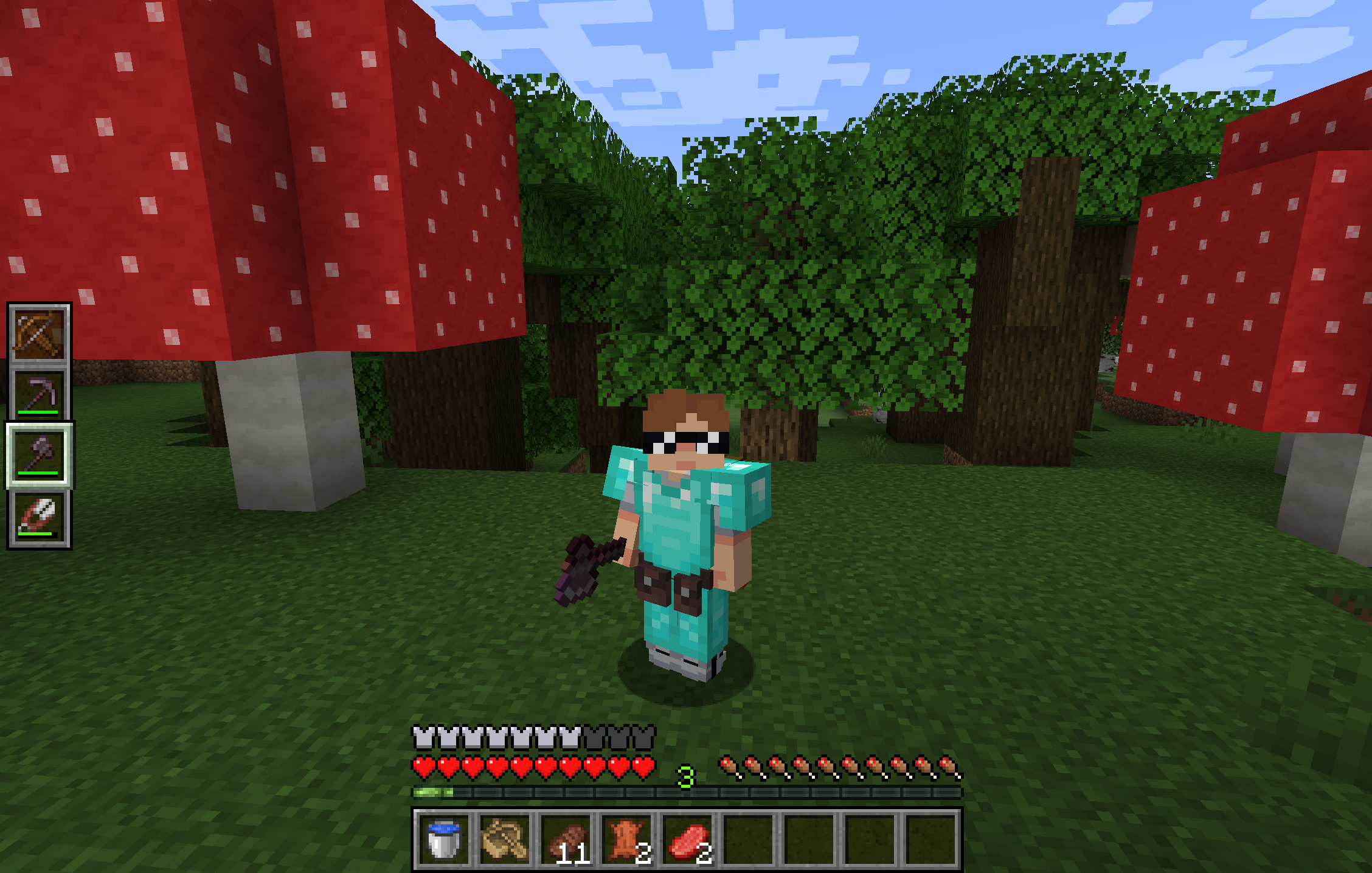
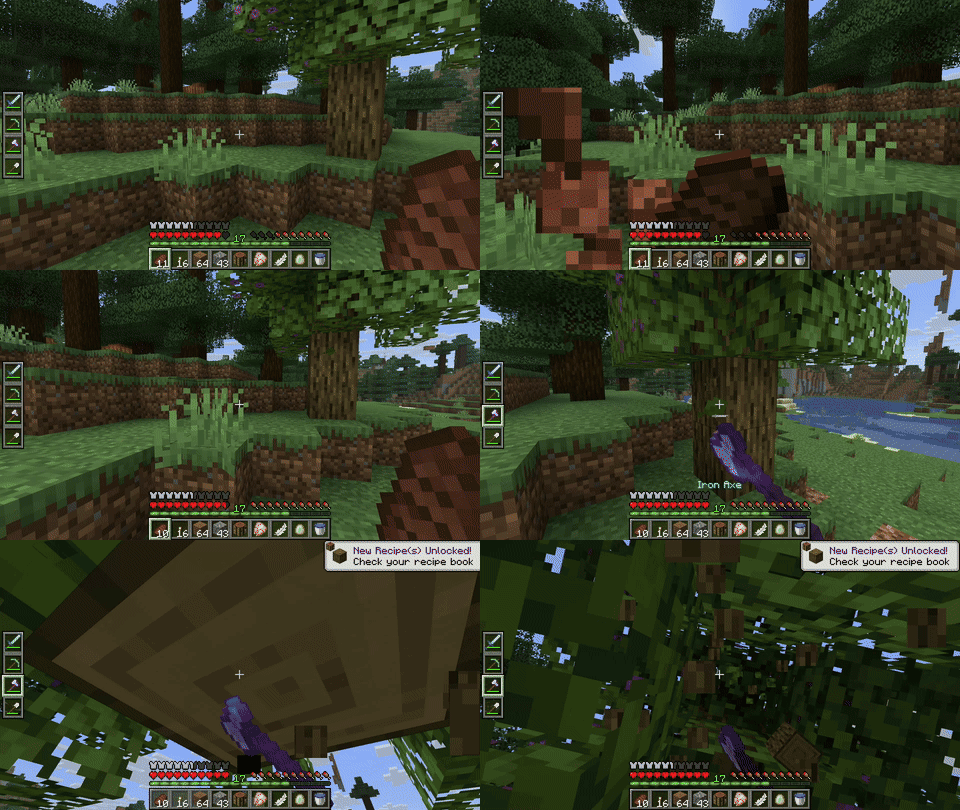
**Utility Belt** will solve your inventory clutter issues. 9 hotbar slots are not enough, especially when playing with mods. Wearing a Utility Belt gives you a second hotbar where only tools and weapons can be stored.
## 🛠️ Getting Started
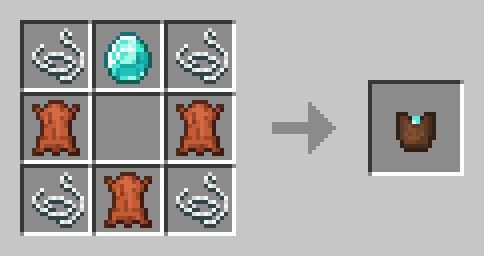
1. **Craft** two belt pouches using the recipe above.
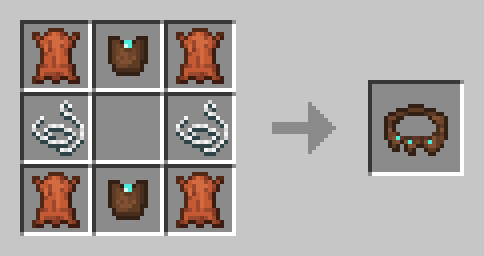
2. **Craft** a Utility Belt using the recipe above.
3. **Equip** it in your belt slot.
4. **Fill** it with your tools and weapons.
## ⬆️ Upgrading the Belt
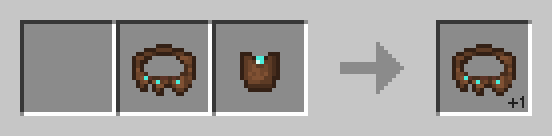
By default, the belt has **4** slots and can be upgraded to have up to **6** slots (_these values can be changed in the mod configuration_). You can add a slot to a belt in a **Smithing Table** using the recipe below.
## 🎮 Controls
| Action | Default Keybind | Description |
|----------------------|--------------------------|------------------------------------------------------------------|
| **Open Belt Screen** | `'` | Opens the belt GUI to store items in the belt |
| **Swap Hotbar** | `B` (toggle), `N` (hold) | Switches between your main hotbar and the belt hotbar |
| **Quick Transfer** | `Sneak` + `Swap` | Swap the item in your hand between your main hotbar and the belt |
## ⚙️ Configuration
You can customize Utility Belt's options using the in-game configuration screen:
- **Fabric**: Accessible using **ModMenu**.
- **Forge/NeoForge**: Accessible using the **Mods** screen.
To change which items are accepted in the belt, you can [**make a datapack**](https://minecraft.wiki/w/Tutorial:Creating_a_data_pack) and add items to the [**allowed_in_utility_belt**](https://docs.jamalam.tech/utility-belt/configuration/) tag.
## 🔗 Compatibility
- **LambDynamicLights**: torches and lanterns in your belt will light up the world around you.
## 🐛 Bugs and Suggestions
You can report any issues and suggest changes on the [GitHub issue tracker](https://github.com/JamCoreModding/utility-belt). Try out the `/utilitybelt fixme` command to see if it resolves the issue while you wait for a fix.
Always keep backups of your world, especially when playing versions marked as beta.
[](https://bisecthosting.com/jamalam)





![Yes Nicer MC [Fabric] YNM](https://media.forgecdn.net/avatars/936/361/638413778516966399.png)