Twilight Forest - Aurora Palace Regeared
Unknown (6945)by sm644me
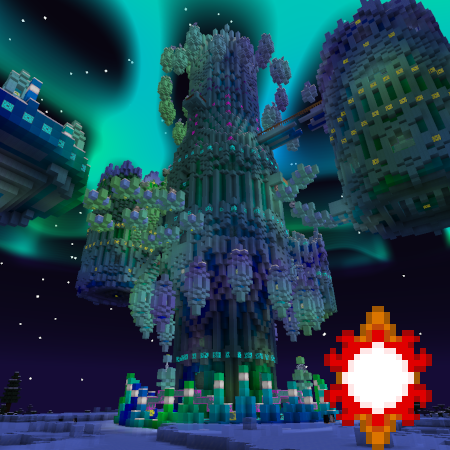
Revamps the Twilight Forest's Aurora Palace with a new build by Gearsaw Studios!
Type
Unknown (6945)
CurseForge Downloads
128,409
CurseForge ID
1074703
Last Updated
Jul 28, 2026
Description
The Twilight Forest's Aurora Palace uses some pretty blocks, but the structure itself hasn't kept up with modern Minecraft. The Twilight Forest developers know this and are planning on reworking it, but why wait? This regeared Aurora Palace can be dropped into your Twilight Forest adventure to breathe new life into this part of the mod! This enormous revamp aims to make the Aurora Palace a high point of the Twilight Forest, both in aesthetics and gameplay. Even once you clear it, the numerous room variants will give you something new to look forward to for the next time! Take a look at the image gallery to see some of what awaits!

This datapack works on 1.19.2, 1.19.4, 1.20.1, 1.20.4, 1.20.6, and 1.21.1. It's primarily made for the Explorer's Eve modpack on Minecraft 1.19.4, so other versions are marked as betas to signify that they've only been briefly tested. However, they are fully functional, and any issues within are minor.
Not sure how to install a datapack? Here's how:
- Download the datapack. Make sure to get the right version, or it'll be invalid!
- Launch your modded Minecraft instance and create a new world.
- On the world creation menu, find the "Data Packs" button and click it.
- In the bottom-left corner, select "Open Pack Folder".
- Place the downloaded datapack in the folder that opens.
- Back in-game, click on the newly-added datapack to move it into the right column, and you're good to go!
- If you're using the 1.19.4 + 1.20.1 version on 1.20.1, you'll see an "outdated version" warning. Ignore this, it's fine.
If you want to add this datapack to an already existing world, open your world save folder and drop it directly into the "datapacks" folder.
Alternatively, use a mod like Open Loader, Paxi, or KubeJS to automatically add datapacks into newly created worlds!
If you're also using Blue Skies, you can enable optional compatibility to use Moonstone as the palace's primary light source! Here's how:
- Unzip the datapack.
- Navigate through the folders to data/gearsaw_palace/worldgen/processor_list. This folder contains two files, compat and compat_and_ice, and another folder named blue_skies_compat_use_to_replace_default.
- Take the items from the blue_skies_compat folder and use them to overwrite the files in the main processor_list folder.
- Blue Skies blocks will now attempt to generate in future Aurora Palaces. If Blue Skies isn't installed, these blocks will be replaced with air.
This structure was primarily made by Gearsaw Studios. Please check out his channel; he's an excellent builder.
Screenshots
Similar Unknown (6945)s
Alm's Crafts and Additions
This Datapack adds recipes to Mariums Soulslike Weaponry, Vanilla, Eldritch End, Mythic Upgrades and End Remastered
Artifact Protection - Prominence II
Keeps your Artifact weapons safe from various sources.
Spell Enchants for All! - Prominence II
Adds spell enchants to most weapons.

Alm's Oil Additions and Compat
This Datapack adds recipes to the Distillery Tower from Tech reborn to guarantee more compatibility with Ad Astra, Moder...
![Spawn Animations [Data Pack]](https://media.forgecdn.net/avatars/871/160/638288454054918022.png)
Spawn Animations [Data Pack]
Hostile mobs dig out of the ground or poof into existence when they spawn!

Marium's Soulslike Weaponry - All the Smites
This Datapack adds the Spell "Smite" from spellblades n such to a few select Weapons
![Medieval MC [NEOFORGE] MMC5](https://media.forgecdn.net/avatars/1082/990/638623555662498179.png)