
GUI Compass
Modby Serilum
🧭 [Client] Shows direction and coordinates in the GUI/HUD with a compass in the inventory.
Type
Mod
CurseForge Downloads
1,629,380
CurseForge ID
Modrinth Downloads
650,813
Modrinth ID
Last Updated
Nov 7, 2026
Description


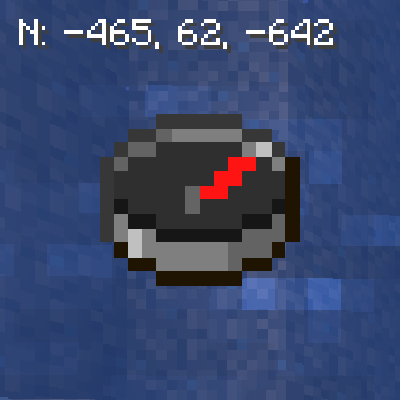
GUI Compass is a minimalistic configurable client-side mod which shows the direction and coordinates in the GUI with a compass in the inventory. By default the compass is positioned in the top left, but you can change that and the height in the config.
The format of what is visible on the screen can be changed via the 'guiCompassFormat' config value.
Default format: Direction: X, Y, Z
You may also be interested in GUI Clock.


All available config options:
Show Spoiler
guiCompassFormat default "FXYZ"
What of the GUI compass should be displayed. Default: [FXYZ]. F: facing (direction), X: x coord, Y: y coord (depth), Z: z coord.
mustHaveCompassInInventory default true
When enabled, will only show the GUI compass when a compass is present in the inventory.
compassPositionIsLeft default true
Places the GUI compass on the left.
compassPositionIsCenter default false
Places the GUI compass in the middle.
compassPositionIsRight default false
Places the GUI compass on the right.
compassHeightOffset default 5, min 0, max 3000
The vertical offset (y coord) for the Compass. This determines how far down the coordinates and direction should be on the screen. Can be changed to prevent GUIs from overlapping.
drawTextShadow default true
If the text displayed should have a shadow drawn below it.
RGB_R default 255, min 0, max 255
The red RGB value for the compass.
RGB_G default 255, min 0, max 255
The green RGB value for the compass.
RGB_B default 255, min 0, max 255
The blue RGB value for the compass.

Example of the compass while rotating the player:

You may freely use this mod in any modpack, as long as the download remains hosted within the CurseForge or Modrinth ecosystem.
Serilum.com contains an overview and more information on all mods available.
For issues, ideas, suggestions or anything else there is the Github repo. Thanks!
Compatibility
Mod Loaders
Game Versions
Recommended Gear
AffiliateHardware and extras that pair well with this mod.

LEGO Minecraft Set
Official sets that translate the building side of the game off-screen.

Minecraft Enderman Character Plush
Enderman plush toys, and a reliable gift for a younger player.
As an Amazon Associate I earn from qualifying purchases.
Similar Mods
Powah!
Generators, Solar panels, Energy Cells, Cables, Reactors, wireless energy ... and more!
![Legendary Tooltips [Fabric]](https://media.forgecdn.net/avatars/450/411/637711339814396004.png)
Legendary Tooltips [Fabric]
Give your rare items a fancier tooltip! Also adds additional tooltip configuration options.

Sodium/Embeddium Options Mod Compat
Adds compatibility for various mods through Sodium Options API
BnBGamingCore
Core Mod containing all ASM for BnBGaming Mods
AdvancementInfo
Get better info about advancements
Enhanced AI
Creepers Breaching, Zombies mining and Skeletons sniping. Customize their AI as you like!
Included in Modpacks (36)
Most downloaded Rebirth of the Night (RotN)
 Slightly Flavoured
 MCSX - Minecraft: PS1 Edition
 The Vanilla Experience | TVE
 RHCraft (RLCraft - Renewed) - Unofficial
 Farming Crossing 3
 Genuine
 Vanilla Forge Essentials
 Dragons and Myths - story about dragons, magic and the Abyss
 Alar
Alar
 The Medieval Adventure
 The Iron Lung Experience
 Terror ( Horror Survival )
 Equinox's Story Mode (MCSM)
 IcyHarry's Disturbing Horrors
 HLStuff - Adventure & Exploration
 Happy Sandwich
 Apocalipse Light - A Zombie Apocalypse Survival
 Nostalgic Craft 2
 Zip-pack