
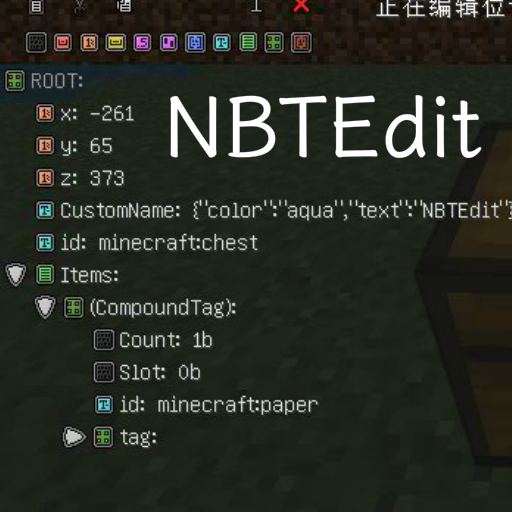
In-game NBTEdit Reborn
Modby InfinRain
A mod adds a GUI to edit NBT of Entities or BlockEntities.
Type
Mod
CurseForge Downloads
638,239
CurseForge ID
678133
Modrinth Downloads
285,993
Modrinth ID
Vr2eDeCw
Last Updated
Jul 27, 2026
Description
# In-Game NBTEdit / 游戏内NBT编辑器
A Minecraft mod allows you to edit any NBT tags of the game content with a GUI while in-game. Such as TileEntities, Entities. It may help map creators to make custom items or help mod creators to debug.
本模组可以用于在游戏内编辑物品、实体或方块的 NBT ,可能会对地图制作者制作自定义物品或模组开发者 Debug 有所帮助。
**Forge, NeoForge, Fabric are supported!**
**Forge、NeoForge、Fabric 均已支持!**
[Documents before version 5.2.0 (5.2.0 版本之前的文档)](https://github.com/qyl27/NBTEdit/blob/1.20.3/README.md)
## Usage(食用方法)
### Shortcuts(快捷键)
Press `N` (by default) to edit your target BlockEntity, Entity or ItemStack in main hand (if target is missing).
使用 `N` 键(默认情况下)打开编辑界面。编辑的目标为十字准星指向的方块实体或者实体,如果没有指向则编辑主手上的物品。
- `Ctrl` + `C` to Copy a node. (复制)
- `Ctrl` + `V` to Paste a node. (粘贴)
- `Ctrl` + `X` to Cut a node. (剪切)
- `Ctrl` + `D` to Delete a node. (删除)
### Commands(命令)
- `/nbtedit me`
Edit player themselves.
编辑玩家自身。
- `/nbtedit hand`
Edit ItemStack in player's main hand.
编辑玩家主手上的物品。
- `/nbtedit `
Edit BlockEntity at x y z.
编辑位于 x y z 的方块实体。
- `/nbtedit `
Edit Entity with entity selector.
编辑由 entity selector 选择的实体。
### Permissions(权限)
| Name(权限名) | Default Level(默认等级) | Description(说明) |
| -------------- | ------------------------- | ------------------------------------------------------------ |
| use | 2 | Open the editor to edit the NBT.
使用编辑器编辑 NBT 的权限。 | | read_only | 1 | Open the editor to view NBT, but can't save.
使用编辑器查看 NBT 的权限,保存按钮会被禁用。 | | edit_on_player | 4 | Use the editor on player, some issue may be caused. USE AT YOUR OWN RISK!
使用编辑器编辑玩家的权限,可能会造成一些问题。谨慎使用。 | If you're using Forge or NeoForge, you may need a permission plugin like LuckPerms to grant permission node `nbtedit.` to any player, or use as the same as Fabric. 在 Forge 或者 NeoForge 平台使用,可以搭配权限管理模组(例如 LuckPerms)授予玩家 `nbtedit.<权限名>` 的权限节点,或者像 Fabric 一样调整配置文件。 ### Configurations(配置文件) #### Forge/NeoForge Location(位置): `.minecraft/config/nbtedit.toml` ```toml # General settings. [general] # Enable debug logs. Necessary if you are reporting bugs. (显示调试日志,反馈问题时需要。) debug = false # Permission node levels. Like vanilla, should in 0 ~ 5 range. (权限节点默认等级,取值和原版相同。) [general.permission] use = 2 read_only = 1 edit_on_player = 4 ``` #### Fabric Location(位置): `.minecraft/config/nbtedit.json` ```json5 { "debug": false, // Enable debug logs. Necessary if you are reporting bugs. (显示调试日志,反馈问题时需要。) "permissionsLevels": { // Permission node levels. Like vanilla, should in 0 ~ 5 range. (权限节点默认等级,取值和原版相同。) "read_only": 1, "edit_on_player": 4, "use": 2 } } ``` ## Origin(原帖地址) http://www.minecraftforum.net/forums/mapping-and-modding/minecraft-mods/1286750-in-game-nbtedit-edit-mob-spawners-attributes-in ## Screenshots(使用截图)   ## Common issues(常见问题) - I was kicked when I tried to save my edit(在尝试保存时被服务器踢出): If it shows `Payload may not be larger than 32767 bytes`, please use [Packet Fixer](https://www.curseforge.com/minecraft/mc-mods/packet-fixer) by [TonimatasDEV](https://github.com/TonimatasDEV) to fix it. 如果客户端显示 `Payload may not be larger than 32767 bytes`,请使用 [TonimatasDEV](https://github.com/TonimatasDEV) 的 [Packet Fixer](https://www.curseforge.com/minecraft/mc-mods/packet-fixer) 修复。 ## Bug report / Feature request(反馈/催更) Please go to the [issues page](https://github.com/qyl27/NBTEdit/issues) of GitHub repo. 请到 [Issues 页面](https://github.com/qyl27/NBTEdit/issues) 提出。
使用编辑器编辑 NBT 的权限。 | | read_only | 1 | Open the editor to view NBT, but can't save.
使用编辑器查看 NBT 的权限,保存按钮会被禁用。 | | edit_on_player | 4 | Use the editor on player, some issue may be caused. USE AT YOUR OWN RISK!
使用编辑器编辑玩家的权限,可能会造成一些问题。谨慎使用。 | If you're using Forge or NeoForge, you may need a permission plugin like LuckPerms to grant permission node `nbtedit.` to any player, or use as the same as Fabric. 在 Forge 或者 NeoForge 平台使用,可以搭配权限管理模组(例如 LuckPerms)授予玩家 `nbtedit.<权限名>` 的权限节点,或者像 Fabric 一样调整配置文件。 ### Configurations(配置文件) #### Forge/NeoForge Location(位置): `.minecraft/config/nbtedit.toml` ```toml # General settings. [general] # Enable debug logs. Necessary if you are reporting bugs. (显示调试日志,反馈问题时需要。) debug = false # Permission node levels. Like vanilla, should in 0 ~ 5 range. (权限节点默认等级,取值和原版相同。) [general.permission] use = 2 read_only = 1 edit_on_player = 4 ``` #### Fabric Location(位置): `.minecraft/config/nbtedit.json` ```json5 { "debug": false, // Enable debug logs. Necessary if you are reporting bugs. (显示调试日志,反馈问题时需要。) "permissionsLevels": { // Permission node levels. Like vanilla, should in 0 ~ 5 range. (权限节点默认等级,取值和原版相同。) "read_only": 1, "edit_on_player": 4, "use": 2 } } ``` ## Origin(原帖地址) http://www.minecraftforum.net/forums/mapping-and-modding/minecraft-mods/1286750-in-game-nbtedit-edit-mob-spawners-attributes-in ## Screenshots(使用截图)   ## Common issues(常见问题) - I was kicked when I tried to save my edit(在尝试保存时被服务器踢出): If it shows `Payload may not be larger than 32767 bytes`, please use [Packet Fixer](https://www.curseforge.com/minecraft/mc-mods/packet-fixer) by [TonimatasDEV](https://github.com/TonimatasDEV) to fix it. 如果客户端显示 `Payload may not be larger than 32767 bytes`,请使用 [TonimatasDEV](https://github.com/TonimatasDEV) 的 [Packet Fixer](https://www.curseforge.com/minecraft/mc-mods/packet-fixer) 修复。 ## Bug report / Feature request(反馈/催更) Please go to the [issues page](https://github.com/qyl27/NBTEdit/issues) of GitHub repo. 请到 [Issues 页面](https://github.com/qyl27/NBTEdit/issues) 提出。
Compatibility
Mod Loaders
Fabric
Forge
Neoforge
Game Versions
1.16.5
1.17.1
1.18.2
1.19.2
1.19.3
1.19.4
1.20
1.20.1
1.20.2
1.20.3
+15 more
Similar Mods
![Detail Armor Bar [Fabric]](https://media.forgecdn.net/avatars/409/453/637624565764615091.png)
Detail Armor Bar [Fabric]
Show more details of armors in Armor bar!
Mod
9,240,559
Balanced Enchanting
Makes enchanting and using the anvil at high levels cost the same number of points
Mod
9,223,947

Aquamirae (Fabric)
Ship graveyard with terrible deep sea creatures
Mod
9,221,071

The Abyss II - The Other Side
The Abyss 2 adds Magic, Quests, Dimensions, Biomes, Entities, Armor, Swords and Tools!
Mod
9,220,422

Vampires Need Umbrellas
An addon for Vampirism! 🧛♂️🌂
Mod
9,210,460
Biome Bundle
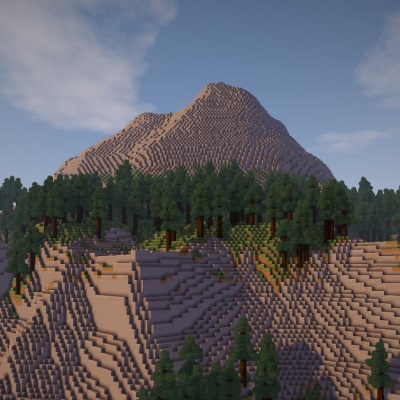
A custom overworld replacement made with Open Terrain Generator (OTG)
Mod
9,207,976
Included in Modpacks
 Bubble Cobble Redux
 Asai Integrated Modpack
 Druidic Quest: Expert
 Jujutsu Aurolith
 Jujutsucraft Arai
 Angel Tale : Shadows of Apollyon
 Aruori
 Rise of the Ottomans
 EldenVoid
 MI:Lost Favor
 Attack on titan - Dawn Of Humanity
 Testing DMZ Legacy
 My Hero Infinity
 Tulacraft IV
 Battlecraft 2.0
 World Of Demons S3
 The Meat Must Grow
 Meow to Exile 2 Custom By Seraphina
 Soldier On
 The Annoying Villagers Remastered
 Cobblemon & Origins SMP
 Eclipse Client
 Fantasy MC Fabric
 Reqium