

Real Camera
Modby xTracr
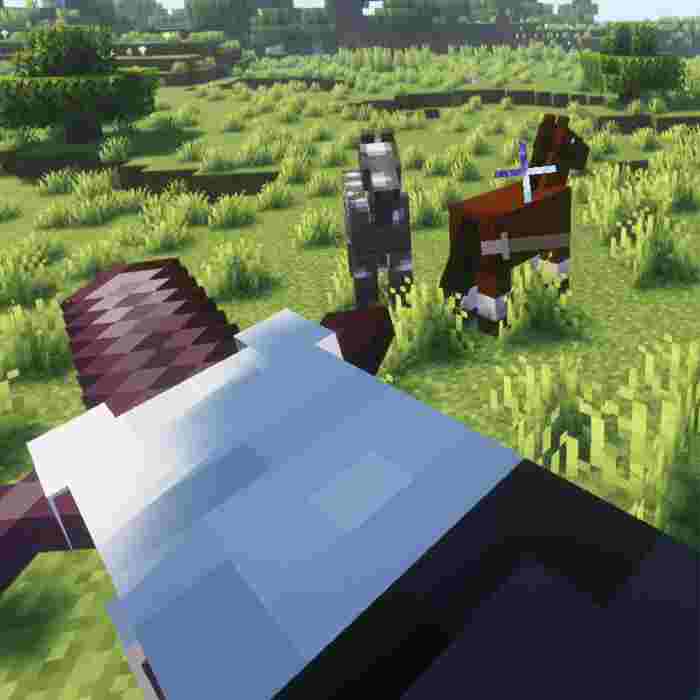
Make the camera more realistic in the first-person view.
Type
Mod
CurseForge Downloads
857,339
CurseForge ID
851574
Modrinth Downloads
581,563
Modrinth ID
fYYSAh4R
Last Updated
Sep 10, 2026
Description
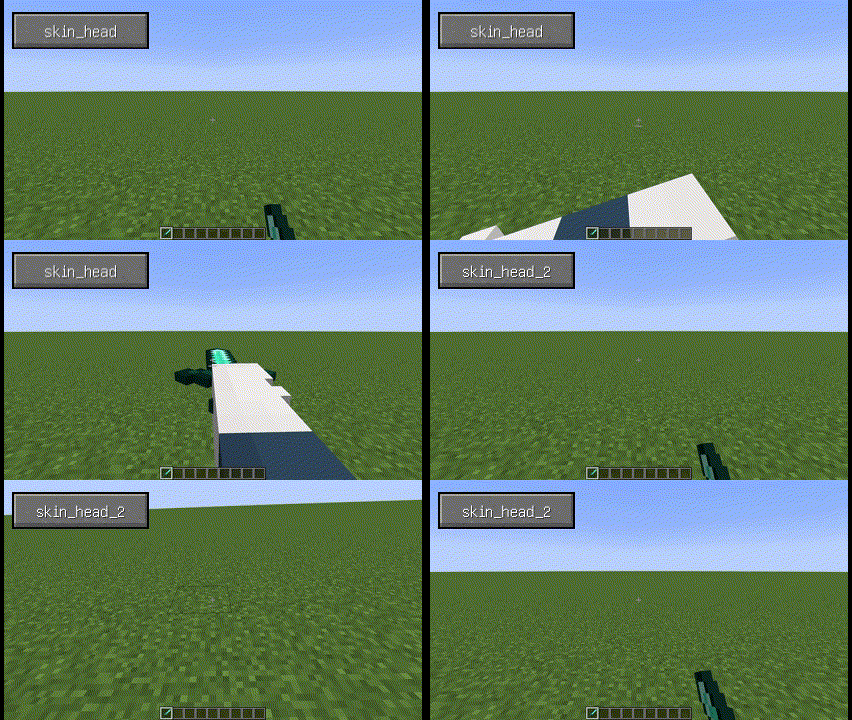 When used with Better Combat
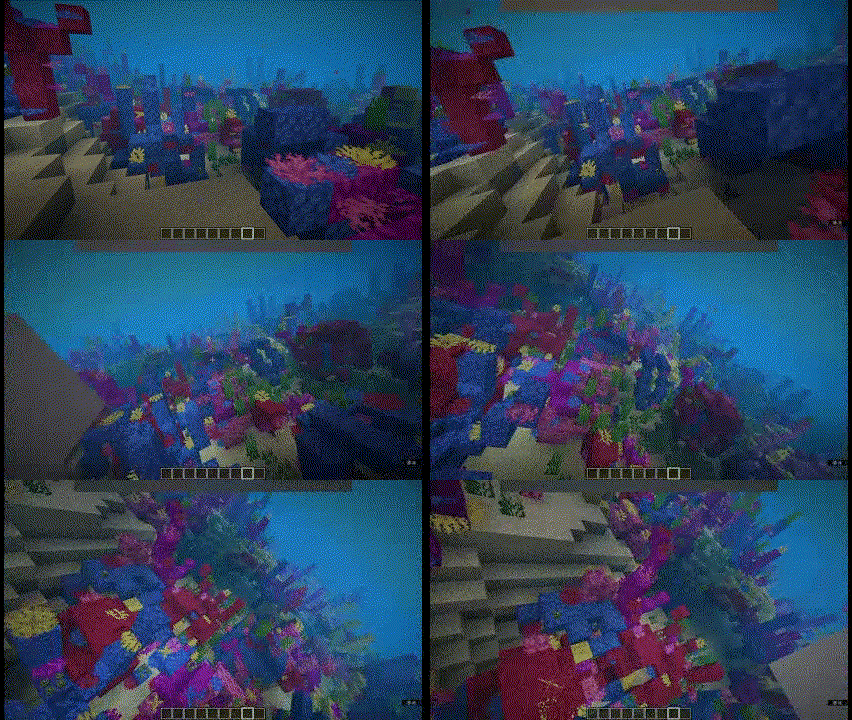 (Using skin_head_2 with some other options changed)
***
### Configuration (0.6+)
* Theoretically, most mod models are supported, but need to be configured manually:
* First, set the key binding for `Open Model View Screen`.
* 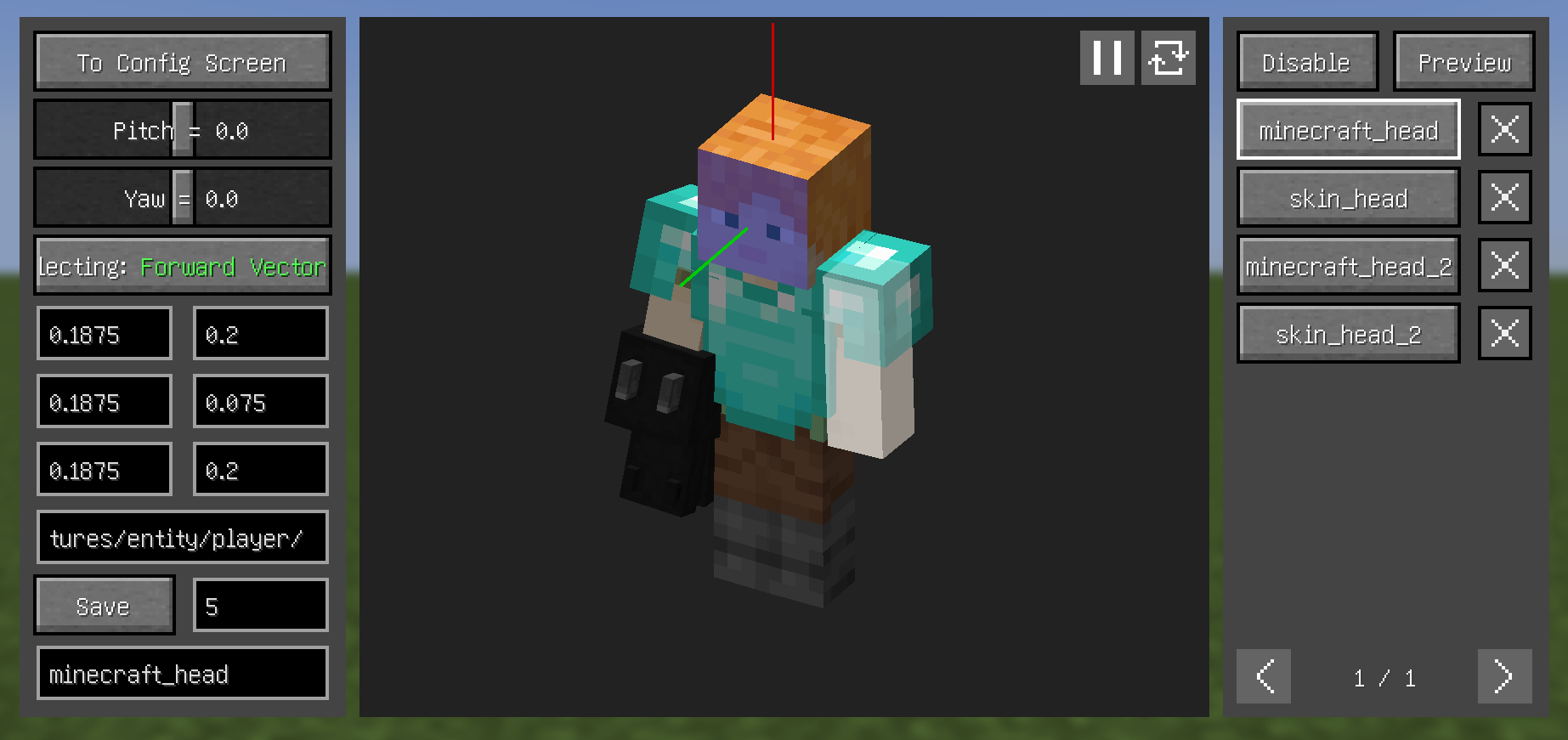
* Open the model view screen and left click with left Alt held to select the corresponding face of the model, scroll with left Alt held to switch between the different layers of the model.
* By clicking the `Selecting` button on the left, switch between the three to select the `Forward Vector`, `Upward Vector`, and `Target Plane`.
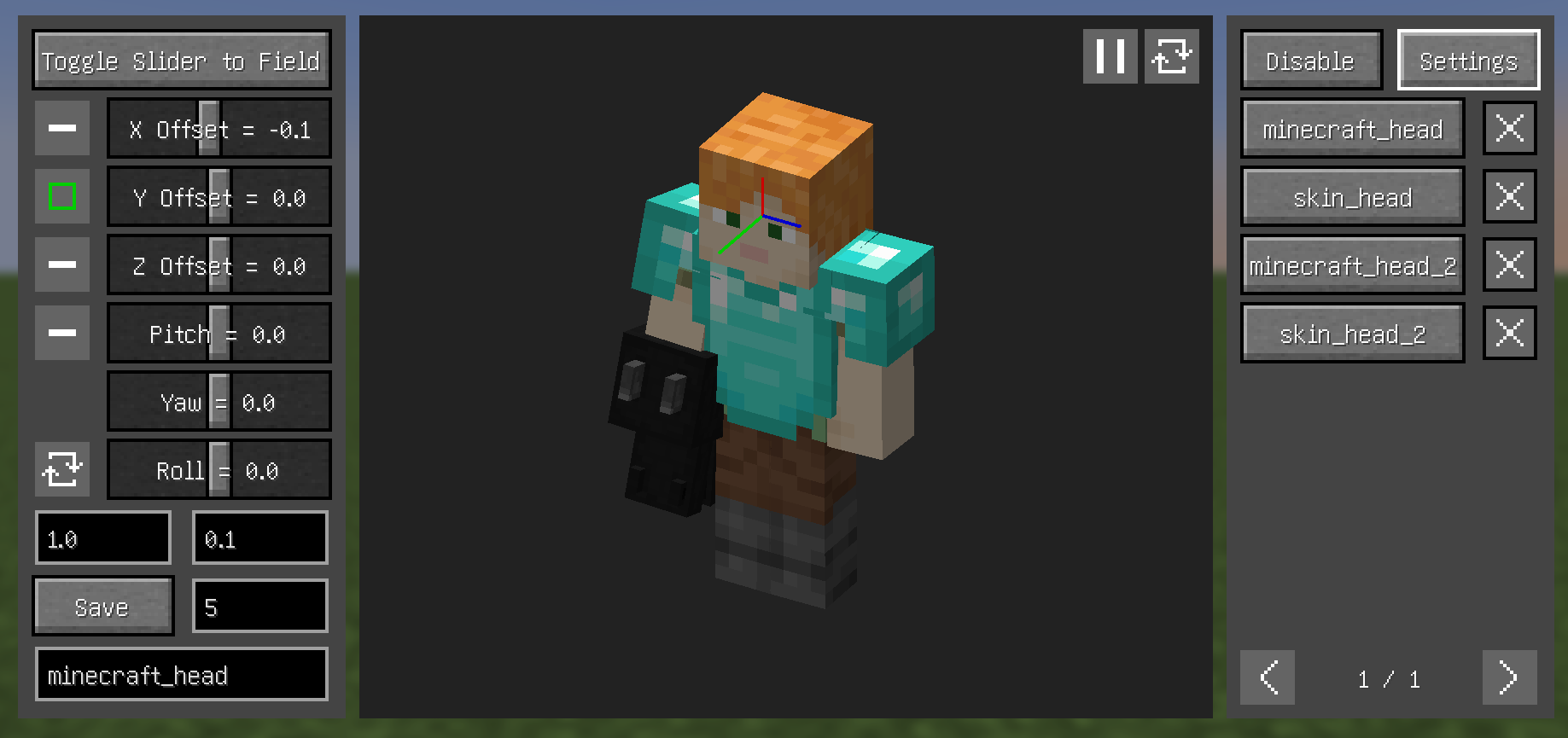
* From the top right button, enter the `Preview` section, where you can see the relative relationship between the camera and the model and make certain adjustments (you can also adjust through key bindings).
* 
* Enter a name and save.
#### Tips
* Configs can have their priority adjusted - higher priority configs appear higher in the right-side list
* Disable depth in `Preview` section to hide models blocking the view
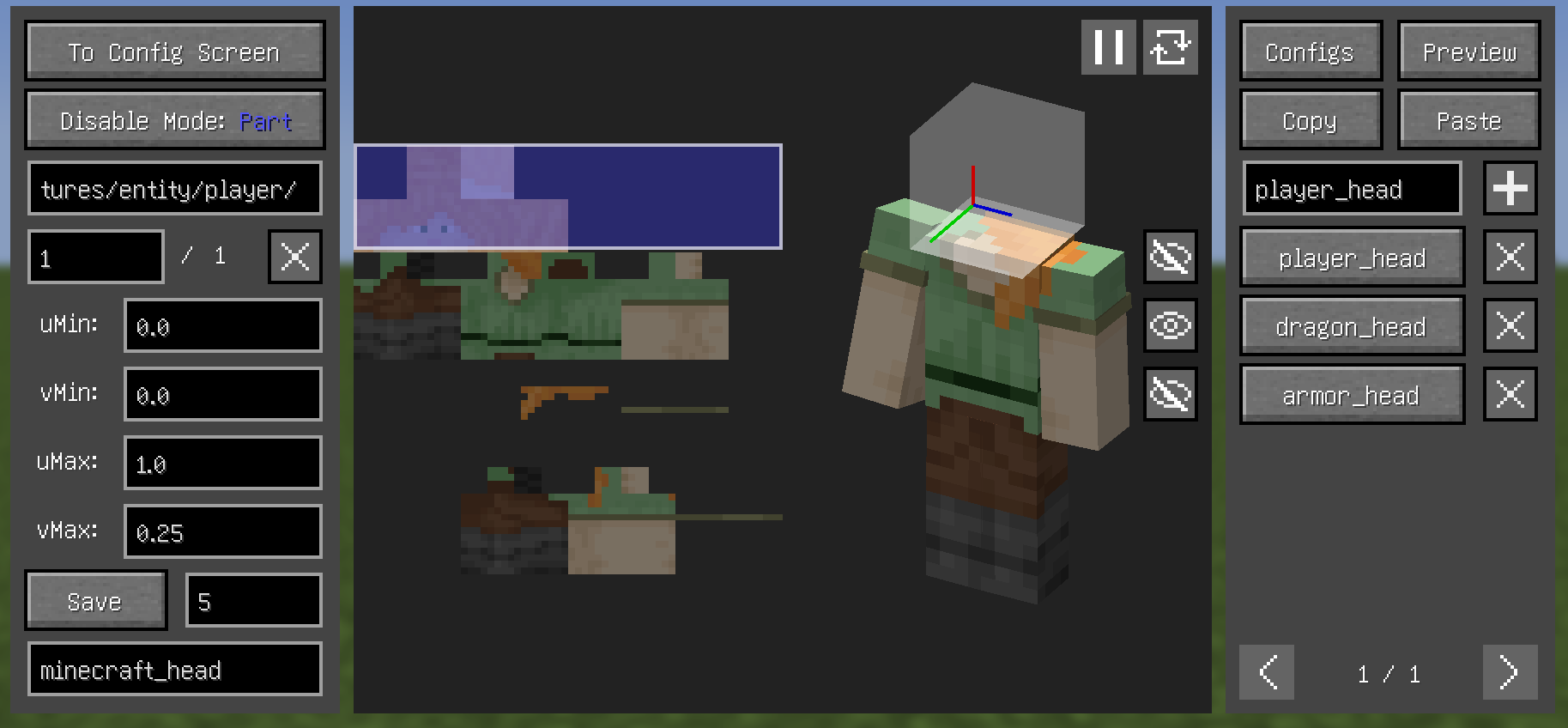
* About `Disable` section (current version still rough, complex operations):
* When texture ID field is empty, use Left Alt+Left Click to select texture
* Model parts contained by blue boxes won't be rendered
* Left-click drag to select in texture view, other keys cancel selection
* Left Alt+Left Click quickly selects hovered parts
* In `All` mode, entire texture's model won't render (blue box containing the texture in left panel indicates this)
* 
## Dependencies
* Fabric:
* [Fabric API](https://modrinth.com/mod/fabric-api)
* Both:
* (Optional but recommended) [Cloth Config API](https://modrinth.com/mod/cloth-config)
## FAQ
* A part of the model (e.g. hair) is always in the way, how to make it invisible?
* Increasing this value may help, or use `Disable` section

* What key to press can open Model View Screen?
* Set the key binding by yourself
* Why can't i open the Config Screen?
* Please downlowd [Cloth Config API](https://modrinth.com/mod/cloth-config)
* Why does it show binding failed when use YSM models?
* Snapshot 0.6.15 "try" to fix problems, but it didn't fix completely
* If Minecraft version is 1.20.1, then bind upward vector to head left (or right) side, and set roll angle to 90 (or -90) in preview section
* why does the head of YSM model disappear when in the Model View Screen?
* You downloaded Better Combat, just put it away
### Compatibility
* Incompatible:
* OptiFine
* Armourer's Workshop (Mod version 0.6+)
* Armors based on GeckoLib
* Customizable Player Models
* Epic Fight (Mod version 0.6-)
* Timeless and Classics Zero,version 1.1.4+
* Compatible:
* most camera mods
* most player model mods
* Armourer's Workshop (Mod version 0.6-)
* Epic Fight (Mod version 0.6+)
* First-person Model
* Not Enough Animations
* ParCool!
* Pehkui
* Player Animation Lib
* Timeless and Classics Zero,version 1.0.3-
* Yes Steve Model (Not stably compatible)
(Using skin_head_2 with some other options changed)
***
### Configuration (0.6+)
* Theoretically, most mod models are supported, but need to be configured manually:
* First, set the key binding for `Open Model View Screen`.
* 
* Open the model view screen and left click with left Alt held to select the corresponding face of the model, scroll with left Alt held to switch between the different layers of the model.
* By clicking the `Selecting` button on the left, switch between the three to select the `Forward Vector`, `Upward Vector`, and `Target Plane`.
* From the top right button, enter the `Preview` section, where you can see the relative relationship between the camera and the model and make certain adjustments (you can also adjust through key bindings).
* 
* Enter a name and save.
#### Tips
* Configs can have their priority adjusted - higher priority configs appear higher in the right-side list
* Disable depth in `Preview` section to hide models blocking the view
* About `Disable` section (current version still rough, complex operations):
* When texture ID field is empty, use Left Alt+Left Click to select texture
* Model parts contained by blue boxes won't be rendered
* Left-click drag to select in texture view, other keys cancel selection
* Left Alt+Left Click quickly selects hovered parts
* In `All` mode, entire texture's model won't render (blue box containing the texture in left panel indicates this)
* 
## Dependencies
* Fabric:
* [Fabric API](https://modrinth.com/mod/fabric-api)
* Both:
* (Optional but recommended) [Cloth Config API](https://modrinth.com/mod/cloth-config)
## FAQ
* A part of the model (e.g. hair) is always in the way, how to make it invisible?
* Increasing this value may help, or use `Disable` section

* What key to press can open Model View Screen?
* Set the key binding by yourself
* Why can't i open the Config Screen?
* Please downlowd [Cloth Config API](https://modrinth.com/mod/cloth-config)
* Why does it show binding failed when use YSM models?
* Snapshot 0.6.15 "try" to fix problems, but it didn't fix completely
* If Minecraft version is 1.20.1, then bind upward vector to head left (or right) side, and set roll angle to 90 (or -90) in preview section
* why does the head of YSM model disappear when in the Model View Screen?
* You downloaded Better Combat, just put it away
### Compatibility
* Incompatible:
* OptiFine
* Armourer's Workshop (Mod version 0.6+)
* Armors based on GeckoLib
* Customizable Player Models
* Epic Fight (Mod version 0.6-)
* Timeless and Classics Zero,version 1.1.4+
* Compatible:
* most camera mods
* most player model mods
* Armourer's Workshop (Mod version 0.6-)
* Epic Fight (Mod version 0.6+)
* First-person Model
* Not Enough Animations
* ParCool!
* Pehkui
* Player Animation Lib
* Timeless and Classics Zero,version 1.0.3-
* Yes Steve Model (Not stably compatible)
Compatibility
Mod Loaders
Game Versions
Recommended Gear
AffiliateHardware and extras that pair well with this mod.

As an Amazon Associate I earn from qualifying purchases.
Screenshots
Similar Mods

QuantumFlux
Wireless RF and other gadgets to make gameplay fun

Yes Steve Model
A mod that modifies the vanilla player model
Bocchium
Forge port of Bedrodium, culling bedrock sides for better performance.

Better Questing Tweaker (BQTweaker)
Tweaker mod to change some aspects of BetterQuesting

DnT Ancient City Overhaul
Standalone Splinter version of Dungeons and Taverns Ancient City Overhaul

PackagedAuto
Enhancing Autocrafting with Packages
Included in Modpacks (41)
Most downloaded Izakji's Zombie Apocalypse
 Izakji's New Beginnings
 Creepy Horse Reimagined
 Surviving 100 Days With The Wither Storm Again
 Doctor Nowhere Adventures - A Doctor Nowhere Creatures Experience
 I heard it too.JAR
 Hyper Realistic
 Luminary Cove
 The Journey SMP Season Of True Survival
 truehorror.jar
 Client Side + | performance boosts + visual upgrades + quality of life changes
 Twixxel's Stalker Series
 Jurassic World JWR
 Realistic Minecraft - Frealism
 The Horrors Of Evil
 The Rome Empire - Ancient Rome
 Falsity Experience
 Block Front
 Surviving 100 Days With The Wither Storm Remastered
 Realisim