
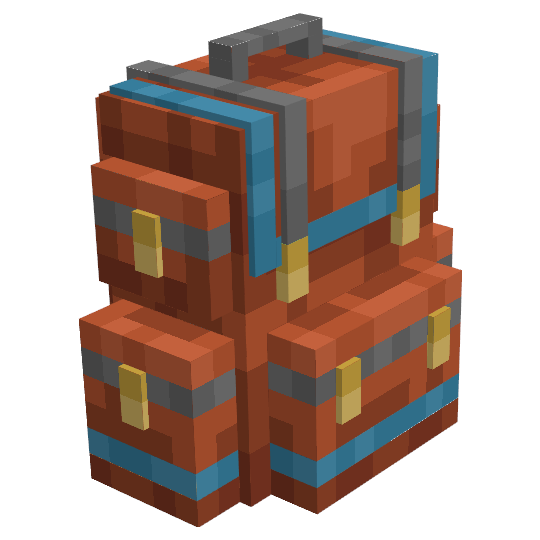
Sophisticated Backpacks
Modby P3pp3rF1y
Yet another backpack mod this time with backpack you can place in world, color in different color combinations, upgrade with more inventory and enhance with many functional upgrades
Type
Mod
CurseForge Downloads
254,825,229
CurseForge ID
Modrinth Downloads
20,659,465
Modrinth ID
Last Updated
Nov 7, 2026
Description
Sophisticated Backpacks introduces upgradable and highly customizable backpacks designed for convenient portable storage. Backpacks come in multiple tiers, each offering increased capacity and support for more upgrades that enhance functionality. They can be worn by the player or placed in the world like a block, making them both functional and flexible. Backpack appearance can be personalized by applying a main color and an accent color, allowing for a unique and easily recognizable look.




Backpack in Item Form
Backpacks can be opened directly using the Open Backpack key (B by default) or by right-clicking while held in hand. Their inventory can also be accessed from the player's inventory by hovering over them with the mouse and pressing the open key. When equipped in the chest slot, the backpack is rendered on the player. With Curios compatibility, it can also be worn and displayed when placed in the "Back" slot, providing an alternative way to carry it.
Backpack in the World
Backpacks can be placed in the world by sneak-right-clicking on a block. Once placed, they can be accessed just like any other container. In block form, they also support automation — items can be inserted or extracted using hoppers, pipes, or other modded systems that interact with inventories. To pick the backpack back up, simply sneak-right-click it with an empty hand, or break it like any regular block to collect it as an item.
Backpack Tiers
Backpacks can be upgraded through six tiers: Leather, Copper, Iron, Gold, Diamond, and Netherite. Each tier increases both the number of storage slots and the number of upgrade slots available, allowing players to enhance their backpacks to suit different needs and stages of gameplay
Loot and Mob Spawning
Backpacks and some upgrades can occasionally be found in loot chests throughout the world. On rare occasions, mobs may spawn wearing backpacks, sometimes with a bit of loot inside, and sometimes even playing a tune when they appear.
Backpack Coloring
Backpacks can be dyed in countless color combinations, allowing for both personalization and easy visual sorting.
To dye a backpack, place it in a crafting grid along with dyes. The color mixing works similarly to leather armor, but with an added twist - backpacks support two colors: a main color and an accent color.
- Dyes placed to the left of the backpack in crafting grid apply to the main color.
- Dyes placed to the right apply to the accent color.
- Dyes placed in the same column as the backpack affect both colors.
You can keep applying additional dyes to a backpack that already has colors, blending them with the existing ones to create even more combinations. To reset the colors, simply right-click the backpack on a water-filled cauldron to wash them off.
Backpacks can also have colors applied using Sophisticated Storage’s Decoration Table.
Want to play with friends or host your own world?
Rent a server from Bisect Hosting and support my mod development a bit while you're at it!
Use code P3pp3rFly for 25% off

Upgrades
Pickup Upgrade
Automatically collects items into the backpack based on a configurable filter. When worn, items the player would normally pick up are sent directly into the backpack. When placed in the world, the backpack collects nearby items that come into contact with it.
- The regular upgrade filters by item and provides 9 filter slots.
- The advanced upgrade offers 16 slots and supports filtering by item, mod, tag, NBT data, and damage values.
- Additionally, it can be configured to only pick up items that already exist in the backpack, using its current contents as an additional filter.
Magnet Upgrade
Teleports nearby items directly into the backpack if they fall within range based on a configurable filter. When worn, items around the player are automatically collected into the backpack. When placed in the world, the backpack collects items from its surroundings in the same range.
- The regular upgrade filters by item and provides 9 filter slots.
- The advanced upgrade offers a larger range and 16 filter slots, with support for filtering by item, mod, tag, NBT data, and damage values.
- Can also collect experience orbs and convert them into experience fluid if a Tank Upgrade is present with available space.
- Additionally, it can be configured to only teleport items that already exist in the backpack, using its current contents as an additional filter.
Filter Upgrade
Restricts which items can be inserted into or extracted from the backpack via automation.
- The regular upgrade filters by item and provides 9 filter slots.
- The advanced upgrade offers 16 filter slots and supports filtering by item, mod, tag, NBT data, and damage values.
- Additionally, it can be configured to only allow transfer of items that already exist in the backpack, using its current contents as an additional filter.
Void Upgrade
Automatically destroys items that match its filter criteria, preventing unwanted items from accumulating.
- The regular upgrade filters by item and provides 9 filter slots.
- The advanced upgrade offers 16 filter slots and supports filtering by item, mod, tag, NBT data, and damage values.
- A configurable option controls whether items inserted manually through the backpack’s GUI are voided—allowing a stack to be added and kept, while still voiding any additional items inserted with automation.
- Another option allows voiding only when a slot overflows, ensuring at least one stack of the filtered item is retained before excess is destroyed.
Compacting Upgrade
Automatically compacts items using 2×2 and 3×3 crafting recipes - commonly used for resources like coal, redstone, and similar materials.
- The regular upgrade has 9 filter slots and supports only 2×2 recipes.
- The advanced upgrade supports both 2×2 and 3×3 recipes and has 16 filter slots.
- A configurable option controls whether compacting occurs only for items inserted through automation, or also when added manually via the backpack’s GUI.
- Another option allows compacting of items that cannot be uncrafted, which is disabled by default to prevent irreversible conversions.
Feeding Upgrade
Automatically feeds the player using food stored in the backpack when they become hungry.
- Includes filters to control which food items can be used—useful for avoiding items with negative effects like rotten flesh.
- The advanced upgrade offers more precise control, including a setting that defines how much hunger must be missing relative to the food's hunger value before feeding occurs, and an option to feed immediately when the player is hurt.
Smelting / Smoking / Blasting Upgrades
Adds furnace-like functionality to the backpack, with an optional automated variant.
- The regular upgrade functions like a standard furnace, requiring manual input and output.
- The automated version automatically pulls in fuel and items to smelt, and pushes finished items back into the backpack.
- Includes filters for both fuel and smeltable items.
- Smoking and Blasting upgrades behave similarly but operate at double the base speed and only accept items valid for vanilla smokers or blast furnaces.
Crafting Upgrade
Provides a built-in crafting grid accessible from the backpack’s upgrade tab.
- Keeps items in the grid even when the backpack is closed.
- Integrates with Crafting Tweaks for enhanced usability.
- Supports recipe filling via JEI, REI, and EMI.
- Includes performance optimizations that make crafting faster and less demanding on servers than using a vanilla crafting table.
Stonecutter Upgrade
Provides access to a built-in stonecutter through the backpack’s upgrade tab.
- Remembers the last recipe used.
- Automatically reselects that recipe when the same input is inserted again.
- Speeds up stonecutting when processing multiple stacks of the same block.
Stack Upgrades & Downgrades
Modify how many items can fit in a single slot of the backpack’s inventory.
-
Stack Upgrades multiply the max stack size limit by a defined value:
- Starter: 1.5×
- Tier 1: 2×
- Tier 2: 4×
- Tier 3: 8×
- Tier 4: 16×
- Omega: raises the limit to the maximum possible value (2,147,483,647)
- Multiple upgrades stack multiplicatively.
Example: two Tier 2 upgrades (4× each) result in a 16× stack size multiplier.
-
Stack Downgrades divide the max stack size by a defined value:
- Tier 1: ÷8
- Tier 2: ÷16
- Tier 3: ÷32
- Downgrades can be combined multiplicatively.
Example: a Tier 1 and Tier 2 together divide the stack size by 128. - Useful in automation setups where precise inventory limits are needed.
-
Shift-Click Behavior
- Shift-clicking from an oversized stack moves only one regular-sized stack.
- Use Ctrl + Shift + Click to move as much as possible.
Jukebox Upgrade
Allows music discs to be played directly from the backpack’s upgrade tab.
- The basic upgrade provides 1 slot for a disc and simple play/stop controls.
- The advanced upgrade includes 12 disc slots and full playback controls: play, stop, next, and previous.
It also features shuffle mode and repeat options: repeat all, repeat one, or repeat disabled (play once and stop).
Restock Upgrade
Transfers filtered items from an inventory block in the world (such as chests, barrels, or other modded containers) into the backpack when the block is shift-right-clicked with the backpack in hand.
- The regular upgrade filters by item and provides 9 filter slots.
- The advanced upgrade offers 16 filter slots and supports filtering by item, mod, tag, NBT data, and damage values.
- Additionally, it can be configured to only pull items that already exist in the backpack, using its current contents as an additional filter.
Deposit Upgrade
Transfers filtered items from the backpack into an inventory block in the world (such as chests, barrels, or other modded containers) when the block is shift-right-clicked with the backpack in hand.
- The regular upgrade filters by item and provides 9 filter slots.
- The advanced upgrade offers 16 filter slots and supports filtering by item, mod, tag, NBT data, and damage values.
- Additionally, it can be configured to only deposit items that already exist in the target inventory, using its contents as an additional filter.
Refill Upgrade
Keeps specified items topped up in the player’s inventory by automatically refilling them from the backpack.
- The regular upgrade allows up to 6 items to be defined in its filter and refills them anywhere in the player’s inventory.
- The advanced upgrade supports up to 12 items and allows targeting specific slots: any slot, main hand, offhand, or a specific hotbar slot number.
Inception Upgrade
Allows a backpack to store other backpacks—one level deep.
- Nesting is limited to a single level: backpacks placed inside cannot contain additional backpacks.
- Upgrades in nested backpacks remain functional—for example, a Pickup Upgrade inside a sub-backpack can collect items directly into it.
- Upgrades in the main backpack can access inventories of nested backpacks, with a configurable option to prioritize either the main backpack or sub-backpacks first.
- Filter Upgrades in nested backpacks can be used to control what items are inserted into or extracted from them.
- Sub-backpacks can be opened using the open backpack key while hovering the cursor over them.
Everlasting Upgrade
Protects the backpack from all kinds of destruction.
- Completely immune to explosions, both as an item and when placed in the world.
- Cannot be destroyed by cactus, lava, or fire.
- Will never despawn when dropped as an item.
- Floats safely above lava instead of being destroyed.
- If dropped into the void, it floats just above the lowest build limit rather than falling out of the world.
Toolswapper Upgrade
Automatically swaps the correct tool or weapon into the player’s hand when mining or attacking with the wrong one.
- The regular upgrade handles swapping when clicking a block or entity, as long as a different tool or weapon is held.
- The advanced upgrade adds filters to control what can be swapped.
- It also enables a configurable keybind that swaps in the appropriate tool based on the block or entity the player is looking at - especially useful for right-click tools like wrenches from other mods.
Tank Upgrade
Adds fluid storage to the backpack, with capacity based on backpack tier.
- Uses part of the backpack’s inventory space to hold fluid.
- Can store any fluid, including modded ones.
- Fluids can be inserted or extracted using pipes, or manually using fluid containers like buckets when the backpack is placed in the world.
- Includes GUI support for draining or filling the tank using fluid containers.
- Stack Upgrades also increase the tank’s capacity, just like they do for item slots.
Battery Upgrade
Adds energy storage to the backpack, allowing it to charge or discharge energy-based items.
- Uses part of the backpack’s inventory space to store energy.
- Can interact with energy containers via the upgrade tab GUI—items can be charged or discharged directly from the backpack.
- When the backpack is placed in the world, modded energy cables can connect to it and push or pull energy.
- Stack Upgrades increase the battery’s capacity, just like they do for item slots.
Pump Upgrade
Transfers fluids between the backpack’s tank and fluid containers or fluid blocks in the world.
- The regular upgrade allows pumping to and from fluid containers in the world, and only functions when the backpack is placed.
- A configurable option controls whether the pump inputs fluid into the tank or outputs from it.
- The advanced upgrade adds support for interacting with fluid containers in the player’s hand, as well as placing or removing fluid blocks directly in the world.
- Useful for automated fluid handling, on-the-go refills, or interacting with tanks and machines from other mods.
Experience Pump Upgrade
Works with the Tank Upgrade to store player experience as a fluid in the backpack.
- Can be set to drain experience from the player above a certain level, push experience to the player below a certain level, or keep the player at a specific level by balancing both directions.
- Supports storing or retrieving all experience, or a specific number of levels (configurable in the GUI).
- Includes an option to automatically repair equipped items with the Mending enchantment, including those in Curios slots.
Anvil Upgrade
Provides built-in anvil functionality directly from the backpack’s upgrade tab.
- Allows repairing, renaming, and combining items without needing a placed anvil.
- Functions just like a vanilla anvil, but accessible on the go.
Smithing Upgrade
Provides built-in smithing table functionality directly from the backpack’s upgrade tab.
- Allows upgrading gear using templates, just like a vanilla smithing table.
- Conveniently accessible without needing to place a smithing table.
NEXT
Alchemy Upgrade
Automatically consumes potions, splash potions, and food with effects based on configurable conditions.
- Can be set to activate under specific situations—such as when sprinting, underwater, or affected by negative effects.
- Supports milk buckets to clear effects, and food items with potion-like benefits.
- The advanced upgrade adds options to match or ignore potion duration and amplifier.
- Also includes logic for multi-effect items: choose whether to trigger when a single effect is missing or only when all effects have worn off.
Infinity Upgrade
Grants infinite supply of items in designated backpack slots—items in those slots can be extracted infinitely through the GUI or automation.
- Any item placed in an affected slot becomes infinite while the upgrade is active.
- Available in two variants:
- Admin: Can only be removed or configured by server operators. When placed in the world, the backpack can only be broken by an admin. Only admins can insert items into empty slots to make them infinite. Designed for server setups where admins provide predefined infinite resources.
- Survival: Intended for expert modpacks as an expensive end-game reward. Fully usable by survival players—can be configured, removed, and freely picked up. No restrictions on who can manage the backpack or its contents.
By default, the Survival version has no recipe and is meant to be gated by modpack progression.
Compatibility
Curios
- Compatibility for wearing backpacks in the Curios "Back" slot.
- Experience Pump Upgrade can repair equipped Mending items, including those in Curios slots.
Chipped
- When Chipped is present, upgrades are added for each of its workbenches, providing their functionality in the backpack’s upgrade tab.
- These upgrades remember the last recipe used and automatically reselect it when the same input is inserted again, making repeated processing more efficient.
Reliquary
- When Reliquary is present, its potions and splash potions can be used with the Alchemy Upgrade.
Sawmill
- When the Sawmill mod is present, an upgrade is added that provides sawmill functionality in the backpack’s upgrade tab.
- Remembers the last recipe used and automatically reselects it when the same input is inserted again.
Crafting Tweaks
- When Crafting Tweaks is present, its rotate, balance, spread, and clear functions are available in the Crafting Upgrade.
JEI / REI / EMI
- Recipe filling is supported in the Crafting Upgrade’s grid.
- Colored backpack variants are properly recognized and their crafting recipes are shown.
- Backpack upgrade tabs are registered as UI elements so recipe viewers can reposition their overlays accordingly.
- Adds support for setting filters by dragging items or fluids directly from the recipe viewer lists into filter slots.
- Adds the Crafting, Anvil, and Smithing Upgrades as recognized workstations for relevant recipes.
Item Borders
- Properly shows item borders in backpack inventories when used with the Item Borders mod.
TrashSlot
- Adds support for positioning the trash slot correctly in backpacks with non-standard sizes and layouts.
- Also defines sensible default positions for different backpack sizes based on how much screen space they use.
Create (via Sophisticated Backpacks Create Integration)
- Full compatibility for using backpacks on Create contraptions.
- See: Sophisticated Backpacks Create Integration
Configuration
Sophisticated Backpacks includes a wide range of configuration options to help customize the mod to your needs.
- Adjust the number of inventory and upgrade slots for each backpack tier.
- Set the number of filter slots available in various upgrades.
- Configure range, speed, and other behavior for specific upgrades - for example, the pickup radius of the Magnet Upgrade.
- Disable individual backpacks or upgrades entirely if they don’t fit your modpack’s theme - this removes their recipes and hides them from the creative menu and recipe viewers.
Compatibility
Mod Loaders
Game Versions
Recommended Gear
AffiliateHardware and extras that pair well with this mod.

As an Amazon Associate I earn from qualifying purchases.
Screenshots
Similar Mods

Just Enough Items (JEI)
View Items and Recipes

Cloth Config API (Fabric/Forge/NeoForge)
Config Screen API for Minecraft

Mouse Tweaks
Enhances inventory management by adding various functions to the mouse buttons.

Fabric API
Core API library for the Fabric toolchain

AppleSkin
Adds some useful information about food/hunger to the HUD

GeckoLib
A 3D animation library for entities, blocks, items, armor, and more!
Included in Modpacks (3,947)
Show fewer Farmageddon
 SuperHero Survival Inscint
 Aeronautics plus
 Create Revamped Server
 Cobblemon histories
 NeoBox
 AntCraft | MHA
![Yendia's Quality Of Life [Forge]](https://media.forgecdn.net/avatars/954/430/638445803537536435.jpeg) Yendia's Quality Of Life [Forge]
Yendia's Quality Of Life [Forge]
 Witches, Warlocks, Vampires, and Werewolves
 Impostor Syndrome - Reimagined
 Futurecraft 5.0
 BMC Modpack
 Stargates, Colonies, And Ridiculous Tech
![The Pond Edition [NEOFORGE]](https://media.forgecdn.net/avatars/815/255/638191205312486625.png) The Pond Edition [NEOFORGE]
The Pond Edition [NEOFORGE]
 Colony Equivalence
 All You Need - AYN
 Create And Stuff With Friends
 GameGarden Ultimate
 EldenVoid
 MVM - Enhanced survival with Epic Fight
 New Age 1
 Redstoner's Paradise
 DREAD - A Horror Survival Pack - Enhanced
 Odysseum
 TeaCraft 18+
 Ciscos Dragonfyre - NFN Official
 Sage's Custom Cisco
 BiomeMAX
 Rusty's Create
 Alex Mobs Extra
 modular technology
 Aircrashed Engineer
 The Legend Of Zelda Tears of the Block Edition
 Lancy's Wither Storm
 The Merciless Void
 TheVaulters
 Minecraft Reimagined (Horror)
![ImmersiVR [ViveCraft]](https://media.forgecdn.net/avatars/1741/694/639108831432729167.png) ImmersiVR [ViveCraft]
ImmersiVR [ViveCraft]
 Protocol Zero-(HARDCORE EDITION)
 Ch0nkPack
 How to get Stars? Become cobblemon master!
 Sword Last Online: Stand on The Rock (Sao)
 Voloron 3
 The most accurate Wither Storm
 Create-O-Holics 1 dot 5
 SuperiorMine
 Pixverse
 Dungeons n' Bosses 2!
 Arcadia Unlimited
 Timeless Apocalypse
 Java Overhaul
 Unsealed Fate
 Create AeronauticsPLUS
 Aether: Apotheosis Awakening
 Dwarfz 5
 NameIT
 Arthropod Takeover
 World War 3 Server
 Stormdal Cobblemon journey's 2
 Fun n' Guns
 Homies Hangout Kingdom
 Artemis Continuum
 theboysvanilla+
 Project 202
 MBS - Ocean Horror with Verity
 Cobblemon: Unbound
 Chronost Incorporated
 Palladium Superherores (Altered)
 Apocalypse: Block by Block - GraplysTeam
 Explorer´s & Marriage
 WUC Cursed Fate
 EarthMC
 Entropy Zero Evolution
 MCA Reborn Modpack
 Valiant RPG
 Terrainium
 Steam and Stardust
 Dragons, yay!
 Create City 4 "The New Journey"
 Magic & Mechanisms - Airborne
 Hollycraft SMP
 BRSK Omega Protocol
 Eldoria: The Last Epoch
 (D&D Addition)
 Tetra: Into the Forge
 Verdant Haven
 Omni-Apocalypse
 Dragon Block Rebirth ( Remaster DBC )
 Create : Constant Warfare
 HunterZ - GussDX Edition
 A Quiet Place - No Time to Breathe
 Fantasy world (like DND)
 Nightmare Craft: Evolved
 Meka Tech
 Pokengineers – Create to Catch
 Antarchy - Ascension
 Create Continuity
 Cabinmod 5
 SkyOrigins
 The Steve Tapes