
Sync (Forge)
Modby Sumiku
One mind. Many Bodies.
Type
Mod
CurseForge Downloads
60,610
CurseForge ID
1309482
Last Updated
Jul 26, 2026
Description

Sync (Forge)
Sync (Forge) is an unofficial reimplementation of the Sync mod, that was originally developed by iChun.
As for the brief description of the mod, I think the original one says it all:
This mod provides clones, or as we like to call it, "shells". These shells are basically new individuals, with their own inventory, experience level, and even gamemode. However, they lack a mind that would control them. That's where the player comes in. Each shell is biometrically tied to the player whose sample was used to create it, and allows the player to "sync" their mind with it, essentially creating multiple player instances.
Crafting recipes
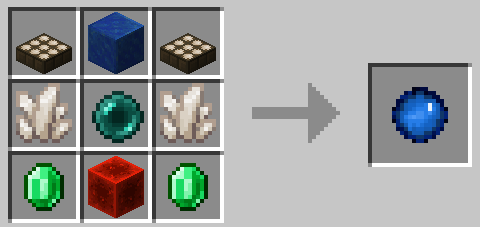
Sync Core:
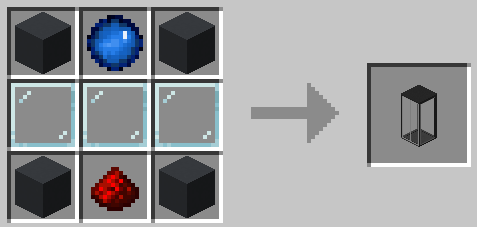
Shell Constructor:
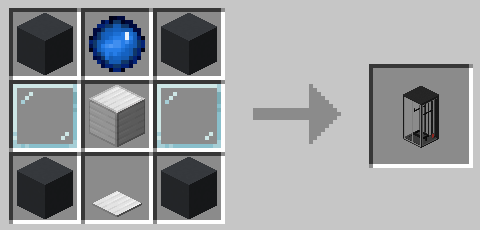
Shell Storage:
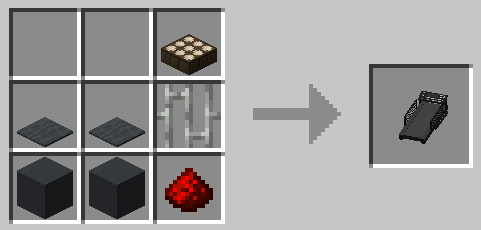
Treadmill:
How to play
- You need to craft a shell constructor and place it down.
- Then you need to provide it with a sample - just right-click the thing. ⚠️WARNING: this action will kill you! In order to create a shell with full health, the constructor must absorb 20HP (40 for Hardcore players). If you don't want to die, you can eat a golden apple to increase your maximum health, or you can hold a totem of undying during the process (which is the only option for Hardcore players).
- The shell constructor needs power to work, so put a treadmill next to it (it should touch any side of any part of the shell constructor) and lure a pig or a wolf to its center to start generating piggawatts. You should end up with something like this:
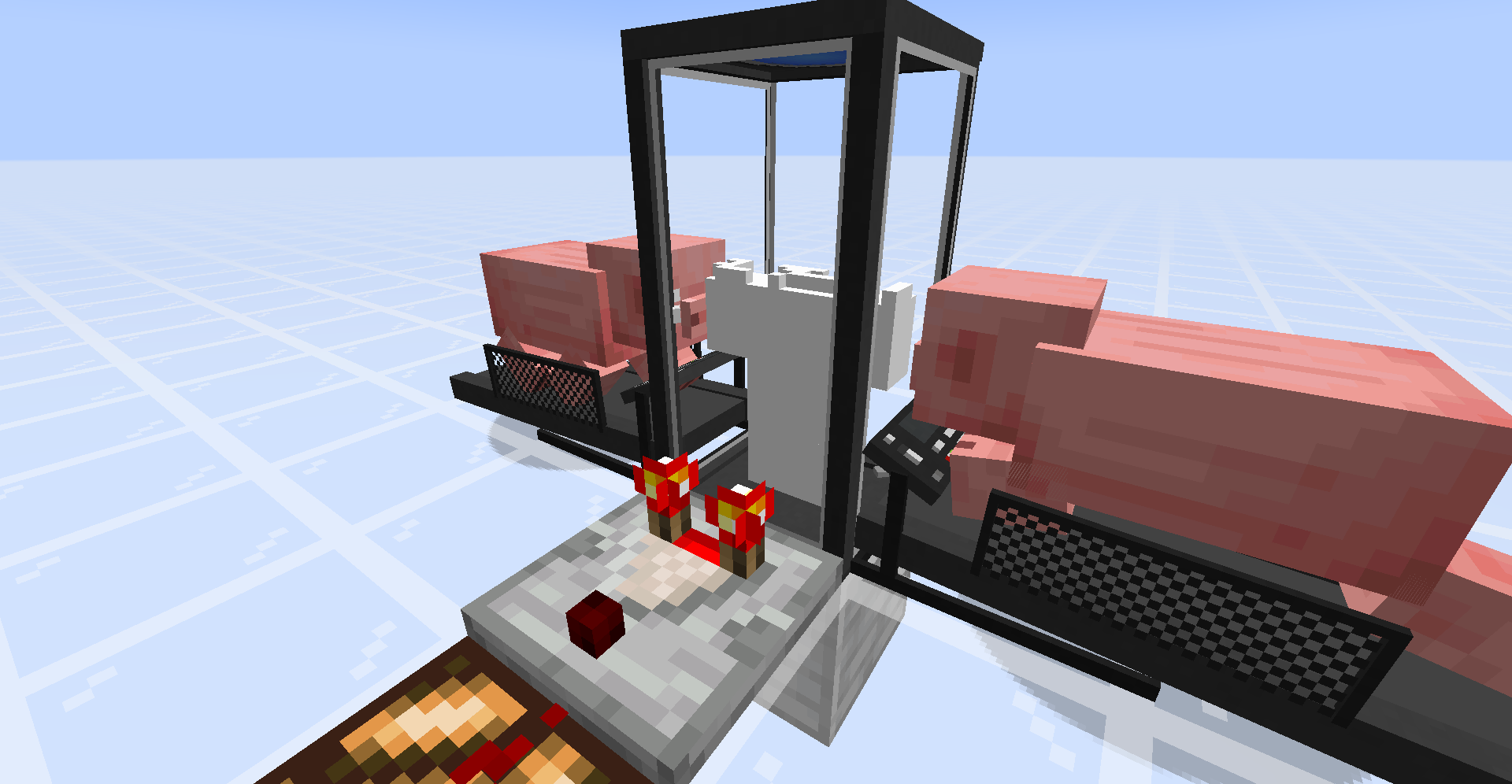 P.S. - You don't really need a comparator, it's here just to demonstrate that you can determine progress of the shell construction process via strength of the comparator output.
 - Once your new shell is constructed, you need to craft a shell storage and place it down.
- Supply it with redstone power.
- Once doors of the shell storage are open, you can walk into it.
- You'll see a radial menu that displays your shells:
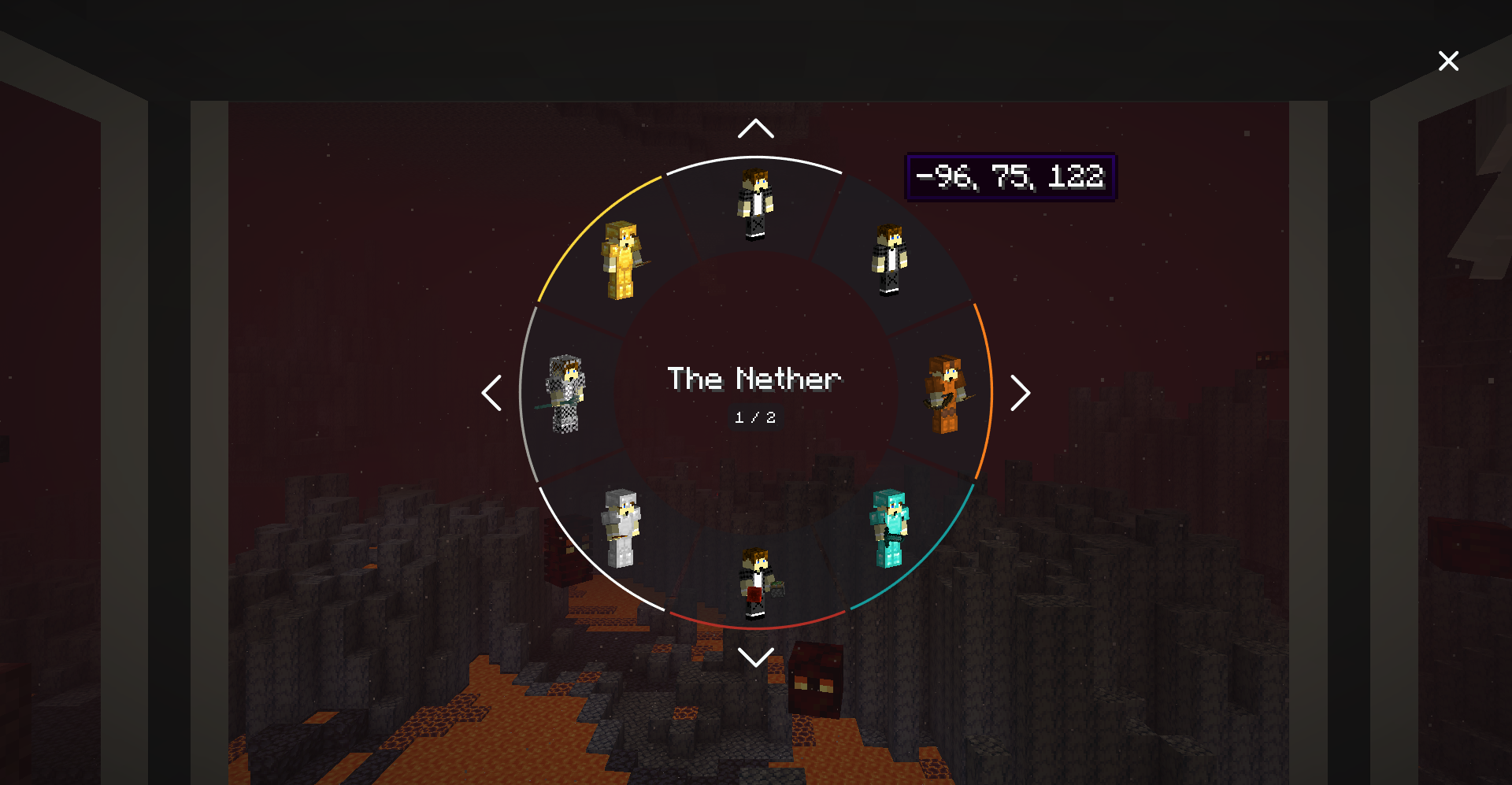
- Select the shell you want to transfer your mind into, and enjoy the process!
Notes
- You can color-code shells stored in shell storages. Just right-click a shell storage with dye.
- Syncing works cross dimensional, and should support custom dimensions.
- If you die while using a shell, you'll be immediately synced with your original body (if you still have one; otherwise your mind will be transferred to a random shell).
- Death of a shell doesn't increase your death counter.
- Shell can be equipped (or unequipped) with armor, tools, etc. via hoppers connected to a corresponding shell container.
- Shell storage should be constantly supplied with power in order to keep stored shell alive.
- Shell storage can be powered by redstone, if the shellStorageAcceptsRedstone option is set to true.
- Shell storage can be powered by any valid energy source (e.g., treadmills, machinery from popular tech mods, etc.).
- It's possible to measure a shell container's state with a comparator.
- You can determine progress of the shell construction process via strength of the comparator output.
- You can measure the fullness of a shell's inventory via strength of the comparator output.
- You can change a comparator output type by right-clicking on a shell container with a wrench.
- Shell storage and shell constructor are pretty fragile, so don't try to mine them without silk touch enchantment.
Config
The mod is highly configurable. You can read more about it in the mod's README.
Installation
Requirements:
- Minecraft 1.20.1
- Forge 47.3.0 or higher
- Java 17
Credits
- Original Sync mod by iChun
- Ported from Sync (Fabric)
- Ported to Forge 1.20.1 by Sumiku
License
This project is licensed under the MIT License
Similar Mods

Icy Incitement
Some useful snowy tools!

Pet Buddy Mod
It's a tiny you !

XL Food Mod+
XL Food Mod · 8 new crops · 150+ new food items · new cakes · new ores and flowers.

Contact
Send parcels and write postcards to your frineds.
RP Renames
View all Resource Pack Renames in a new anvil GUI catalog!
![Cobblemon - Yet Another Chance Booster [Discontinued]](https://media.forgecdn.net/avatars/1055/181/638586392843149253.png)
Cobblemon - Yet Another Chance Booster [Discontinued]
A server-side side-mod for Cobblemon that allows you to boost spawn chances