

GugleCarpetAddition
Modby Gugle
Gugle's Carpet Addition
Type
Mod
CurseForge Downloads
216,686
CurseForge ID
662867
Modrinth Downloads
1,300,586
Modrinth ID
UHjbX5mk
Last Updated
Jul 26, 2026
Description
# Gugle's Carpet Addition
[](https://github.com/Gu-ZT/gugle-carpet-addition/actions/workflows/build.yml)
[](https://www.curseforge.com/minecraft/mc-mods/guglecarpetaddition)
[](https://modrinth.com/mod/gca)
[](https://github.com/Gu-ZT/gugle-carpet-addition/releases)
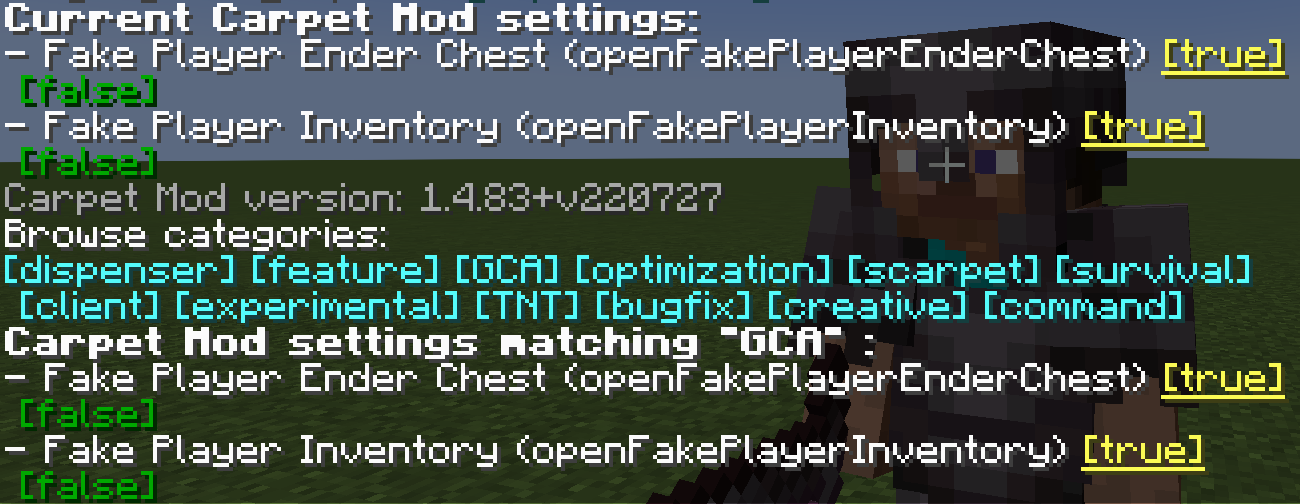
## GCA
#### If you need GCA for Minecraft 1.13, [please click here](https://github.com/Gu-ZT/TISCarpet113WithGCA/releases/latest)
### gcaPageSize
Set the number of entries per page on GCA list pages
* Type: `int`
* Default: `8`
* Options: Any positive integer
* Categories: `GCA`
```
/carpet [setDefault] gcaPageSize 10
```
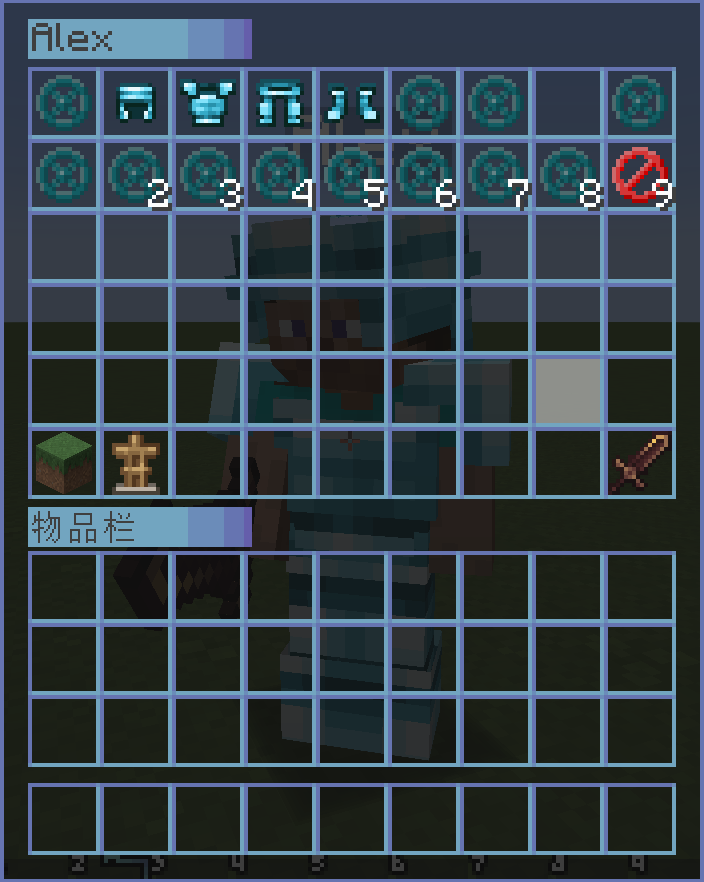
### openFakePlayerInventory
Allow player to open the fake player's inventory
* Type: `boolean`
* Default: `false`
* Options: `true`, `false`
* Categories: `GCA`, `BOT`
```
/carpet [setDefault] openFakePlayerInventory true
```
**Usage**: Right-click on a fake player to open their inventory
### openRealPlayerInventory
Allow player to open the real player's inventory
* Type: `String`
* Default: `false`
* Options: `true`, `false`, `ops`, `0`, `1`, `2`, `3`, `4`
* Categories: `GCA`, `experimental`
```
/carpet [setDefault] openRealPlayerInventory true
/carpet [setDefault] openRealPlayerInventory ops
```
**Usage**: Right-click on other real players to open their inventory, requires appropriate permission level
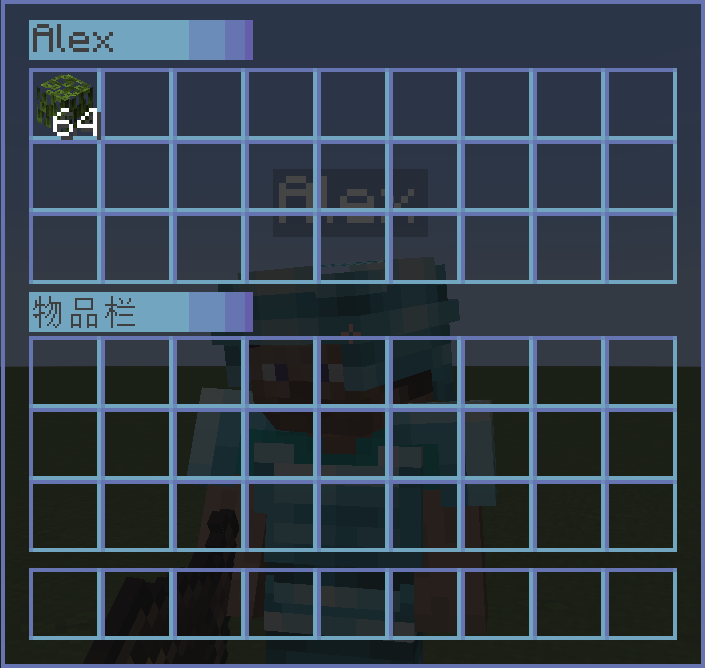
### openFakePlayerEnderChest
Allow player to open the fake player's ender chest
* Type: `String`
* Default: `false`
* Options: `ender_chest`, `true`, `false`
* Categories: `GCA`, `BOT`
```
/carpet [setDefault] openFakePlayerEnderChest true
/carpet [setDefault] openFakePlayerEnderChest ender_chest
```
**Usage**: Sneak (hold Shift) + right-click on a fake player to open their ender chest
### fakePlayerResident
Keep the fake player when exiting the level
* Type: `boolean`
* Default: `false`
* Options: `true`, `false`
* Categories: `GCA`, `BOT`
```
/carpet [setDefault] fakePlayerResident true
```
### fakePlayerReloadAction
Keep the fake player action when exiting the level
* Type: `boolean`
* Default: `true`
* Options: `true`, `false`
* Categories: `GCA`, `BOT`
```
/carpet [setDefault] fakePlayerReloadAction false
```
### fakePlayerAutoReplenishment
Make fake player to auto replenishment
* Type: `boolean`
* Default: `false`
* Options: `true`, `false`
* Categories: `GCA`, `BOT`
```
/carpet [setDefault] fakePlayerAutoReplenishment true
```
### fakePlayerAutoReplenishmentFormShulkerBox
Make fake player to auto replenishment from shulker box
* Type: `boolean`
* Default: `false`
* Options: `true`, `false`
* Categories: `GCA`, `BOT`
```
/carpet [setDefault] fakePlayerAutoReplenishmentFormShulkerBox true
```
### fakePlayerAutoFish
Make fake player to auto fish. When the fishing hook catches a fish, it will automatically reel in and cast again.
* Type: `boolean`
* Default: `false`
* Options: `true`, `false`
* Categories: `GCA`, `BOT`
```
/carpet [setDefault] fakePlayerAutoFish true
```
**Usage**: Let the fake player hold a fishing rod and use `/player use` to start fishing. The fake player will automatically complete the reel-in and cast operations.
### fakePlayerAutoReplaceTool
Make fake player to auto replace almost damaged tool
* Type: `String`
* Default: `false`
* Options: `true`, `false`, `keep`
* Categories: `GCA`, `BOT`
> `true`: Tools with Mending will keep 10 durability; other tools will automatically switch after they break.
> `keep`: All tools will keep 10 durability.
```
/carpet [setDefault] fakePlayerAutoReplaceTool true
```
### fakePlayerToolDamagedNotification
Broadcast a server-wide message when a fake player's tool breaks or when restocking fails (May cause message spam)
* Type: `boolean`
* Default: `false`
* Options: `true`, `false`
* Categories: `GCA`, `BOT`
```
/carpet [setDefault] fakePlayerToolDamagedNotification true
```
### fakePlayerPrefixName
Fake Player Prefix Name
* Type: `String`
* Default: `#none`
* Options: `#none`, `bot_`
* Categories: `GCA`, `BOT`
```
/carpet [setDefault] fakePlayerPrefixName bot_
/carpet [setDefault] fakePlayerPrefixName #none
```
### fakePlayerSuffixName
Fake Player Suffix Name
* Type: `String`
* Default: `#none`
* Options: `#none`, `_fake`
* Categories: `GCA`, `BOT`
```
/carpet [setDefault] fakePlayerSuffixName _fake
/carpet [setDefault] fakePlayerSuffixName #none
```
### fakePlayerForceOfflineUUID
Force fake players to use offline UUIDs (requires `allowSpawningOfflinePlayers` enabled)
* Type: `boolean`
* Default: `false`
* Options: `true`, `false`
* Categories: `GCA`, `BOT`
```
/carpet [setDefault] fakePlayerForceOfflineUUID true
```
> Disabling this feature requires clearing usercache.json and restarting the server/client to switch back to online UUIDs.
### commandBot
A Bot Management Menu for saving, loading, and grouping fake players
* Type: `String`
* Default: `ops`
* Options: `ops`, `0`, `1`, `2`, `3`, `4`, `true`, `false`
* Categories: `GCA`, `BOT`, `command`
```
/carpet [setDefault] commandBot ops
```
**Command Usage**:
```
/bot # Show saved bot list
/bot list [page] # Show bot list with pagination
/bot add # Save current online fake player (including position, actions, etc.)
/bot load # Load saved fake player
/bot remove # Delete saved fake player
/bot group # Show bot group list
/bot group create # Create bot group
/bot group remove # Delete bot group
/bot group add # Add bot to group
/bot group load # Load all bots in group
/bot group unload # Unload all bots in group
/bot group info # View group details
/bot group generated [load] # Batch generate bots and group them
```
### commandBotAction
A Bot Action Management Menu for adding/removing actions and setting startup actions for bots
* Type: `String`
* Default: `ops`
* Options: `ops`, `0`, `1`, `2`, `3`, `4`, `true`, `false`
* Categories: `GCA`, `BOT`, `command`
```
/carpet [setDefault] commandBotAction ops
```
**Command Usage**:
```
/bot action # View bot's action list
/bot action add # Add action to bot
/bot action remove # Remove action from bot
/bot action startup set # Set bot's startup action
/bot action startup clear # Clear bot's startup actions
```
### commandTodo
A Todo Management Menu with support for adding, removing, and marking completion
* Type: `String`
* Default: `ops`
* Options: `ops`, `0`, `1`, `2`, `3`, `4`, `true`, `false`
* Categories: `GCA`, `command`
```
/carpet [setDefault] commandTodo ops
```
**Command Usage**:
```
/todo # Show todo list
/todo list [page] # Show todo list with pagination
/todo add # Add new todo item
/todo remove # Remove todo item
/todo success [true/false] # Mark todo as done/undone
```
### commandHere
Quickly broadcast your current position to all players and add glowing effect to yourself
* Type: `String`
* Default: `ops`
* Options: `ops`, `0`, `1`, `2`, `3`, `4`, `true`, `false`
* Categories: `GCA`, `command`
* Conditions: Only works when CarpetAmsAddition is NOT loaded
```
/carpet [setDefault] commandHere ops
```
**Command Usage**:
```
/here # Broadcast your coordinates, showing current dimension and converted coordinates
# Also outputs Xaero's Minimap compatible waypoint format
```
### commandWhereis
Quickly locate players and add glowing effect to target
* Type: `String`
* Default: `ops`
* Options: `ops`, `0`, `1`, `2`, `3`, `4`, `true`, `false`
* Categories: `GCA`, `command`
```
/carpet [setDefault] commandWhereis ops
```
**Command Usage**:
```
/whereis # Query specified player's location
/vris # Alias, same function
```
### commandLoc
A Location Management Menu for saving, viewing, and deleting location points
* Type: `String`
* Default: `ops`
* Options: `ops`, `0`, `1`, `2`, `3`, `4`, `true`, `false`
* Categories: `GCA`, `command`
```
/carpet [setDefault] commandLoc ops
```
**Command Usage**:
```
/loc # Show location list
/loc list [page] # Show locations with pagination
/loc add # Add location at current position
/loc remove # Remove specified location
/loc info # View location details (including dimension converted coordinates)
```
### commandWlist
Whitelist Management, allows authorized regular players to manage the whitelist
* Type: `boolean`
* Default: `false`
* Options: `true`, `false`
* Categories: `GCA`, `command`
```
/carpet [setDefault] commandWlist true
```
**Command Usage**:
```
/wlist # Show current whitelist
/wlist add # Add player to whitelist
/wlist remove # Remove player from whitelist
/wlist permission add # Grant player whitelist management permission (OP only)
/wlist permission remove # Revoke player's whitelist management permission (OP only)
```
### commandBlist
Banned List Management
* Type: `boolean`
* Default: `false`
* Options: `true`, `false`
* Categories: `GCA`, `command`
```
/carpet [setDefault] commandBlist true
/blist
```
### commandSop
Simple op get
* Type: `boolean`
* Default: `false`
* Options: `true`, `false`
* Categories: `GCA`, `command`
```
/carpet [setDefault] commandSop true
/sop
```
### commandSeed
Sets the required permission level for the /seed command
* Type: `String`
* Default: `vanilla`
* Options: `vanilla`, `true`, `false`, `ops`, `0`, `1`, `2`, `3`, `4`
* Categories: `GCA`, `command`
```
/carpet [setDefault] commandSeed ops
/carpet [setDefault] commandSeed 0
```
### betterFenceGatePlacement
Make the placed fence gate have the same block status as the fence gate you clicked
* Type: `boolean`
* Default: `false`
* Options: `true`, `false`
* Categories: `GCA`
```
/carpet [setDefault] betterFenceGatePlacement true
```
### betterWoodStrip
Only the axe with "Strip" in its name is allowed to peel logs
* Type: `boolean`
* Default: `false`
* Options: `true`, `false`
* Categories: `GCA`
```
/carpet [setDefault] betterWoodStrip true
```
### betterSignInteraction
Make the block attached to the sign interact when you right-click it
* Type: `boolean`
* Default: `false`
* Options: `true`, `false`
* Categories: `GCA`
```
/carpet [setDefault] betterSignInteraction true
```
### betterItemFrameInteraction
Make the block attached to the ItemFrame interact when you right-click it
* Type: `boolean`
* Default: `false`
* Options: `true`, `false`
* Categories: `GCA`
```
/carpet [setDefault] betterItemFrameInteraction true
```
### betterQuickCrafting
Keep an item in the inventory during quick crafting
* Type: `boolean`
* Default: `false`
* Options: `true`, `false`
* Categories: `GCA`, `experimental`
```
/carpet [setDefault] betterQuickCrafting true
```
### simpleInGameCalculator
Simple In-Game Calculator
* Type: `boolean`
* Default: `false`
* Options: `true`, `false`
* Categories: `GCA`
```
/carpet [setDefault] simpleInGameCalculator true
```
### fastPingFriend
Fast ping friend
* Type: `boolean`
* Default: `false`
* Options: `true`, `false`
* Categories: `GCA`
```
/carpet [setDefault] fastPingFriend true
```
### qnmdLC
What is the height value for setting the LC value
* Type: `int`
* Default: `-1`
* Categories: `GCA`, `experimental`
```
/carpet [setDefault] qnmdLC 64
/carpet [setDefault] qnmdLC -1
```
### fixedEndCrystalSync
Fixed End Crystal Sync
* Type: `boolean`
* Default: `false`
* Options: `true`, `false`
* Categories: `GCA`, `experimental`
```
/carpet [setDefault] fixedEndCrystalSync true
```
### welcomePlayer
Welcome Player
* Type: `boolean`
* Default: `false`
* Options: `true`, `false`
* Categories: `GCA`
```
/carpet [setDefault] welcomePlayer true
```
### wanderingTraderSpawnFailedWarning
Wandering Trader Spawn Failed Warning
* Type: `boolean`
* Default: `false`
* Options: `true`, `false`
* Categories: `GCA`, `experimental`
```
/carpet [setDefault] wanderingTraderSpawnFailedWarning true
```
### wanderingTraderSpawnRemind
Wandering Trader Spawn Remind
* Type: `boolean`
* Default: `false`
* Options: `true`, `false`
* Categories: `GCA`, `experimental`
```
/carpet [setDefault] wanderingTraderSpawnRemind true
```
### commandTransfer
/transfer command
* Type: `boolean`
* Default: `false`
* Options: `true`, `false`
* Categories: `GCA`, `command`
* Conditions: Requires Minecraft >= 1.21
```
/carpet [setDefault] commandTransfer true
/transfer [port]
```
### commandTick
Fix Carpet's /tick command permission
* Type: `String`
* Default: `3`
* Options: `true`, `false`, `ops`, `0`, `1`, `2`, `3`, `4`
* Categories: `GCA`, `command`, `experimental`
* Conditions: Requires Minecraft >= 1.20.3
```
/carpet [setDefault] commandTick 3
```
### fakePlayerLocatorBar
Display Fake Player Positions On The Locator Bar
* Type: `boolean`
* Default: `true`
* Options: `true`, `false`
* Categories: `GCA`, `command`, `BOT`
* Conditions: Requires Minecraft >= 1.21.6
```
/carpet [setDefault] fakePlayerLocatorBar true
```
Compatibility
Mod Loaders
Fabric
Forge
Quilt
Game Versions
1.14
1.14.1
1.14.2
1.14.3
1.14.4
1.15
1.15.1
1.15.2
1.16
1.16.1
+39 more
Similar Mods

Guard Villagers (Fabric/Quilt)
Guards that help with village pest control
Mod
15,171,292
![Corn Delight[Forge]](https://media.forgecdn.net/avatars/495/216/637808184516946624.png)
Corn Delight[Forge]
A Corn Addon for Farmer's Delight, Forge Version
Mod
15,158,890

Friends&Foes - Beekeeper Hut (Fabric/Quilt)
An addon for the Friends&Foes mod, adding a beekeeper hut structure.
Mod
15,154,160

WrapUp
A simple library to wrap up initialization stages.
Mod
15,143,992
Faster Ladder Climbing
Quickly climb up or down ladders by looking in the direction you want to go.
Mod
15,136,821
Void Island Control
Adds a world type for a customizable, multiplayer, "void" world.
Mod
15,135,524
Included in Modpacks
 Turtle's Auxiliar Modpack
 XPlus PerioTable Modpack (Fabric)
 Carblock
 Croissant Pack
 Smooth Journey
 Electricity Generation Integration Package
 Just Essential Survival modpack
![[SUC]Surival Useful Circuit生电全家桶](https://cdn.modrinth.com/data/w0JeKLaY/0fb7d629ac3fe63e2c0a0f9b60e4442eaa7be0bf_96.webp) [SUC]Surival Useful Circuit生电全家桶
[SUC]Surival Useful Circuit生电全家桶
 ctrlverge optimize
 简约生电优化 Simplicity Survival Optimization
Survival Discovered for minecraft
简约生电优化 Simplicity Survival Optimization
Survival Discovered for minecraft
![Considerable original [co1]](https://cdn.modrinth.com/data/Y7nLFfn1/fb98482cc30a520a04a942847205d4a2f7ab3523_96.webp) Considerable original [co1]
Considerable original [co1]
 GSZYpack