Trade Enchantment Display
Modby imoonday1008
Automatically display the enchantment name of traded items
Type
Mod
CurseForge Downloads
92,520
CurseForge ID
1080668
Modrinth Downloads
61,645
Modrinth ID
EIyCildu
Last Updated
Sep 19, 2026
Description
Some features are not supported by version 1.21 and later for the time being, please be patient and wait for subsequent updates!
Introduction
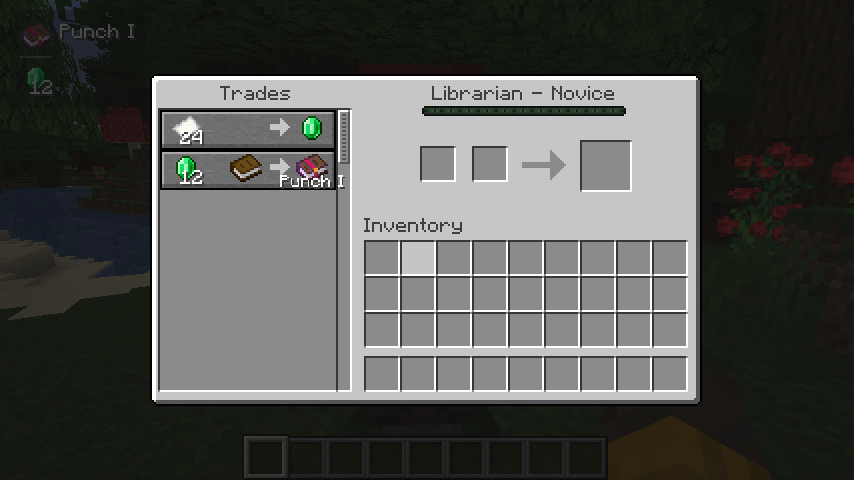
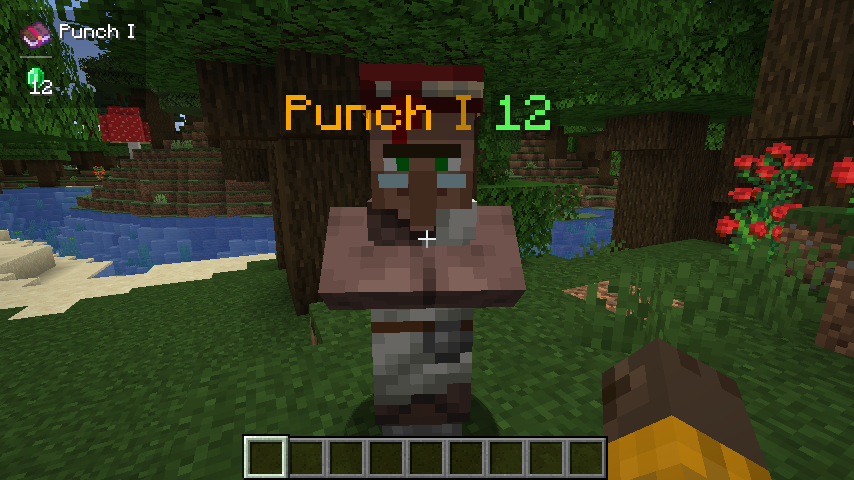
When trading with a villager, it will automatically display its enchantment above the enchantment book or enchanted item, cycling through them in sequence.
When the crosshair is aligned with a tradable villager and within the normal trading range, try to obtain the trade information and save it. (Or enable the setting Always attempt to get nearby offers to automatically get it)
If the trade information is successfully obtained, all enchanting trades will be displayed.
Commands
/trade-display [disable/reload/reset/save/settings]
- disable: Disable all features about display.
- reload: Load settings from the config file.
- reset: Clear cache.
- save: Save the settings to the config file.
- settings: Open the settings screen.
Hotkeys
Toggle Enable State (H)
- In the trading GUI, pressing the hotkey toggles the visibility of enchantments.
- In the main game screen (i.e., no other GUI open), pressing the hotkey toggles the visibility of enchantments. Additionally, when sneaking (Shift), pressing the hotkey toggles the visibility of enchantments above merchants’ heads.
Recommended Gear
AffiliateHardware and extras that pair well with this mod.

As an Amazon Associate I earn from qualifying purchases.
Screenshots
Similar Mods

Book of Dragons
Dragons and more from the Dreamworks Dragons universe for 1.20.1 Forge
![IAP [Silent's Mechanisms]](https://media.forgecdn.net/avatars/487/245/637790114043483970.png)
IAP [Silent's Mechanisms]
Adds crops for Silents Mechanisms to Mystical Agriculture.

Hotai
Patch mods with external files for modern version

Balkon's WeaponMod
Balkon's WeaponMod adds a variety of new weapons to Minecraft.
Wool Tweaks
🐑 Makes various changes to wool-type block recipes, string conversion and the dyeing process.

Scape and Run: Parasites
Add more dangerous mobs (type monster Parasite-themed) to your world