
Biome Replacer
Modby werdei
A quick way to get rid of a biome. Useful for tweaking datapack-based generators (like Terralith) that don't have a convenient configuration.
Type
Mod
CurseForge Downloads
12,448,970
CurseForge ID
910274
Modrinth Downloads
5,335,402
Modrinth ID
DAXbR0Wj
Last Updated
Sep 9, 2026
Description


 **Biome Replacer** is a simple and easy-to-use utility mod for removing unwanted biomes
## Features
- **Easy configuration:** Simple properties file with intuitive syntax
- **Designed for datapacks** Configure Terralith or other worldgen packs with ease\*
- **(Limited) mod integration:** Remove biomes from a mod that has no configuration of its own\*\*
- **Server-side:** No client installation needed (unless you want to use it in singleplayer, of course!)
- **High availability:** From 1.18.2 up to the most current Minecraft version, all equally supported
- **Negligible performance impact:** Runs only once on world start, does not slow down the generation
\*Please note that Biome Replacer **cannot change terrain shape**. This means that it's impossible
to change oceans to land, create ocean-only worlds, etc.
\*\*The only currently supported biome libraries are TerraBlender & Blueprint, so you won't be able to change Biolith biomes,
for example. Still, BR should not break, and will work fine alongside most world generation mods.
## Setup
1. Install the mod, then run your client/server once to generate configuration file
2. Find `biome_replacer.properties` in the `config` folder
3. Add your replacement rules (see examples below), then load up the world
If you made any mistakes, you will see warnings in chat. Check for typos in your biome IDs, and try again.
Tip: on client, you don't deed to restart the game every time you change your rules, you can simply leave and enter the world again.
## Examples
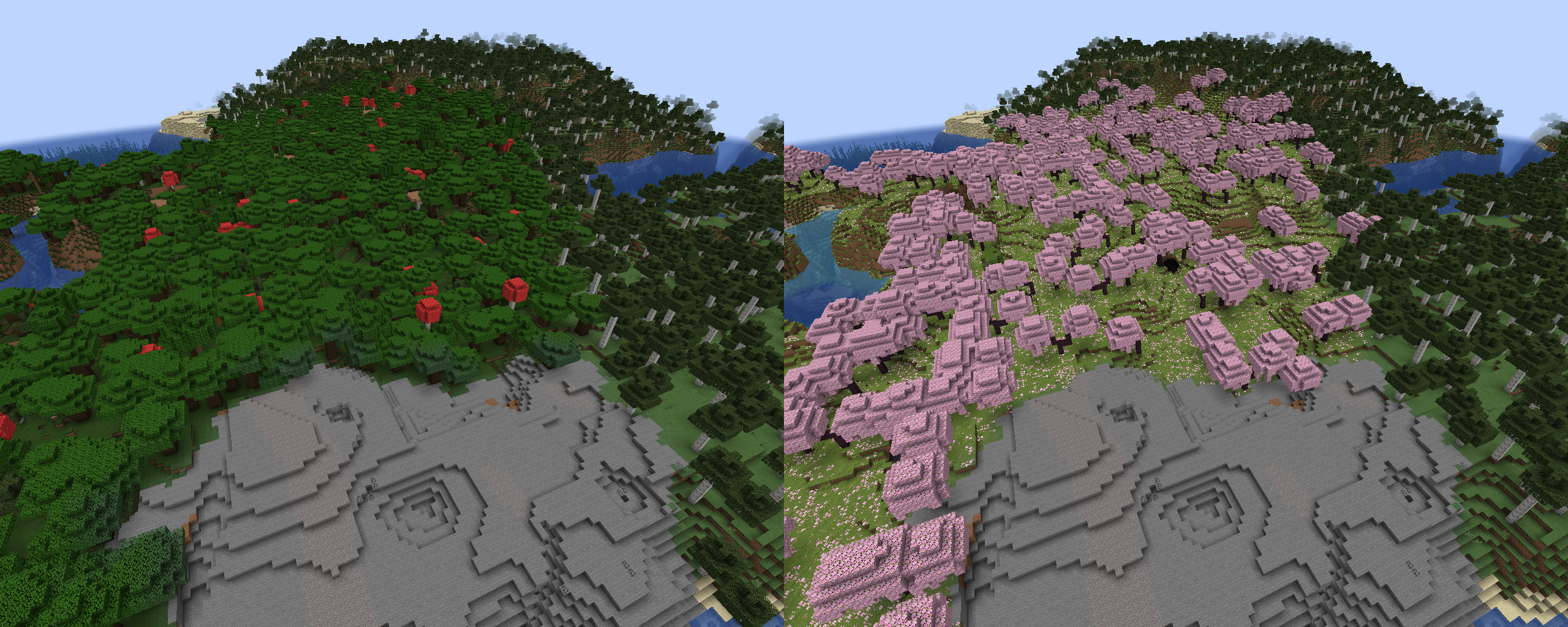
Rules follow the format `old_biome > new_biome`. Here is an example with vanilla biomes:
```
minecraft:dark_forest > minecraft:cherry_grove
```
**Biome Replacer** is a simple and easy-to-use utility mod for removing unwanted biomes
## Features
- **Easy configuration:** Simple properties file with intuitive syntax
- **Designed for datapacks** Configure Terralith or other worldgen packs with ease\*
- **(Limited) mod integration:** Remove biomes from a mod that has no configuration of its own\*\*
- **Server-side:** No client installation needed (unless you want to use it in singleplayer, of course!)
- **High availability:** From 1.18.2 up to the most current Minecraft version, all equally supported
- **Negligible performance impact:** Runs only once on world start, does not slow down the generation
\*Please note that Biome Replacer **cannot change terrain shape**. This means that it's impossible
to change oceans to land, create ocean-only worlds, etc.
\*\*The only currently supported biome libraries are TerraBlender & Blueprint, so you won't be able to change Biolith biomes,
for example. Still, BR should not break, and will work fine alongside most world generation mods.
## Setup
1. Install the mod, then run your client/server once to generate configuration file
2. Find `biome_replacer.properties` in the `config` folder
3. Add your replacement rules (see examples below), then load up the world
If you made any mistakes, you will see warnings in chat. Check for typos in your biome IDs, and try again.
Tip: on client, you don't deed to restart the game every time you change your rules, you can simply leave and enter the world again.
## Examples
Rules follow the format `old_biome > new_biome`. Here is an example with vanilla biomes:
```
minecraft:dark_forest > minecraft:cherry_grove
```
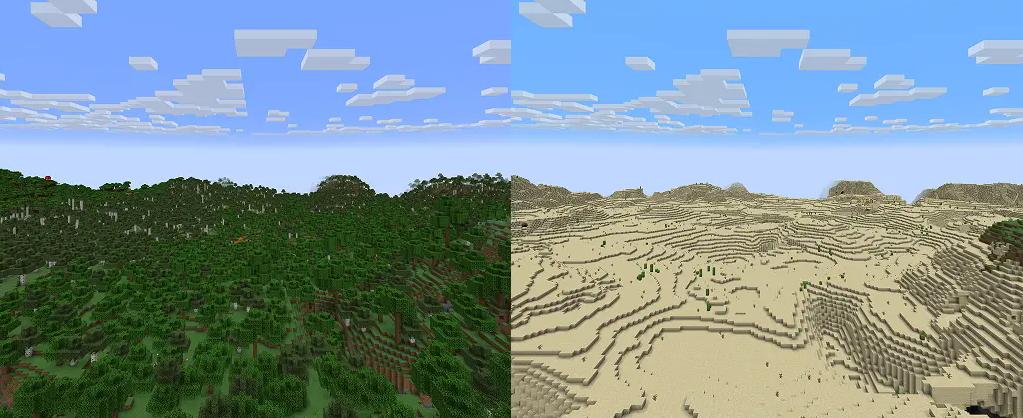
 Using biome tags is supported:
```
#minecraft:is_forest > minecraft:desert
```
Using biome tags is supported:
```
#minecraft:is_forest > minecraft:desert
```
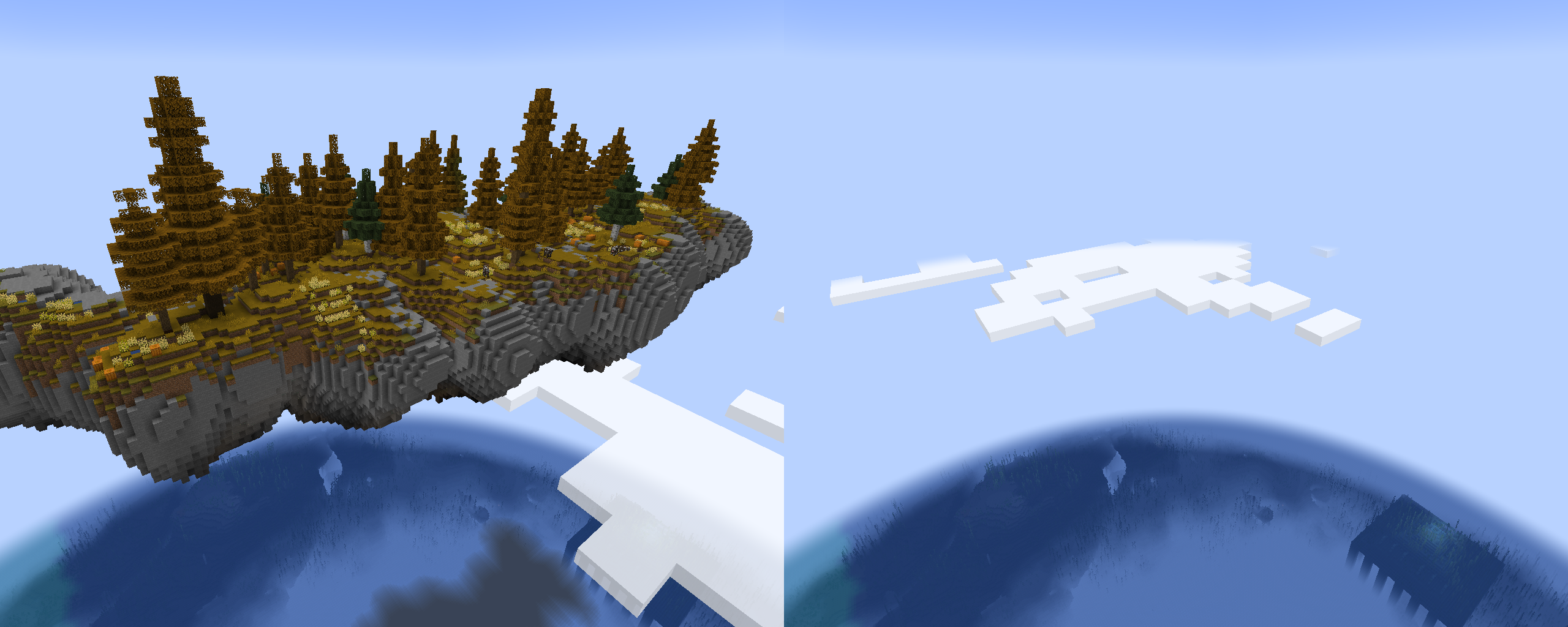
 it's possible to completely remove biomes using a "null" keyword. For example, these rules will remove Terralith's skylands:
```
terralith:skylands_autumn > null
terralith:skylands_winter > null
terralith:skylands_spring > null
terralith:skylands_summer > null
```
You can also use a biome tag to achieve the same effect:
```
#terralith:skylands > null
```
Important: if you're not careful, using this method on biomes from vanilla and datapacks can cause crashes, or mess up biome distribution.
Please **test thoroughly** before using it in a world you care about!
it's possible to completely remove biomes using a "null" keyword. For example, these rules will remove Terralith's skylands:
```
terralith:skylands_autumn > null
terralith:skylands_winter > null
terralith:skylands_spring > null
terralith:skylands_summer > null
```
You can also use a biome tag to achieve the same effect:
```
#terralith:skylands > null
```
Important: if you're not careful, using this method on biomes from vanilla and datapacks can cause crashes, or mess up biome distribution.
Please **test thoroughly** before using it in a world you care about!
 ### Advanced features
To target specific dimensions, use headers with dimension ID: `[mod:dimension]`. Rules following it will only be applied to a specified dimension.
(Note that this typically isn't needed, unless you have custom dimensions that generate the same biomes, and you want to target only one of them)
```
[minecraft:overworld]
minecraft:desert > null
[custom:dimension]
minecraft:desert > minecraft:badlands
```
## Resources
* [Report bugs and issues here](https://github.com/WerDei/Biome-Replacer/issues)
* [Vanilla Biome Tags](https://mcreator.net/wiki/minecraft-biome-tags-list)
* [Vanilla Biome IDs](https://minecraft.wiki/w/Biome#Biome_IDs)
* [Source code](https://github.com/WerDei/Biome-Replacer)
### Advanced features
To target specific dimensions, use headers with dimension ID: `[mod:dimension]`. Rules following it will only be applied to a specified dimension.
(Note that this typically isn't needed, unless you have custom dimensions that generate the same biomes, and you want to target only one of them)
```
[minecraft:overworld]
minecraft:desert > null
[custom:dimension]
minecraft:desert > minecraft:badlands
```
## Resources
* [Report bugs and issues here](https://github.com/WerDei/Biome-Replacer/issues)
* [Vanilla Biome Tags](https://mcreator.net/wiki/minecraft-biome-tags-list)
* [Vanilla Biome IDs](https://minecraft.wiki/w/Biome#Biome_IDs)
* [Source code](https://github.com/WerDei/Biome-Replacer)
Compatibility
Mod Loaders
Game Versions
Recommended Gear
AffiliateHardware and extras that pair well with this mod.

As an Amazon Associate I earn from qualifying purchases.
Screenshots
Similar Mods
OpenBlocks Elevator
Port of OpenBlocks Elevator.

No Chat Reports
Makes chat unreportable (where possible)

Thermal Foundation
The Foundation of a Thermally Expanding World!

MmmMmmMmmMmm (Target Dummy)
Target Dummy that show damage dealt and can be equipped with armor. Damage numbers!

Cucumber Library
A library of shared code and functionality used by my mods.
Botania
An innovative natural magic themed tech mod
Included in Modpacks (132)
Most downloaded DeceasedCraft - Urban Zombie Apocalypse
 Cursed Walking - A Modern Zombie Apocalypse
![COBBLEVERSE - Pokemon Adventure [Cobblemon]](https://cdn.modrinth.com/data/Jkb29YJU/581ecf54530972afb18a04660afd820f2f24f6c7.png) COBBLEVERSE - Pokemon Adventure [Cobblemon]
COBBLEVERSE - Pokemon Adventure [Cobblemon]
 DREAD - A Horror Survival Pack
 Linggango
 Biohazard: Project Genesis - The Ultimate Apocalypse
 Create: Stranded at Sea
 Create 2 Mekanism: Sky Edition 2
![Alaskan Wilderness Reimagined - ForgeLabs Recreation [AWR]](https://media.forgecdn.net/avatars/1234/862/638809133649942709.png) Alaskan Wilderness Reimagined - ForgeLabs Recreation [AWR]
Alaskan Wilderness Reimagined - ForgeLabs Recreation [AWR]
 Reimagined
 Project - Arcane Frontier
 Create: Delight Remake
 Fabri's Frontiers
 Zombie R.E.A.P Plague Against Your World.
 Create Colonies - AERONAUTICS
 Better Adventures+
 Create Aeronautic
 My Biome Is So Beautiful
 EL MINE MAS EPICO 2
 Medieval Horizons (Distant Horizons)