Mod Settings
Modby magicus
Provides an easy to access configuration screen for all installed mods on Fabric
Type
Mod
CurseForge Downloads
68,936
CurseForge ID
Modrinth Downloads
44,478
Modrinth ID
Last Updated
Oct 17, 2026
Description
Mod Settings for Fabric
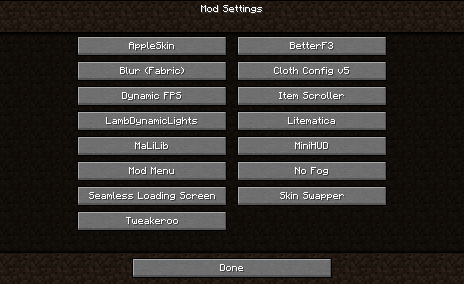
This is a Minecraft mod for Fabric that provides an easy to access configuration screen for all installed mods!
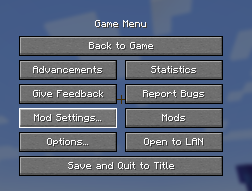
Similar to how "Mod Options" works in Forge, this will add a Vanilla-style menu screen with easy-to-access buttons to get to the configurations for your mods.
You can go directly to this screen using the Mod Settings hotkey. This means there is no need to memorize all those hotkeys for settings of all your mods. The Mod Settings hotkey is F6 by default, but this can be changed in the ordinary "Key Binds" options screen.
I created this mod when I found myself over and over again go into the Mod Menu list, scroll to the bottom to find Tweakeroo or whatever, and then try to hit the configuration button on the opposite side of the screen. With this mod, you can directly go to the configuration screen with just a single button, and unless you have an extreme amount of mods installed, they are all likely to fit on a single page.
This mod requires the Fabric loader and the Fabric API. See dependencies below.
Screenshot
This is what it looks like when you are using the mod.
Interoperability
Mod Settings work fine with Mod Menu. It does not require the Mod Menu mod to be present, but if it is, it tries to add the "Mod Settings..." button close to the "Mods" button from Mod Menu.
Mod Settings use the API created by Mod Menu to query the mods for how to present a configuration screen. All mods that can be configured from within Mod Menu will show up on the Mod Settings screen, and conversely, mods that cannot be configured from within Mod Menu will not show up on the Mod Settings screen.
Dependencies
This mod needs Fabric API. If you have a modded Minecraft, chances are it is already installed. Otherwise, you can find it here: Fabric API on Modrinth.
Download
You can download the mod from any of these sites:
Installation
Install this as you would any other Fabric mod. (I recommend using a replacement launcher such as Prism Launcher for modded Minecraft.)
Support
Do you have any problems with the mod? Please open an issue on Github.
Known Incompatibilities
The mod Content Creator Integration versions 1.9.3 and older contains an incompatible implementation of the Mod Menu API. This is fixed in newer versions of CCI.
Other Mods
Check out my other mods, which also supplies vanilla-style usability enhancements:
Status Effect Timer

Status Effect Timer is a Minecraft mod for Fabric that overlays a timer on the Vanilla status effect HUD icons.
Elytra Indicators

Elytra Indicators is a Minecraft mod for Fabric that provides Vanilla-style "fly by instrument" support for elytra flight.
Compatibility
Mod Loaders
Game Versions
Recommended Gear
AffiliateHardware and extras that pair well with this mod.

As an Amazon Associate I earn from qualifying purchases.
Screenshots
Similar Mods
Fishing Dangers
this mod give you anxiety when fishing

Dimensional Cake Rebaked
There is cake and it takes you to The End!

2D Projectiles ➵
Makes projectiles (arrows, firework rockets, trident, etc.) look 2D!
What Did You Vote For? 2022: Sniffer, Rascal and Tuff Golem
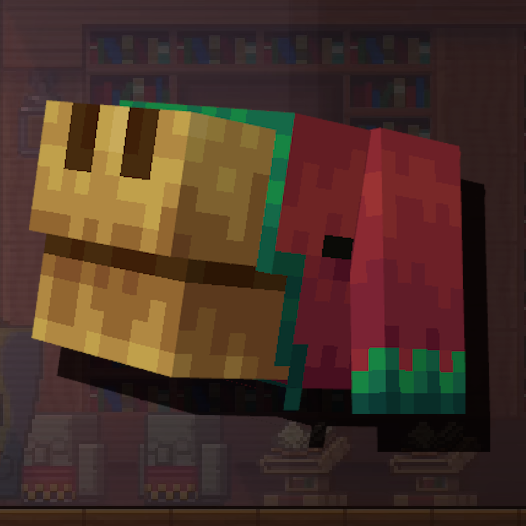
Formerly What Are You Voting For? 2022, this mod adds the mobs from the 2022 Minecraft Mob Vote to the game!
![CobbleCats [cobblemon]](https://cdn.modrinth.com/data/K2Q9LnPH/b7bb21c16247be8814d70072b484b24fc75290f1_96.webp)
CobbleCats [cobblemon]
Adds cat pokemon to cobblemon. Requires Cobblemon.

EvergreenHUD
Improves your heads up display.