

Command Keys
Modby NotRyken
Send pre-written messages and commands using hotkeys.
Type
Mod
CurseForge Downloads
179,281
CurseForge ID
Modrinth Downloads
3,197,792
Modrinth ID
Last Updated
Nov 5, 2026
Description
Features
- Multiple commands per macro
- Multiple macros per keybind
- Optional delay timing between commands
- Efficient keybind conflict management with modifier key support
- Five modes:
- Send all commands when the key is pressed
- Cycle through commands, one per keypress
- Repeat on a configurable interval
- Select a random message and send
- Type the command in chat, but don't send it
- Profiles with automatic switching based on server address or world name
- Fully custom GUI for easy configuration
|  |
| |
| |
|
Usage
Profiles
Automatic Switching
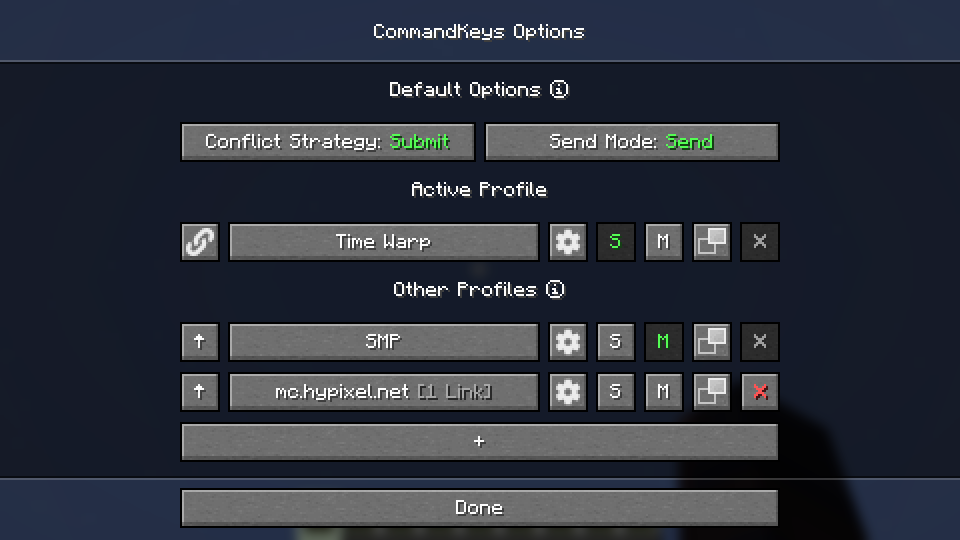
- When you join a world/server, the name/address will be checked against the list of profiles. If there is a profile linked to that world/server, it will be activated. Otherwise, the default profile will be used.
- Use the
SandMbuttons to make a profile the default for singleplayer or multiplayer.
Manual Switching
- To activate a profile manually, click the up-arrow button on the left.
- Click the link button to link the profile to the world/server for future automatic activation.
- Click the settings button to rename the profile or remove links.
Macros
Access
- Edit a profile by clicking the large button on the profile selection screen, or by pressing the edit key (default:
K) in-game.
- Edit a profile by clicking the large button on the profile selection screen, or by pressing the edit key (default:
Binding Keys
- You can bind almost any keyboard key or mouse button to a macro, similar to Minecraft's own Controls. However, you can also bind any pair of keys; just press one while holding the other (e.g. press 'T' while holding 'Shift').
Conflict Strategy
- If a key is already in use by Minecraft, you can choose a conflict strategy;
Submit: The macro will be ignored, the Minecraft keybind will function normally.Assert: The macro and the Minecraft keybind will both function.Veto: The macro will function, the Minecraft keybind will be cancelled (if possible).Avoid: The macro will not work in-game, but you can still activate it by pressing the key while on the edit screen (with nothing selected). For example, if you have a macro bound toW, pressKthenWto activate it.
Send Mode
Send: All commands for the macro will be sent. You can configure delays between commands.Type: The first command will be typed into the chat box, but not sent.Cycle: The commands will be cycled through, with one command sent each time you press the key.- Note: In
Cyclemode, if you need more than one command to be sent for a single key-press, enter those commands into a single box, separated by pairs of commas (e.g./tick freeze,,/say Stopped).
- Note: In
Random: A message will be chosen at random and sent each time the key is pressed.Repeat: LikeSend, but the macro will be repeated (delay is configurable) until you press the key again.
Placeholders
Simple Placeholders
%lastsent%: The most recently-sent message or command in history, if any.%lastcmd%: The most recently-sent command in history, if any.%clipboard%: The contents of the clipboard, if any.%myname%: Minecraft username.%pmsender%: The name of the sender of the most recently-received private message, if any. (Searches max of 50).%pos%: The integer coordinates of the player (x y z).%x%: The integer X coordinate of the player. Also available for Y and Z.Regex Placeholders
%#(.*)%: Regex Group 1 from the most recently-received message matching the regex following the#, if any. Note: regex pattern must have at least 1 capturing group.%clipboard#(.*)%: The contents of the clipboard, if any, verified to match a regex pattern following the#. This can be used to prevent unintentional exposure of clipboard contents. E.g. use%clipboard#^-?\d+ -?\d+ -?\d+$%to only send the clipboard contents if it's formatted like a set of coordinates.%pos([FBLR])(\d+)%:%pos%but offset some number of blocks in a direction relative to the cardinal direction that the player is nearest to facing. E.g. use%posL20%to get the coordinates 20 blocks to the player's left.%x([+-]\d+)%:%x%but offset some number of blocks. E.g. use%x-10%to get the X coordinate 10 blocks to the player's West. Also available for Y and Z.
Dependencies
Fabric: Fabric API (required), ModMenu (optional)
NeoForge: None
Compatibility
If you encounter issues, please report on Discord or GitHub.
License
Contact


Discord @notryken for MDZ
Compatibility
Mod Loaders
Game Versions
Recommended Gear
AffiliateHardware and extras that pair well with this mod.

As an Amazon Associate I earn from qualifying purchases.
Screenshots
Similar Mods

Fabrishot
Take large screenshots because why not
No Recipe Book
Removes the Recipe Book button from the player inventory and crafting table GUI.
Model Gap Fix
Fixes gaps in Block Models and Item Models

Controlify (Controller support)
Adds controller support to Minecraft!
Project Red - Expansion
Expansion module for Project Red series
Dungeons and Taverns
an Vanilla styled structure mod
Included in Modpacks (52)
Most downloaded Ice Boat Racing
 Bedrock Reloaded
 Builders Essentials
 Fiyrthgu's Hypixel Skyblock Modpack
 Crystal PvP Modpack
 GSZYpack
 ImagineFun Add-Ons
 The Server26 Clientside Bundle
 MineboxModPack
 Bodkin Boats League
 RedstoneToolkit
 Vulkan Chapter Of Potato PVP
 Kart's Chaotic Kit
 Dev Relief
 BTE Germany Modpack
 Epinephrine
 GalleyRP Askalon
 Funtime FPS+
 Potato PVP
 Stratum