

DurabilityInfo
ModSee your item's durability in the tooltip — numbers, percentage, and a color-coded bar.
Type
Mod
Modrinth Downloads
640
Modrinth ID
RFyWEXpc
Last Updated
Jul 28, 2026
Description
DurabilityInfo 2.0
DurabilityInfo is a fully client-side Minecraft mod that shows clear, customizable durability information without changing item behavior.
Track the durability of your tools, weapons, armor, and held items through detailed tooltips, a configurable HUD, warnings, notifications, and inventory overlays.
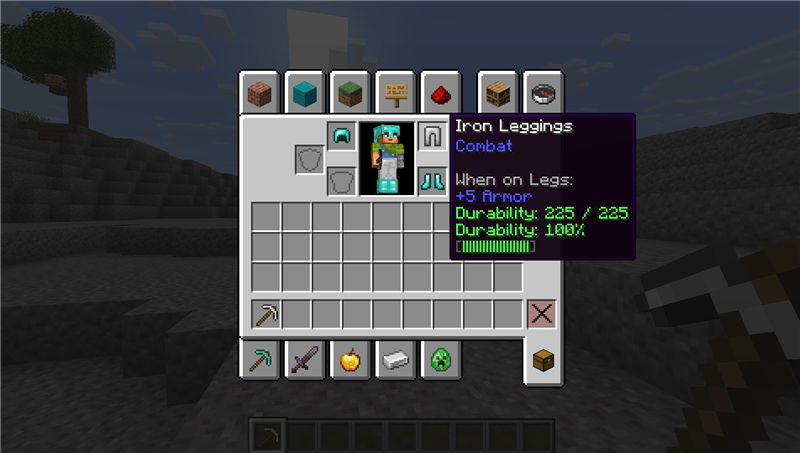
Tooltip Styles
Choose how durability information appears on damageable items:
- Compact
- Vanilla+
- Detailed
- Bar Only
- Custom
- Off
Custom mode lets you independently control:
- Remaining durability
- Maximum durability
- Percentage
- Text durability bar
- Damage used instead of durability remaining
- Unbreakable item labels
- Fully repaired item visibility
- Bar width and durability colors
Customizable Equipment HUD
Display the durability of:
- Helmet
- Chestplate
- Leggings
- Boots
- Main hand
- Offhand
Available display modes include:
- Mini Bar
- Percentage
- Remaining
- Remaining / Maximum
- Combined
The HUD supports vertical, horizontal, and compact-grid layouts, configurable scale and spacing, item ordering, alignment, background opacity, screen anchors, offsets, and visibility filters.
A built-in HUD editor lets you drag the preview, adjust its scale, snap it to screen guides, use keyboard nudging, and safely restore previous changes with Apply, Cancel, and Done controls.
Smart Visibility
Choose when the HUD should appear:
- Always
- Damaged Only
- Below Threshold
- Recently Changed
- Smart
The HUD can also be hidden while:
- Playing in Creative or Spectator mode
- Viewing the debug screen
- Using menus or containers
- Minecraft's main HUD is hidden
Held-only and armor-only display filters are also available.
Multi-Level Durability Alerts
Armor and held items can use independent warning levels:
- Warning
- Low
- Critical
- Last Chance
Each alert level can be configured or disabled separately.
Available alert channels include:
- Warning sound
- Action-bar message
- Chat message
- HUD flash
Alerts activate only when durability crosses downward through a threshold. Repairing or replacing the item resets its alert state.
Damage and Repair Notifications
Optional notifications show when tracked items lose durability or are repaired.
Notifications:
- Merge rapid repeated changes
- Retain a maximum of three visible entries
- Show the affected item icon
- Support armor, both hands, and the entire hotbar
- Clear safely when changing worlds, dimensions, or players
Hotbar and Inventory Overlays
Add durability information directly to hotbar and inventory slots.
Available overlay styles:
- Percentage
- Remaining
- Mini Bar
- Colored Border
- Off
Overlay scale, text shadow, border thickness, durability threshold, and fully repaired item visibility are configurable.
Vanilla durability bars remain enabled unless replacement is explicitly selected.
Presets
Quickly configure the mod using one of the included presets:
- Minimal
- Vanilla+
- Mining
- Combat
- Detailed
Preset changes are previewed before they are saved. Editing an individual controlled option automatically switches the configuration to Custom.
Native Configuration Screen
DurabilityInfo includes its own settings interface and does not require Cloth Config or another configuration library.
The main settings page contains the most commonly used options, while advanced settings are organized into:
- Tooltip
- HUD
- Warnings
- Indicators
- Popups
- Presets
On Fabric, Mod Menu is optional and provides a convenient Configure button.
Safe and Client-Side
DurabilityInfo:
- Does not change item durability
- Does not prevent items from breaking
- Does not modify inventories
- Does not send network packets
- Does not require installation on the server
- Does not change attributes or gameplay rules
- Performs no configuration file access during rendering
Configuration is stored at:
.minecraft/config/durabilityinfo.json
Existing DurabilityInfo 1.x configurations are automatically migrated to the new 2.0 format.
Supported Versions
Minecraft 26.1.2
- Fabric
- Forge
- NeoForge
Minecraft 26.2
- Fabric
- Forge
- NeoForge
Use the file matching both your Minecraft version and mod loader.
Optional Integration
- Mod Menu on Fabric
No mandatory configuration-screen dependency is required.
License
DurabilityInfo is available under the MIT License.
Source code: https://github.com/Cukkoo12/durabilityinfo
Compatibility
Mod Loaders
Game Versions
Recommended Gear
AffiliateHardware and extras that pair well with this mod.

As an Amazon Associate I earn from qualifying purchases.
Similar Mods
MT Lucky Block
Multi Lucky Block mod

TooltipToggles
Provides toggles for a couple of tooltips and tooltip features.

Create Fly: Extra Recipes
A set of new recipes to Create Fly to improve automation.

FTB Quest Translator
Client-side addon for FTB Quests that adds a translate button. Translates quest titles, subtitles and descriptions on-th...

Dan's Origins
All of Dan's Origins made into a mod.
Screenshot Uploader
Making screenshotting a bit easier