Lag Meter
Modby iPixeli
ARCHIVED/DISCONTINUED. Displays lag, connectivity and TPS information on screen. Versions for Forge and Fabric.
Type
Mod
CurseForge Downloads
123,423
CurseForge ID
382304
Last Updated
Jul 28, 2026
Description
ARCHIVED/DISCONTINUED. I think I'm done modding.
Lag Meter
About
Displays lag, connectivity and TPS information on screen.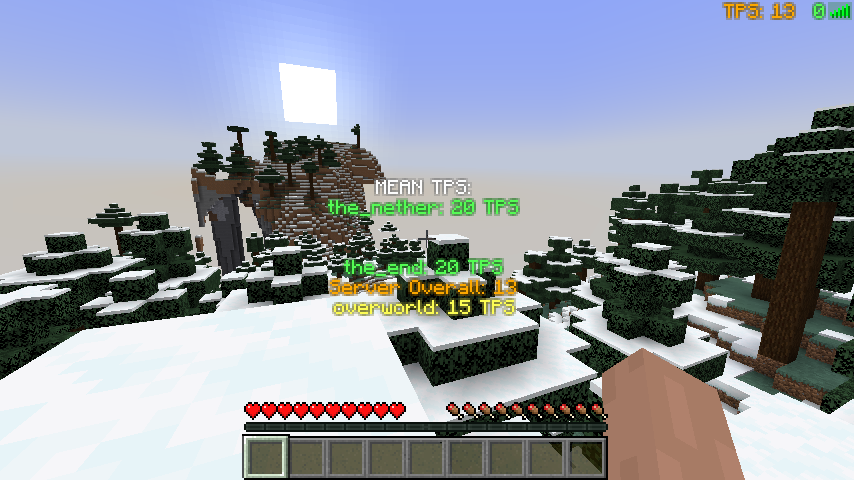
Disclaimer
** Disclaimer: CurseForge.com and forgecdn.net are the current official locations to obtain this mod. Files obtained elsewhere were uploaded without permission from iPixeli. It is possible that files and mod packs obtained from other locations or means are not genuine and have been altered or tampered with. The only one with my permission to continue this mod (should I ever stop) is iChun (https://twitter.com/ohaiiChun) **
Installation
1) Install MinecraftForge
2) Put a the .jar file into the mods folder (see below).
• Windows: /AppData/Roaming/.minecraft
• Mac: Home -> Library -> Application Support -> Minecraft
• Linux: ~/.minecraft
3) If you have a .zip file, extract file into the mods folder
FAQ
• Is there a fabric version?
Not yet! I am working on one though...
• Is this required to have on the client? Is this required to have on the server?
Both the client and server don't require the other side to have this mod installed. To see TPS data, you do need to have LagMeter installed on the server.
• I'm not seeing the meter...
1. Verify that you see it in Forge's in-game mod listing. If you don't see it, check that you have placed the correct version of the mod into your mods folder.
2. Verify you are connected to an external server. The meter will automatically display when you are connected to a server. The meter will not show when you are playing single player or if your client is hosting because in both situations you will not face any network-related connectivity issues.
3. Is something rendering on top of it? Try adjusting the 'rendercorner' setting in the 'lagmeter-client.toml' configuration file.
• Do you plan to add more to this mod?
Yes. Hit the follow button to be notified of updates.
• Can I use this mod in a video?
Yes. Please link back to this page: https://www.curseforge.com/minecraft/mc-mods/lagmeter
• Can I put this mod in a ModPack?
Yes. Please see the README file included inside the download file.
• Can I host the mod file on my website / server / online so others can download it?
No. Please see the README file included inside the download file.
• Where did you get the idea for this mod?
Sometimes I'm not sure if slowness is network or client related. Made this mod to add an on-screen indication.
Information for Texture Pack & Mod Pack Creators
Configuration File: config\lagmeter-client.toml
Texture File: minecraft:textures/gui/icons.png
Wordpress • CurseForge • Twitter • GitHub • MinecraftForum • Twitch
Recommended Gear
AffiliateHardware and extras that pair well with this mod.

As an Amazon Associate I earn from qualifying purchases.
Screenshots
Similar Mods

Tinkers' Rapier
We brought back the Rapier!
Substratum
Adds basic ores, and crafting materials for use by other mods.

Animal Hats
A bunch of hats based on the mobs from Minecraft. Inspired by *Adventure Time*.

Modern Industrial Routers
An addon for Modular Routers that adds upgrades for transporting Modern Industrialisation energy

Debugify Reforged
Unofficial port of Debugify that fixes Minecraft bugs found on the bug tracker.

Tensura Compat: Iron's Spells 'n Spellbooks
A compatibility brigde between Tensura: Reincarnated and Iron's Spells 'n Spellbooks.