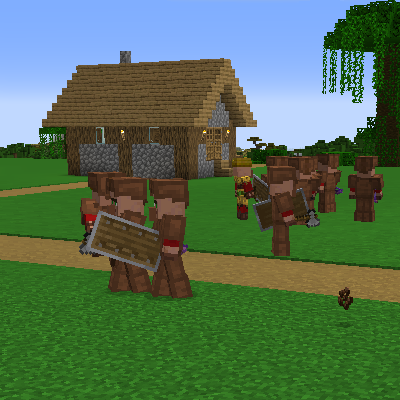
Villager Recruits: Village Expansion
Modby pippopippo233333
Addon for Recruits that introduces autonomous villages with their own center, faction, roles, and internal logic. Settlements organize themselves, manage recruits, and function as self‑sustaining communities without player intervention.
Type
Mod
CurseForge Downloads
22,188
CurseForge ID
1517986
Modrinth Downloads
1,077
Modrinth ID
mkSW0fEr
Last Updated
Jul 29, 2026
Description
Recruits: Village Expansion – Addon for Recruits
Recruits: Village Expansion is an addon for Recruits (also requires workers!) that introduces a fully autonomous village system. Each settlement has its own center, faction, and internal logic, allowing villages to function as living communities capable of organizing themselves, growing, and defending their territory without player involvement.
Villages created by this addon are not static structures: they are active entities that manage recruits, assign roles, maintain their identity, and react to world events. Each village can expand, build functional structures, establish territory, and maintain internal balance between civilians, soldiers, and resources.
The goal is to turn villages into autonomous factions, consistent and believable, interacting dynamically with the world and the player. The result is a more alive, emergent, and strategic experience that integrates seamlessly with Recruits.
NEW UPDATE Make your custom factions!( for now no special buildings for a singular faction will be added later) to start creating a faction do /vrfaction (everything is explained in the game after you do the command) also if you don't have items and wanna exit the menu just press esc grab what you need and then redo /vrfaction even tho it is explained in game its better to know that your progress will be kept after exiting the faction creating menu. to test your special faction do /vrspecial next then the tips should tell you what to write and after doing it the next village to spawn will have your special faction!
📦 ADD NEW BUILDINGS INSTRUCTIONSHow to Make Custom Structures for the Village Recruits Addon
This guide explains how to build and save your own structures so they show up in villages. There are two kinds of structure you can make:
- Tower replacements – the big central building of a village (the "town hall").
- Normal buildings – the ordinary houses and workplaces scattered around it.
Each kind has its own rules. Read the rule box for the kind you are making. If you get the rules wrong, your village will spawn broken (no soldiers, no villagers, or duplicate town halls), so please follow them carefully.
You do not need to know how to code. Everything here is done in‑game with the vanilla Structure Block. The only "special" parts are two blocks and one command, all explained below.
The two special blocks you need to know
Block Where it comes from What it does Item/ID Recruit block The base Recruits mod Turns villagers into recruits and becomes the village center for the village recruits:recruit_block Villager spawn block This addon Pops out 16 villagers to populate the village, then disappears village_recruits:basic_villager_spawnerYou place these blocks inside your build like normal blocks. When the village is generated in a real game, they automatically turn into the recruit / villagers.
⚠️ The villager spawn block self‑destructs!
The moment it ticks in the world, the villager spawn block spawns its villagers and removes itself. If you try to save a structure with it still in place, it will already be gone — your structure ends up with no villagers. The fix is one command, explained in Step 0 below. Do this first, every time.
Step 0 — Freeze the villager spawn block (DO THIS FIRST)
Before you place a villager spawn block in your build, run this command once:
/vr disable_spawnerThis stops every villager spawn block from activating, so it will sit still in the world and let you save it into your structure. You will see a message: "Spawner disabilitato." (= spawner disabled).
When you are completely finished saving all your structures, you can turn it back on with:
/vr enable_spawner(You only need it enabled when actually playing — for building/saving, keep it disabled.)
Building a TOWER REPLACEMENT
✅ Tower rules (must follow)
- Exactly one Recruit block (recruits:recruit_block) placed in the middle of the structure (center X/Z). The tower is generated centered on that spot, so the middle is where the village's first soldier appears.
- At least one Villager spawn block (village_recruits:basic_villager_spawner) placed anywhere inside the structure (a hidden corner or basement is fine).
- Recommended size: max 11 × 11 blocks (length × width). Height is up to you, but keep the footprint at 11×11 or smaller so it fits the village layout.
Steps
- Run /vr disable_spawner (see Step 0).
- Build your tower. Try to keep the floor footprint 11×11 or smaller.
- Place one Recruit block at the exact center of the floor. (For an 11×11 floor, that's 5 blocks in from each edge.)
- Place one Villager spawn block anywhere inside — it can be hidden.
- Place a vanilla Structure Block and switch it to Save mode.
- Give it a name (this is your structure's ID, e.g. mypack:cool_tower).
- Set the size/position so the whole tower (including the two special blocks) is inside the highlighted box, then click SAVE.
- Your .nbt file is now saved. Done!
Quick checklist before you save a tower
- ☐ /vr disable_spawner was run
- ☐ One Recruit block is in the center
- ☐ One Villager spawn block is somewhere inside
- ☐ Footprint is 11×11 or smaller
- ☐ The Structure Block box covers everything
Building a NORMAL BUILDING (house / workplace)
✅ Normal building rules (must follow)
- NO Recruit block. A normal building must never contain a recruits:recruit_block. (Recruit blocks belong only in tower replacements.)
- A villager spawn block is not required here, but if you add one it still needs /vr disable_spawner first (see Step 0).
- Keep it a sensible village size. There is no hard limit like the tower, but small/medium houses look best and fit the road layout.
Steps
- (Only if you put a villager spawn block in it) run /vr disable_spawner.
- Build your house or workplace. Do not place any Recruit block.
- Place a vanilla Structure Block in Save mode.
- Name it (your structure ID, e.g. mypack:cozy_house).
- Fit the box around the whole build and click SAVE.
Quick checklist before you save a normal building
- ☐ There is NO Recruit block anywhere in it
- ☐ The Structure Block box covers everything
Common mistakes (and what goes wrong)
Mistake What you'll see in‑game Forgot /vr disable_spawner before saving Your villager spawn block vanished — village spawns with no villagers Put a Recruit block in a normal building Multiple village centers in one village; village logic breaks Tower has no Recruit block The village never gets its starting soldier and a center Tower has no villager spawn block The village spawns empty (no villagers) Recruit block not in the center of the tower The soldier spawns off to the side / outside the building Tower bigger than 11×11 It overlaps roads/other buildings and looks brokenRegistering your structures (turning .nbt files into an addon)
Saving the .nbt is only half the job — the addon won't use your structure until you register it. The good news: you do NOT need to write a mod or any Java. You just make a normal datapack (a folder or .zip) with two things in it:
- your saved .nbt files, and
- one tiny .json file per structure telling the addon how to use it.
The addon reads these automatically when the world loads and every time you run /reload. There is a ready-made example in the example_datapack/ folder next to this guide — copy it and change the names.
Folder layout
A datapack looks like this:
my_structures_pack/ ├── pack.mcmeta └── data/ └── mypack/ ← your namespace (any lowercase name you like) ├── structures/ ← your saved .nbt files go here │ ├── desert_tower.nbt │ ├── cozy_house.nbt │ └── blacksmith.nbt └── vr_structures/ ← one .json per structure goes here ├── desert_tower.json ├── cozy_house.json └── blacksmith.json- pack.mcmeta marks the folder as a datapack (copy it from the example).
- structures/ is the vanilla folder the Structure Block saves into. A file at data/mypack/structures/desert_tower.nbt has the ID mypack:desert_tower.
- vr_structures/ is where you put the small .json descriptors that register each structure with the addon.
The .json descriptor
Each .json has a type and points at a structure ID. Fields:
Field Used by Meaning type all "tower", "house", or "work" (required) structure all the structure ID, e.g. "mypack:desert_tower" (optional — defaults to the json file's own name) weight tower only how often it's chosen; higher = more common (default 1) biomes tower only list of real biome IDs, e.g. ["minecraft:desert"]. Leave it out to allow every biome categories house / work only list of village categories: plains, taiga, desert, savanna, snowy. Leave it out for all of themTowers use real biome IDs, houses/work use the 5 categories — they're different!
Tower biomes are exact biomes like minecraft:desert. House/work categories are one of only five: plains / taiga / desert / savanna / snowy. The addon maps every real biome to one of those (e.g. forest/meadow/jungle → plains, spruce/pine → taiga, anything snowy/frozen → snowy). Using a real biome name like forest in categories will be ignored.
Examples (copy these)
A tower in two specific biomes:
{ "type": "tower", "structure": "mypack:desert_tower", "weight": 10, "biomes": ["minecraft:desert", "minecraft:plains"] }A tower that can appear anywhere (no biomes):
{ "type": "tower", "structure": "mypack:global_tower", "weight": 3 }A house in a couple of categories:
{ "type": "house", "structure": "mypack:cozy_house", "categories": ["plains", "savanna"] }A workplace in every category (no categories):
{ "type": "work", "structure": "mypack:blacksmith" }Installing the pack
- Single world: drop the folder/zip into <world>/datapacks/, then run /reload (or rejoin the world).
- Whole server / every world: put it in the global datapack location, or zip it and share it with other players the same way as any datapack.
After loading, check the server log — you'll see a line like [VillageRecruits] Strutture da datapack caricate: 2 torri, 1 case, 1 lavoro. If a .json is wrong, that same log prints the file name and what's wrong, and only that one entry is skipped.
Reminder: the building rules still apply. A tower structure must have the Recruit block in the middle + a Villager spawn block; a house/work structure must have no Recruit block. Using the wrong type will spawn it broken.
Recap (the one‑line version)
- Tower replacement: /vr disable_spawner → Recruit block in the middle + Villager spawn block anywhere → keep it ≤ 11×11 → save.
- Normal building: never a Recruit block → save (use /vr disable_spawner first only if it contains a villager spawn block).
Coming Next Update
Diplomacy and war, automatic expansion, attacks, battles, and hirable promoted entities.
Compatible Mods
ewewukek's Musket Mod gives muskets to crossbowmen, increasing their spawn rate.
Upcoming Features
- Diplomacy and War
- Automatic faction expansion
- More advanced structure building
- Balancing improvements
Recommended Optimization Mods
- Let Me Despawn
- Radium Reforged
- Almanac Lib
- Embeddium
- ServerCore
- ModernFix
- Entity Culling
- FerriteCore
Compatibility
Mod Loaders
Game Versions
Recommended Gear
AffiliateHardware and extras that pair well with this mod.

As an Amazon Associate I earn from qualifying purchases.
Screenshots
Similar Mods
Brick Pyramid Infdev - UpPort
Bring back one of Minecraft’s strangest and most nostalgic structures — the Infdev Brick Pyramid!

Magical Torches
Adds torches with magical effects.

Corsair McCUE
Corsair RGB | LogitechG + Minecraft = AWESOME
Seared Ladder (Backport)
Backports the seared ladder from tconstruct 1.16+

Discerning The Eldritch
An Addon for Iron's Spells and Spellbooks expanding on the Eldritch School

Twilight Forest Portal Catalyst
A Mod that Adds a Twilight Forest Portal Catalyst, which Can be Used as a Custom Portal Creation Item for The Twilight F...