

Pop-up Emotes
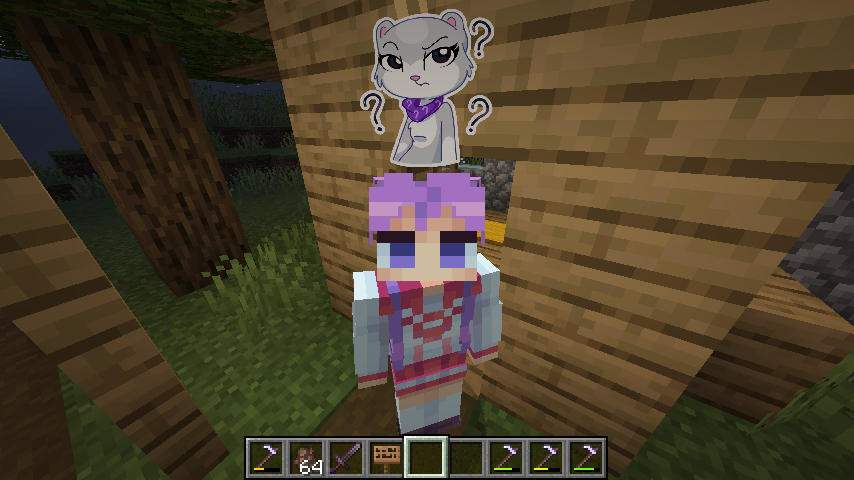
ModCustomize and display pop-up emotes above your character's head
Description

This mod allows you to customize and display pop-up emotes above your character's head
Custom emotes
- Can be added by entering image URLs in the My Emotes screen, accessible through a button on the title screen
- Supported formats are .png, .gif and .jpeg.
- I recommend using uploadimgur.com for uploading images
- There are several selectable sounds for each emote
Usage
- Open the emote menu by holding the V key
- Move the cursor to the desired emote and release the button
- To change pages, click either the right or left side of the screen
Mods > Pop-up Emotes > Config
- Configure scale and brightness of emotes
- Set personal emote height. Helps when you play with custom player model mods like Yes Steve Model
- Access player blacklist
- If you are using a texture pack to replace default emotes that has fewer emotes than the default emount, you can hide what's left by specifying resourcePackEmoteAmount in the client config file
Server
- Server-side blacklist can be managed via the /popupemotes serverblacklist add/remove/clear/show command. It requires permission level 3 (configurable) or the pop_up_emotes.moderator permission.
Also check out Pop-up Emotes Online Addon

Compatibility
Mod Loaders
Game Versions
Recommended Gear
AffiliateHardware and extras that pair well with this mod.

LEGO Minecraft Set
Official sets that translate the building side of the game off-screen.

Minecraft Enderman Character Plush
Enderman plush toys, and a reliable gift for a younger player.
As an Amazon Associate I earn from qualifying purchases.
Screenshots
Similar Mods

FTB Power Pots (Forge)
Power pots!

Biome Particle Weather
Replaces the old weather rendering with particles while spicing it up by adding new effects!

ReHooked
A simple hook mod
Pokécube Core
Main mod for Pokécube, Natural Pokémon in Minecraft.

Unusual End
An Improved Vanilla+ End !
GeckoJS
Use Geckolib to create animatable block/item/armor by KubeJS
