Description
# Shader Profiles
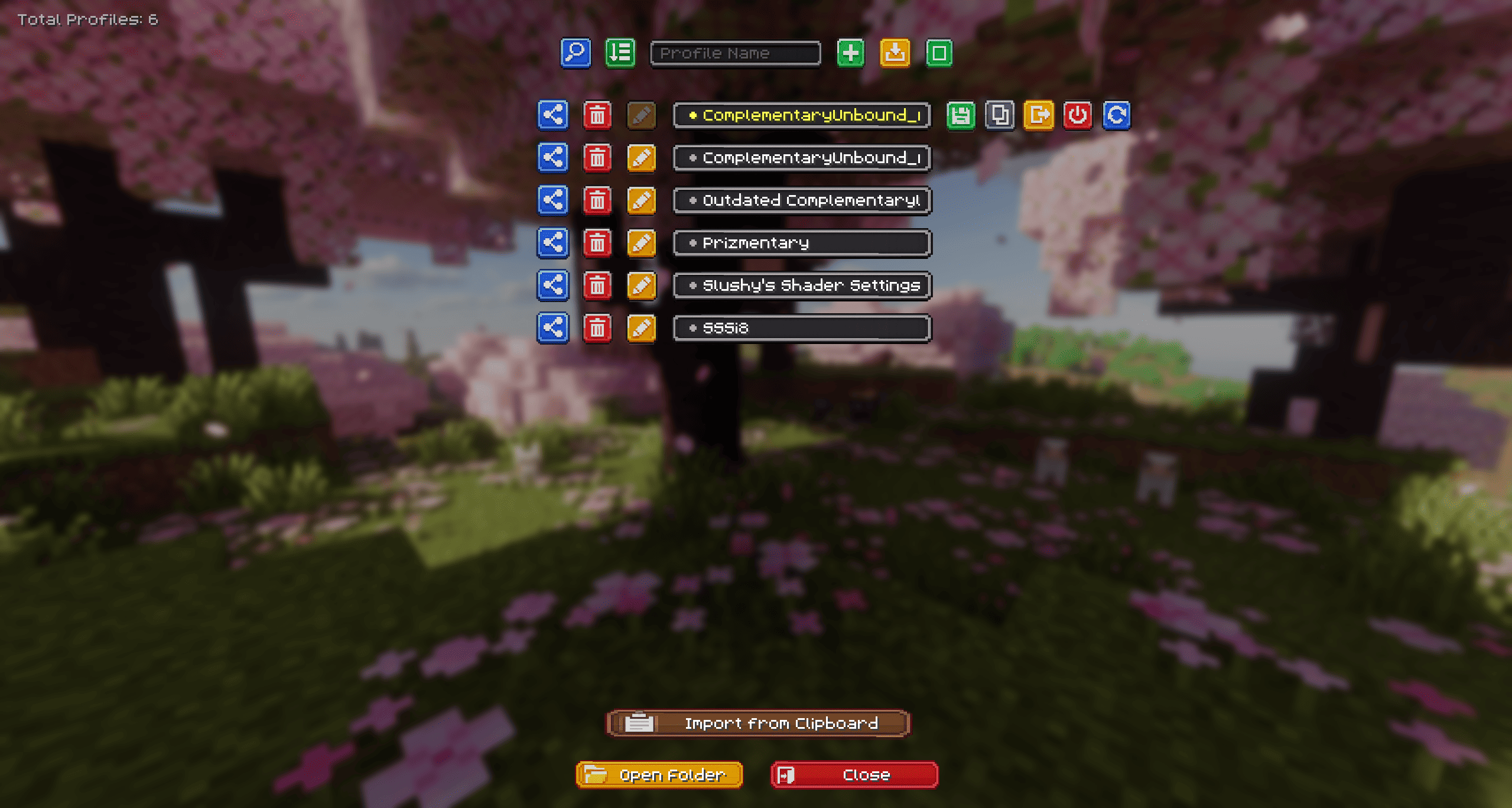
Shader Profiles is a lightweight, client-side utility mod designed to bring a comprehensive profile management system to your Iris shader configurations. It allows you to save, manage, and switch between multiple shader settings seamlessly without ever leaving the game.
## Why use Shader Profiles?
If you frequently change your shader settings based on your current activity—such as using highly demanding settings for taking cinematic screenshots, and performance-optimized settings for regular gameplay or combat—this mod eliminates the need to manually adjust individual sliders every time.
## Features
- **Cloud Integration (NEW):** Instantly upload your configurations to the cloud (powered by mclo.gs) to generate a short link. **You can send this link directly to the server chat with a single click to easily share it with your friends!** You can also magically import profiles directly from a copied link in your clipboard.
- **Smart Shader Detection (NEW):** When importing a cloud profile, the mod deeply scans your `shaderpacks` folder and uses a smart fingerprinting system to automatically detect and select the correct matching shader, even if you changed the original `.zip` file name.
- **Profile Comparison (NEW):** Select exactly two profiles in multi-select mode to compare them. View every single configuration difference side-by-side using the built-in diff interface!
- **Enhanced Custom UI (NEW):** Features a polished, custom-textured interface with dynamic loading animations, colored feedback, and auto-scrolling marquee text, all integrating naturally into the existing Iris Shader Packs screen.
- **Profile Management:** Easily create, rename, duplicate, and delete distinct configuration profiles for any installed shader pack.
- **Quick Switch:** Change active shader profiles instantly directly from the shader selection menu.
- **Local Import & Export:** Share your tailored configurations by exporting single `.txt` files or bulk-exporting via `.zip` archives. You can easily import these local files back into the game.
- **Bulk Actions:** Utilize the multi-select mode to delete several profiles at once or export them as a batch.
## Technical Details & Dependencies
- **Client-Side Only:** This mod operates entirely on the client. It does not need to be installed on servers for you to use it in multiplayer.
- **Requirements:**
- Fabric API
- Iris Shaders
## How to Use
1. Navigate to `Video Settings` > `Shader Packs` and select a shader.
2. Open the `Shader Pack Settings` menu.
3. Click the new `Profiles` button located in the top-left corner.
4. From this interface, you can create, modify, share, and manage your custom configurations.
5. **Keybind:** Press the assigned hotkey (default: **O**) while in-game for instant access. You can change this in the standard Minecraft `Controls` menu under the Shader Profiles category.



![Radical Gyms & Structures [Cobblemon]](https://cdn.modrinth.com/data/3sLJoaQH/da2233c63d4d32c72afca4a83bc642cfffafea0d.png)