

MWHud
ModA customizable Fabric HUD mod that displays real-time server stats like money, fly time, PVP status, and more — paired with a Paper plugin.
Type
Mod
Modrinth Downloads
141
Modrinth ID
4x5eLTVc
Last Updated
Jul 28, 2026
Description
🎨 MWHud — Customizable HUD for Minecraft
A feature-rich, highly customizable HUD mod for Fabric that brings your server's essential stats right onto your screen — in real-time, beautifully styled, and fully draggable.
📖 About
MWHud is a Fabric client-side mod that pairs with the MWHudPlugin (Paper/Spigot) to push real-time server statistics directly to your HUD — no commands, no menus, no scoreboard clutter.
Your server stats appear right on your screen — money, fly time, PvP status, and more. Drag them where you want, style them your way, and save layouts to switch between anytime.
📸 Preview
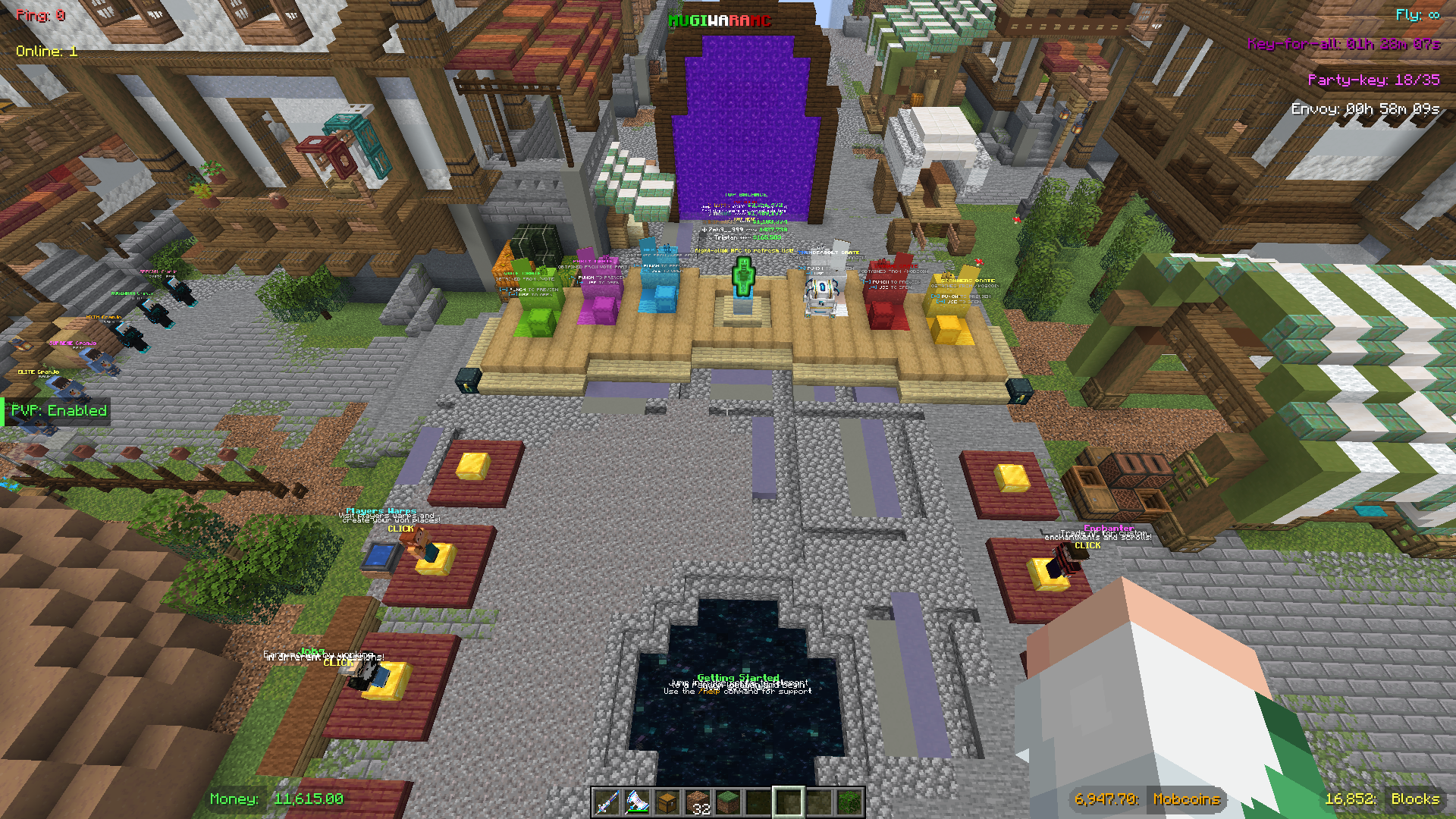
The default Mugiwara preset — fully customizable layout with all HUD elements displayed.
✨ Features
🖥️ HUD Display Elements
Element Description Requires Plugin 💰 Money Your current balance ✅ 🪙 Mobcoins Your mobcoin balance ✅ 🕊️ Fly Time Remaining flight duration countdown ✅ 🧱 Claim Blocks Remaining GriefPrevention claim blocks ✅ ⚔️ PvP Status Whether PvP is enabled or disabled ✅ 📦 Envoy Timer Countdown to the next Envoy event ✅ 🔑 Key-for-all Timer Countdown to the next Key-for-all drop ✅ 🎉 Party Key Current / required votes for a Vote Party ✅ 📶 Ping Your live connection latency ❌ 👥 Online Players Current server player count ✅ 🏷️ Server Title A custom server name shown on-screen ✅Ping is read directly from the Minecraft client — no plugin needed.
⚙️ Customization
Option Details 16 Box Shapes Plain Box, Pill, Accent Bar, Text Only, Bottom Line, Corner Brackets, Tag/Flag, Outline Text — plus 8 split variants with ghost/pill modes 15 Colors White, Light Grey, Grey, Black, Green, Dark Green, Gold, Yellow, Cyan, Blue, Light Blue, Purple, Red, Orange, Pink Server Color Sync Auto-matches box colors to whatever the server sends; one-click reset Per-box Control Cycle value color, box shape, and label color independently per element Drag & Drop Freely reposition any box; smart snapping to edges, alignments, and midpoints Group Drag Hold Shift and drag to move a cluster of nearby boxes together Hide Boxes Toggle individual boxes off without losing their position Preset System 3 built-in presets + save unlimited custom layouts (positions, colors, shapes, visibility) HUD Scale Cycle through 5 scale presets — Tiny, Small, Normal, Large, Huge — independent of Minecraft's UI Scale Smart Anchoring Boxes auto-detect edge positions and anchor accordingly — left, center, or right — keeping layouts consistent across all scalesEdit Mode Controls
Control Action Left-click (Drag Mode) Drag a single box Shift + Left-click (Drag Mode) Group-drag nearby boxes Left-click (Edit Mode) Cycle value color Right-click (Edit Mode) Cycle box shape Shift + Right-click (Edit Mode) Cycle label color (split shapes only) Left-click (Hide Mode) Toggle box visibility⌨️ Hotkeys
Key Action F6 Toggle the entire HUD on / off F7 Toggle the scoreboard on / off F8 Open HUD Configuration F9 Open Password Manager Esc Exit the current edit mode🔐 Password Manager (bonus feature)
MWHud includes a built-in per-server password manager, independent of the HUD itself.
Feature Details Auto-login Automatically runs /login <password> when you join a saved server Per-account storage Passwords are stored per server + player name pair Encrypted storage Passwords are AES-encrypted before being written to disk In-game UI Add, view (masked), and delete saved entries from the F9 screenThis is entirely optional and unrelated to the HUD data system.
📦 Installation
- Install Fabric Loader for Minecraft 1.21.x
- Download the latest mwhud-*.jar from the releases page
- Drop it into .minecraft/mods/
- Launch Minecraft with the Fabric profile
The mod works standalone — ping shows immediately with a default layout. Full HUD data (money, fly time, etc.) requires the MWHudPlugin installed on the server side.
🔌 Server admins: see the MWHudPlugin page for setup instructions.
🎮 Explorer's Mugiwara SMP
Join Mugiwara SMP — our thriving Minecraft Survival Multiplayer server! 🌊
Embark on an epic adventure in a friendly community-driven world featuring:
- 🏪 Shop — Buy and sell items in the player-driven economy
- 🐉 Custom Dragon — Face unique dragon battles with special rewards
- ⚾ Pokéballs — Catch mobs and build your collection
- 🛡️ Custom Items/Armors — Equip exclusive gear with special abilities
- 🏠 Grief Protection — Claim your land and build with peace of mind
- ⚔️ PvP Arena / PvP Training Arena — Test your skills in balanced combat zones
Set sail for adventure — the Grand Line awaits! 🏴☠️


Compatibility
Mod Loaders
Game Versions
Recommended Gear
AffiliateHardware and extras that pair well with this mod.

As an Amazon Associate I earn from qualifying purchases.
Screenshots
Similar Mods

Faster Boats
Makes your slow boat faster by holding down your sprinting key.

Kill Effects
Adds client sided kill effects and custom critical hit particles

Create: Simple storage recipes
Recipes for Tom's Simple Storage to match and use the Create mod.

Mob Locator
This mod ports the locator bar mechanic to the mobs.

TNTSweeper
Minesweeper, BUT IN MINECRAFT!

Dimensional Teleporter
Teleporter