

TabChannel
ModCreate public or private chat channels, manage staff discussions, organize faction communication, and improve multiplayer communication with a modern tab-based chat system inspired by large community servers.
Type
Mod
Modrinth Downloads
104
Modrinth ID
GlReZwZN
Last Updated
Jul 29, 2026
Description
TabChannel
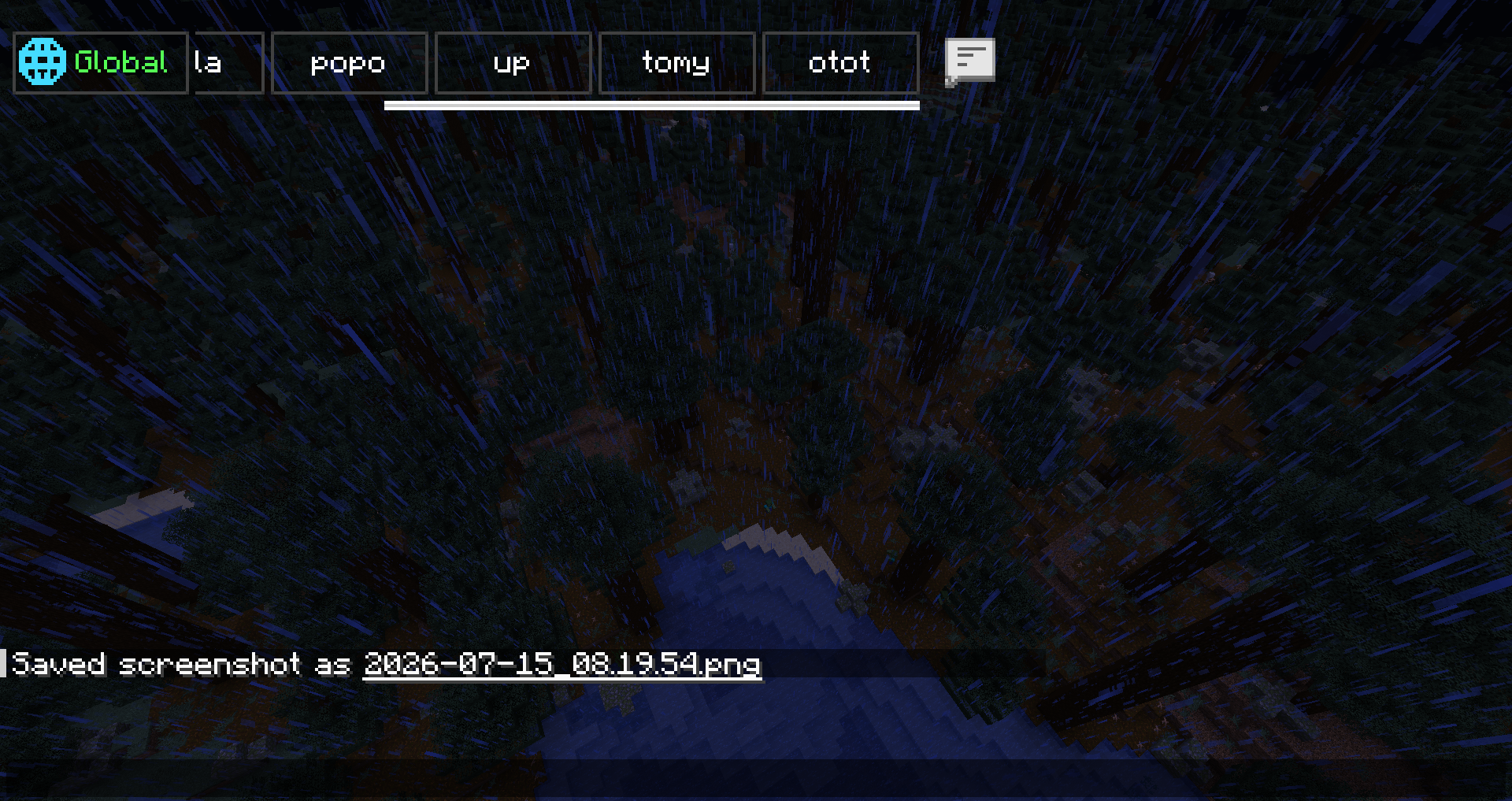
Minecraft 1.21.x · Tabbed chat channels, TabColor, PMs, staff tools, log search, client HUD, and optional Twitch stream overlay (client-only).
TabChannel Version 1.0.4
 | Add New Optionel Dependencies
Compatibility
Setup Result Fabric client + Fabric server with TabChannel Channels, tab sync, server commands NeoForge on Youer NeoForge jar on both server and client LuckPerms Compatible and optionalTabColor — all colors
Chat colors is # exemple #Red or #FF000 Commands: /tabchannel color <channel> <COLOR> or /setchannel tabcolors <channel> <COLOR>
Use the exact name in UPPERCASE (underscores).
Standard
BLACK · DARK_BLUE · DARK_GREEN · DARK_AQUA · DARK_RED · DARK_PURPLE · GOLD · GRAY · DARK_GRAY · GREEN · AQUA · LIGHT_PURPLE · YELLOW · WHITE · ORANGE · PINK · MAGENTA · CYAN · LIME · BROWN · SILVER · NAVY · TEAL · OLIVE · MAROON · INDIGO · VIOLET · TURQUOISE · SKY_BLUE · MINT · SALMON · CORAL · CRIMSON · BEIGE · IVORY · CHARCOAL · EMERALD · RUBY · AMBER · BRONZE · ROSE · HOT_PINK · DEEP_PINK · FUCHSIA · LAVENDER · PLUM · ORCHID · SCARLET · FIRE_RED · BLOOD_RED · CHERRY · ICE_BLUE · BABY_BLUE · OCEAN_BLUE · ROYAL_BLUE · MIDNIGHT_BLUE · FOREST_GREEN · DARK_FOREST · MOSS_GREEN · JADE · SUNSET_ORANGE · TANGERINE · PEACH · APRICOT · LEMON · CANARY · HONEY · COFFEE · CHOCOLATE · CARAMEL · SAND · SNOW · PEARL · SMOKE · ASH · OBSIDIAN · VOID · NIGHT
“Premium” theme (no admin restriction in the mod)
ELECTRIC_BLUE · LASER_GREEN · TOXIC_GREEN · RADIOACTIVE · GALAXY_PURPLE · COSMIC_PINK · MANA_BLUE · ENDER_PURPLE · DIAMOND · RUBY_RED · SAPPHIRE · TOPAZ · AMETHYST · EMERALD_GREEN
Admin only (OP 2 or tabchannel.admin)
BLUE · RED · NEON_GREEN
Commands
Root aliases: /tabchannel, /tc, /tb, /channel, /ch
Command Description /channel create <name> <public|private|prive|faction> Create (staff channel = admin) /channel join <channel> Join /channel leave <channel> Leave /channel list List /channel delete <channel> Delete /channel color <channel> <TabColor> Tab color /channel invite <player> <channel> Invite /channelcreate <name> <type> Create (shortcut) /channeljoin <channel> Join (shortcut) /channellist List (shortcut)/setchannel
Command Description /setchannel delete <channel> Delete /setchannel tabcolors <channel> <TabColor> Tab color /setchannel invite <channel> <player> Invite /setchannel leave <channel> Leave /setchannel perm add|remove <channel> <player> <perm> Member permissions /setchannel rules <channel> <text> Rules /setchannel warn <channel> on|off Profanity filter /setchannel kick <channel> <days> <hours> <sec> <player> Kick + timed mute /setchannel ban <channel> <player> Channel ban /setchannel f <channel> <faction> Link factionPMs and logs
Command Description /mp <player> <message> Private message /r <message> Reply to last PM /mp block <player> Block /mp unblock <player> Unblock /mp socialspy SocialSpy (permission) /chatsearch <text> Log search (25 max) /chat search <text> Search aliasAdmin
Command Description /tabchanneltploc <dimension> <x> <y> <z> Teleport (OP 2)Built-in channels: global (vanilla / global chat), staff channel (creation: admin, access: staff).
Mentions: @staff, @admin, @mod, @modo in messages (configurable anti-spam).
Client commands
Command Description /channel position · position default Channel HUD position /channel resize · resize default Channel HUD sizeTwitch stream (client, optional)
Command Description /streamchat connect Connect (set Twitch username in config) /streamchat disconnect Disconnect /streamchat toggle Show / hide /streamchat position · position default Overlay placement /streamchat resize · resize default Resize overlay /streamchat config Config screen /streamchat clear · test · reload UtilitiesStream does not change Minecraft chat; Twitch only (no YouTube).
LuckPerms
TabChannel — LuckPerms permissions (reference)
LuckPerms is compatible and optional. Without LuckPerms: OP level 2 for some actions, per-member permissions on each channel, and default Bukkit permissions on Youer / Paper (HybridBukkitPermissions).
Global roles
Permission Description tabchannel.admin Mod admin (bypass, staff channel, admin TabColor colors, etc.) tabchannel.staff Staff (staff channel, staff invites, staff mentions)Private messages (PM)
Permission Description tabchannel.mp.browse See all online players in the PM UI tabchannel.mp.socialspy /mp socialspy tabchannel.mp.bypasscooldown Ignore PM cooldownChat styling (optional)
Permission Description tabchannel.chat.color Classic colors (&) tabchannel.chat.hex Hex colors tabchannel.chat.format Formatting (bold, italic, etc.) tabchannel.chat.style Bundles color + hex + formatPer-channel permissions (setchannel.*)
Permission Usage setchannel.create Create a channel setchannel.delete Delete setchannel.invite Invite setchannel.leave Leave setchannel.perm Manage member rights setchannel.rules Rules setchannel.warn Profanity filter setchannel.kick Kick / mute (duration via /setchannel kick) setchannel.ban Ban from channel setchannel.tabcolors Change TabColor setchannel.f Link a factionBypass
Permission Description setchannel.bypass.join Join without restrictions setchannel.bypass.private View / join private channels setchannel.bypass.ban Ignore channel bansTabColor — admin-only colors
Only these names require OP 2 or tabchannel.admin:
- BLUE
- RED
- NEON_GREEN
All other TabColor names in the mod can be used without that restriction (still subject to channel rights for /setchannel tabcolors).
LuckPerms example (YAML)
tabchannel.admin: description: TabChannel admin default: op tabchannel.staff: description: TabChannel staff default: false tabchannel.mp.socialspy: default: false setchannel.create: default: true setchannel.tabcolors: default: trueDependencies
- NeoForge: NeoForge 1.21.x build
- LuckPerms: no jar required
Compatibility
Mod Loaders
Game Versions
Recommended Gear
AffiliateHardware and extras that pair well with this mod.

As an Amazon Associate I earn from qualifying purchases.
Screenshots
Similar Mods
Panda Command Whitelist
Whitelist commands on your server for usage and suggestion, supports basic wildcards.

TinyPieces
A small, vanilla+ mod filling in the gaps but never going over the top

Always Multiplayer
Automatically enables multiplayer/online play when loading into a singleplayer world. Allows your friends to request to...

boshtweaks
Does what CobblemonTweaks did but better

Lazyboy's No Global Sounds
Stop global sounds like the wither's spawning, ender dragon death, end portal activation.
Rede Nerd Core
A progression-based class system for zombie apocalypse servers, featuring skill trees, class abilities, medical mechanic...