Mine and Slash Damage Tracker
Modby Dawnforger
This mod is used to track damage dealt while playing with the Mine And Slash mod.
Type
Mod
CurseForge Downloads
410,810
CurseForge ID
1378742
Last Updated
Sep 5, 2026
Description
Damage Tracker (Mine and Slash)
===============
What It Is
===============
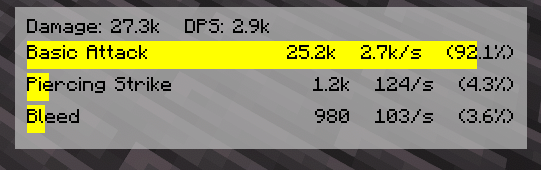
A client-side DPS overlay for Mine and Slash. It parses the combat log in real time and renders a compact, movable HUD showing Total, DPS, and your top abilities with element-colored bars.
===============
Features
===============
> Live overlay HUD
> Measure by rolling time frame or manually cleared sample (configurable)
> Per-ability data rows show Total, DPS, % of Overall damage, and a progress bar tinted to the damage element.
> Draggable (Move/Edit key) with snap + bounds clamp; configurable position and padding.
> Background panel with configurable color + opacity; optional per-row bar backgrounds.
> Smart parsing:
-Regex-driven capture (configurable profile) for Mine and Slash output lines
-Heuristics to normalize skill names/elements and pick up common variants (“applied” vs “dealt”, multi-element, etc.).
-Duplicate suppression (prevents repeated lines from double counting).
-Target Dummy filtering (prevents Target Dummy display outputs from polluting the meter data).
-Idle Freeze (optional): pauses the rolling window timer after X ms of no new damage.
>Details & reporting
-Quick Report screen (keybind) with a 15-row breakdown and last-hit details per skill.
-Tooltip/details API for future expansion (e.g., crit rate, avg hit, etc., as chat exposes it).
>Cosmetics & Colors
-Defaults (editable):
-Physical = Orange
-Lightning = Yellow
-Cold = Light Blue
-Fire = Red
-Chaos/Shadow = Purple
-Multi-Element = Violet
*You can theme every element color in config.
>Keybinds (defaults)
-Toggle Overlay: /
-Move/Edit Overlay: - (also Shift+- to reset position to center)
-Clear Data: * (Numpad Multiply)
-Report: Unbound (set your favorite)
>Using the overlay
-Press / to toggle the HUD.
-Press - to enter Move/Edit mode, then drag the window; Esc to exit.
-(Hold Shift while pressing - to reset position to screen center.)
Press * to clear the current sample (if you set manual clear mode).
===============
Permissions
===============
Modpacks: Allowed. Please credit and link the project page.
Redistribution: Link the CurseForge or GitHub release; don’t rehost binaries.
===============
Links
===============
Source & Issues: GitHub (Damage Tracker)
Recommended Gear
AffiliateHardware and extras that pair well with this mod.

As an Amazon Associate I earn from qualifying purchases.
Screenshots
Similar Mods
Infinity Buttons
A mod which adds new exciting buttons!
ClickThrough
Click chests/containers through signs and item frames

Adorable Eggs - New Spawn Eggs and Plushies
Play with the new Minecraft 1.21.5 egg textures in previous versions, and get new placeable plushies!

Sounds Be Gone!
Allows you to disable specific sounds you don't like. Perfect for people with Misophonia!

Rough Tweaks Revamped
A mod that adds an extra layer of difficulty to minecraft's health system
Texels Paintings
Adds paintings based on landscapes, natural environments, and structures to the game.