
Animated Frames
Modby SunnyMP
Display GIFs PNGs & JPG in Minecraft
Type
Mod
CurseForge Downloads
3,292
CurseForge ID
Modrinth Downloads
10,224
Modrinth ID
Last Updated
Oct 17, 2026
Description
📺 AnimatedFrames — v1.7
Display GIFs, PNGs, JPGs, JPEGs and MP4 videos on screen!
AnimatedFrames allows you to display GIFs, PNGs, JPGs, JPEGs and MP4 videos within Minecraft using commands.
Requirements
- Loader support: Forge • Fabric • NeoForge • Purpur • Spigot • & forks
- Dependency: WaterMedia
Wiki
📝 Commands
Client-side commands (/mediac) — only you see them
-
/mediac show <name> [duration] [position] [scale] [volume]Display media locally from your files. Example:/mediac show sunny.gif 10 center 1.0 80 -
/mediac stopStop all active media on your screen. -
/mediac listList files in your local folder. -
/mediac lang <en|es>Change the language (English or Spanish).
Server-side commands (/medias) — requires OP or admin permission
-
/medias show <player|@a> <name> [duration] [position] [scale] [volume]Send a file from the server to the selected players and play it. Players do not need to have the file beforehand. Example:/medias show @a example.gif 15 topleft 2.0 80 -
/medias showlocal <player|@a> <name> [duration] [position] [scale] [volume]Play a file already stored in each selected player's local media folder. This preserves the previous behavior of/medias show. Example:/medias showlocal @a example.gif 15 topleft 2.0 80 -
/medias stop <player|@a>Stop media for selected players. -
/medias listList files in the server's media folder. -
/medias helpDisplay command help.
Important: Players always need the client mod and WaterMedia. With /medias show, the file comes from the server. With /medias showlocal, the file must already exist in each player's own client folder.
⚠️ File Location
Client folder: .minecraft/config/animatedframes/media/
Server folder with the mod: config/animatedframes/media/
Server folder with the plugin: plugins/AnimatedFramesPL/media/
- Supported files:
.gif,.png,.jpg,.jpeg,.mp4 - Media folders are created automatically during initialization
/mediac showand/medias showlocaluse the player's client folder/medias showuses the server's media folder and transfers the file to the selected players- Received files are stored automatically in a separate client cache
- For launchers with separate instances, use the corresponding instance's folder
🔌 Plugin Support
AnimatedFrames also has a Bukkit/Spigot/Paper/Purpur plugin version for server-side control. With the plugin, server admins can trigger media on players' screens without needing the mod on the server.
Place server files in plugins/AnimatedFramesPL/media/ and use /medias show to send them to players.
The plugin uses the animatedframes.admin permission, granted to OPs by default. Use /medias lang <en|es> to change the plugin's language.
Players still need the client mod and WaterMedia. They only need the media files installed beforehand when using
/medias showlocal.
-
GIF, PNG, JPG or JPEG displayed locally (client):
.gif)
-
GIF, PNG, JPG or JPEG sent to players (server):
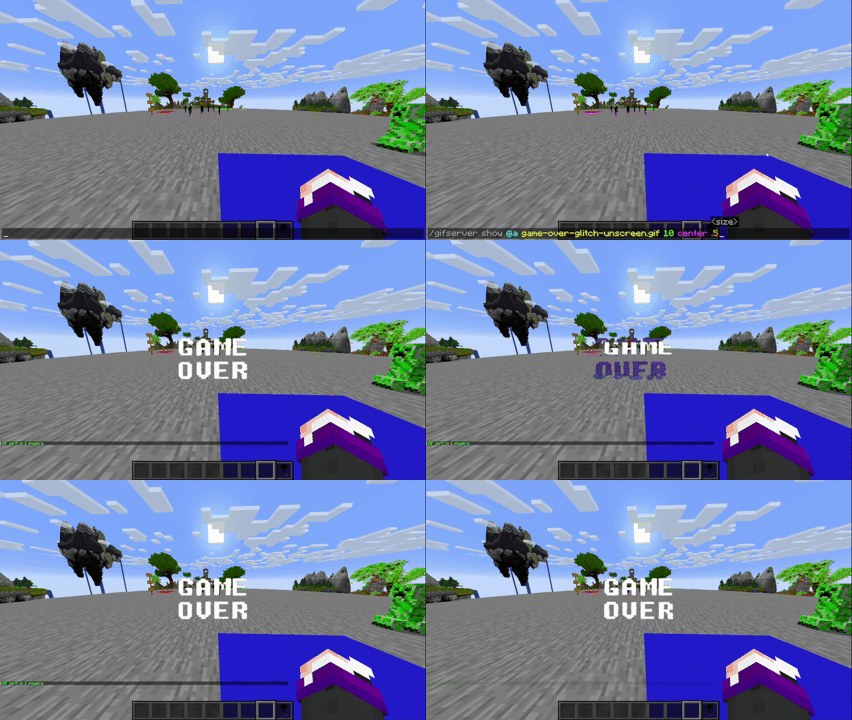
-
GIF, PNG, JPG or JPEG sent to players (plugin):
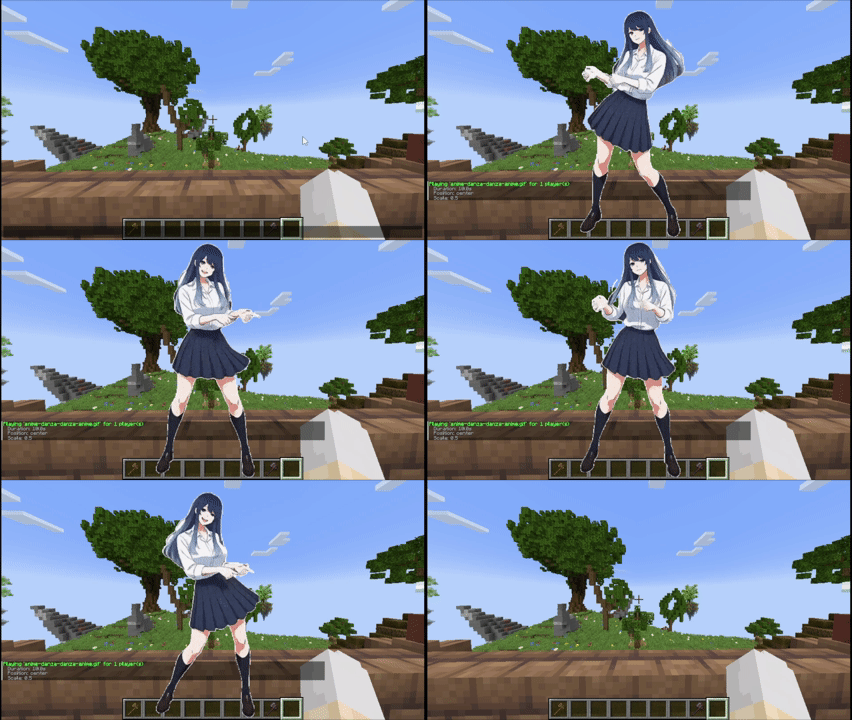
Tutorial
Placing files (Client and server)
Client folder: .minecraft/config/animatedframes/media/
Server folder with the mod: config/animatedframes/media/
Server folder with the plugin: plugins/AnimatedFramesPL/media/
Steps:
- Copy your GIF, PNG, JPG, JPEG or MP4 file into the appropriate media folder:
- Client folder for
/mediac showor/medias showlocal. - Server folder for
/medias show.
- Client folder for
- Make sure the file has the correct extension (
.gif,.png,.jpg,.jpeg,.mp4). - Display it in-game:
- Local (only you):
/mediac show sunny.gif 10 center 1.0 80 - Send a server file to others:
/medias show @a sunny.gif 15 center 1.0 80 - Play files already installed on players' clients:
/medias showlocal @a sunny.gif 15 center 1.0 80
- Local (only you):
Notes:
/mediac show→ only visible to you/medias show→ transfers a server file to selected players — they need the mod and WaterMedia, but not the file beforehand/medias showlocal→ uses each player's local file — they need the mod, WaterMedia and the file in their client folder- Updating from 1.6.2: replace
/medias showwith/medias showlocalif you want to keep using files already installed on players' computers - Filenames with spaces must use double quotes:
/medias show @a "welcome video.mp4" 10 center 1.0 80 - Large files may take some time to transfer before playback begins
- Check chat or logs if a file fails to load
- Use
/mediac listto see your local files and/medias listto see server files - Duration is measured in seconds;
0means no command-imposed time limit. Videos still stop when they reach the end - Scale range:
0.05–10(default:1.0) - Volume range:
0–100(default:80) - Media stops automatically when you disconnect
Available positions (10 options)
center topleft topright bottomleft bottomright topcenter bottomcenter leftcenter rightcenter fullscreen
fullscreen — fills the entire screen for videos while maintaining their aspect ratio, cropping the edges when necessary. Omit the scale and enter the volume directly after
fullscreen. Example:/medias show @a intro.mp4 0 fullscreen 80
Credits
- Created by @SunnyAim_
- 🎬 MP4 integration made possible with the help of @SoyKatto1
- Support: Contact @SunnyAim_ for help or questions.
Compatibility
Mod Loaders
Game Versions
Recommended Gear
AffiliateHardware and extras that pair well with this mod.

As an Amazon Associate I earn from qualifying purchases.
Screenshots
Similar Mods
Day Counter Fabric/Forge/Quilt/Neoforge
A simple Day Counter Mod
GraveStones -Die Classy
an advanced Gravestones mod !

Epic RPG: Average DPS
Real-time global damage meter

Finite Gas
Patches the "infinite gas" bug in Advanced Generators for 1.12.

TFC Florae
A rather large addon to TFC that adds new biomes, terrain, flora and fauna, new mechanics and other things.

Litemoretica
Adds features and fixes to the Litematica mod.