

InOr
ModAutomatically sort your inventory with one button. Define custom slot rules by item category, type, or specific items, and never manually organize again.
Type
Mod
Modrinth Downloads
735
Modrinth ID
doEH8k0l
Last Updated
Jul 29, 2026
Description
Inventory Organizer — Full description A Fabric mod for organising your inventory and your storage with one click, plus a server‑aware multi‑chest "warehouse" system, a set of optional automations, and remote crafting. Runs on Minecraft 26.1 / 26.1.1 / 26.1.2. environment: "*" — it's a client‑side mod (required on the client) with optional server‑side support that unlocks the shared multiplayer features.
Part 1 — Every feature Sorting OI (Organize Inventory): one click sorts your whole inventory — identical items merge into full stacks, the same types group together. OST (Organize STorage): does the same to the chest you have open. Sort keybind: OST when a chest is open, otherwise OI. A Sort action setting picks the behaviour: Smart (default), OI‑only, OST‑only, or Both. Stack consolidation: scattered partial stacks of one item are merged back into full stacks. The Slot Config editor The central screen (the S button or a keybind). Tabs across the top: Inv, Storage, Groups.
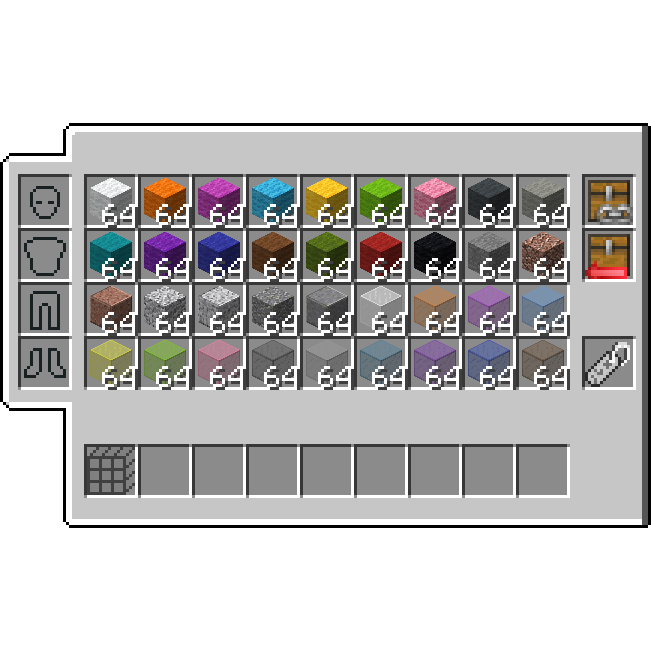
Inv tab: a live picture of your inventory. Pick a rule from the right‑hand palette, then left‑click a slot to assign it; right‑click resets a slot to any. Rules: any (accepts anything), empty (kept empty), Groups (Weapons, Tools, Armor, Blocks, Food, Valuables, Potions, Splash, Arrows, Utility, Misc), Sub‑groups (Logs, Boats, …), or a specific item. A search box filters 1600+ items. Armor + offhand: rules for helmet / chestplate / leggings / boots and the shield/offhand slot. Auto‑refill marker: middle‑click a hotbar slot to flag it with a green R (see Automations). Bottom row: Save, Clear, Kits, Names, Ranks (Tier Order), Back, and Warehouse when available. Help: a Guide button (full manual) and a ? quick‑tip overlay (click outside to close). Per‑chest profiles Each chest can remember its own sort layout. Open a chest → New profile? → Yes. Identity is resolved by, in order: anvil custom name → exact block coordinates (both halves of a double chest) → adjacent‑sign text. A sign next to a chest also names its profile. Carrying mode: a profile becomes "active" only while its chest is open; the Pr button re‑binds a carried profile to the open chest. Nothing marks a chest as non‑storage (hidden from the map). Profiles are private and local — never shared. Groups & Tier Order (Ranks) Groups tab / editor: edit the built‑in item groups or create custom groups so rules match exactly what you mean. Tier Order (Ranks): within a type, set the priority order so sorting is deterministic (e.g. netherite above diamond). Double‑click a slot to jump straight into it. Kits Save a whole slot‑config layout as a named Kit and load it later. A Cycle slot preset keybind flips between saved Kits on the fly. Warehouses (linked chests) The Warehouse map (Wh button / keybind) is a top‑down view of your chests. Link 2+ nearby chests (within range, connected) into one warehouse; OST at any member — or Sort on the map — organises the whole group together. Unlink breaks it up. On servers, links are private by default; a foreign link is revealed to another player only after they open one of its chests (then the whole warehouse shows on their map). Permissions & anti‑theft (servers) Per‑player OST permission: select your own link → OST button → a picker of known players, each toggled on/off. Default off — a revealed link is visible but not sortable until granted. Anti‑theft (server‑enforced): you can't link a chest that's in someone else's warehouse, can't remote‑withdraw from a foreign link, and can't sort a link without permission. Automations (Free mode) Auto‑refill (green R): a marked hotbar slot refills itself from your inventory when it empties, using the slot's rule or the last item that was there. Chest refill (Rf): top up every marked hotbar slot from the open chest in one press. Deposit‑all (Dep): send back every inventory stack whose item is already in the chest. Scroll: plain‑scroll a slot to quick‑move it; Shift+scroll sorts one item per notch. Trash / Void (under Storage): a rule grid; matching items are dropped on pickup. A Trash mode toggle switches Drop‑all vs Keep‑1‑stack. Remote crafting A materials panel by the inventory and crafting table lists the combined contents of nearby chests (icon + name + count) with search and a quantity box; click to pull items to your inventory. Range: 60 blocks at a table in single‑player, 15 elsewhere. Server‑friendliness & safety Quick switch (master mode): one button flips everything between Server‑Friendly and Free. Free gating: automations only run in private/whitelisted environments (single‑player, LAN, Realms, Aternos, whitelisted servers); off on normal public servers. Whitelist (opt‑in): add a trusted server (behind a confirmation) to enable Free features there. Fight mode: real PvP forces Server‑Friendly for ~20s (with a small HUD timer); kept on at all times on public servers, so the mod never gives a combat edge. Death auto‑sort: optionally re‑sorts after you recover your gear. Keybinds (Controls → Inventory Organizer) All unbound by default: Sort, Open Kits, Open Settings, Open Warehouse map, Chest refill, Cycle slot preset. A Keybind mode setting (Inventory‑only / Free / Off) controls where they're allowed to fire.
Help & languages A full, word‑wrapped in‑game Guide (auto‑opens on first settings entry) and a per‑screen ? quick help. 9 languages: English, Magyar, Deutsch, Español, Français, 中文, 日本語, Русский, Português, with button labels sized so translations don't overflow. Part 2 — How it's built (architecture) Sides & entry points Environment "*" — loads on both sides. The main entrypoint registers the networking payload types (common) and the server‑side receivers; the client entrypoint registers keybinds, screen hooks (Fabric ScreenEvents), the HUD element, and the client tick. Core split: the client owns all UI/sorting/config; the server owns only the shared warehouse link store + sort engine + remote‑craft aggregation. Configuration (client, local) OrganizerConfig — a JSON config holding slot rules, storage presets, custom groups, warehouse groups (local links), known chests, Kits, keybind/sort settings, whitelist, trash rules, etc. StoragePreset — one chest's layout (slot rules, size, identity: name/positions/sign). SlotRule, WarehouseGroup — supporting data. Sorting InventorySorter / SortLogic — inventory sort + rule matching + stack consolidation. StorageSorter — chest sort using the active StoragePreset. ChestIdentifier (client) — resolves which local profile is active for the open chest (name → coordinates → sign), and whether the chest belongs to a foreign link (sort‑only). Warehouse subsystem WarehouseClient — client‑side state: the handshake flag, the visible‑links cache (own + revealed foreign), the remote‑craft stock, the OST‑roster cache, and all the send helpers. WarehouseNet — registers payloads and the server receivers; the server thread does all the work. WarehouseLinks — server‑side store of links (owner, dimension, positions, the owner's per‑chest rules, OST allow‑list) + a joined‑player roster; persisted to inventory-organizer-warehouse-links.json. WarehouseEngine — the sort engine: pulls all items from a group into a pool, then re‑places each stack into the chest whose rule matches best (double‑chest aware, distance‑guarded). RemoteStock — server‑side remote‑craft: aggregates nearby chest contents and withdraws items (skips foreign‑link chests). WarehouseMapScreen, OstPermScreen — the map UI and the OST permission picker. Networking (handshake‑gated) On join the server sends WarehouseHelloPayload; the client sets an available flag. Until then the client sends nothing, so on a vanilla server the mod is completely silent. Client→server: warehouse map query, upload/delete link, sort link, sort group, request OST roster, set OST permission, craft stock query, craft withdraw. Server→client: hello, link map data, OST roster, craft stock. Every server action re‑validates distance and ownership/permission and never trusts the client; anti‑spam cooldowns guard sorting and withdrawing. Client integration & robustness Mixins: CreativeInventoryScreenMixin (buttons in the creative inventory), InventoryScreenMixin, ContainerScreenAccessor (leftPos/topPos/hovered slot), ContainerScrollMixin (scroll on container screens). FightModeTracker (tamper‑resistant PvP detection + HUD), ServerEnvironment (Free‑mode gating), DeathSortTracker. UI is resize‑safe: layout is rebuilt in init() (re‑run on resize); a universal guard forces a re‑init when the screen's cached size differs from the window, and a leftPos watcher re‑lays‑out the in‑game overlays when the recipe book shifts the GUI. Build & releases Single Java source base; per‑version projects (26.1 / 26.1.1 / 26.1.2) share the same code with version‑specific Fabric metadata. Distributed as one jar per Minecraft version.
Compatibility
Mod Loaders
Game Versions
Recommended Gear
AffiliateHardware and extras that pair well with this mod.

As an Amazon Associate I earn from qualifying purchases.
Screenshots
Similar Mods

Halloween Biome - Trick or treat!
A simple vanilla friendly mod that adds a new Halloween themed biome. Complete with new structures, candy, trick-or-tre...

Abyssal's Cottage Builder pack
This mod ass a variety of new cottage building blocks.
Extended Inventory
Backpacks! With convenient hotbar refilling.

Apothic Renaming
An Apotheosis addon that lets you rename affixed items in an anvil without needing the Sigil of Unnaming.

Allthemodium - Ender IO Grinding Ball Additions
Adds Allthemodium, Vibranium, Enderium and Infinity grindingballs to Ender IO, enhancing sagmill output rate and other m...

FPS Display+
A easy-to-use FPS display mod with infinite customizability.