
Eric's Retail
Modby phygz
Adds a Vending Block
Description
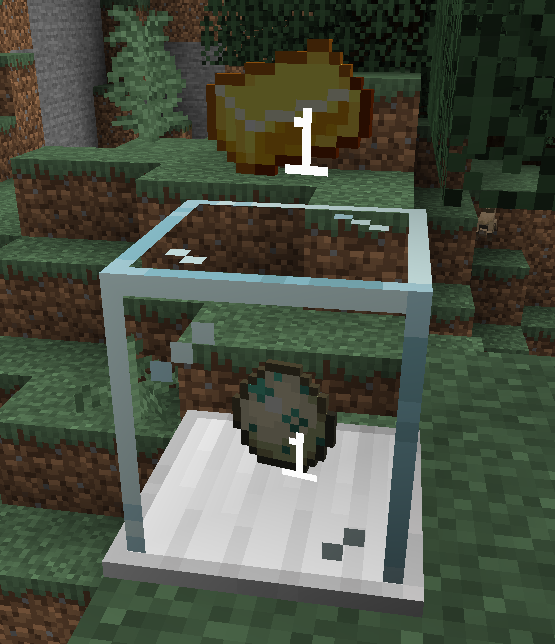
The Vending Block allows players to easily accept item trades.
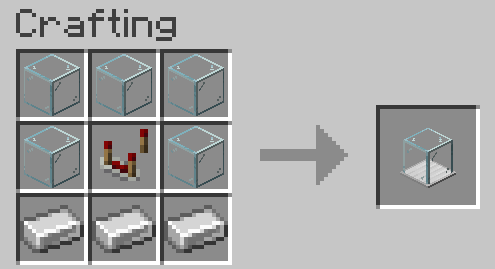
Crafting
How to Use
To set up a Vending Block, place it on the ground and right-click to open a menu. The player that placed it is the only player that can open the configuration/inventory.
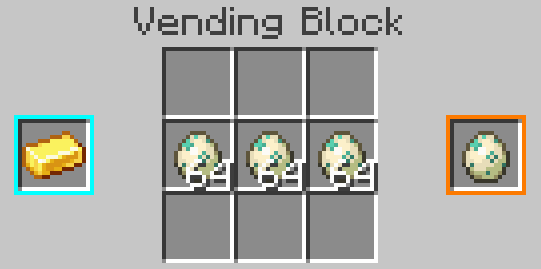
The blue slot on the left is the stack accepted for trade, and the orange slot on the right is the stack that will be returned to the customer. These slots don't consume items, but can be clicked with a stack to set them.
In the center is the inventory of the block, which should contain the stock of items to distribute. Items paid by users will also appear here, so make sure to leave space for them.
Once configured, players can exchange items by right-clicking on the block with the required item in hand.
Creative Vending Block
A variant of the Vending Block, this item is not craftable and meant to be used by server admins. It has no inventory, and will infinitely allow the configured trade.
Exposed Vending Block
A variant of the Vending Block that can interact with item transport (e.g. hoppers). Note that this weakens the security of the block, as other players could extract items.
Contact
Recommended Gear
AffiliateHardware and extras that pair well with this mod.

As an Amazon Associate I earn from qualifying purchases.
Similar Mods

SpaceCraftX
Explore the space aboard the SpaceCraftX technology

QuickQuit
Allows closing Minecraft during the Forge resource loading screen when starting the game.

Animalistic
New animals, tamable, mountable and summonable

Create: Steel armor blocks
Armor blocks from steel

Sophisticated Inventory Interactions
Adds Sophisticated-style search, sort, and transfer controls to vanilla and compatible modded container GUIs, including...

ResolutionControl+
Allows you to set render resolutions and take large screenshots.