

Easy Hopper
ModSpeed up Hoppers and add classification function to it!
Description
EasyHopper
 English |
 简体中文 |
 繁體中文 |
 Deutsch
EasyHopper adds item filtering capabilities to vanilla hoppers without introducing any new blocks. Because no custom blocks are added, you can safely uninstall this mod at any time without affecting your save world.
Reporting Issues
Due to work commitments, thorough testing for every scenario can be difficult. If you encounter any issues or bugs, please report them on GitHub Issues.
When submitting an issue, please include:
- Mod version and Minecraft version.
- Steps to reproduce the issue and a description of what went wrong.
Configuration & Feature Setup
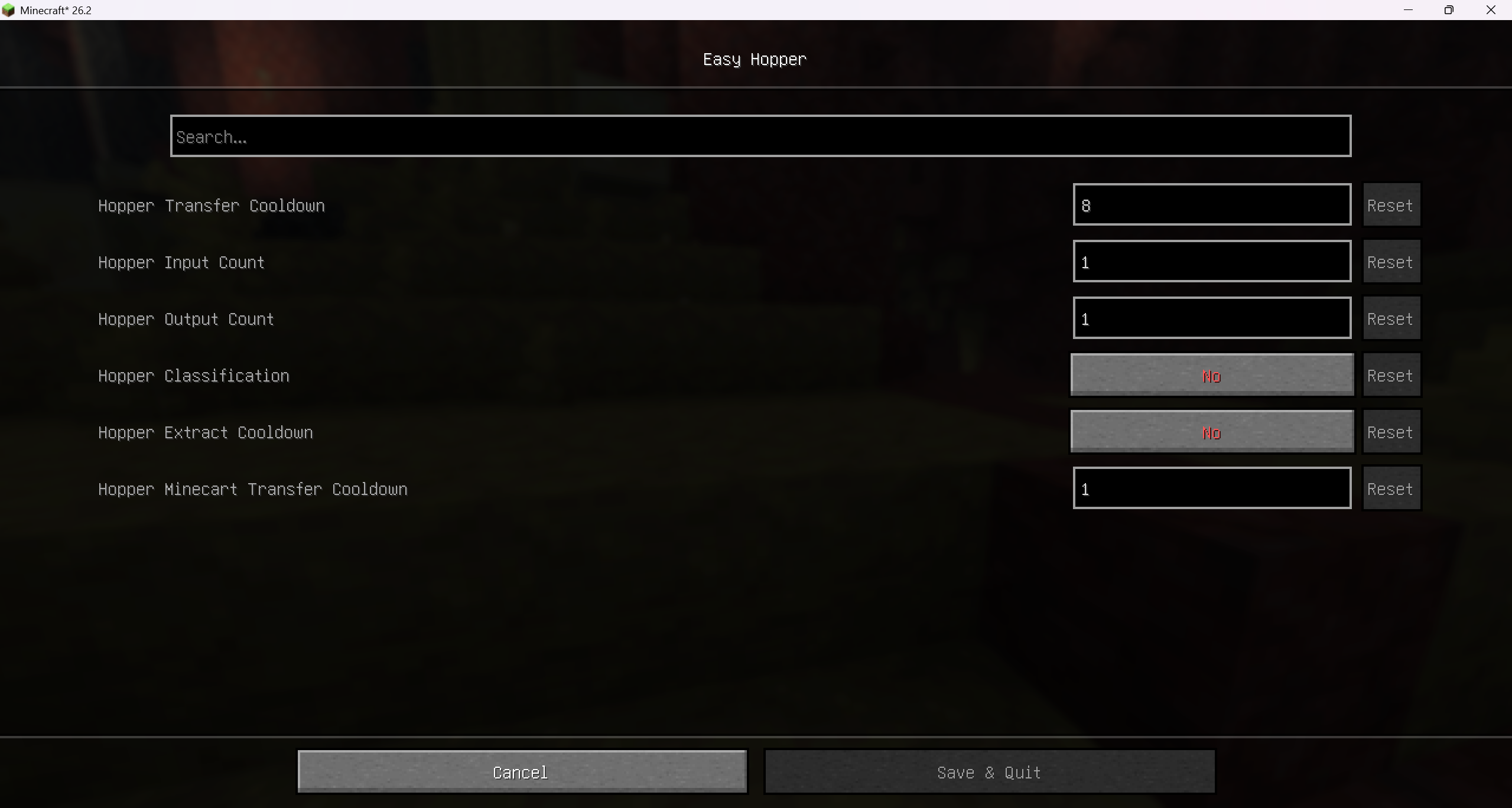
Configuration Access
- Any Scenario: You can directly edit
./config/easyhopper.yamlin your game directory. Changes will take effect after re-entering the world. - Singleplayer: You can adjust configurations via the in-game GUI (requires graphical UI dependencies; see below).
- LAN Host: The host can freely modify configurations in-game.
- Dedicated Servers: Players on a server (including non-host LAN players) can only modify configurations in-game if
Operator Modification (
ALLOW_OP_MODIFY) is enabled in the server config file AND the player has **Operator (OP) ** permissions.
Graphical UI Dependencies
For Fabric
To enable the config GUI, you must install the following:
- Mod Menu: Adds a configuration button in the mod list.
- Either Cloth Config API (Recommended) **or ** YACL: Provides the graphical interface. If both are installed, Cloth Config API will be used by default.
For NeoForge
To enable the config GUI, install either:
- Cloth Config API (Recommended) **or ** YACL. If both are installed, Cloth Config API will be used by default.
Features
Transfer Speed Adjustment
Modify hopper transfer cooldowns and the number of items transferred per tick/batch to speed up or slow down item movement.
Search / Extract Cooldown
Adds a cooldown whenever a hopper attempts to search for or extract nearby dropped items. This significantly reduces lag when large numbers of hoppers are placed. Note: This may affect timing-sensitive redstone contraptions, such as high-speed super smelters.
Hopper Item Filtering
Uses the 5th (last) slot of a hopper as a filter slot. Only items matching the item type in the 5th slot will be pulled in or outputted. If an invalid item is manually placed into the hopper, it remains in place, but other hoppers below can still pull valid items out.
Performance Optimization (<= 1.20.4)
Disables dropped item entity checks when a hopper is positioned directly below a full solid block or container, reducing server tick lag.
Note: Starting from version
1.20.5, Mojang natively integrated this optimization into vanilla Minecraft code, making this option no longer necessary for newer versions.
Compatibility
Mod Loaders
Game Versions
Recommended Gear
AffiliateHardware and extras that pair well with this mod.

As an Amazon Associate I earn from qualifying purchases.
Screenshots
Similar Mods

MVSI - Moog's Voyager Structures Integrated
An extension of MVS containing integrated structures with your fabrourite mods like Supplementaries & Amendments

Relic Mod Description Crash Handler
Handles and reports crash of relics mod that happens due to unknown mods combination

GodMod + LuckyBlock
God Tools, God Swords, God Armor, and Emerald Armor + LuckyBlock

Mob Control
Gives you full control over spawning mobs/spawners. Add custom AI to mobs, give them better weapons, and block burning i...

Creeper Ore!
For every ore mined, there is a 1% chance a creeper will be summoned.

TerrariaCraft RecipeViewer
View recipes and usages for items from TerrariaCraft!
