Enchantment Switch
Modby Fuzs
Swap active enchantments on your items on the fly! Toggle between otherwise incompatible enchantments.
Description








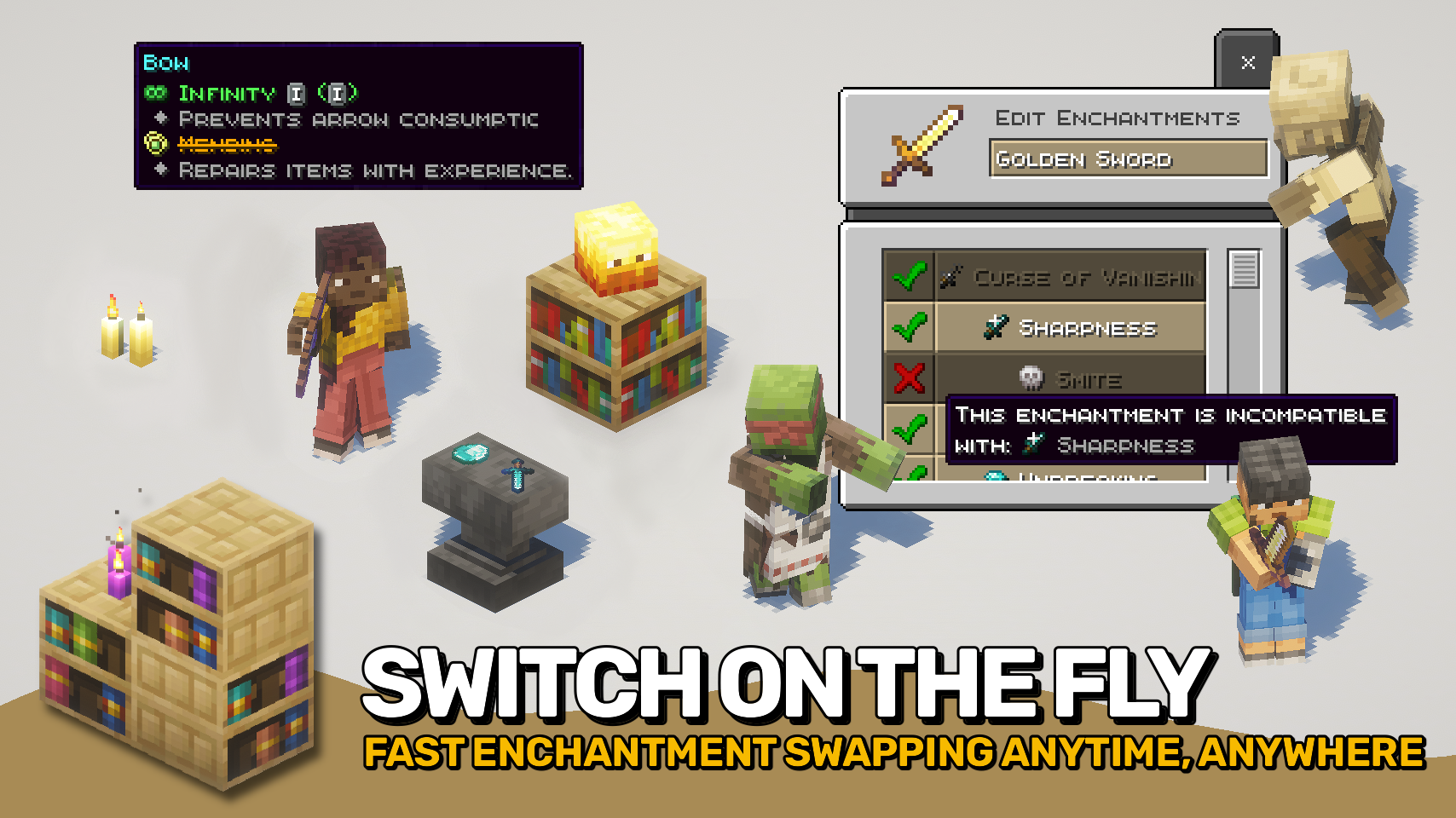
Enchantment Switch lets you control which enchantments are active on your tools, weapons, and armor. With a simple key press while hovering your mouse cursor over an enchanted item, a menu appears showing all enchantments on that item. You can then turn each one on or off to match the situation.
This makes it possible to combine enchantments that normally cannot exist together, as long as only one is active at a time. For example, switch between Mending and Infinity on your bow, or Sharpness and Smite on your sword. Even Frost Walker can be toggled off when you want to go swimming again.
Curses and other special enchantments cannot be turned off, keeping gameplay fair. Disabled enchantments still appear on the tooltip with a clear strike-through effect so you always know what is active.

- ⚙️ Quick Switching: Open the enchantment menu from your inventory with a simple key press.
- 🔄 Combine Incompatible Enchantments: Swap between Mending and Infinity on one bow, or toggle from Piercing to Multishot on your crossbow.
- 🧊 Smart Switching: Turn enchantments like Thorns or Soul Speed off when not needed, then back on anytime.
- 🚫 Fair Gameplay: Special enchantments stay permanently active and cannot be disabled.
- 👁️ Clear Tooltips: Disabled enchantments show with strike-through text so nothing is confusing.
- 🧩 Data Driven: Mod support and compatibility handled through the enchantmentswitch:persistent_enchantments tag.


⏩ INSTALLATION REQUIRED ON CLIENT & REQUIRED ON SERVER
⏩ REQUIRES PUZZLES LIB TO BE INSTALLED (FABRIC & NEOFORGE)
⏩ REQUIRES FABRIC API TO BE INSTALLED (FABRIC)
⏩ REQUIRES FORGE CONFIG API PORT TO BE INSTALLED (FABRIC)

If available for a mod, configuration is possible directly from in-game using the mod menu (requires Mod Menu by Prospector to be installed on Fabric). Please note that on older Minecraft versions installing Forge Config Screens is also a requirement.
For manual configuration using an external text editor all files are found at .minecraft/config, named as MOD_ID-client.toml, MOD_ID-common.toml, or MOD_ID-server.toml, depending on the type of config. Not all types might exist for a mod, if any at all.






Recommended Gear
AffiliateHardware and extras that pair well with this mod.

Mini PC for Self-Hosting
A low-power box that can sit in a cupboard and run a modded server around the clock.

Minecraft Enderman Character Plush
Enderman plush toys, and a reliable gift for a younger player.

LEGO Minecraft Set
Official sets that translate the building side of the game off-screen.
As an Amazon Associate I earn from qualifying purchases.
Similar Mods

Cherry Blossom Grotto
Adds new biomes with cherry blossom trees and many new thematic features!

Lost Cities Squared
A fork of The Lost Cities trying to fix the bugs with its old versions, focused on 1.12.2

Player Health Indicators (ANIMATED)
Renders a player health indicator HP bar with dynamic animations above players' heads.
AE2 EE3 EMC Add-On
Adds EMC to AE2 Items
Moff's AddonAPI-DynLoad
A library mod that provides an API for dynamically loading objects in addon mods based on the mods loaded by Forge.
![Stalker Creepers [FABRIC]](https://cdn.modrinth.com/data/y8ciiWUO/e7a841afa7e05fdb70489414f6c4ecfb202d5e3a_96.webp)
Stalker Creepers [FABRIC]
This is a fabric port of "Stalker Creepers" by AtomicStrykerGrumpy