

AE2:Utility
ModAdded upload function buttons for the Extended AE-Plus mod in the JEI interface, introduced the JEI recipe tree view, and supported mass recipe encoding and uploading.
Type
Mod
Modrinth Downloads
1,574
Modrinth ID
kJXRtOkZ
Last Updated
Jul 29, 2026
Description
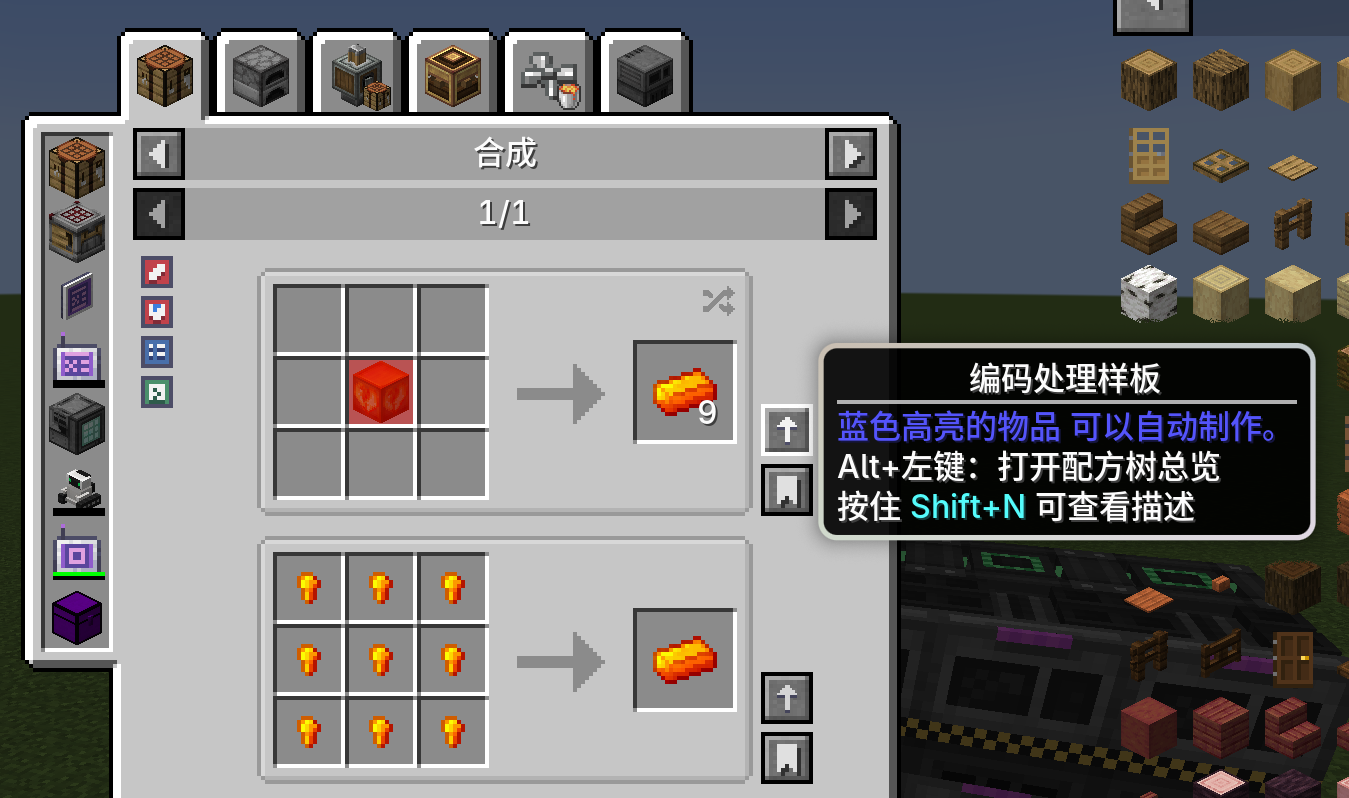
- Encoding buttons will appear when opening the Pattern Encoding Terminal, or when the player carries (Wireless) Pattern Encoding Terminal / Universal Wireless Terminal in inventory or Curios slots.
- Left Click: Encode patterns from current JEI recipes into player inventory. Toggle Item/Fluid Replacement at the top-left corner of the JEI page.
- Shift + Left Click (Requires ExtendedAE-Plus): Execute EAEP-related processes including pattern mapping and uploading patterns to pattern providers.
- Ctrl+Shift+Left Click: Upload patterns following Shift upload rules, and add primary input items without auto-crafting patterns (the first item in JEI default flash item list) to JEI favorites.
- Input slot highlight on hovering arrows: Blue = Corresponding crafting pattern exists in ME Network; Red = No matching crafting pattern found.
- Blue/Orange button background indicates craftable conditions on output or input side.
- Priority rule for multiple raw material selections: Bookmarks > Existing ME Network Recipes > First item in JEI default flash list.
-
Support pulling non-craftable recipe items from JEI into ME Terminals. Items with sufficient quantity in player inventory will not be pulled. Items are prioritized into terminal grid; if full, stored into inventory; skipped with prompt if no available storage space.
-
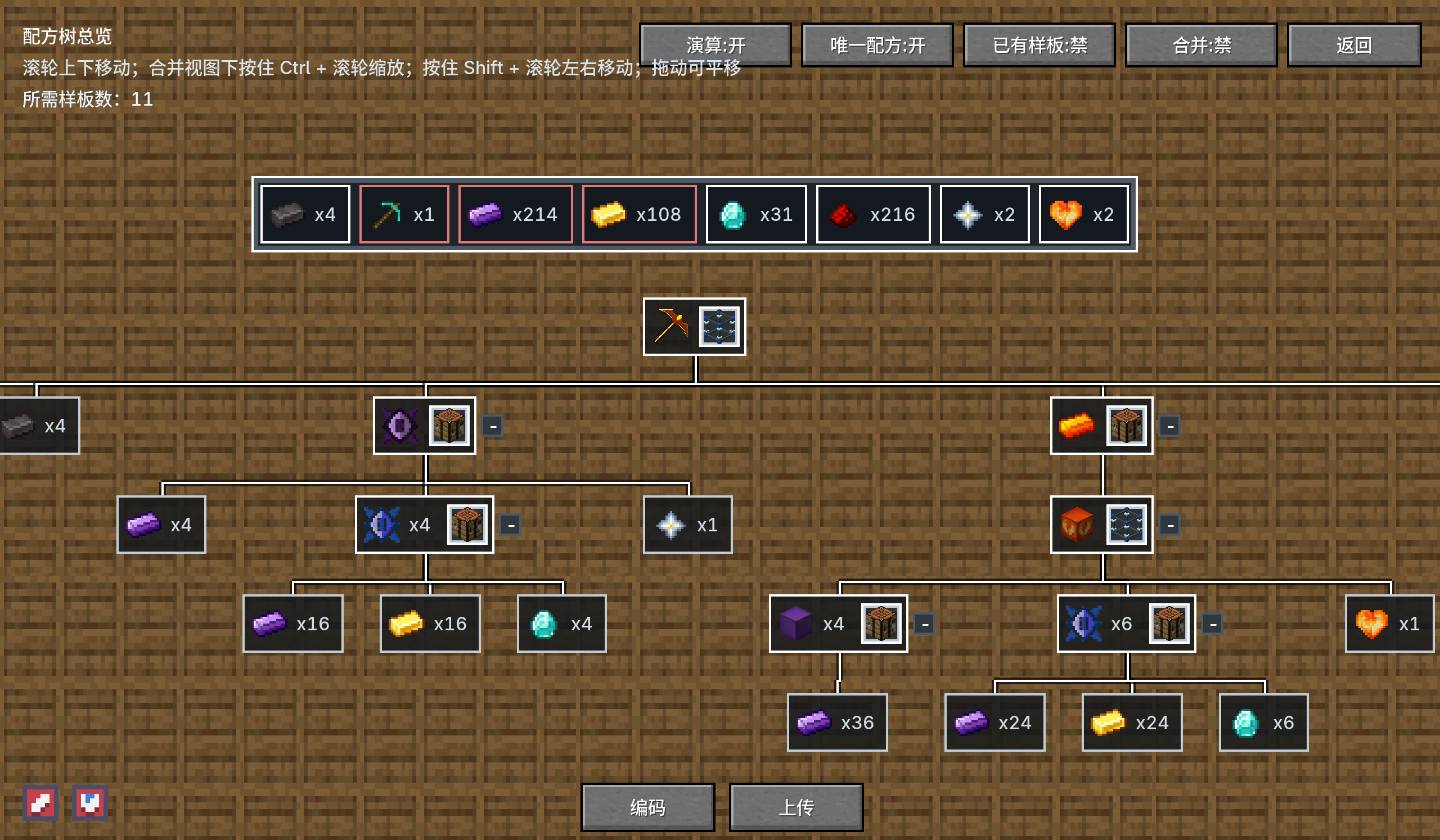
Added Recipe Tree function, accessible via Alt + Left Click on JEI encoding button.
- Encode all designated recipes at once and consume corresponding blank patterns.
- Enable pattern batch upload function when ExtendedAE-Plus is installed, supporting one-click encoding and uploading of all patterns.
- Unmapped machines will open mapping interfaces sequentially during upload. Canceling upload sends patterns back to player inventory and adds designated recipes to JEI favorites.
- Send notifications for successfully uploaded and pending patterns after completion.
- Probabilistic products are hidden by default.
- Disable duplicate selection if identical patterns already exist in ME Network.
- Click dropdown button to switch alternatives when multiple material options are available; first item in static list is selected by default.
- Selectable recipes in Recipe Tree Overview with identical operation logic; machine icons support quick recipe selection.
- Display required blank pattern quantity at the top-left corner during batch encoding.
- Toggle to skip encoding existing ME network patterns at the top-right corner.
- Real-time total material list for all selected recipes.
- Click material icons to jump to corresponding recipe branches; hover to check recipe existence in ME Network.
- Collapse optional recipe branches to skip encoding.
- Enable Item Replacement and Fluid Replacement at the bottom-left of overview interface.
- Merge Recipe Tree function: auto combine identical-tier material branches when enabled.
- Encoding and Upload buttons; Upload function is only available with EAEP installed.
- Unique Recipe Switch: Auto select and expand branches with only one available encodable recipe in JEI. Still works when existing pattern skip is enabled while skipping matched network patterns; disabled when multiple material choices exist.
- New top-left JEI interface features:
- One-click encode all recipes on current page; hold Shift to directly batch encode and upload.
- One-click encode all recipes under current JEI machine category (all pages); hold Shift for direct batch upload.
- Both functions skip patterns already stored in ME Network during uploading.
-
Added NBT Strip Card functional card. Place it inside Pattern Providers to ignore NBT data of crafting materials and finished products. Right-click the card to mark specific items for exclusion; ignore all NBT data by default. Compatible with AE2 Lightning Tech, AE2 Crystal Science, AdvancedAE and Neo Eco AE Extension.
-
Added three new commands: (1) /ae2utility stopuploads Stop current player's ongoing batch pattern uploads (No admin permission required). (2) /ae2utility stopuploads all Stop batch upload tasks of all online players (Admin permission required). (3) /execute as <Player> run ae2utility stopuploads Used in server console to halt batch upload progress of specified player.
-
Added configurable options: (1) Toggle one-click full-category JEI recipe encoding, and set maximum single-batch upload pattern limit. (2) Toggle pattern encoding & uploading permissions when Pattern Encoding GUI is closed.
-
Each player can only run one batch upload queue at a time; new tasks can only start after current queue finishes.
-
Added Ctrl+A hotkey to clear all JEI bookmarks instantly. Toggleable in config files and rebindable in in-game keybind settings.
1.在打开样板编码终端时,或背包/Curios 中佩戴有 (无线)样板编码 / 通用无线终端 时显示编码按钮
· 左键:按当前 JEI 配方编码样板至玩家物品栏( JEI 页面左上角可开关“物品/流体替换”)
· Shift+左键(需安装 ExtendedAE - Plus 模组):走映射 / 上传样板到供应器 等 EAEP 相关流程
· Ctrl+Shift+左键:按 Shift 上传路径上传样板,并把无自动合成样板的输入(当前槽位物品 JEI 默认闪烁物品列表中的第一项)加入 JEI 收藏
· 悬停箭头时输入槽高亮:蓝 = ME 网络中存在对应合成样板;红 = 无对应合成样板
· 按钮背景蓝/ 橙表示输出或输入侧存在可合成判断
· 多选原材料的优先级规则:书签优先 > ME 网络已有配方 > JEI默认闪烁物品列表中的第一项
-
支持 JEI 拉取非合成配方物品到 ME 终端,物品栏中含有足量的物品将不会拉取,优先放至终端网格,空间不足时再放至物品栏,均无法放置则跳过并提示。
-
新增“配方树”功能,入口设定为JEI界面编码按钮Alt+左键进入。
· 编码时将一次性编码所有已指定配方,并消耗等量样板;
· 当安装有 ExtendedAE-Plus模组时,启用上传功能,可一次性编码并上传所有样板;
· 上传样板时未映射机器将一个个走映射界面,取消则将样板发送至玩家背包并收藏指定配方到JEI;
· 上传完成后发送已成功样板与未上传样板提示;
· 概率产物默认不展示;
· 网络中已含有样板时,可禁用二次选择;
· 若存在某种材料有多种选择,点击下拉按钮可选择其他物品,默认选择静态列表第一个;
· 配方树总览界面支持选取配方,操作逻辑与配方树类似,机器图标可选择配方;
· 界面左上角增加显示当前配方编码样板时所需空白样板数量;
· 界面右上角增加开关禁用编码ME网络中已存在该样板功能;
· 总材料清单可实时汇总当前配方所需材料;
· 点击材料清单物品图标,可跳转到对应分支位置,鼠标悬停时可查看ME网络里是否含有该配方;
· 存在分支的配方可进行折叠取消编码;
· 在总览界面左下角可开启物品替换和流体替换;
· 合并配方树功能,开启时自动合并同层材料分支;
· “编码”和“上传”按钮,上传功能仅在安装EAEP模组时启用;
· “唯一配方”按钮:开启时,若某未展开分支在JEI中仅有唯一一条当前可编码配方,将自动选中并展开。「已有样板:禁」时仍会尝试自动展开,但会跳过「ME网络已有样板」的材料;多种可选材料时不自动展开。
- JEI界面左上角新增功能:
· 一键编码当前页显示的所有配方,按住shift点击可直接批量编码上传;
· 一键编码当前JEI机器分类下的全部配方(含所有分页)按钮,按住shift点击可直接批量编码上传;
· 两种功能在上传样板时均会跳过ME网络中已有样板。
-
新增“NBT撕裂卡”功能卡,样板供应器放入该卡可以忽略产物与合成材料的NBT,右键撕裂卡可打开标记特定物品,不标记默认全部忽略,兼容AE2 Lightning Tech、AE2 Crystal Science、AdvancedAE、Neo Eco AE Extension模组;
-
新增三个指令:
(1)/ae2utility stopuploads 停用当前玩家批量上传样板状态(无需管理员权限)
(2)/ae2utility stopuploads all 停用当前所有在线玩家批量上传样板状态(需管理员权限)
(3)/execute as <玩家> run ae2utility stopuploads 纯控制台时,停用指定玩家的批量上传状态
- 增加配置文件:
(1)允许自定义开关一键编码当前JEI机器分类下的所有配方,且可配置最大可允许单次上传样板数量;
(2)允许开关未打开样板编码界面时是否可编码/上传样板;
- 同一玩家仅允许发送一条批量上传队列,需等待队列完成后才可再次上传;
- 新增JEI书签栏按住“Ctrl+A”一键清空书签栏,可在配置文件开关,可在按键绑定修改按键。
Compatibility
Mod Loaders
Game Versions
Recommended Gear
AffiliateHardware and extras that pair well with this mod.

As an Amazon Associate I earn from qualifying purchases.
Screenshots
Similar Mods

Brutes Drops Scraps (Fabric/Forge/NeoForge/Quilt)
Now piglin brutes can drop up two netherite scraps!

Wings Devel
Add wings in different versions and creations, it is not our idea, it was a mod that was not updated and we decided to u...

AutoJump Fix
Grants auto-jumping a second life by fixing annoying issues, such as auto-jumping too late and causing you to lose your...

Foxified Dense Flowers
Makes flowers fields look denser
Critical Strike Enchant
Adds Critical Strike as a weapon enchantment.
Item Scrapper Pack - VPB
Item Scrapper Pack for VBP