

RealClockHUD
ModA simple client-side Fabric mod that shows the current time in-game. Fully configurable, works on any server.
Type
Mod
Modrinth Downloads
366
Modrinth ID
H9BVLxgv
Last Updated
Jul 29, 2026
Description
RealClockHUD
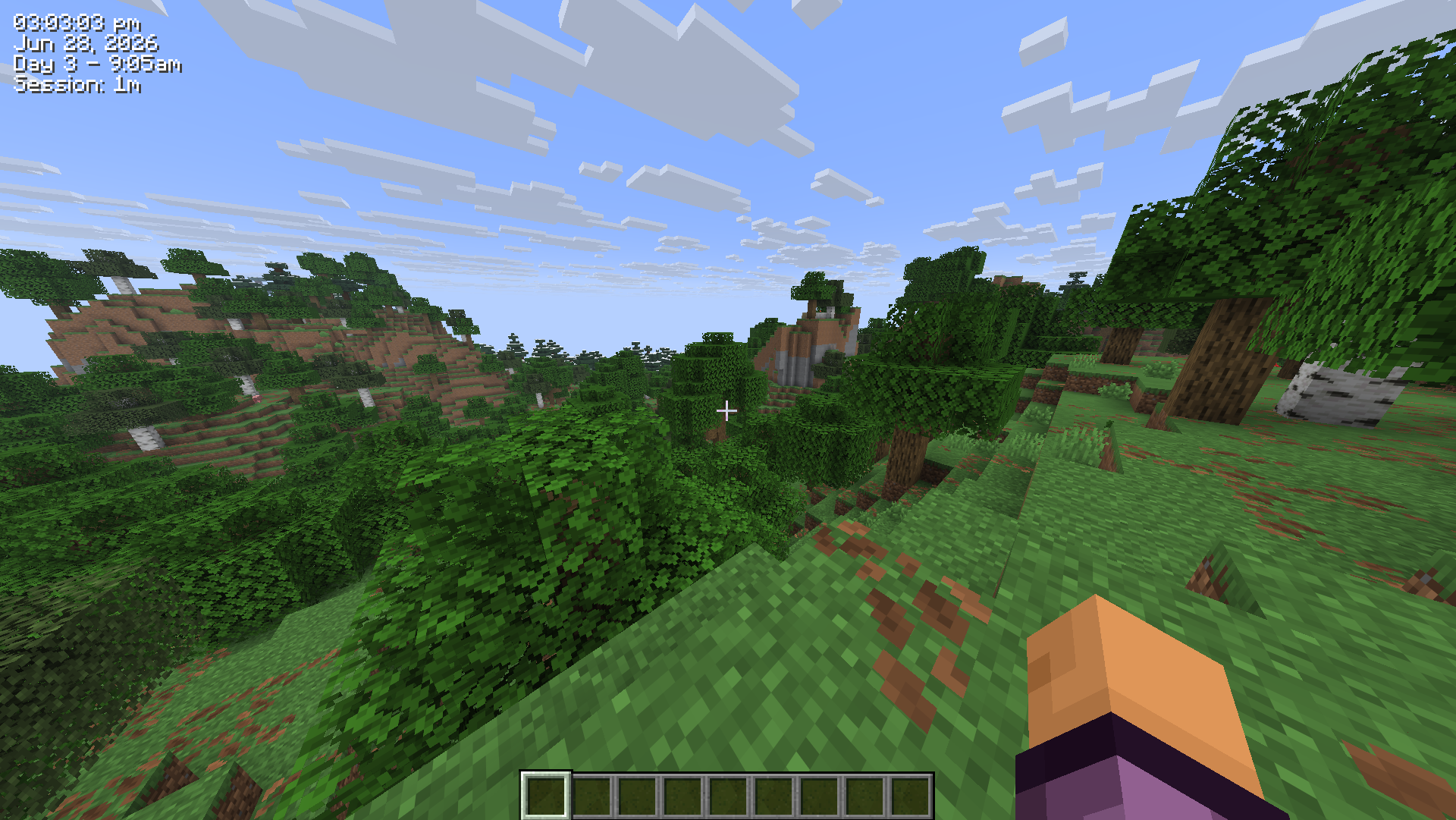
Displays the real-life system time as a HUD overlay in Minecraft.
Features
- Real-life clock displayed as an in-game HUD overlay
- 12-hour and 24-hour format toggle
- Optional seconds display
- Real-life date display (e.g. Jun 28, 2026)
- In-game time display (e.g. Day 42 - 6:30am)
- Session timer showing how long you've been playing (e.g. Session: 1h 23m)
- Configurable corner positioning (top-left, top-right, bottom-left, bottom-right)
- X/Y offset for fine-tuned placement
- Custom text color (hex)
- Optional background box
- Optional text shadow
- Keybind to toggle visibility (default: K, rebindable in Controls)
- /realclock commands for all settings
- Self-healing config - invalid or missing values are corrected and re-saved automatically
- Hides during F1/F3 and screenshots
- Updated for 26.2
Settings/Commands
All settings are stored in .minecraft/config/realclock.json and can be edited manually. The config is self-healing - any invalid values will be reset to defaults automatically on next launch.
You can also change any setting using the /realclock command - no need to edit the config file directly. Changes take effect immediately and are saved automatically.
The clock can also be toggled with the K keybind (rebindable in Options > Controls).
Setting Command Default Description 24h /realclock 24h true false Use 24hr time format instead of 12hr background /realclock background true true Show a dark box behind the clock color /realclock color #FF0000 #FFFFFF Text color as a hex value corner /realclock corner top-left top-right Clock position - top-left, top-right, bottom-left, bottom-right date /realclock date true false Show the real-life date below the clock gametime /realclock gametime true false Show the in-game day and time of day offsetx /realclock offsetx 8 4 Horizontal nudge in pixels from the corner offsety /realclock offsety 8 4 Vertical nudge in pixels from the corner scale /realclock scale 1.5 1.0 Text scale - 1.0 is normal, 2.0 is double size seconds /realclock seconds true false Show seconds alongside the time sessiontimer /realclock sessiontimer true false Show how long you've been in the current session shadow /realclock shadow true true Render a drop shadow behind the text toggle /realclock toggle true Whether the clock is currently visibleConfiguration
Config file is created automatically at .minecraft/config/realclock.json on first launch.
{ "visible": true, "corner": "TOP_RIGHT", "use24Hour": false, "showSeconds": false, "color": 16777215, "scale": 1.0, "showDate": false, "showGameTime": false, "showSessionTimer": false, "showBackground": true, "textShadow": true, "offsetX": 4, "offsetY": 4 }color is stored as a decimal integer. 16777215 = #FFFFFF (white).
Compatibility
Mod Loaders
Game Versions
Recommended Gear
AffiliateHardware and extras that pair well with this mod.

As an Amazon Associate I earn from qualifying purchases.
Screenshots
Similar Mods

thats not a deer (Fixed & Restored) (Horror) (skinwalker) (dweller)
The restored version of Not Deer for 1.19.2. This version fixes the "purple checkered" missing textures for Venison and...

Cobblemon Quick Item Swap
Add quick held item switching function to Cobblemon's PC
Industrial Wires Classic
An addon to ImmersiveEngineering and IC2C
unsuccessful.jar
Horror arthouse

Totem Utils
Totem hotkey, pop overlay and much more >:)
Just Nether Reactor
Nether Reactor in MC 1.12.2/1.14.4/1.15.2