

Sulker
ModSulker is a client-side Minecraft Fabric mod for named shulker box templates. Named shulker boxes act as reusable inventory layouts. A shulker's custom name is the template key, so multiple shulkers with the same name intentionally share the same layout.
Type
Mod
Modrinth Downloads
155
Modrinth ID
imHwio0Z
Last Updated
Jul 29, 2026
Description
Sulker

Sulker is a client-side Minecraft Fabric mod for named shulker box templates.
Named shulker boxes act as reusable inventory layouts. A shulker's custom name is the template key, so multiple shulkers with the same name intentionally share the same layout.
Templates are saved locally and work across worlds. Set up your layouts once, then reuse them anywhere by naming shulker boxes the same way.
Usage
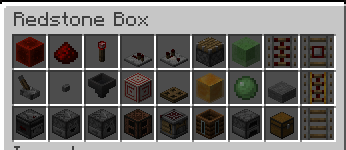
Name a shulker box in an anvil, open it, arrange the items, then run /sulker save. Every shulker with the same name shows the same layout. Empty expected slots show ghost items, and hovering a ghost item shows the expected item's normal tooltip.
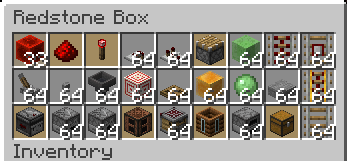
Sulker marks wrong items with a red background and shows low count items with an amber background so you can see when to restock at a glance. Low-count warnings can start at any missing item, 75%, 50%, 25%, or be turned off.
Saved templates preserve item components for exact slots, so component-bearing items such as potions, maps, banners, and renamed items can show and match their saved variant. /sulker save counts saves the remembered stack sizes as target counts. /sulker itemcount or /sulker setitem can adjust count targets without rebuilding the whole shulker. Command feedback includes the template name, and the recently opened shulker memory expires after 60 seconds. /sulker rename and /sulker copy help reuse layouts when shulker names change. Command feedback includes the template name, saved template names are suggested for template arguments, and the recently opened shulker memory expires after 60 seconds.
Options
The config controls ghost items, ghost tooltips, wrong-item tint, low-count warning level, and recently closed shulker memory.
When Mod Menu is installed, Sulker exposes the same options from Mod Menu's configure screen. Mod Menu is optional.
Commands
Commands that act on a shulker use the recently opened named shulker unless a template name is supplied.
/sulker save
Saves the recently opened shulker contents as the template for that shulker name. Empty slots are ignored.
/sulker save counts
Saves the layout and stores each non-empty stack size as that slot's target count. A slot saved with 8 eggs expects at least 8 eggs, not a full stack.
/sulker list
/sulker give <template name>
Creates a named shulker box filled from the saved template and puts it into a free inventory slot. Requires creative mode. Saved template names are suggested while typing.
/sulker rename <old> <new>
Renames a saved template. Quote names with spaces, such as /sulker rename "Redstone Kit" "Travel Kit".
/sulker copy <from> <to>
Copies a saved template to a new name. Quote names with spaces, such as /sulker copy "Redstone Kit" "Backup Kit".
Lists saved template names in alphabetical order.
/sulker delete [name]
Deletes the recently opened shulker template, or a named template when name is supplied.
/sulker itemcount <slot> <count> [template name]
Sets a target count for one expected slot. If template name is omitted, Sulker uses the recently opened named shulker. Slots are numbered 0 to 26, left to right, top to bottom. Counts cannot exceed the item's normal max stack size.
/sulker itemcount <slot> clear [template name]
Removes a custom target count from one slot. The slot goes back to the normal full-stack target for that item.
/sulker setitem <slot> <item> <count> [template name]
Sets one template slot directly, using an item id such as minecraft:egg. If template name is omitted, Sulker uses the recently opened named shulker.
/sulker setitem <item> <slot> <count> [template name]
Item-first alias for the same direct slot edit.
Short aliases:
/sulkersave /sulkerlist /sulkerdelete [name]Compatibility
Mod Loaders
Game Versions
Recommended Gear
AffiliateHardware and extras that pair well with this mod.

As an Amazon Associate I earn from qualifying purchases.
Similar Mods
EventAntiXray
a lightweight Minecraft Fabric mod designed for server administrators to detect potential X-ray cheating

expRepair
Take control of your Mending enchantment. expRepair lets you decide when and how your gear gets repaired using your stor...
TKVM Enemies: Dark Knight
Adds a dark knight boss in the nether, along with an arena.

Sound Awareness
A mod adding visual cues to know your sorroundings!

Dual Daggers
Adds dual daggers as a new weapon
Stone Tool Progression
Getting Stone Tools is a little harder now.