

Simple Datapacks
Modby BizCub
This mod makes it easier to use datapacks for those who want to install them without any hassle and enjoy the game
Type
Mod
CurseForge Downloads
129,510
CurseForge ID
Modrinth Downloads
1,350,915
Modrinth ID
Last Updated
Nov 4, 2026
Description
📂 Simple Datapacks
The purpose of this mod is to simplify the ways of adding datapacks to the game. To do this, the mod creates a folder in the root directory of Minecraft called datapacks. In my opinion, the capabilities of datapacks are underestimated by players, mostly because not everyone understands how to install datapacks into the game. This is more difficult to do than to install a mod or resource pack, although many datapacks bring a lot of content to the game.
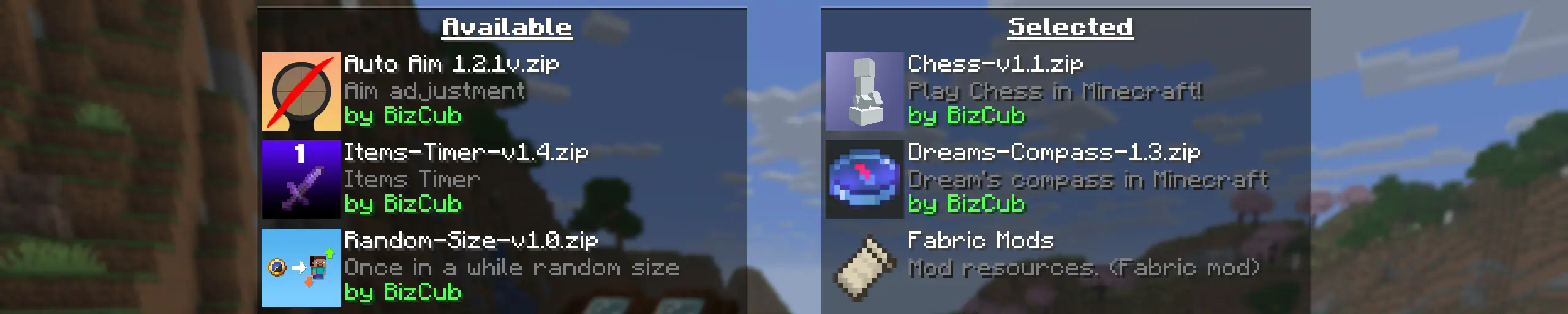
My goal is to make a mod that will help players with installing datapacks into the game so that they can get a new portion of unforgettable impressions.
💼 Usage

In order to launch a world with datapacks, you need to download any datapack that is compatible with the selected version of Minecraft, open and place the datapack in the datapacks folder, start creating a world and select the desired datapack from the list. However, when using Cloth Config, the mod settings specify the path to the downloads folder, so to use datapacks, you only need to download them, then simply open the datapack selection menu and enable the desired one.
✨ Features
Whenever possible, I added the most basic features for the mod that I could imagine.
Click to open
-
Since the main thing for me is that as many players as possible start using datapacks, I made the mod available on 4 different loaders so that it can be launched from almost any modpack.
-
The mod has a configuration. The values used by the mod can be changed in the mod menu (Fabric requires ModMenu), and can also be changed in the configuration file, which is available using the Cloth Config API.
-
The mod allows players to add and load datapacks from different folders. To change the sources of these packs, you need to configure them in the mod settings. If you want to specify a folder in the game's root directory, for example,
my_datapacksinstead of the full pathC:\Users\{USERNAME}\AppData\Roaming\.minecraft\my_datapacks, simply enter the folder name in the field in the mod settings menu. -
By default, datapacks are loaded from the datapacks folder in the root directory and the downloads folder, allowing them to appear in the game immediately after installation (provided Cloth Config API is loaded; otherwise, only the datapacks folder will be used).
-
The mod settings have two lists: one for required and one for optional datapacks. The first list specifies the paths to datapacks that are automatically applied when entering a world. The second list contains datapacks that remain inactive but can be enabled at any time using the
/datapack enablecommand. -
The Simple Datapacks mod runs on the server. Since the mod settings are not accessible on the server, it automatically uses all datapacks from the datapacks folder.
-
It's possible to disable feature packs (experimental datapacks). If you don't use feature packs, you can disable them to save space on the datapack selection screen. In the mod settings, function packages can be set to required, and then they will be applied when the world starts.
-
Unlike similar mods, datapacks will continue to work in the world, even if you disable the mod. In the mod settings, you can enable copying datapacks to the world folder. In this case, the datapack will work without the mod, because the game will read it from the world.
🤝 Support

Compatibility
Mod Loaders
Game Versions
Recommended Gear
AffiliateHardware and extras that pair well with this mod.

LEGO Minecraft Set
Official sets that translate the building side of the game off-screen.

Minecraft Enderman Character Plush
Enderman plush toys, and a reliable gift for a younger player.

Mini PC for Self-Hosting
A low-power box that can sit in a cupboard and run a modded server around the clock.
As an Amazon Associate I earn from qualifying purchases.
Screenshots
Similar Mods

Upgraded Netherite : Items
Adds some items like apples and totems to the Upgraded Netherite mod.

Refined Storage - Quartz Arsenal
Quartz Arsenal is an addon for Refined Storage that adds various new tools.
Better Questing Tweaker (BQTweaker)
Tweaker mod to change some aspects of BetterQuesting

Tax Free Levels
Flattens the ever-increasing anvil and enchantment costs and makes renaming items always cost 1 level

Refined Storage - JEI Integration
Refined Storage has an optional integration mod for Just Enough Items (JEI), enhancing crafting and recipe interaction.
Pretty Pipes
A hassle-free, all-inclusive item transport mod
Included in Modpacks (58)
Most downloaded Vanilla Perfected
 Tales
 Unstable SMP Recreation
 Diamond Age
 Project 4J
 Kuri's FreshVanilla
 Dark TFC - UltraHardcore
 Mirabilis - Vanilla Plus Plus!
 Big Globe Optimized (FABRIC)
 Optimal Survival
 editon's Modpack
 Create ADDONS
 Nomurras Terror
 Dev Relief
 Celestial Performance [QoL]
 Liquid Client
 Vanilla Ventures
 Vanilla Horizons
 Vanilla's Finest
 Seecret Sunday