

Dimension Notifier
ModDimension alerts, server chat announcements, and Tab list labels so players know where everyone is.
Type
Mod
Modrinth Downloads
122
Modrinth ID
kpwhwrp4
Last Updated
Jul 29, 2026
Description
Dimension Notifier




Dimension Notifier keeps your whole server oriented as players move between worlds.
- See every dimension change — a short action bar cue the moment a player enters the Nether, the End, or the Overworld.
- Broadcast travel to the server — an optional chat message when anyone changes dimension.
- Read the room from the Tab list — live dimension labels next to player names.
- Server-first — runs entirely on the server; players do not need to install anything.
- Yours to tune — optional client settings and live Mod Menu controls.
Features
See where you arrive, instantly
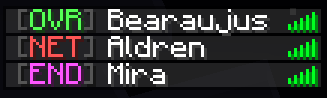
A short action bar message confirms where you arrived without filling chat. Hide coordinates for a cleaner line, or show them when your group wants exact arrival points. Compact labels such as OVR, NET, and END keep alerts tight.



Tell the server who is on the move
Broadcast a compact chat message when a player enters another dimension — useful for survival groups, events, and operator visibility when players spread across worlds. Switch to short labels for less noise, and choose whether the traveling player sees it too.



A Tab list that shows where everyone is
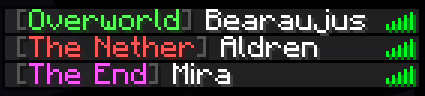
Dimension labels make the vanilla Tab list easy to scan. Use full labels when clarity matters most, compact badges for a tighter column, and aligned names for a tidy layout.
Settings when you want them
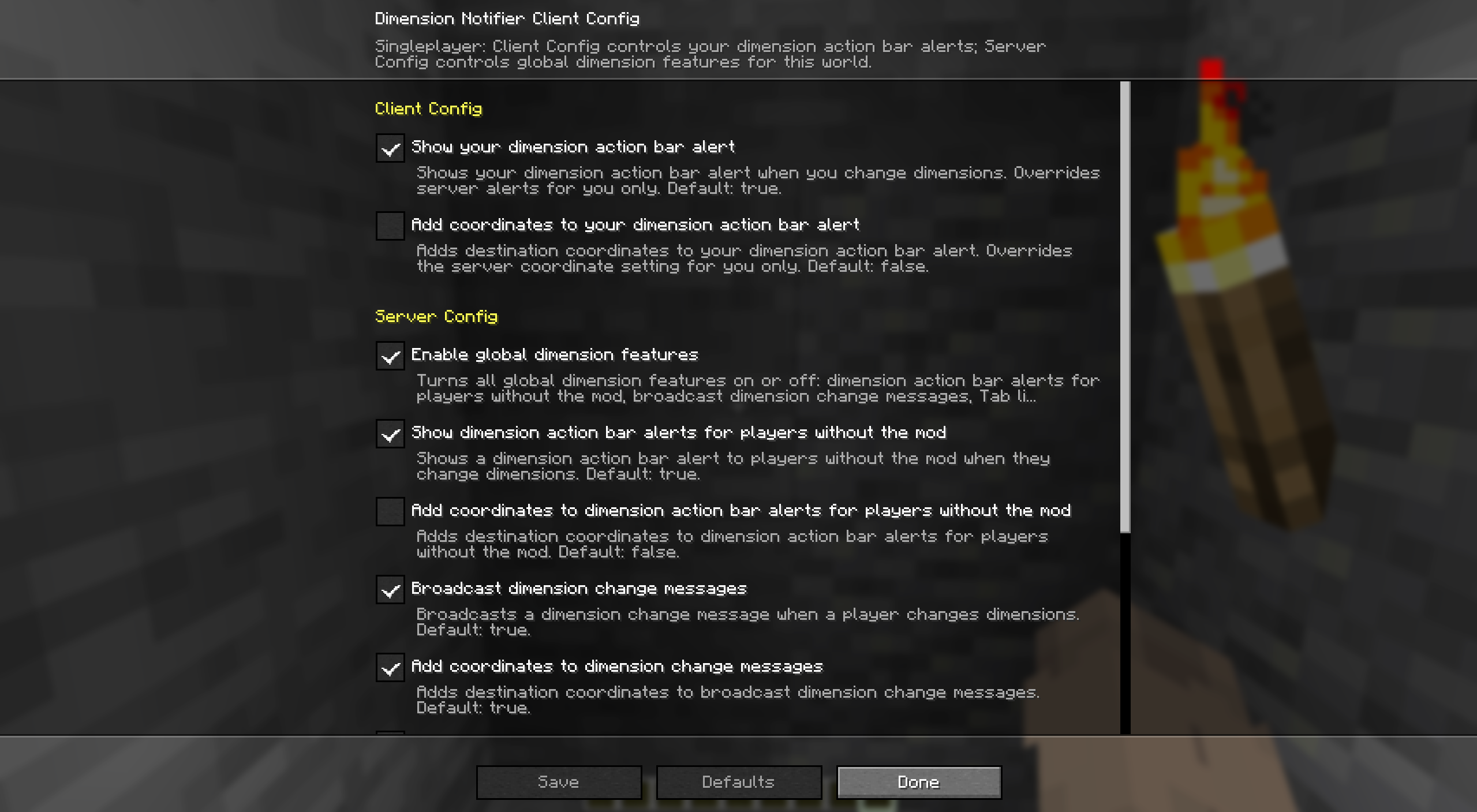
With Mod Menu, adjust your own action bar settings, or let them inherit Server Config while keeping your local values saved for later. In singleplayer, or on a server where you have operator permission, Server Config also exposes the global dimension features.
Quickstart
- Install Fabric Loader and Fabric API on your server.
- Drop Dimension Notifier into the server's mods/ folder and start it. Every player now sees dimension cues, broadcasts, and Tab list labels — no client install required.
- Want personal action bar control or live settings? Add the mod (and Mod Menu) on your client.
- Change anything later in Mod Menu — Server Config needs operator permission — or in the config file below.
Compatibility
Dimension Notifier is server-first. Here is where each piece runs and what it needs.
- Dedicated server (required): broadcast dimension-change messages, action bar alerts for players without the mod, and Tab list labels.
- Client (optional): personal action bar alerts, Client Config, Mod Menu settings, and singleplayer.
- Required dependency: Fabric API, wherever the mod is installed.
- Optional dependency: Mod Menu on clients for Client Config and permission-gated Server Config.
Make it yours
Dimension Notifier keeps client settings separate from server settings.
- Client settings control your dimension-change action bar on this computer.
- Client Config can inherit overlapping Server Config values without overwriting your saved local values.
- Server settings control the action bar for players without the mod, broadcast messages, and Tab list labels.
- Each scope has its own master toggle, so either side can stay on or off.
- In singleplayer, Server Config edits the server settings in the local file. On remote servers, Server Config is editable only with operator permission.
Config file
After first launch, edit config/dimension-notifier.json. File edits need a game or server restart; Mod Menu changes apply immediately where editable.
{ "schema_version": 1, "server": { "enabled": true, "action_bar": { "on_dimension_change": { "enabled": true, "include_coordinates": false, "use_short_labels": false } }, "broadcasts": { "on_dimension_change": { "enabled": true, "include_coordinates": false, "use_short_labels": false, "send_to_triggering_player": false } }, "tab_list": { "dimension_labels": { "enabled": true, "use_short_labels": false, "align_player_names": true, "add_space_before": false, "add_space_after": true } } }, "client": { "enabled": true, "inherit_server_settings": false, "action_bar": { "on_dimension_change": { "enabled": true, "include_coordinates": false, "use_short_labels": false } } } }More from bearaujus
More server-first Fabric mods in the same family:
- Death Respawn Notifier — Die less lost — death coordinates, respawn broadcasts, and a dead-player marker in the Tab list.
Support & license
Report issues at [email protected].
Dimension Notifier is distributed under the Bearaujus Proprietary License v1.0. Full terms ship inside the downloaded jar as LICENSE.txt.
Dimension Notifier is not official Minecraft content and is not endorsed by or associated with Mojang or Microsoft.
Compatibility
Mod Loaders
Game Versions
Recommended Gear
AffiliateHardware and extras that pair well with this mod.

As an Amazon Associate I earn from qualifying purchases.
Screenshots
Similar Mods

Custom Chest Name
Allows you to rename chest

LuckyLucky
LuckyLucky is a customizable command-based gambling mod, Players can wager experience or items in exchange for configura...

I'm So Lucky!
Simple Luck Potion Crafting recipe for survival.

Dynamic Trees - Arts and Crafts
Compatibility mod between Dynamic Trees and Arts and Crafts

Quick menu Renewed
This is a renewed fork based on the original (abandoned?) quick-menu.
Factori-0 Rebuild
Factory-0 Rebuild brings Factorio-style automation. Use Scanners to map ore density and coal-fired Burner Drills for eff...