

Sorted
ModSmart inventory sorting with zone-aware layout, persistent chest memory, and quick stack to nearby containers. Fully client-side, vanilla UI that follows resource packs.
Type
Mod
Modrinth Downloads
14,171
Modrinth ID
vtsGVHan
Last Updated
Sep 10, 2026
Description
Sorted
Client-side inventory sorting with chest memory and quick stack.
Fabric · Client-only · 1.21.x · 26.x
Your inventory gets messy. You open chests looking for things you put somewhere. You manually move stacks around you already have in a nearby barrel.
Sorted handles all of that. It sorts your inventory with a real layout in mind, remembers what's in every chest you've opened, and lets you push/pull items across nearby containers in one button press.
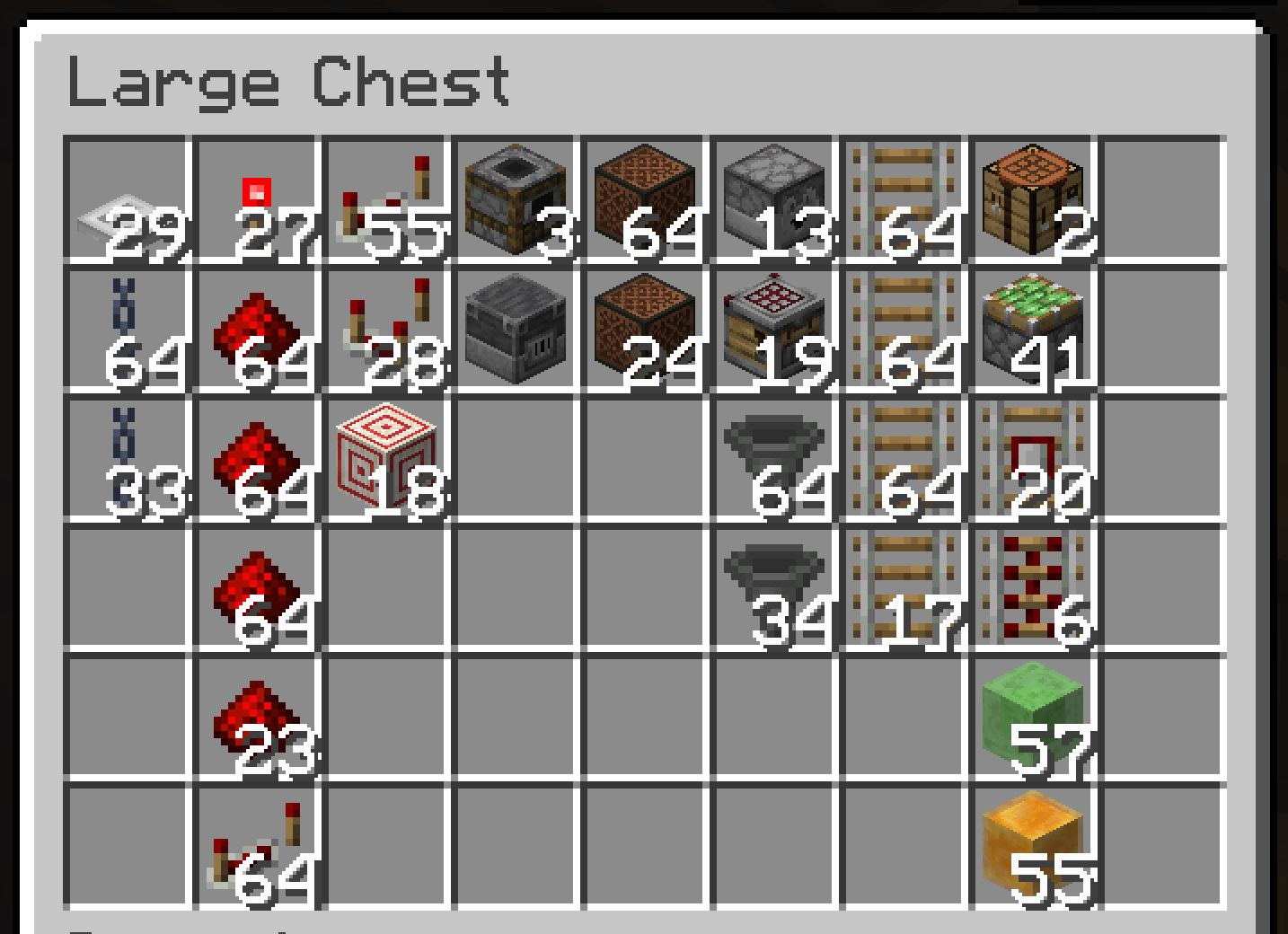
- Auto-sort on pickup — items land in the right place the moment you pick them up
- Zone layout — gear and tools first, then food, then building blocks, then everything else — same order every time
- Hotbar stays put — sorting only rearranges your main inventory; your hotbar gear is never touched
- Sort buttons — sort your inventory or any open chest with one click
- Quick Stack — deposit matching items into nearby containers in one keybind (Terraria players, this one's for you)
- Quick Empty / Fill / Pull — dump your bags, top up partial stacks, or pull a whole chest to your inventory
- Chest knowledge — remembers what's in every chest you've opened, persists across restarts
- Container search — find any item across all cached containers near you, with count and position
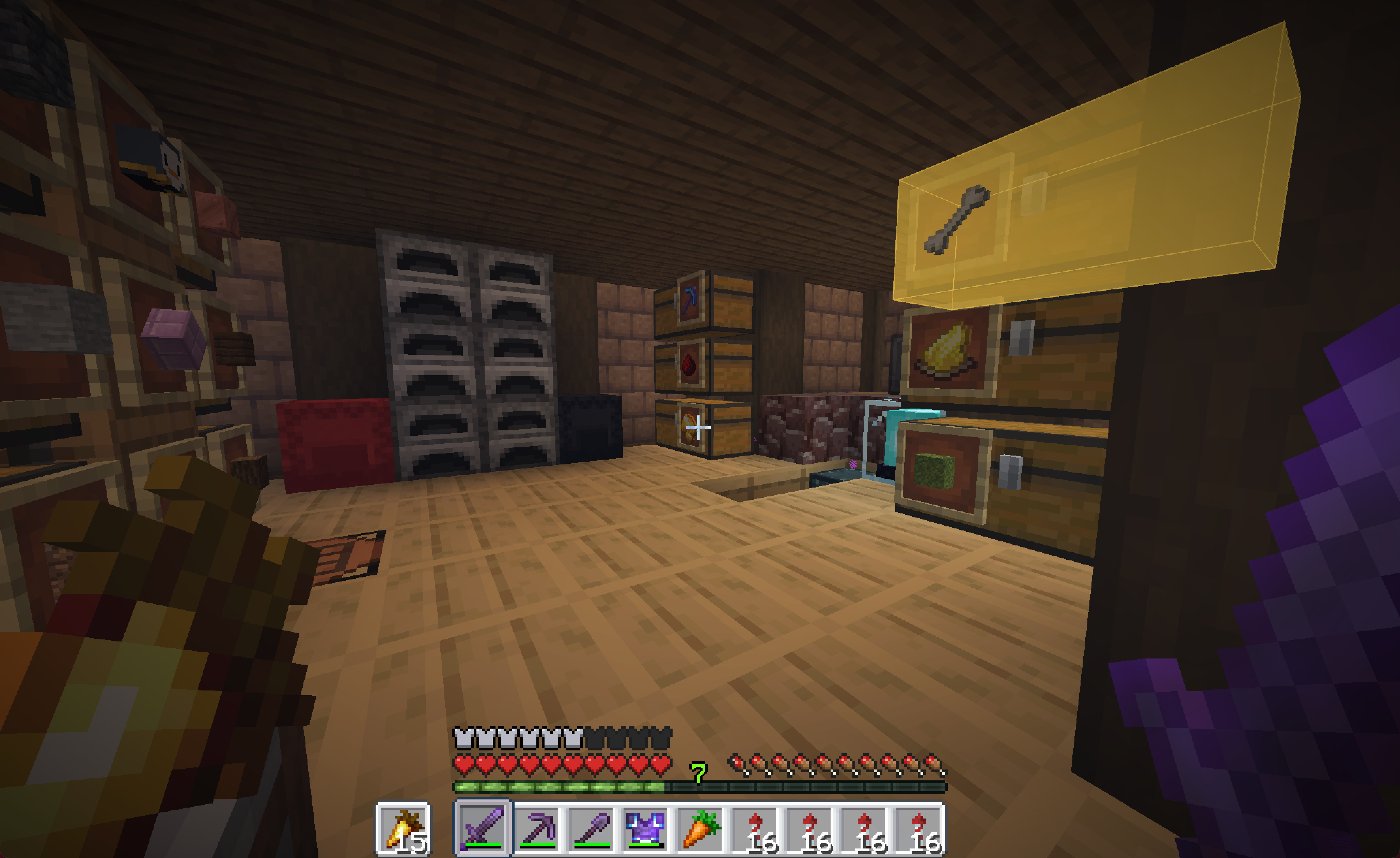
- Find it in the world — click a result and the chest holding it lights up, visible through walls
- Container labels — nearby chests, barrels, and shulker boxes show their contents (and custom name) floating right on top — see inside without opening
- Vanilla button frames — buttons sit in vanilla widget frames, so any resource pack that restyles buttons restyles these too
- Server-friendly — a built-in block list that disables the mod entirely on servers that ban automation, plus an adaptive throttle that lowers its action rate per server if a kick lands mid-sort
- Client-only — no server mod needed; works on vanilla servers, Realms, and most modpacks
Chest knowledge
Open a chest once and Sorted records its contents — persistently, in a local database per world/server. That data survives restarts. When you want to find something, open the container search screen and type the item name. It shows you every container that has it, with count, position, and dimension.
The cache invalidates itself. Broken container? Entry dropped. Chunk loads? It re-checks. Data reflects the last time you opened each container — it updates the moment you open one again.
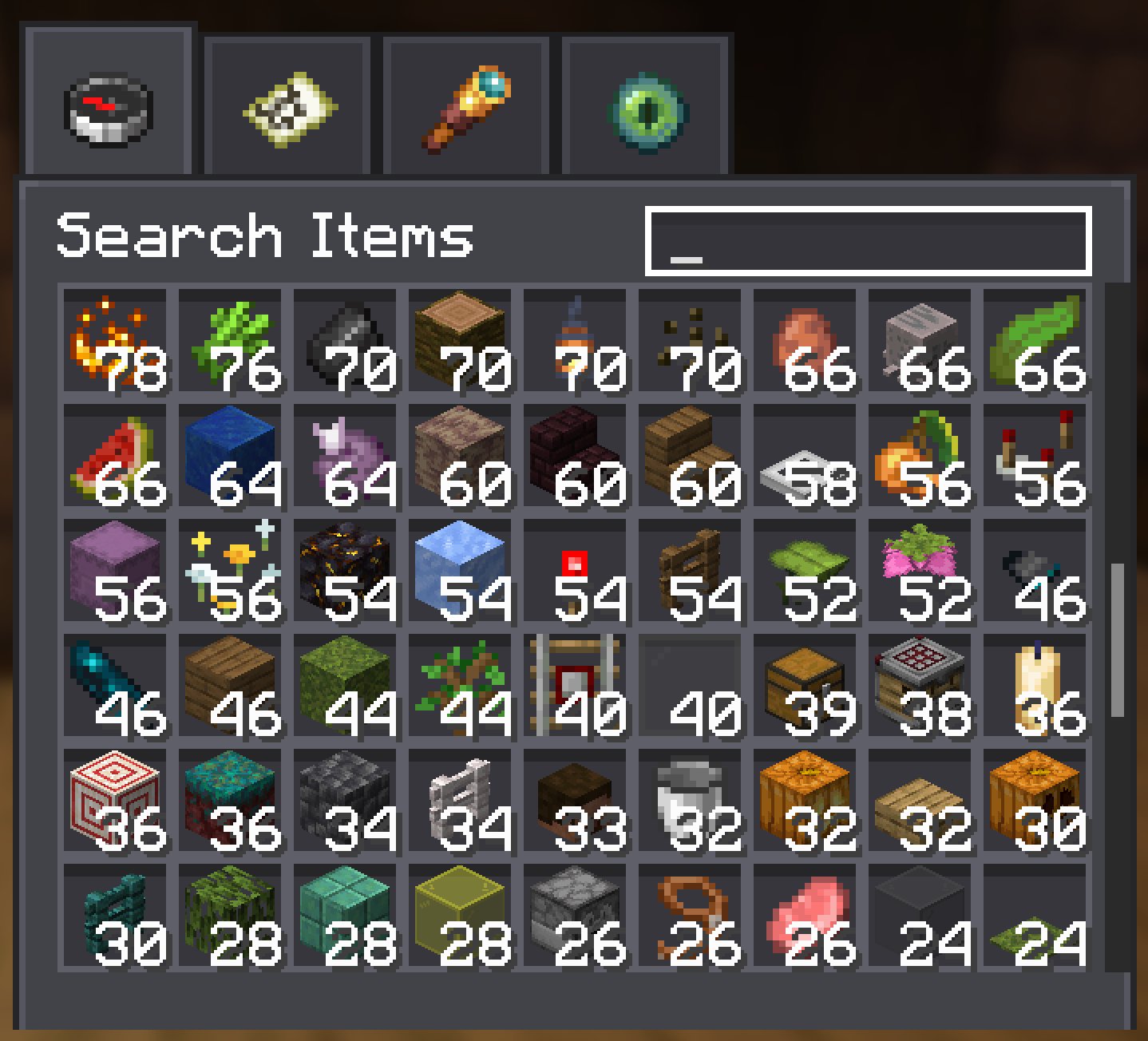
Click a search result and Sorted highlights the chest in the world — even through walls — so you walk straight to it.
See inside without opening
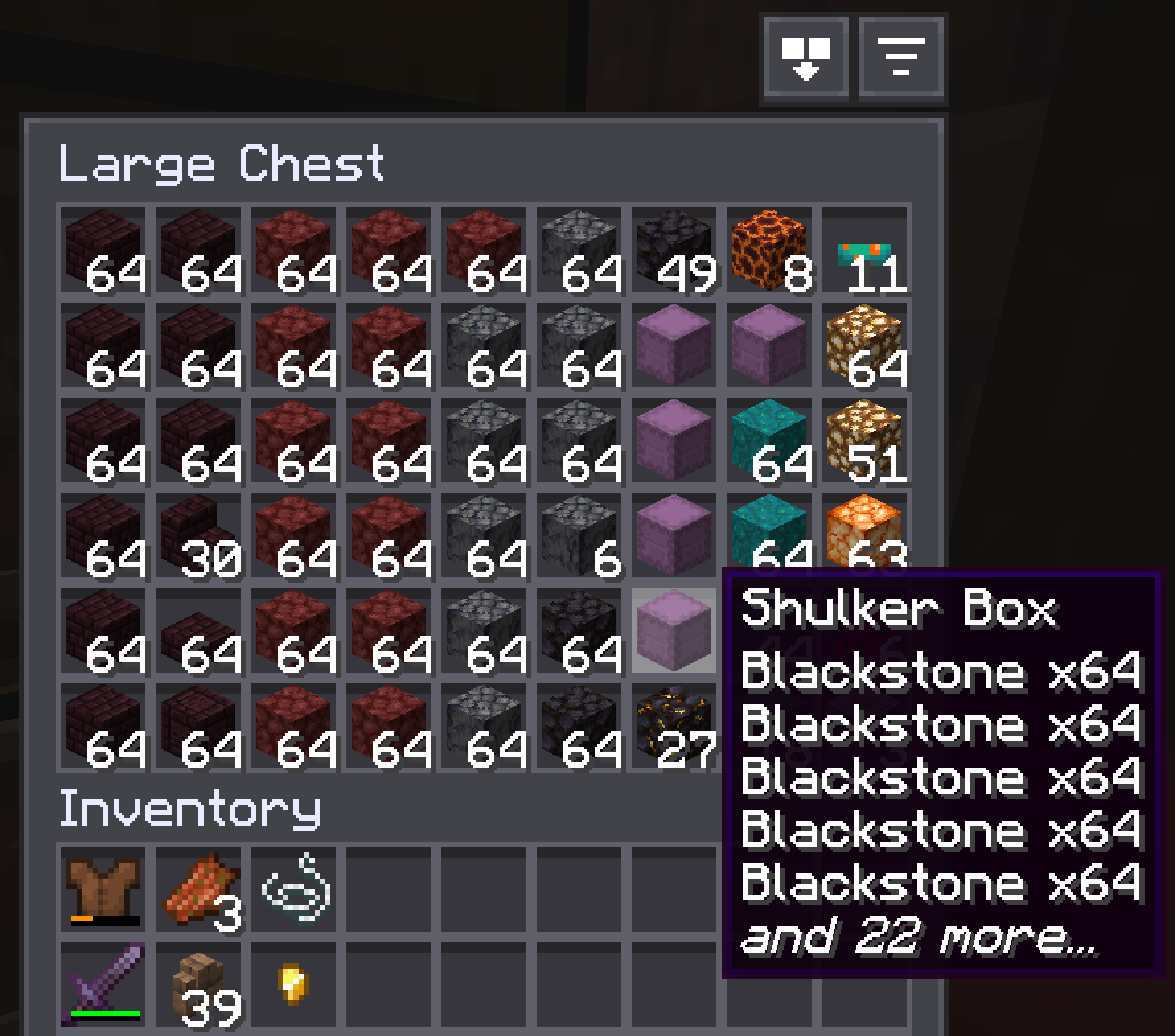
Glance at a shulker box, barrel, or chest and its contents sit right on the lid — a small grid of the items inside, plus the container's custom name if you've renamed one. No opening, no hovering, no menus.
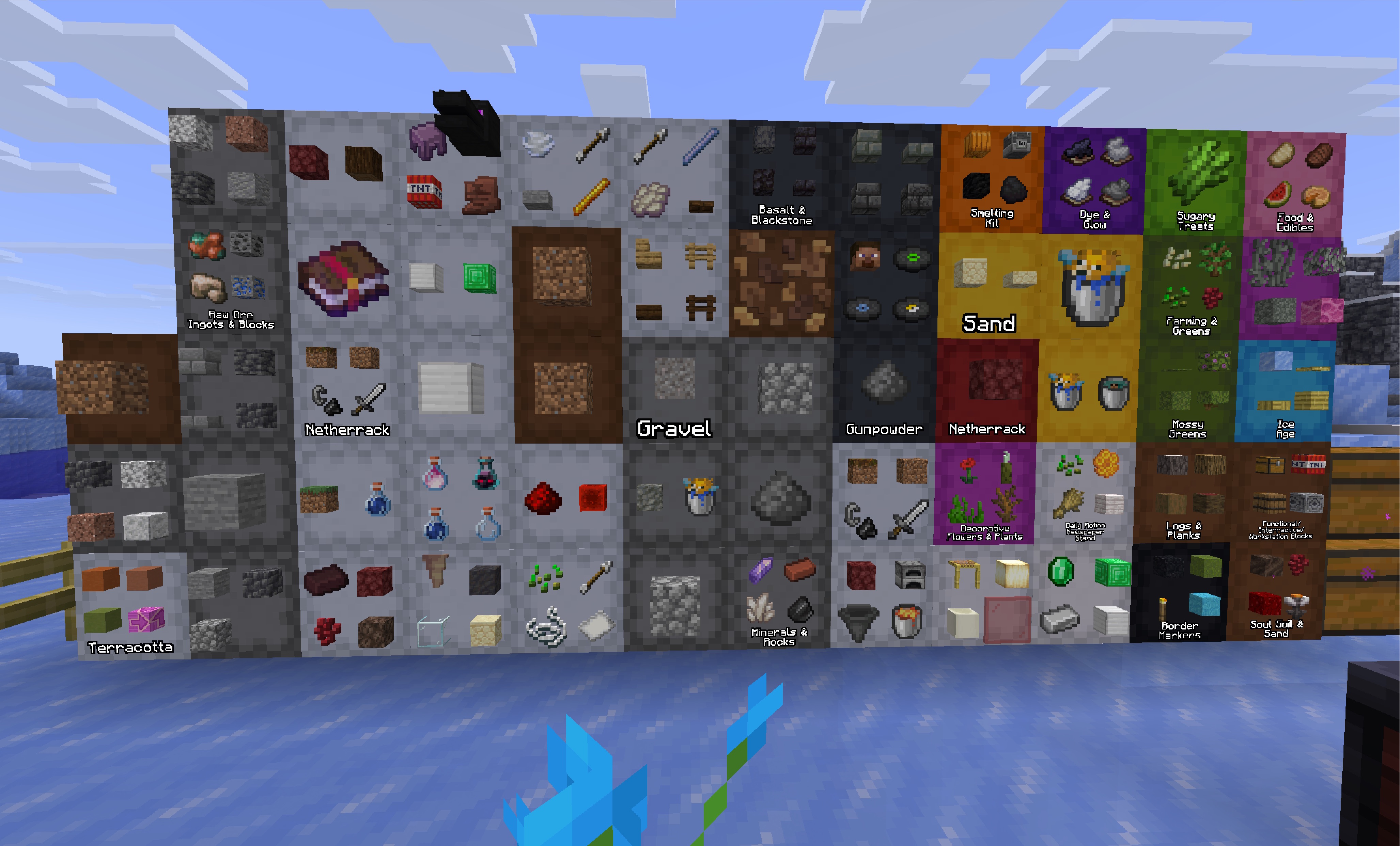
The label lies flat on the face the lid opens from, so it reads right whether a shulker sits on the floor, hangs from the ceiling, or is stuck to a wall — and on top/bottom lids it turns to face you. You choose what shows — just the items, just the name, both, or the name only when a container is empty — plus how many items, how far away labels appear, and which container types get them (shulker boxes on by default; chests and barrels opt-in).
In singleplayer the contents are read live. On servers they come from what Sorted has already recorded, so a container fills in the first time you open it (or let auto-scan read it for you).
Sorting with a real layout
Not alphabetical. Not random. There's a consistent layout, applied top-to-bottom across your main inventory:
- Weapons, tools, and armor sort to the top
- Food and consumables come next
- Building blocks fill the middle, grouped by material and dimension
- Everything else lands at the bottom
Your hotbar is left alone — sorting only rearranges the main inventory, so your active gear and quick-slots stay exactly where you put them. Pick something up — it sorts itself in. Open a chest — sort button's right there. Same rules everywhere.
Shulker boxes get sorted too — each one slots in next to its primary item, so a box of redstone lands with your redstone.
Quick Stack
One keybind. Every item in your inventory that already has a matching stack in a nearby container gets deposited there. If you've played Terraria you know exactly what this button does. Quick Empty, Quick Fill, and Pull All round out the set — dump your bags, top up partial stacks, or pull a chest into your inventory.
UI that belongs in the game
Every button — sort, quick stack, quick empty, quick fill, search — appears directly inside inventory and container screens. Each one sits in a vanilla button frame (the same widget/button sprite the game uses everywhere), so any resource pack that restyles buttons restyles these automatically. The icons on top are simple white glyphs in the mod's own sprite atlas, so resource packs can override those too if they want to.
Safe on servers
Sorts and transfers run as a queue of slot-clicks rather than all in one burst — by default ~80 actions/sec.
If a server kicks you while a sort or transfer is running, Sorted takes the hint: it steps that server's action rate down a notch (80 → 40 → 20 → 10 → 5 per second) and remembers it, so next time it starts slower and keeps adjusting until the kicks stop. Only server-initiated disconnects that land mid-sort count — a normal "Disconnect", an AFK kick, or a ban won't drag your rate down. Learned rates are per-server, persist across sessions, shown on rejoin, and resettable in the config. You can also pin a manual rate yourself if you'd rather not rely on the learning.
Some servers prohibit inventory automation outright. Sorted ships with a built-in block list covering servers where it fully disables itself on connect — no buttons, no keybinds, no cache updates, nothing. Same as not having the mod installed, just on those specific servers.
Installation
- Fabric
- Fabric API
- YACL
- ModMenu (optional — adds a config button to the mods list)
Client-side only. No server component. Works on vanilla servers, Realms, and modpacks.
Click a search result and Sorted highlights the chest in the world — even through walls — so you walk straight to it.
Sorting with a real layout
Not alphabetical. Not random. There's a consistent layout, applied top-to-bottom across your main inventory:
- Weapons, tools, and armor sort to the top
- Food and consumables come next
- Building blocks fill the middle, grouped by material and dimension
- Everything else lands at the bottom
Your hotbar is left alone — sorting only rearranges the main inventory, so your active gear and quick-slots stay exactly where you put them. Pick something up — it sorts itself in. Open a chest — sort button's right there. Same rules everywhere.
Shulker boxes get sorted too — each one slots in next to its primary item, so a box of redstone lands with your redstone.
Quick Stack
One keybind. Every item in your inventory that already has a matching stack in a nearby container gets deposited there. If you've played Terraria you know exactly what this button does. Quick Empty, Quick Fill, and Pull All round out the set — dump your bags, top up partial stacks, or pull a chest into your inventory.
UI that belongs in the game
Every button — sort, quick stack, quick empty, quick fill, search — appears directly inside inventory and container screens. Each one sits in a vanilla button frame (the same widget/button sprite the game uses everywhere), so any resource pack that restyles buttons restyles these automatically. The icons on top are simple white glyphs in the mod's own sprite atlas, so resource packs can override those too if they want to.
Safe on servers
Sorts and transfers run as a queue of slot-clicks rather than all in one burst — by default ~80 actions/sec.
If a server kicks you while a sort or transfer is running, Sorted takes the hint: it steps that server's action rate down a notch (80 → 40 → 20 → 10 → 5 per second) and remembers it, so next time it starts slower and keeps adjusting until the kicks stop. Only server-initiated disconnects that land mid-sort count — a normal "Disconnect", an AFK kick, or a ban won't drag your rate down. Learned rates are per-server, persist across sessions, shown on rejoin, and resettable in the config. You can also pin a manual rate yourself if you'd rather not rely on the learning.
Some servers prohibit inventory automation outright. Sorted ships with a built-in block list covering servers where it fully disables itself on connect — no buttons, no keybinds, no cache updates, nothing. Same as not having the mod installed, just on those specific servers.
Installation
- Fabric
- Fabric API
- YACL
- ModMenu (optional — adds a config button to the mods list)
Client-side only. No server component. Works on vanilla servers, Realms, and modpacks.
Compatibility
Mod Loaders
Game Versions
Recommended Gear
AffiliateHardware and extras that pair well with this mod.

As an Amazon Associate I earn from qualifying purchases.
Screenshots
Similar Mods
Lagless: FPS Optimizer
LaglessMod is an optimization mod for Minecraft 1.20.1 that boosts FPS and reduces lag on low-end PCs by adjusting rende...
The Betweenlands: Eternal Melodies
The Betweenlands: Eternal Melodies is a soundtrack add-on for The Betweenlands mod with soundtracks composed by Rotch Gw...
Billund
LEGO inspired building bricks!

Smiley's Better Brain
A Verity JE add-on for a smarter and more capable Verity.

The Haunting
Adds a new terrifying vanilla-like horror entity.

Printa's Arsenal
some weapon
