

Good Flags
ModBeta 1.7.3 mod that adds placeable flags that you can paint on.
Type
Mod
Modrinth Downloads
409
Modrinth ID
79YCyjpn
Last Updated
Aug 22, 2026
Description
Good Flags



Beta 1.7.3 mod to add flags to the game. Flags have a 48×32 canvas supporting the 16 colours of wool, and can be painted on by players by right-clicking the flag.
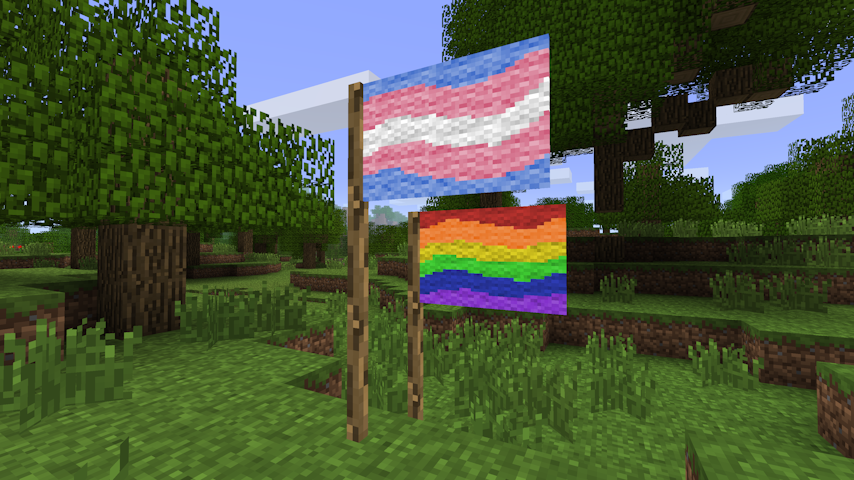
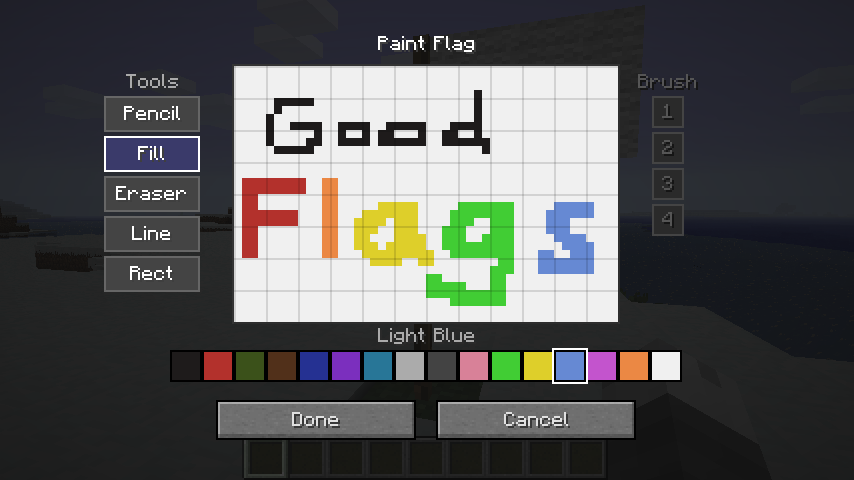
Items
Flag
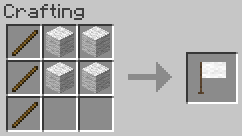
3x Stick + 4x Wool → 1x Flag. Any wool can be used.
Painting
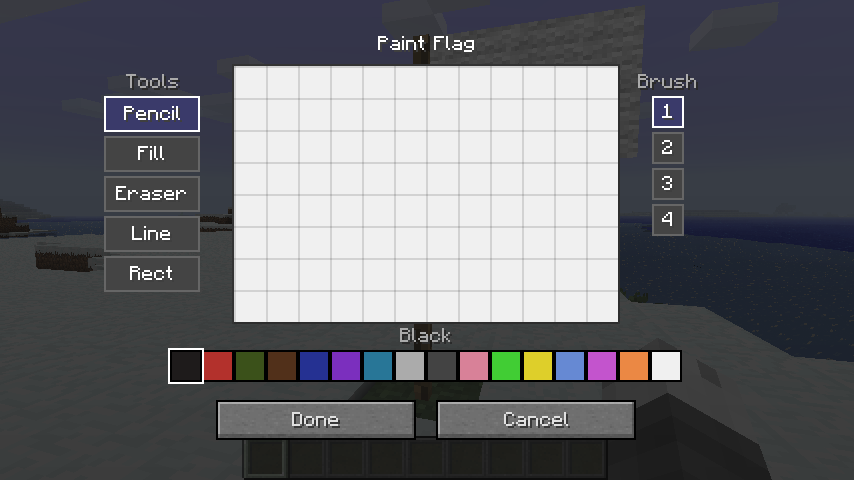
Right-clicking a placed flag pole opens the paint editor.
Canvas
The flag's canvas is 48 × 32 pixels using the 16 wool colours as a palette.
Tools
Tool Description Pencil Freehand drawing. Respects brush size. Eraser Erases pixels back to white. Respects brush size. Fill Flood-fills a contiguous region with the selected colour. Line Draws a straight line between two points. Respects brush size. Rect Draws a filled rectangle. Circle Draws a filled ellipse.Undo / Redo
The paint screen supports up to 32 levels of undo/redo history.
Action Shortcut Undo Ctrl+Z Redo Ctrl+Y or Ctrl+Shift+ZFlag Item
Design Preserved on Break
Breaking a painted flag drops it as an item that carries the full pixel data. Placing the item down restores the original design exactly.
Inventory Preview
A downsampled miniature of the flag's design is rendered on top of the item icon in inventory slots, giving you a quick visual reference without needing to place the flag.
Copying a Flag
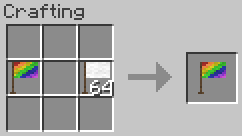
Place a blank flag and a painted flag together anywhere in the crafting grid to produce a copy of the painted flag. The painted source is not consumed.
Clearing a Flag
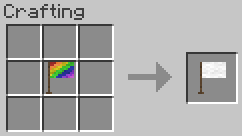
Place a painted flag alone in the crafting grid to receive a blank flag back.
Configuration
Configuration is exposed via Glass Config API and can be edited in-game with Mod Menu Babric.
Option Default Description Item Renderer Enabled true Draw the flag preview on the item icon in inventory. Item Texture Resolution 16 Base icon resolution in pixels; increase for HD texture packs. Flag Preview X 3 X offset of the preview region within the item icon. Flag Preview Y 0 Y offset of the preview region within the item icon. Flag Preview Width 12 Width of the preview region (item pixels). Flag Preview Height 8 Height of the preview region (item pixels).Compatibility
This mod has no known compatibility issues. It adds explicit compatibility with Always More Items and Entity Culling.
Requirements
- Minecraft Beta 1.7.3
- Babric
- StationAPI
- Fabric Language Kotlin
- Glass Config API
- Glass Networking
Recommended
- Mod Menu Babric (for in-game configuration)
License
This mod is licensed under the MIT license.
Compatibility
Mod Loaders
Game Versions
Recommended Gear
AffiliateHardware and extras that pair well with this mod.

As an Amazon Associate I earn from qualifying purchases.
Screenshots
Similar Mods
Graphing Calculator 3D
High-quality, high-performance 3D graphs in more coordinate systems than you can name (probably).

Sable Beyond Dynamic Copycats Addon
Adds DYNAMIC mass for copycat blocks from Create: Copycats+ mod depending on block inserted

No Zombified Piglin ❌
Disable Zombified Piglin in Minecraft by preventing its spawning and removing any that appear in the world
Quiver From Mine Tools and Blocks
Adds Quiver from Mine Tools and Blocks
![Cottontail Companion [Vtuber Companions] [Kult Craft]](https://media.forgecdn.net/avatars/1802/994/639141127139842122.png)
Cottontail Companion [Vtuber Companions] [Kult Craft]
Adds Cottontail as a tameable companion.
Vampirism Rings
Vampirism Rings is a NeoForge 1.21.1 addon for the Vampirism mod that introduces the Ring of Eternal Dusk — a powerful a...