

BGMCraft
ModPlay minecraft with background music, Different music for biomes and structures, Combat music, Extremely easily editable.
Type
Mod
Modrinth Downloads
128
Modrinth ID
nTviPgrV
Last Updated
Aug 22, 2026
Description
BIG OL NOTICE, YOU SHOULD READ IF YOU DON'T LIKE AI
This mod is considerably vibecoded, it was made as a personal mod as other music mods are a bit tedious to add custom content to.
You don't have to use it, or do, I don't care.
Also this is not an attempt to compete with CircuitLords mod "Reactive Music", Like I said it is just a bit tedious to add custom content to it and I wanted to make one that is simpler and people who aren't familiar with Java.
Thank you for reading ^^
What is BGMCraft?
BGMCraft (Background Music Craft... I am really proud of this name...) is a mod that flavors up your minecraft by playing... Music in the background.
When playing, Any songs you have added to their respective folders will play and change depending on what's happening in your game,
Just travelling? Play some calm ambient music, Fighting mobs? Automatically plays battle music alongside, Low hearts and fighting mobs? Put your lock in music or something idk.
You can also set music to play only in certain Biomes, pois, and structures.
For example, Have desert themed music... In the desert, or play industrial type music in the trial chambers.
All easily editable (and shareable!) in the file directory.
You can download an example profile here: https://files.catbox.moe/hbs0ak.zip
If you're unsure how to add this to your game, Scroll down just a bit till you reach 'Profiles'
Kick ass settings and features
All of these settings are in mod menu config, but are also accessible by pressing B in game (you can turn this off dw)
- The volume slider: Slide yo volume (Hell yeah)

- The crossfade slider: Make your music seamlessly slide into tha other

- Profiles: Instantly switch your music preset mid game, Zip your files and send to your friends, or to the world.
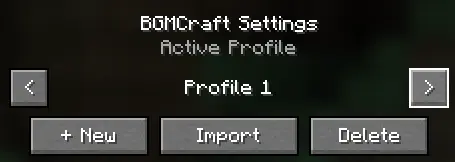
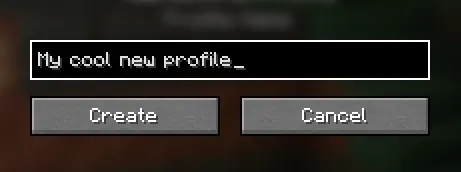
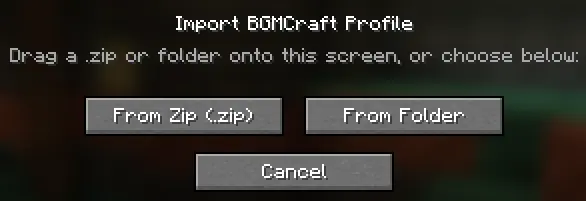
- Zones: Set specific areas to your own custom music, Currently only client sided but will be server wide in a future update.
Ok but how easy is it to make your own packs
Pretty damn easy.
In the config for bgmcraft, open the profiles folder and pick the profile you want to edit.\
It is easier to create a new one in game as it makes all the extra folders for you, And you don't have to restart your game to try them out.
You should see 4 options
- Overworld
- Nether
- The End
- Custom
Everything is self explanatory except 'Custom', we'll talk about that later.
For this example we're gonna use the 'Overworld' Folder.
Once in the folder, You'll see a ton of different biomes and locations, If you feel like setting music for each one you can, But if you just want one set, Use the 'Surface' folder.\
If a folder is missing audio, It will automatically fallback to whatever audio matches the state in 'Surface'
You should see 4 folders
- Calm
- Tense
- Alert
- Danger
Calm is the default music that plays when your character is healthy and not fighting.
Tense is the music that plays when your character is either spotted by a hostile mob OR has taken a certain amount of hits.\
It will not automatically play if you anger a neutral mob, Said mob would have to hit you a certain amount of times to trigger it
Alert music will play when you character has 4 hearts or less and is not fighting
Danger music will play when your character has 4 hearts or less and is either spotted by a hostile mob OR has taken a certain amount of hits.
Multiple tracks can be put into these sections and will randomly play from one of the tracks in the folder.
Sharing your profile
Easier than making it
Simply zip your profile (something like 7zip, Win.Rar does not work and must be extracted.) and send it to a friend, then drag and drop the zip into your game to import it.
yeah thats bout it
The creditos
Yokai (me): Coming up with the idea
Braylon: Helping with QOL, Things like profiles were his idea.
Ceemad: Also helped with QOL, Things like crossfades were her idea.
AI: I guess.
Planning on making this open source eventually but not until we're out of alpha.
Any music used in this mod is not made by me or (mostly) any users who use it.
Compatibility
Mod Loaders
Game Versions
Recommended Gear
AffiliateHardware and extras that pair well with this mod.

As an Amazon Associate I earn from qualifying purchases.
Similar Mods
Chunk Loaded Withers
Server-side mod that chunk loads withers with a customizable radius

Turbo Happy Ghast
Increases the Happy Ghast's flying speed whenever a player is mounted on it.

Biomes of Overworld
This mod adds new biomes to the overworld adds new ores and items enjoy this mod

Debug stick crafting
This pack adds a simple way to craft the debug stick in survival, which is great for those who wanna create detailed bui...

Create: Archived
Stop belt lag! Automatically compresses thousands of items into a single entity on belts and chutes, fully compatible wi...

Mortis
Mortis is a configurable death system for manipulating items after death.