
Modpack Option Control
ModAn mod allowing atomic option management for modpack makers
Type
Mod
Modrinth Downloads
959
Modrinth ID
sFjZBMOg
Last Updated
Aug 29, 2026
Description
Modpack Option Control (MOC)
MOC is a Fabric mod for modpack makers. It lets you manage the vanilla and mod configuration options of your modpack — not by distributing full config files, but by defining which individual options to set and how.
If you're familiar with YOSBR, MOC works along similar lines but goes further in two ways. YOSBR operates at the file level and only handles defaults — it copies a reference file for the user if they don't have one yet, but never touches an existing file. MOC operates at the option level, and lets you choose for each option whether it should be a default (applied only if the user has no value) or an override (always enforced).
Patches
MOC does not store a single snapshot of your target configuration. Instead, it maintains an ordered list of patches — each patch being a set of option changes you introduce at a specific version of your modpack.
When a user launches the game, MOC applies all patches they haven't received yet, in order. This means that even if a user skips a version of your modpack, no change is ever lost.
Modpack timeline: v1.0 ──────────────── v2.0 ──────────────── v3.0 │ You want to enforce renderDistance = 12 User installs v1.0, then jumps directly to v3.0 (skipping v2.0): ┌── Without MOC ─────────────────────────────────────────────────────┐ │ Common approach: ship the full options.txt in the modpack root. │ │ Problems: │ │ • Every option in the file is overridden, not just renderDistance│ │ • The file must be re-shipped in v3.0 (and every future version) │ │ for the override to persist — otherwise a user who skips v2.0 │ │ will never receive it. │ └────────────────────────────────────────────────────────────────────┘ ┌── With MOC ────────────────────────────────────────────────────────┐ │ A patch targeting only renderDistance = 12 is recorded in v2.0. │ │ When the user reaches v3.0, all pending patches are applied in │ │ order — including the v2.0 one. Only renderDistance is touched. │ │ The change is never lost, no matter how many versions are skipped.│ └────────────────────────────────────────────────────────────────────┘Default and Override
Each option in a patch has a mode that controls when it is applied:
- default — the option is set only if the user does not already have a value for it. Use this for first-time recommendations.
- override — the option is always applied, replacing whatever value the user currently has.
Example: a mod stores its settings in a JSON file.
// examplemod/config.json (user's current file) { "maxParticles": 500, "renderDistance": 8 }A patch sets renderDistance to 12:
- with default — no change, the user already has a value for this option
- with override — renderDistance becomes 12, regardless of what the user had
GUI
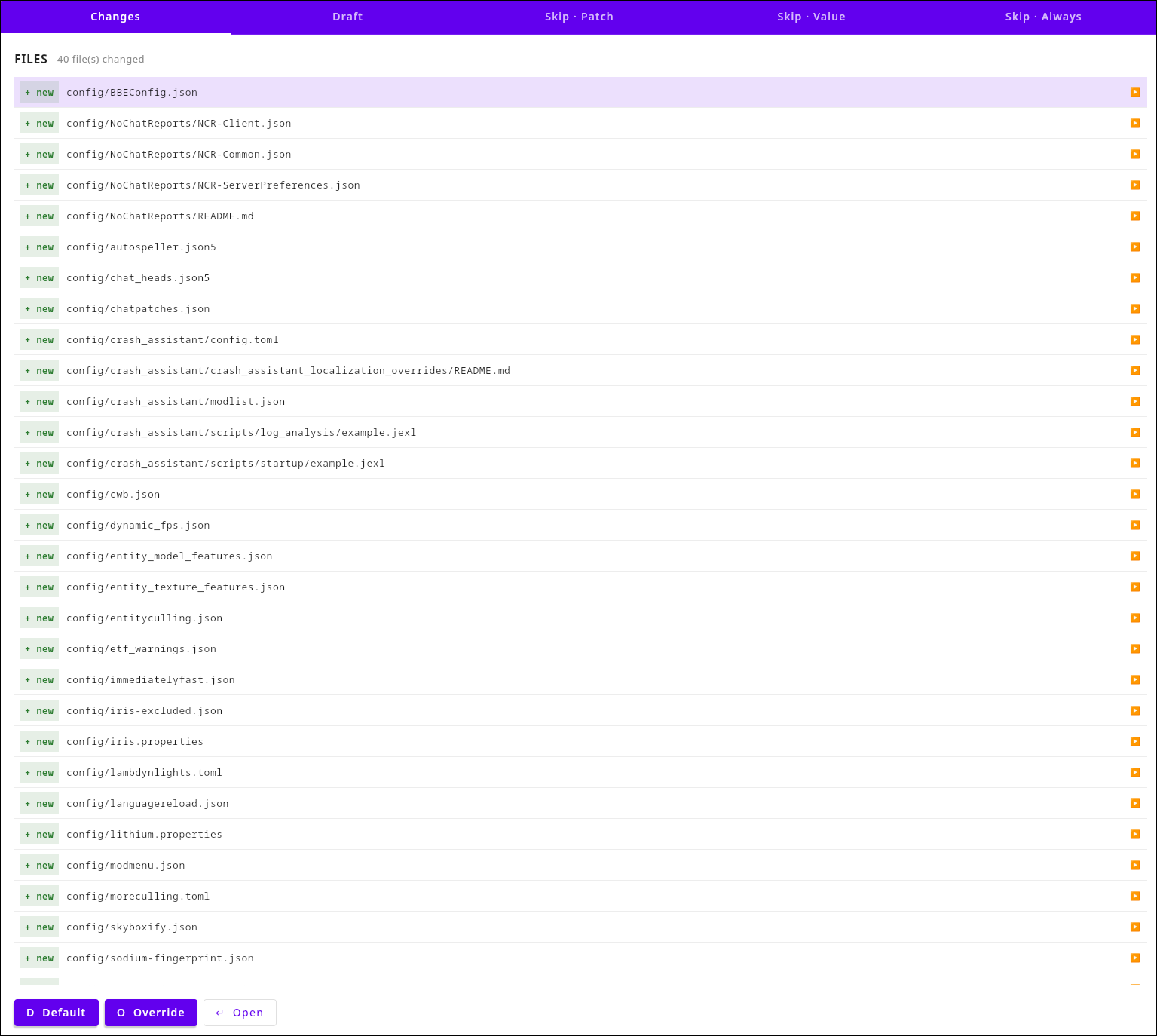
MOC includes a standalone GUI tool for authoring patches. It connects to your local game instance, computes the diff between the current config and the modpack reference, and lets you select which options to include in a new patch — and with which mode.
License
This project is licensed under the LGPL-3.0-only license.
Compatibility
Mod Loaders
Game Versions
Recommended Gear
AffiliateHardware and extras that pair well with this mod.

As an Amazon Associate I earn from qualifying purchases.
Screenshots
Similar Mods
Map4Image
NeoForge mod for converting images to map art, heavily inspired by Image2Map.

Remove Binding Curse
Removes the Binding Curse upon death when KeepInventory is enabled, preventing items from being stuck forever or until t...
The Legend of Steve
A mod themed after older Legend of Zelda and other Retro games
Variating Mobs
Mobs can spawn with varied stats! Aswell as a few more related things.

NeoTerraForged
A worldgen overhaul mod

Fractal
Library for item subgroups for the creative menu