Stonecutting Upgrade
Modby Fuzs
Bigger stonecutter menus, remembered recipes, and quick refills for speedy crafting.
Type
Mod
CurseForge Downloads
47,689
CurseForge ID
Modrinth Downloads
9,382
Modrinth ID
Last Updated
Sep 12, 2026
Description








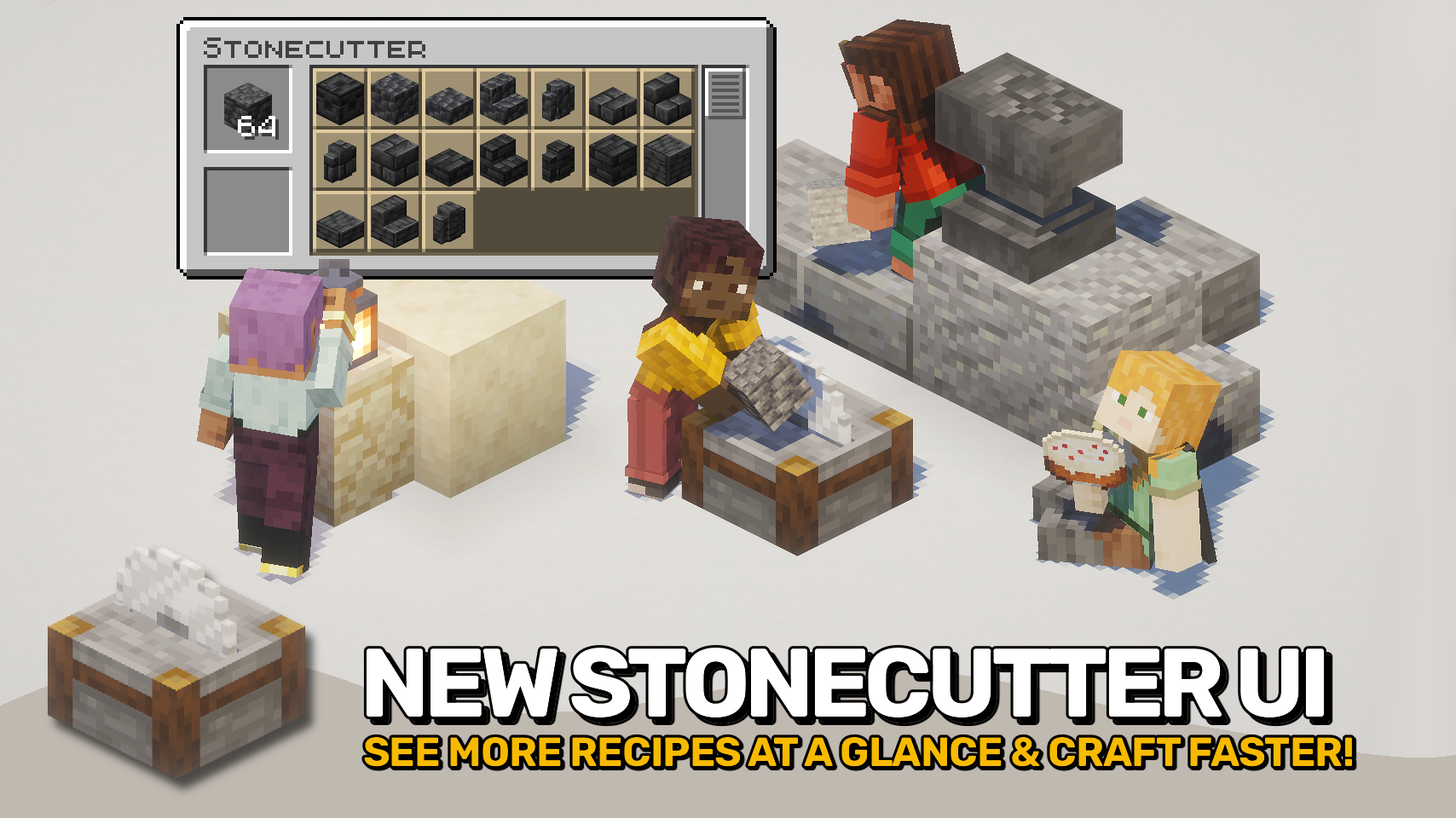
Stonecutting Upgrade gives the stonecutter menu the overhaul it deserves. 🪨 With a larger recipe selection area, smoother scrolling, and a more convenient layout, stonecutting finally feels comfortable to use again.
No more constantly scrolling through cramped recipe lists or reselecting the same block over and over. This mod remembers your last recipe and includes quick refill controls to keep crafting flowing smoothly. ✨
Best of all, the mod is fully client side, making it easy to use anywhere without requiring server installation. ⚙️

- 🪨 Expanded Recipe Menu: The stonecutter now displays up to 21 recipes at once instead of vanilla's 12.
- 🧱 Improved Layout: Inputs, outputs, and recipe selection are rearranged for a cleaner workflow.
- ✨ Smoother Scrolling: Recipe lists scroll more smoothly for faster and more comfortable browsing.
- 🔁 Remember Last Recipe: Previously selected recipes are automatically restored when adding more materials.
- ⌨️ Quick Refill Controls: Press the space bar to refill a single item to the input slot (or a fully stack while holding any shift key).
- 🌍 Fully Client Side: Enjoy all features without needing the mod installed on servers.


⏩ INSTALLATION REQUIRED ON CLIENT
⏩ REQUIRES PUZZLES LIB TO BE INSTALLED (FABRIC & NEOFORGE)
⏩ REQUIRES FABRIC API TO BE INSTALLED (FABRIC)
⏩ REQUIRES FORGE CONFIG API PORT TO BE INSTALLED (FABRIC)

If available for a mod, configuration is possible directly from in-game using the mod menu (requires Mod Menu by Prospector to be installed on Fabric).
For manual configuration using an external text editor all files are found at .minecraft/config, named as MOD_ID-client.toml, MOD_ID-common.toml, or MOD_ID-server.toml, depending on the type of config. Not all types might exist for a mod, if any at all.

🌟 Thanks to weirdbrackets and their Portable Stonecutter mod for inspiring the improved stonecutter menu.




Compatibility
Mod Loaders
Game Versions
Recommended Gear
AffiliateHardware and extras that pair well with this mod.

As an Amazon Associate I earn from qualifying purchases.
Screenshots
Similar Mods

The Famished
a crazed cannibalistic man, emerging from the depths to devour you...
![[Legacy] AzureDooms Angel Ring](https://media.forgecdn.net/avatars/602/626/637983400989026911.png)
[Legacy] AzureDooms Angel Ring
Adds an Angel Ring based on the Extra Utilities 2 Angel Ring and DenisMasterHerobrine's Angel Ring

Infinity Item Editor
Customized GUIs for nearly all items. Usable on any Creative Server!
Step It Up
Step Up blocks smoothly instead of Auto Jump

Undertale Death Screen
Makes your last heart shatter when you die like in undertale.

SW's wukong: better combat & epic fight
add wukong's armor & weapon in minecraft