

InventoryBinds
ModA mod that adds buttons with binds directly to the inventory
Type
Mod
Modrinth Downloads
20,695
Modrinth ID
Yi2fIEtc
Last Updated
Jul 30, 2026
Description

🇺🇸
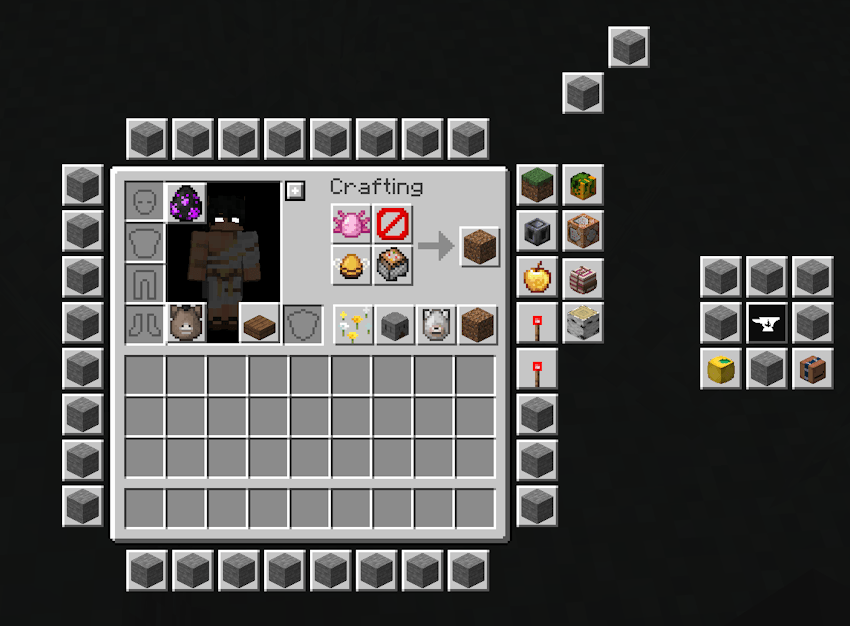
InventoryBinds adds fully customizable bind buttons directly to your inventory and container screens — one click runs a command, opens a suggestion, or sends a chat message, without leaving the screen.
Action types
Every bind runs one of three action types:
- Command — instantly sends the command to the server.
- Suggestion — inserts the command into chat for manual send/edit.
- Chat message — sends plain text to chat.
Multi-command binds
A single bind can chain several commands in order, each with its own delay (in milliseconds) before it fires. The first command runs immediately; the rest are queued and dispatched on time — perfect for combos that need a pause between steps.
Per-bind customization
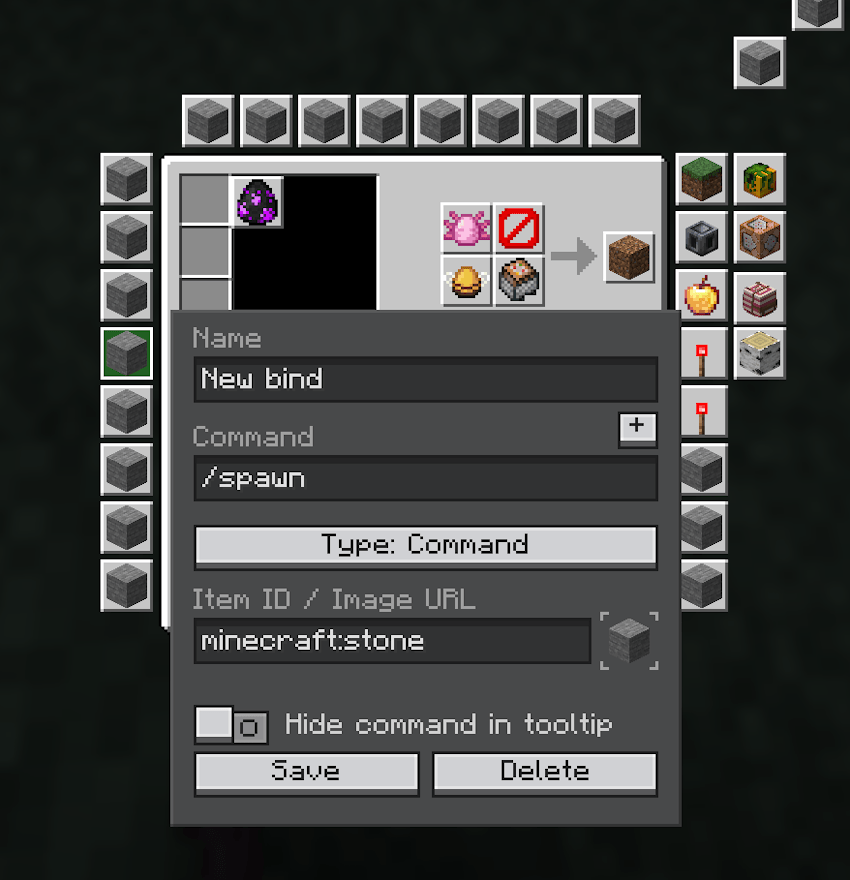
- Name shown in the tooltip.
- Action text (command / suggestion / chat).
- Hide command text — the tooltip shows a mask instead of the real command.
- Server scope — limit a bind to a specific server or keep it global.
- Icon (see below).
- Position — drag binds anywhere around the inventory, with optional grid snapping.
Icons
Supported icon sources:
- Minecraft item ID — for example minecraft:diamond_sword.
- Item ID + custom model data via :: — for example namespace:item::123 or namespace:item::model_name (works with both range_dispatch and select resource-pack models).
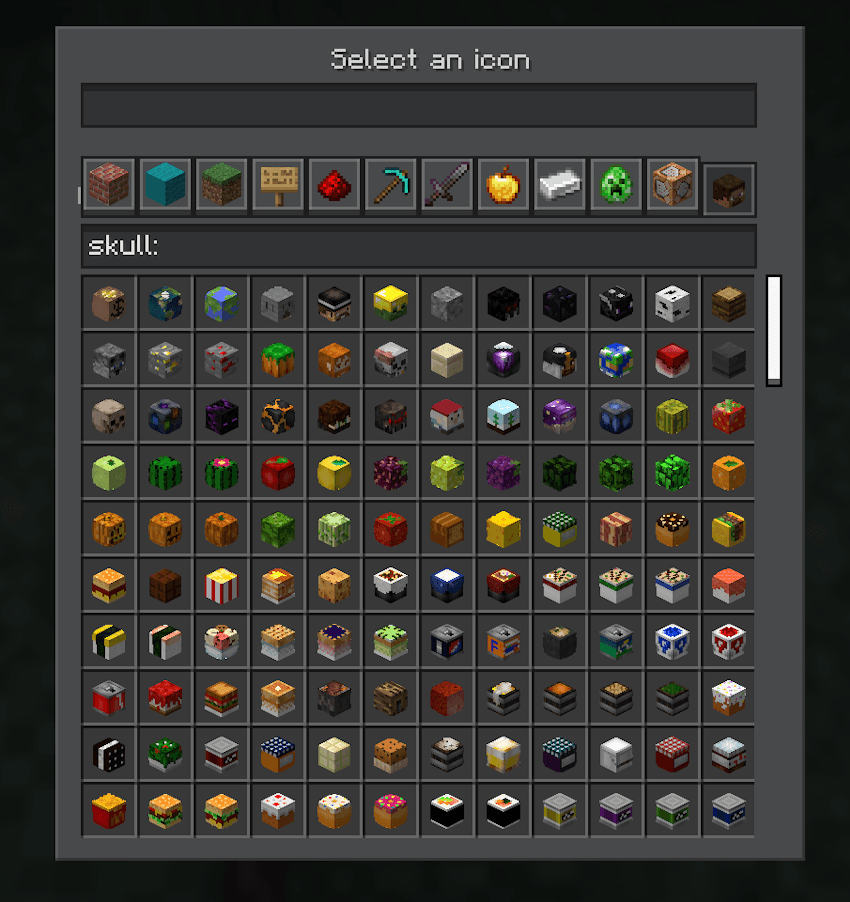
- Player heads — pick from the built-in Heads tab, or paste a skull:<texture> id.
- Direct image URL (HTTP/HTTPS) — fetched and cached automatically (hashed by URL).
- Item in hand — open the editor while holding any item (a player head, a custom-model-data item, or a plain one) and a new bind is created instantly, already wearing that exact item's icon.
A built-in icon picker mirrors the creative inventory: one tab per creative category, a curated Heads tab, live search, and a smooth scrollbar.
Bind editor
- Open it from the dedicated button in your inventory.
- Left-click + drag to move a bind; hold S to toggle grid snapping.
- Right-click an empty spot to create a new bind there.
- Backspace / Delete removes the selected bind.
- Edit panel with multi-command rows, delays, icon picker, action type dropdown, hide toggle, and Save / Delete.
Profiles
Create, save, switch and delete named bind profiles, so different servers or playstyles keep their own sets of binds.
Mod settings
- Visible Binds — show or hide all binds at once.
- Bind Editor button — enable/disable the editor button in the inventory.
- Hide Status Effects — keep the inventory clean of the potion-effect panel.
- Hide Recipe Book Button — hide the vanilla recipe-book toggle so binds aren't blocked.
- Hide Binds in Creative (on by default) — automatically hide binds while you're in creative mode.
🇷🇺
InventoryBinds добавляет полностью настраиваемые кнопки-бинды прямо в инвентарь и любые окна-контейнеры — один клик выполняет команду, подставляет её в чат или отправляет сообщение, не выходя из экрана.
Типы действий
Каждый бинд выполняет одно из трёх действий:
- Команда — мгновенно отправляет команду на сервер.
- Подстановка — вставляет команду в чат для ручной отправки/правки.
- Сообщение в чат — отправляет обычный текст в чат.
Мульти-команды
Один бинд может выполнять несколько команд по очереди, у каждой — своя задержка (в миллисекундах) перед запуском. Первая команда срабатывает сразу, остальные ставятся в очередь и отправляются вовремя — удобно для комбинаций, где между шагами нужна пауза.
Настройка каждого бинда
- Название в подсказке.
- Текст действия (команда / подстановка / чат).
- Скрытие текста команды — в подсказке вместо реальной команды показывается маска.
- Привязка к серверу — ограничить бинд конкретным сервером или оставить глобальным.
- Иконка (см. ниже).
- Позиция — перетаскивай бинды вокруг инвентаря, с опциональной привязкой к сетке.
Иконки
Поддерживаемые источники иконок:
- ID предмета Minecraft — например minecraft:diamond_sword.
- ID предмета + custom model data через :: — например namespace:item::123 или namespace:item::model_name (работает и с range_dispatch, и с select моделями ресурспаков).
- Головы игроков — выбери из встроенной вкладки «Головы» или вставь id вида skull:<текстура>.
- Прямая ссылка на изображение (HTTP/HTTPS) — загружается и кэшируется автоматически (по хэшу URL).
- Предмет в руке — открой редактор, держа любой предмет (голову, предмет с custom model data или обычный), и сразу создастся новый бинд с иконкой именно этого предмета.
Встроенный выбор иконки повторяет креативный инвентарь: вкладка на каждую креатив-категорию, отдельная вкладка «Головы», живой поиск и плавный скроллбар.
Редактор биндов
- Открывается отдельной кнопкой в инвентаре.
- ЛКМ + перетаскивание — перемещение бинда; клавиша S переключает привязку к сетке.
- ПКМ по пустому месту — создать новый бинд там.
- Backspace / Delete — удалить выбранный бинд.
- Панель редактирования: строки мульти-команд, задержки, выбор иконки, выпадающий список типа действия, тумблер скрытия и кнопки Сохранить / Удалить.
Профили
Создавай, сохраняй, переключай и удаляй именованные профили биндов — для разных серверов и стилей игры свои наборы.
Настройки мода
- Отображать бинды — показать или скрыть все бинды сразу.
- Кнопка редактора — включить/выключить кнопку редактора в инвентаре.
- Скрыть статус-эффекты — убрать панель эффектов из инвентаря.
- Скрыть кнопку рецептов — прячет ванильную кнопку книги рецептов, чтобы она не перекрывала бинды.
- Скрывать бинды в креативе (включено по умолчанию) — автоматически прячет бинды в режиме креатива.

Compatibility
Mod Loaders
Game Versions
Recommended Gear
AffiliateHardware and extras that pair well with this mod.

As an Amazon Associate I earn from qualifying purchases.
Screenshots
Similar Mods
Natural Waters
Bring bright, colorful waters from Bedrock to Java. Easy to tweak and enjoy!

Passive Mobs
Make all mobs passive

Mega Evolve! (for Pixelmon)
Mega Evolve those Pixelmon!
![xiaofanwei's items[Iron's Spellbooks and Terra Curios]](https://media.forgecdn.net/avatars/1217/343/638796257708865718.png)
xiaofanwei's items[Iron's Spellbooks and Terra Curios]
This mod is based on the Terraria Curios mod and adds magic accessories for Iron‘s Spellbooks

Substrate
Optimization of the bottom and/or top layer(s) of the world
RPG Style More Bosses : Exoframe
Adds a new boss and new weapons to the game. Add-on for RPG Style More Weapons
