MaxRealstic Shader
Shaderby TaeVersePlayz
Ultra-realistic Minecraft shader with animated foliage, dynamic water, realistic lighting, cinematic skies, and optimized performance.
Description
MaxRealstic Shader
Subscribe on Youtube
Youtube
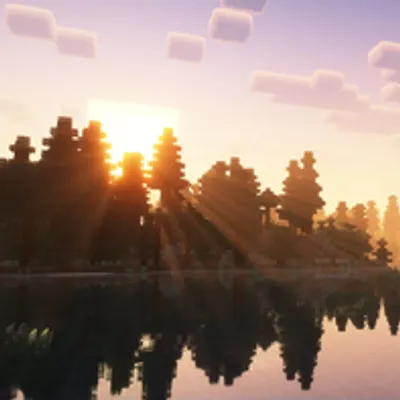
Transform your Minecraft world with MaxRealstic Shader, a high-quality shader pack designed to deliver stunning visuals while maintaining smooth gameplay. Experience realistic lighting, vibrant colors, immersive weather, dynamic shadows, animated vegetation, and beautifully animated water that bring every biome to life.
Whether you're exploring vast landscapes, building detailed creations, recording cinematic videos, or simply enjoying survival mode, MaxRealstic Shader provides a visually immersive experience without sacrificing performance.
Features
-
🌞 Realistic lighting and dynamic sunlight
-
🌅 Beautiful sunrise and sunset colors
-
🌙 Realistic moon with a star-filled night sky
-
☁️ Enhanced clouds and atmospheric fog
-
🌊 Crystal-clear animated water with reflections
-
🌳 Waving trees, leaves, flowers, and grass
-
🌼 Natural wind animation for vegetation
-
💡 Improved shadows and ambient lighting
-
✨ Bloom and color enhancement
-
🌧️ Improved rain and weather effects
-
🔥 Warm torch and lantern lighting
-
🎥 Perfect for screenshots, videos, and cinematic gameplay
-
🎮 Optimized for smooth FPS on a wide range of hardware
Compatibility
-
Minecraft Java Edition
-
Iris Shaders
-
OptiFine (supported versions, if applicable)
Performance
MaxRealstic Shader has been designed to provide an excellent balance between realistic graphics and smooth performance. Multiple quality settings allow players with different hardware configurations to enjoy the shader.
Installation
-
Install Iris Shaders or OptiFine.
-
Download the latest version of MaxRealstic Shader.
-
Place the shader ZIP file into your Minecraft
shaderpacksfolder. -
Launch Minecraft and enable the shader from the Video Settings menu.
Feedback
Found a bug or have a suggestion? Your feedback helps improve MaxRealstic Shader. Report issues and share ideas for future updates.
Thank you for downloading MaxRealstic Shader. Enjoy a more realistic Minecraft experience!
Recommended Gear
AffiliateHardware and extras that pair well with this shader.

As an Amazon Associate I earn from qualifying purchases.
Similar Shaders
Trailer Shaders
Make your game look like a Minecraft trailer — but with higher FPS.

VECTOR
Retrocomputing in Minecraft

Sildur's Enhanced Default Shaders
Improves the look of vanilla MC with shadows, reflections and more. Runs on any Potato!

TrueLight FX Lite
A lightweight Shader for low end Hardware - Vanilla styled

Verity Shader
Shader made for the mod Verity by PKFL fixes the Verity
Monophonic Shaderpack
A lightweight & gameplay friendly shaderpack!