

ResourcePackSettings
ModAdd individual settings to the texture
Type
Mod
Modrinth Downloads
147
Modrinth ID
rTlbu6CW
Last Updated
Jul 30, 2026
Description
Resource Pack Settings
Turn individual files inside any resource pack on or off — without editing or unzipping the pack.
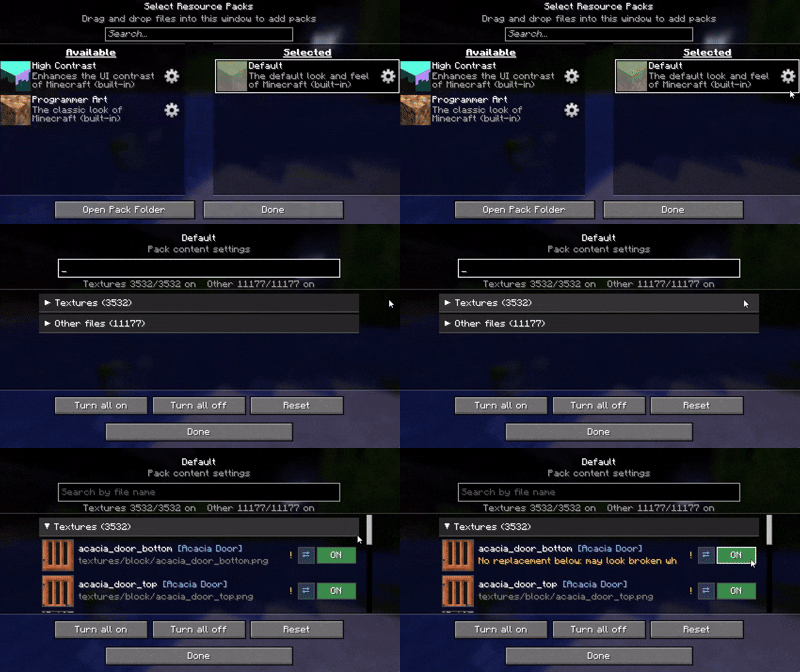
A settings (gear) button appears on every pack in the resource pack selection screen. Open it to browse everything the pack contains and toggle each file one by one. Works with any resource pack, no setup required.
If possible, I recommend using a mod such as Remove Reloading Screen alongside it.
Features
- ⚙️ Gear button on every resource pack (available and selected lists alike)
- 🖼️ Per-file ON / OFF with a live thumbnail and the file name
- 🔎 Search by file name
- ⚠️ warnings — it reads how textures and JSON files reference each other, and only warns you when a change would actually break rendering (the purple-and-black missing texture)
- 🔗 Jump between related files, review all current warnings, and reset with a confirmation step
How it works
Disabling a file never modifies the pack. The mod hides that file so the game falls back to the pack below it (or vanilla). Changes apply on the next resource reload.
Language
Follows your game language automatically, with translations in English, 日本語, Deutsch, Français, Português, हिन्दी and 中文. Any other language falls back to English.
License
All Rights Reserved. Personal use and unmodified inclusion in modpacks (with credit and a link back) are allowed. Re-uploading elsewhere or distributing modified versions is not permitted.
Compatibility
Mod Loaders
Game Versions
Recommended Gear
AffiliateHardware and extras that pair well with this mod.

As an Amazon Associate I earn from qualifying purchases.
Screenshots
Similar Mods

Open Parties and Claims: Warfare
Turn OPaC claims into battlefields with chunk wars, raid rules, claim protection, and Xaero/Create support.

NhatJS's Enhanced Furniture Mod
Add reimplemented and new enhanced furnitures and cool electronic to your new Minecraft from old Furniture Mod!

Cobblemon EvoNotify
An evolution popup telling you when your cobblemon can evolve.

Monulite
This mod adds one ore to your world! Monulite! Monulite can be used for tools, magic items, or money! The choice is your...

Utility Golems
Extends Minecraft's copper golem functionality to add a series of colourful golems with different purposes!

Smore'd
This is just one GIANT outer wilds reference :D