Create: Molten Vents Fabric Port
Mod[FABRIC] Adds a renewable source of the orestones found in the Create mod, and by extension, many resources.
Description
This is a Fabric 1.20.1 port of the mod Create: Molten Vents. The original mod was developed by Apothicon02, and this port is made with permission from the original author.
Molten Vents is a mod which adds a renewable source of the orestones found in the Create mod, and by extension the many resources that can be processed from them.
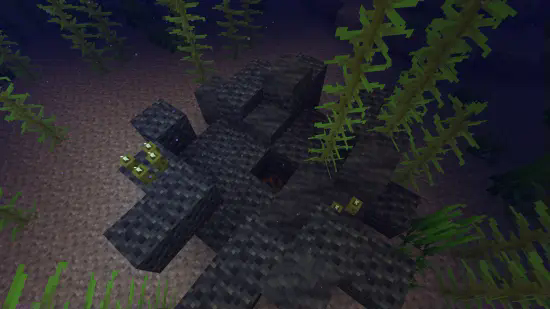
How to use:
- Locate a vent; Vents are found anywhere on the surface, but are more easily found underwater. (Configurable)
- Dig out the blocks inside of the vent until you find a block that looks like the orestones the vent is made of except with magma on it, that is the dormant orestone.
- Explode the dormant orestone by any means.
- Notice that the dormant molten vent is now an active molten vent by seeing the magma in it become brighter.
- Dump lava (preferrably via an automated method) on the active molten vent and watch as the lava turns into the corresponding orestone.
- Process the orestones into resources, or use them for building.
Default Vents:
- Veridium Vent
- Asurine Vent
- Crimsite Vent
- Ochrum Vent
- Scorchia Vent
- Scoria Vent
How to add a custom molten block
Just add the name of the block to this list (a .json file that generates in the config folder)
{"values":["asurine","veridium","crimsite","ochrum","scorchia","scoria","exampleblock"]}
Then make a datapack that adds these two jsons: data/molten_vents/molten_vents/blocks/conductive/exampleblock.json (You can add whatever blocks you want here but definitely include these three)
{
  "replace": false,
  "values": [
    "examplemodthataddsblock:exampleblock",
    "molten_vents:dormant_molten_exampleblock",
    "molten_vents:active_molten_exampleblock"
  ]
}
data/molten_vents/molten_vents/blocks/convertible/exampleblock.json (The lava can be changed to any other block and other blocks can be additionally added)
{
  "replace": false,
  "values": [
    "minecraft:lava"
  ]
}
Example datapack can be found in the #datapacks channel in the discord (https://discord.gg/HHqKa8vTAN)
Then make a resourcepack that adds the blockstates, models, and textures for "molten_vents.active_molten_exampleblock.json" and "molten_vents.dormant_molten_exampleblock.json" (optional)
How to make a custom molten vent feature
Just recreate your own copy of the placed and configured feature jsons available in the base mod in the respective directories within your own datapack: data/worldgen/configured_feature/examplevent.json data/worldgen/placed_feature/examplevent.json Then add your placed feature to the forge biome modifiers: data/yourdatapackname/forge/biome_modifier/add_vents.json
Examples are here: https://github.com/Apothicon02/Create-Molten-Vents/tree/main/src/main/resources/data/molten_vents
Discord: https://discord.gg/HHqKa8vTAN
This mod may be used in any modpack. The original mod is licensed under the MIT License.
Compatibility
Mod Loaders
Game Versions
Recommended Gear
AffiliateHardware and extras that pair well with this mod.

As an Amazon Associate I earn from qualifying purchases.
Screenshots
Similar Mods

ETERNULL
Explore the Corruption and fight The Null!

Geode O' Plenty
A Mod that add Geodes+ Mod to Biomes O' Plenty Mod

Another Unbreakable Enchantment
A simple mod added the enchantment that can prevent items from consuming durability.

DBC-CreatureBoost
Empowering the villains in Dragon Block C with the abilities they rightfully deserve.

Create: Fastfood
A Create mod addon, which adds Fastfood stuff.

Crawler | Dungeon Crawling In Minecraft
A Minecraft mod aimed at giving dungeons a more dungeon crawler feel.