

BuildPrint
ModGhost your blueprints into the world. Buildprint loads any schematic or litematic, shows exactly what to place next, tracks the material list, and can build it for you — a modern, Axiom-inspired take on Litematica.
Type
Mod
Modrinth Downloads
8,534
Modrinth ID
pa8th8fX
Last Updated
Aug 26, 2026
Description
Buildprint
See your build before you place a single block.
Buildprint ghosts any schematic into your world, tells you exactly what's missing, and can place it for you — block by block, survival-legal. A modern take on Litematica and Schematica, inspired by Axiom.
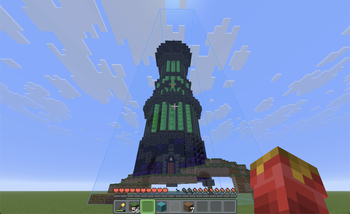
Why builders use it
- A real preview, not coloured boxes. Actual block models and states — glass, leaves, water, signs with their text, chests, mobs, modded blocks.
- Huge builds stay smooth. GPU-cached meshes draw several big schematics at full render distance, and quietly scale back instead of freezing.
- A live shopping list. What's placed, what's left, what's wrong — updating as you build.
- Colour-coded progress. Green = right, amber = wrong rotation, red = wrong block, purple = something that shouldn't be there.
- Swap any material. Don't like the wood? Click it in the list and build it out of something else. The ghost, the checklist and easy place all follow — your file is never touched.
- Fair in survival. It won't flag a half-grown crop or a lit furnace as a mistake you have to fix.
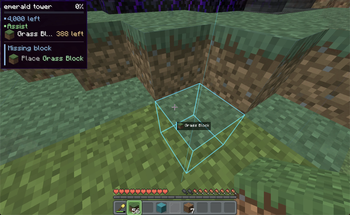
Let it build for you
Turn on easy place and right-click near the ghost — the exact block goes down, facing the right way. Normal placement, so it works in survival and never breaks what you've already built.
Hold right-click to sweep across cells. Middle-click to pick a block into your hand.
- The fiddly stuff — repeater ticks, candle counts, double slabs, open doors, sign text.
- Your tools — shovel, hoe, axe, flint & steel, borrowed from your inventory as needed.
- Things you can't hold — tall grass gets bone-mealed, crops planted from seed onto tilled soil.
- Crafters — slot locks and contents, without a screen ever popping open.
- Nether portals — lit the moment the frame is finished.
- Your inventory — blocks swap into your hand, stacks refill mid-build.
- Your build — it places past chests, never litters, never re-edits a block that's already right.
Easy place is off by default — bind a key or flip it in settings.
Make your own
Press B for the selection editor. Built for survival, where you can't just fly:
- Freecam — the camera flies, your body stays safe where it is.
- Select — click two blocks for a box; Shift-click for more regions.
- Resize, move, rotate, flip — drag colour-coded gizmos, snapped to blocks.
- Auto align — one click drops a loaded build onto the matching spot in your world.
- Save — blocks, block entities and entities to a .litematic, ghosted in place instantly.
Builds to start from
The Marketplace tab browses VoxelSprout schematics without leaving the game. Search, filter, open a listing for previews and block counts, then Download — or hit Place and have it ghosted into your world in one click. No account needed.
Browse the same catalogue on the web at voxelsprout.com → voxelsprout.com/marketplace.
Shortcuts
Rebind anything in Options → Controls, under the Buildprint heading.
Key Action M Open the Buildprint menu N Toggle easy place B Open the selection editor . / , Layer view up / down unbound Toggle printer mode unbound Cycle view filter — all / unbuilt / wrong / extra Input Action Right-click Place the block the schematic wants Hold right-click Sweep across cells Middle-click Pick that block into your hand Key Tool 1 / 2 / 3 Select · Resize · Save (make a blueprint) 4 / 5 / 6 / 7 Place · Move · Rotate · Auto align (position one) [ / ] Previous / next region Delete Delete the active region H Show or hide the controls cardOpens anything
Format Extension Import Export Litematica .litematic ✅ ✅ Sponge schematic .schem ✅ Planned Classic schematic .schematic ✅ Planned Vanilla structure .nbt ✅ Planned Axiom blueprint .bp ✅ PlannedDrop a file on the window, pick it from your files, or drop it in schematics/ — it shows up on its own.
On first launch Buildprint offers to import your placements and put your builds back where they were. Your files are left untouched.
Managing your builds
- Local — your schematics/ folder with folders, search, Recent and ★ Favourites, plus a spinnable 3D preview of whatever you select.
- Loaded — everything you've placed: toggle, rename, move, rotate, flip, slice to a layer, all updating live.
- Remembered — per world and per server. Your builds are waiting where you left them.
Build it together
Start a sync session and share the code. Everyone who joins sees the same builds ghosted in the same place — same position, rotation and flip, in the right dimension — and watches the progress move as the others work.
- A code and a link. Join from the mod, or from the link in your browser.
- Live progress. Placed, missing, wrong, extra, and what's still to gather — per build, with who reported it.
- Nobody needs the file. Turn on file sharing and the schematic travels with the session — anyone who doesn't have it gets it automatically.
- Your call who can move things. Guests can be allowed to add and reposition builds, or just watch.
- Join whenever. The session lives on the server, not on the host's client — turn up while everyone's offline and you'll still see the plan. Drops reconnect on their own.
No account needed. Still client-side, too: it works on any server, with no plugin and nothing for the server owner to install.
Find your materials — with Sorted
Sorted is an optional companion. Install it and the material list gains a Chests column — how much of each material is sitting in the containers Sorted has indexed for this world — and a magnifier button on every row that lights those chests up through walls. While they're lit the ghost and every overlay step aside for 20 seconds, so you're looking for a glowing chest instead of hunting for one behind a translucent building.
Chest counts stay in their own column rather than being folded into what you're carrying — the index is what Sorted last saw, so on a server it's a memory, not a guarantee, and the list says so.
Without Sorted the column simply doesn't exist. Nothing else changes.
Requirements
- Minecraft 26.2+, Fabric Loader 0.16+
- Fabric API and YACL
- Mod Menu (optional) — to reach the settings screen in-game
- Sorted (optional) — chest locating and an In chests count in the material list
Client-side only. Works on any server you can join.
Compatibility
Mod Loaders
Game Versions
Recommended Gear
AffiliateHardware and extras that pair well with this mod.

As an Amazon Associate I earn from qualifying purchases.
Screenshots
Similar Mods
Fast Item Frames Botania Fix
A mod to fix the issues caused in Botania by Fuzs' Fast Item Frames
Eight's Primates
A mod that adds a selection of new primates to Minecraft

SHOUT
An Alien Evolution Addon that adds a bunch of small QoL features to the existing mod!

Sintel
Adds configurable chimney smoke for decoration
Maple
The Maple Mod adds a wealth of natural elements and decorative options to Minecraft, allowing players to experience more...
VillagersTradingPlus
Add, replace or delete the trades of any villager, change the currency, gate trades behind conditions and reprice them,...