Dark early loading
Modby kentapainter
Change the neo-forge loading screen darker
Type
Mod
CurseForge Downloads
381
CurseForge ID
1618581
Last Updated
Aug 30, 2026
Description
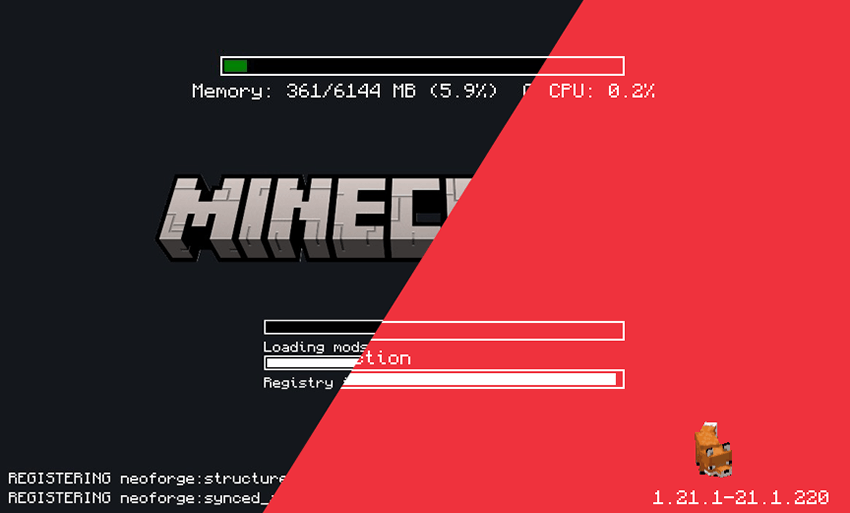
All code authorship belongs to Lukáš Kaňka; I was not involved in any way in the development of this mod.
My participation is limited to modifying the compiled JAR file to alter visual aspects to my liking. If there are any problems with the programming, performance, or errors, I recommend going to the original author's website, from where I obtained the file I'm sharing here.
https://www.curseforge.com/minecraft/mc-mods/simple-custom-early-loading
Since my contribution was visual, I can alter only what the config file and my graphics files allow.

This mod allows the customization of Neoforge's early loading screen.
As the original mod allows all the options mentioned by its author.
Features:
- add and position custom images (see supported image formats)
- toggle and change the position of the progress bar
- toggle performance bar
- toggle NeoForge's fox
- toggle bottom left log
- toggle NeoForge's version (bottom right)

Installation
- Just leave it in to the mods folder.
- when you run minecraft, you'll see an alert windows said something like "you didn't change manually the config file. do you wanna make it automatically?" press yes, and run minecraft again.
- now you can see loading screen darker.
If you wish to make the modifications manually, follow the author's steps.
- place the jar in the mods folder
- modify the config/fml.toml file

Some options that I left
If you want to change something, like background, or logo, maybe hiding things in the corners…
- Go to the config folder.
- Look for simple-custom-early-loading (here you can change everything that appears on screen).
- If you want the simple logo, look for the line that says "image": "logoplain.png"
- logoplain.png - is simple
- logof.png - is the game's most recent logo
- loading.apng - is an animation of the word "loading"
If you want to change the background, look for the line "image": "plaindark.png"
- plaindark.png - is the default dark version
- plaindark2.png - is a version with decorative corners
- stellarview.png - is a screenshot of the Minecraft sky using a mod the author used
If you want to use custom images, you can create a folder inside the config/simple-custom-early-loading ,put yours images there, and go to modify the simple-custom-early-loading.json file.
Recommended Gear
AffiliateHardware and extras that pair well with this mod.

As an Amazon Associate I earn from qualifying purchases.
Screenshots
Similar Mods

Phantom Armor
This mod adds armor made from phantom leather. The perfect counter to those pesky phantoms!

No Bed Explosions
Prevents beds from exploding in the Nether and End
Feruchemy
Bringing Feruchemy to Minecraft!
Experiment 277
A slow burn psychological horror mod.

Nuclear and Atomic Bombs
Place and remotely detonate nuclear bombs that create massive craters, mushroom clouds with volumetric shaders, radiatio...

CoffeeG's Supereme Back
Back to your lastest death position using "/trigger back" ("/back" alternatives)