DataTip
Modby cooobird
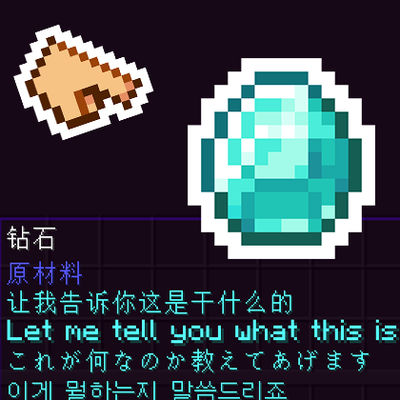
JSON-driven custom item tooltips via resource packs. Multi-language, rich text, NBT/condition matching, shift-protected display. No coding — just JSON.
Description
About
Add custom tooltips to any item with a JSON file in your resource pack. Multi-language, rich styling, conditional display — no Java required.
{
  "minecraft:diamond": {
    "type": "text",
    "text": "A shiny diamond",
    "color": "#55FFFF"
  }
}
Features
- 14 Content Types — text, items, 3D blocks/entities, progress bars, charts, carousels, typewriter effect, textures, images, layouts
- Rich Text — hex/named colors, bold, italic, underline, strikethrough, custom fonts
- Multi-Language — per-language text with per-language styles, no fallback
- Custom Fonts —
fontproperty for text and typewriter (e.g.minecraft:alt,minecraft:uniform) - Live Variables (27+) —
{durability},{player_health},{player_x/y/z},{game_time},{nbt:path}, and more - Expressions —
{durability > 100 ? 'Good' : 'Needs repair'} - Color Expressions —
"color": "{durability > 100 ? 'green' : 'red'}" - Flexible Matching — exact ID, tags (
#minecraft:swords), wildcards (minecraft:*_sword) - Conditions (17 types) — filter by dimension, biome, weather, time, health, hunger, nbt, item_tag, etc.
- Shift Toggle — hide details behind a "Hold Shift" prompt
- Prepend Display — show content after item name (before original tooltip)
- Hot Reload —
/reloadorF3+Tapplies changes instantly - Charts — bar, pie, line charts with variable support
- 3D Rendering — rotating block models, entity models, painting display
- X/Y Offset — fine-tune position with
offsetXandoffsetY - Event System — pre/post render hooks, variable resolve events
Quick Start
- Create
assets/<namespace>/datatip/datatip.jsonin your resource pack - Define entries with item ID as key
/reload— done
Configuration
config/datatip-common.toml:
enabled— global on/off toggledefaultColor— default text color (ARGB format)defaultLineHeight— default line height in pixelsmaxWidth— maximum tooltip width
Key bind in Controls → DataTip (default: Left Shift)
For Mod Developers
Datagen Support
// Text with styles and fonts
TipContentBuilder.text("Hello", "gold", true, false, false, false)
TipContentBuilder.text("Hello", "gold", "minecraft:alt")

// Multi-language with styles
TipContentBuilder.langText(langMap, "gold", true, false, false, false)

// All content types
TipContentBuilder.item("minecraft:diamond")
TipContentBuilder.entity("minecraft:wolf", 48, 0, 8)
TipContentBuilder.block("minecraft:stone", 48)
TipContentBuilder.atlas("minecraft:apple", 32)
TipContentBuilder.image("mymod:icon.png", 32, 32)
TipContentBuilder.progress(0.75f, 100, "75%")
TipContentBuilder.chart("bar", 100, 60, "Title", chartEntry("A", 50, "#FF0000"))
TipContentBuilder.typewriter(0xFF55FF, "Line 1", "Line 2")
TipContentBuilder.divider("gray", "dashed")
TipContentBuilder.aligned(content, HorizontalAlign.CENTER)
Java API
// Register custom content type
TipContentRegistry.registerParser("my_type", new MyContentParser());

// Register custom variable
VariableResolver.registerVariable("my_var", stack -> "custom_value");

// Register custom condition
ConditionChecker.registerCondition("my_condition", (value, stack, player, level) -> {
    return player.getAbsorptionAmount() > 0;
});

// Event hooks
TipEventManager.onPreRender(event -> { /* ... */ });
TipEventManager.onResolveVariable(event -> { /* ... */ });
TipEventManager.onAppendLines(event -> { /* ... */ });
Recommended Gear
AffiliateHardware and extras that pair well with this mod.

As an Amazon Associate I earn from qualifying purchases.
Screenshots
Similar Mods

Lumberaxe
Adds veinmining lumberaxes to the game

OpSec
A client-side Minecraft mod that provides protection against client fingerprinting, tracking exploits, and other privacy...

Dive in
Custom animation when diving into fluids like water or lava

repair workbench: durability system
repair your item more easily

Arsenal
A weapons mod focused on adding few but qualitative weapons

HealthIndicator
shows you a warning when your health goes under a certain amount