

Resource Pack Profiles
ModSave, manage, and share named resource pack load-order profiles. Switch between completely different pack setups in seconds, right from the resource pack screen.
Description
Resource Pack Profiles


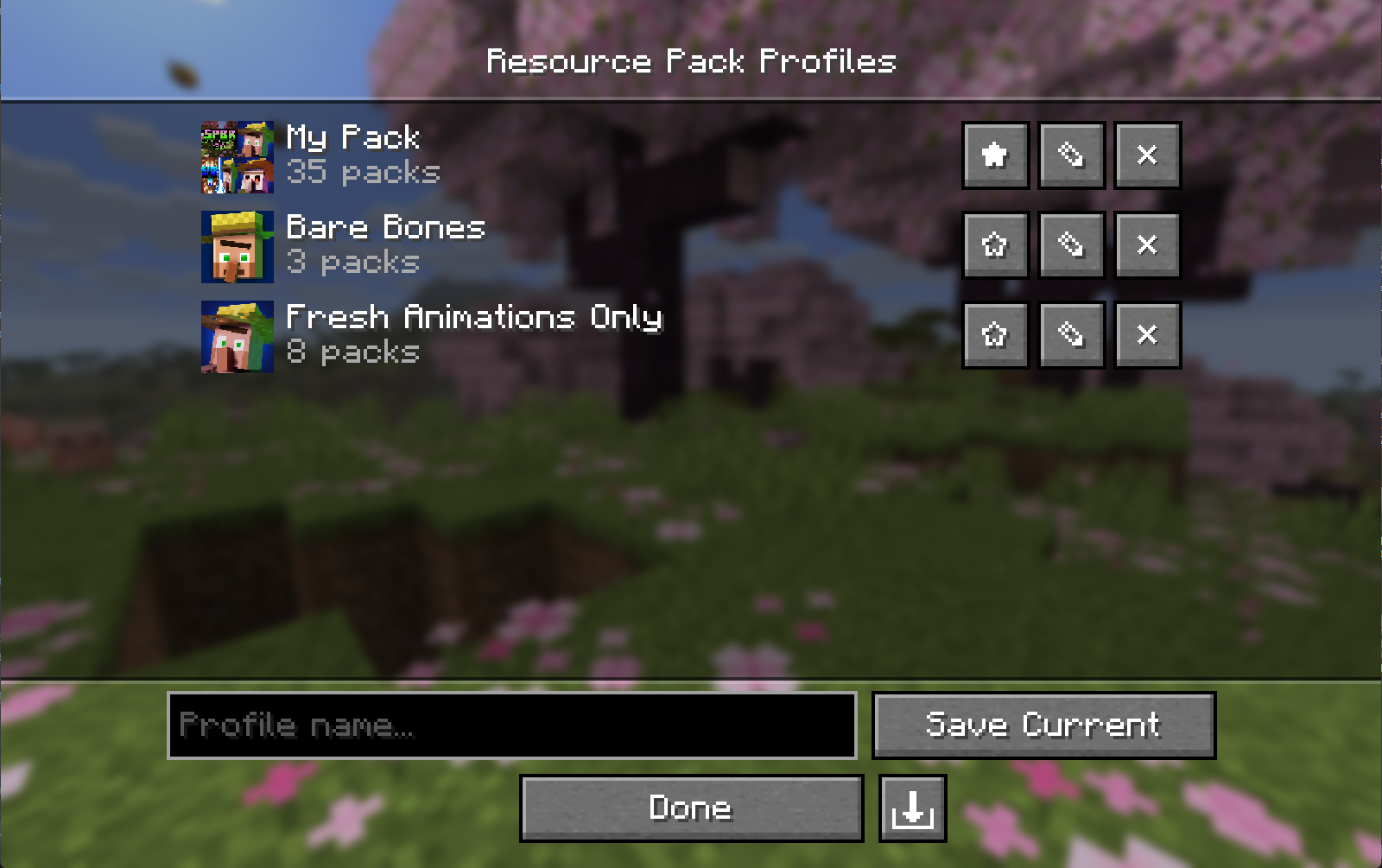
A lightweight client-side Fabric mod that lets you save, manage, and share named resource pack load order profiles right from the resource pack screen.
Features
- Profile Saving - Snapshot your current resource pack load order as a named profile with a single click.
- Instant Loading - Apply any saved profile and have your packs reload automatically; no restarts needed.
- Profile Editing - Add, remove, and reorder packs within a profile without touching your main load order. Edit the active profile and it re-applies automatically, so your changes stay live.
- Favorites - Star profiles to pin them to the top of the list.
- Custom Icons - Assign a custom image to any profile; auto-generates a composite icon from your pack art if none is set.
- Import / Export - Share profiles as
.rpprofilefiles, a single JSON that includes your pack list and custom icon. - Missing Pack Detection - Profiles with unavailable packs are flagged automatically and can still be applied without the missing packs.
- Keyboard & Narrator Friendly - Built on Minecraft's native widgets, so the profile and pack lists support full keyboard navigation and screen-reader narration.
Download
- Modrinth (recommended)
- GitHub Releases
Installation
- Install Fabric Loader for your Minecraft version.
- Install Fabric API.
- Install Fabric Language Kotlin.
- Drop the mod
.jarinto your.minecraft/modsfolder. - (Optional) Install Mod Menu to open the profiles screen from the mods list.
Client-side only — no server installation needed.
Compatibility
| Dependency | Version |
|---|---|
| Minecraft | 26.1 - 26.2 |
| Fabric Loader | 0.19.3+ |
| Fabric API | 0.152.1+26.1.2 |
| Fabric Language Kotlin | 1.13.12+kotlin.2.4.0 |
| Mod Menu | 18.0.0-beta.1 (optional) |
Usage
Open the Resource Pack Profiles screen via the Profiles button on the vanilla resource pack screen (left of Open Pack Folder), or via Mod Menu.
| Action | How |
|---|---|
| Save current load order | Type a name → click Save Current |
| Load a profile | Click anywhere on the profile's row |
| Edit packs in a profile | Click ✎ |
| Delete a profile | Click ✕ |
| Favorite a profile | Click ★ / ☆ |
| Set / change a profile icon | Open Edit (✎) → click Icon… |
| Remove a custom icon | Open Edit (✎) → click ✕ next to the icon |
| Export a profile | Open Edit (✎) → click the export button (bottom right) |
| Import a profile | Click the import button (bottom right of the profile list) |
In the editor, click a pack in the Available column to add it to the top of Selected. Use the arrow overlay on a selected pack's icon to remove it or reorder it. With keyboard focus, use Enter to add/remove and Shift+Up/Down to reorder.
Profile File Format
Profiles are saved to:
config/resourcepackprofiles.json
Custom icons are stored in:
config/resourcepackprofiles/icons/
Exported .rpprofile files are standard JSON:
{
  "name": "My Profile",
  "packIds": ["file/Pack1", "file/Pack2"],
  "favorite": false,
  "customIcon": "<base64 encoded PNG, or null>"
}
Building from Source
git clone https://github.com/ZephByte/ResourcePackProfiles.git
cd ResourcePackProfiles
./gradlew build
The built jar will be in build/libs/.
License
MIT - free to use, modify, and redistribute. See LICENSE.
Author
Made by ZephByte.
Compatibility
Mod Loaders
Game Versions
Recommended Gear
AffiliateHardware and extras that pair well with this mod.

As an Amazon Associate I earn from qualifying purchases.
Similar Mods

TKVM Epic Fight Additions
Small additions to epic fight for FalchionMC!

Pirates & Treasures
kill pirates, find treasures and deal with curses
Oculus - Au Naturel Edit
An fork of oculus to expose more modded minecraft internals and make them available for shader development in the Au Nat...

Code Defined Gui
A Minecraft mod that allows other mods to define GUIs in code - without the need to create the full layout in an image e...

Clear Head
Removes pumpkin overlay

CritterPet
Tameable spiders and other creatures
