
Item Collector
Modby Skatric_
Track your collection of every item from every installed mod in one custom menu
Type
Mod
CurseForge Downloads
26,275
CurseForge ID
1606992
Last Updated
Oct 11, 2026
Description


Item Collector turns your entire modpack into one giant scavenger hunt!
On world load, Item Collector auto-generates a collection quest for every obtainable item from every mod you have installed, and you can quickly blacklist items with the click of a button. Install it alongside 2 mods or 500, and it’ll create an entry for every item no matter when you add a mod!
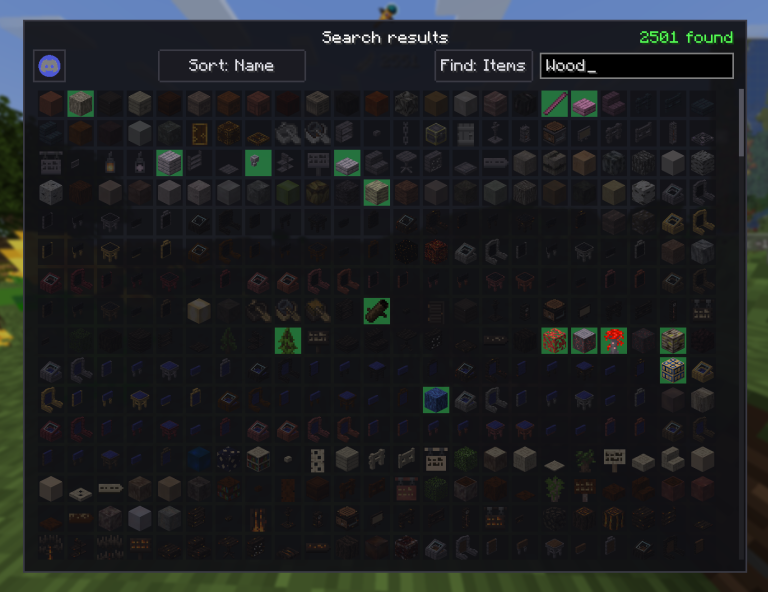
The Collection Book
Press B (rebindable) or type /collection to open the collection menu:
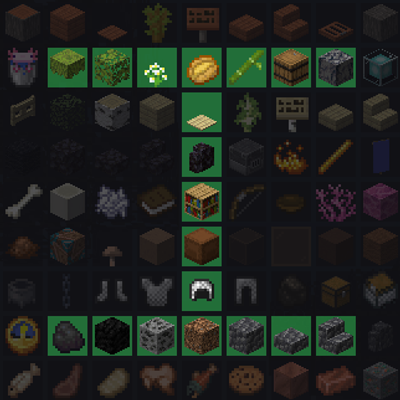
- Collected items glow with a green highlight, missing ones stay dimmed, and blacklisted items will have a red “X” over them.
- You can search for individual mods to check your progress in each of their dedicated pages, or search from a mega-list of every item in all your mods. Hundreds of mods to look through? No problem!
- Additional “Sort” options are available for items as well!
- Items can be blacklisted just by right-clicking on them, no config needed.
- The main menu and mods will have respective “collected/total” counts next to them, so you can quickly track your progress.

How It Works
Normal items are collected the moment they enter your inventory.
Unobtainable blocks (bedrock, end portal frames, modded indestructibles) are collected just by looking at them through a spyglass or while crouching for 3 seconds (configurable).
Creative-only items (command blocks, spawn eggs, and anything else hidden from the survival creative tabs) are excluded automatically, so you don’t have to blacklist them yourself.

Easily Configurable For Any Playstyle
Everything runs automatically, but config/itemcollector.json lets you fine-tune:
- forceBlacklist — Item IDs to exclude from the collection completely, such as "minecraft:bedrock".
- forceInclude — Item IDs to force into the collection even if they are normally blacklisted as creative only.
- announceToChat — Whether or not a chat message should be shown when you collect an item for the first time.
- showToasts — Whether or not the advancement popup should be shown in the top-right corner when you collect an item for the first time.
- stareSeconds — How many seconds you must look at an unobtainable block (such as bedrock) for it to be "collected."
- blacklistBlocksCollection — When true, blacklisted items are not recorded at all, and cannot be collected until unblacklisted. When false, the blacklist will hide its items from the total count, but will still record if the items are collected.
- stareBlocksAlsoCollectable — When true, blocks that are normally only collected by looking at them will also be collected if you obtain the item. Helps with modded blocks that are mistakenly marked as unobtainable.
All of your blacklisted items are also stored in the separate config file, itemcollector-blacklist.json.

Multi-loader & Multi-version
Available for Fabric, Forge, and NeoForge across a range of Minecraft versions. Grab the file that matches your setup. (Requires Fabric API on Fabric. No API dependency on Forge/NeoForge.)
Mod created by Skatric with help from SobGoth <3
Compatibility
Mod Loaders
Game Versions
Recommended Gear
AffiliateHardware and extras that pair well with this mod.

As an Amazon Associate I earn from qualifying purchases.
Screenshots
Similar Mods
PolarisTrading
This mod adds a Market Block for trading between players. Players can set the items they want to sell and what they are...

Redaction
The cleanest Minecraft experience (no hacks included).
Rockhounding Mod: Surface
A collection of features concerning nature and geology resources and their applications.

Bundles Backport
Backport of Bundles for 1.12.2

TensuraMoreUtils
TensuraMoreUtils is the ultimate QoL toolkit for Tensura server owners, built to make server management smoother, faster...
Evil Notch Lib
A Library and API for both java and Minecraft