

FPS hud
ModHigh precision FPS displaying mod with a customizable HUD
Type
Mod
Modrinth Downloads
63,469
Modrinth ID
2iH7sx2j
Last Updated
Oct 11, 2026
Description
FPShud,
a mod that displays FPS with high precision on a customizable HUD
Mod features:
- Main FPS is the main FPS value, regulated by the Main Update Interval
- Avererage FPS is the average FPS value from all the values took in Average Update Interval
- Max FPS is the maximum FPS value from all the values took in Min Update Interval
- Min FPS is the minimum FPS value from all the values took in Max Update Interval
FPShud with default settings
HUD Features:
- General Settings:
- Toggle HUD toggles the entire HUD
- X Position changes the X position of the HUD on the screen
- Y Position changes the Y position of the HUD on the screen
- Text Color changes the color of the entire HUD
- Shadow enables or disables the text shadow on the HUD
- Polling Rate indicates how frequently the mod should poll FPS
- FPS Display, Average Display, Maximum Display, Minimum display
Those settings can be changed for every one of the 4 fields:
- Show FPS toggles the FPS field
- FPS Position indicates the position of the field (first, second, third, fourth)
- FPS Precision indicates how many points of precision the field have
- Before FPS Text changes the text displayed before the specific field FPS value
- After FPS Text changes the text displayed after the specific field FPS value
ModMenu config:
- GUI config is accessible from the ModMenu mods list
The config screen is divided into 5 categories:
- General Settings:
- FPS Display, Average Display, Maximum Display, Minimum display:
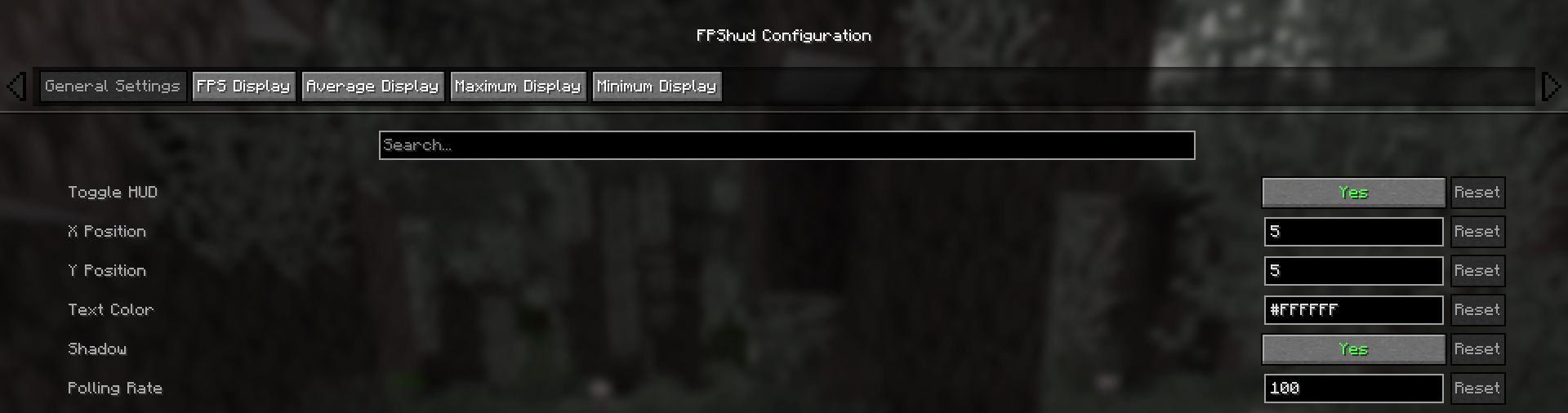
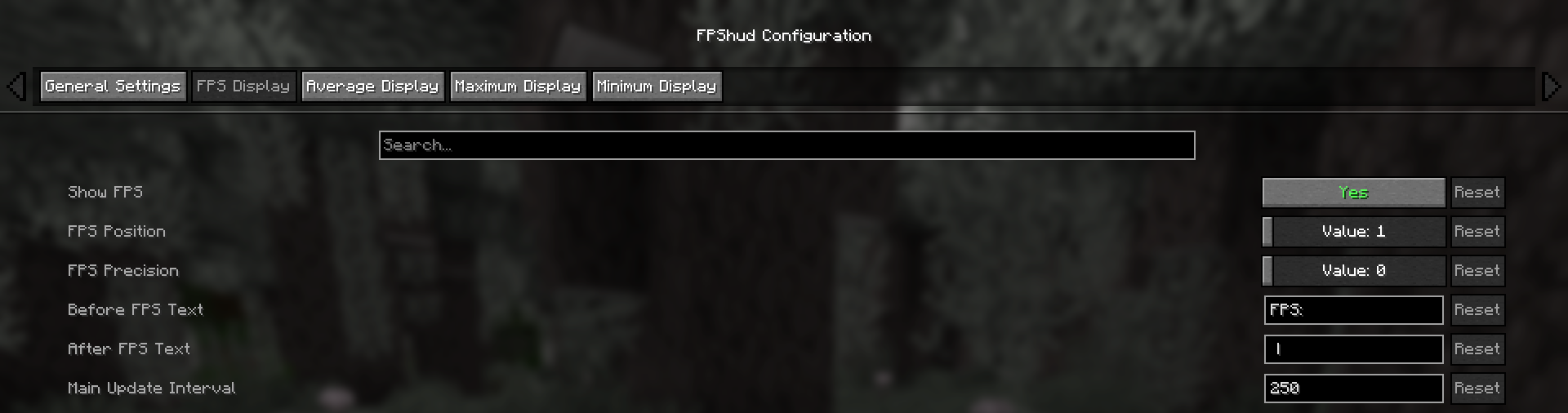
Why FPShud?
Highly precise:
FPShud uses time elapsed from frame to frame for the FPS value calculation; This method of sampling elevates precision and customization, permitting millisecond precise calculations and FPS displaying
FPShud works with a Polling Rate algorithm; samples are taken every frame, then smoothen every poll-time and finally processed to make them match the required Main Update Interval, Average Update Interval, Maximum Update Interval and Minimum Update Interval requirements
For those reasons, it is not recommended to set Polling Rate and Update Interval to low values because results may appear very fluctuating
Highly customizable:
You can customize the HUD to match every style:
only showing Avr and Max, modified 'Before Text', changed 'Text Color', removed 'Shadow', changed 'Precision' and modified 'Update Intervals'
Other:
If you are using ModMenu install ClothConfigAPI to access the config screen
Don't want ModMenu? The config file is accessible and editable in your config directory, changes apply after a game restart
Settings will be saved in your config folder and updated at runtime
The mod is client side (works on multiplayer)
Links:
Compatibility
Mod Loaders
Game Versions
Recommended Gear
AffiliateHardware and extras that pair well with this mod.

As an Amazon Associate I earn from qualifying purchases.
Similar Mods

REI Search Bar Calculations
Adds a calculator to REI's search bar.

Changed
A Minecraft experience in the world of Changed.

AppliedEnergisticsTweaker
Adds CraftTweaker Support for Applied Energistics 2

Psionic Peripherals
A mod that introduces new tools for Psi

TFC Create
Mod that provides some compatibility between TerraFirmaCraft and Create

Hunger Remover
Removes the hunger bar and makes food restore health.
