
Absolute Afk Cinema
Modby DelinkedDE
Go AFK and the camera takes over: slow cinematic shots of you, nearby animals, villagers, other players and interesting places – like the idle camera in racing games. Client-side, no dependencies.
Description


Version 1.7 out now
Out now: the camera cuts your idle time into a film · it keeps the best frames for you · ten camera moves made only for vehicles · shots made for the Nether, the End and the deep dark · a playlist that follows the daylight · your own music in any format · 41 camera moves with a slider each · fourteen languages · INGAME settings menu · AFK with the inventory open (wiki at the end of the description)
You walked away. The camera didn't.
You know that moment in a racing game when you put the controller down and the game starts admiring the car for you? Slow orbits, glossy pans, the lens creeping in on a headlight while the sun goes down?
That – but for your Minecraft world.
Step away for a few seconds and AFK Cinema takes the director's chair. The camera lifts off your shoulder, drifts around your character, finds the herd of cows on the hill, follows a villager across the square, lingers on the campfire glow, and pulls back until your base is a speck in the landscape. Letterbox bars slide in, the HUD fades away, a calm soundtrack rises.
Touch the mouse. You're back. Instantly.
Where this is going
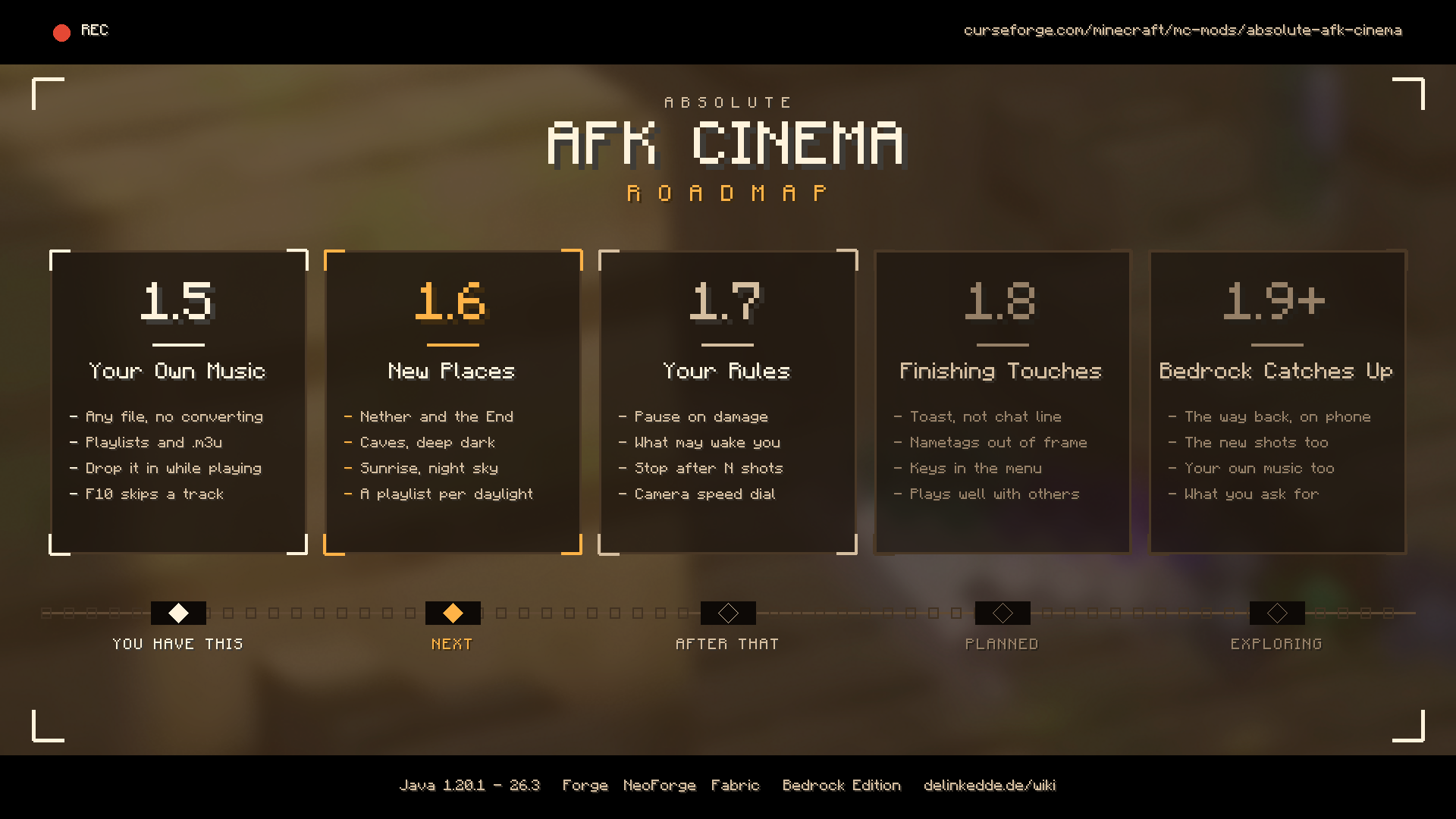
1.8 is next: the finishing touches – a toast instead of a chat line, nametags out of frame, key bindings in the mod's own menu, and a settings screen you can drive with a controller.
Then 1.9, Your Gallery: the frames the camera keeps get a place of their own – browse them in game, get a contact sheet of a whole session, open the folder with one key.
And 2.0, Moments: the camera stops filming whatever is there and starts waiting for the good one – the sun going down behind your base, the first snow, something rare walking past – and cuts on the beat of the soundtrack.
After that: Bedrock catches up, and whatever you ask for in the comments. Half of this list came from there.
New in 1.7: it cuts a film, it does not shuffle one
Until now every shot stood on its own merits. Twelve good moments in a row – and no reason for any of them to follow the one before.
The camera now plans in arcs, the way a scene is cut. It arrives wide and high, so you know where you are. It looks in towards whatever it has found. It gets close – down in the grass, over your shoulder, hand-held. Then it leaves, back out into the landscape, and the arc ends on black before the next one begins somewhere else.
It never picks a shot by itself: it only leans on the ones that were already possible. A cave still forbids the crane, a slider at 0 is still never seen, and Director off gives you exactly the old behaviour back.
A line at the start, a card at the end. Day 342 · Sunflower Plains · Dusk as the camera takes over – and when you come back: 14 min away · 23 shots · With: villager, wolf, skeleton.
And it keeps the best frames. A few stills land in screenshots/afk-cinema, taken mid-shot once the move has settled, with the bars in and the writing out. Come back after twenty minutes and there are six pictures of your base you would never have taken yourself, because you were not at the keyboard. They are ordinary screenshot files; nothing is sent anywhere.
One dial instead of nine. Subject mix runs from your world – places, vistas, machines – to the living. In the middle it changes nothing and the nine weights stay exactly as you wrote them. Camera speed is one multiplier over every move: half speed for something stately, double for something restless.
And the rules are yours. Damage can be ignored, can end the show, or can pause the game so you are not eaten while you are away. The show can stop by itself after so many shots. A hostile mob nearby or another player walking up can end it, if you want them to. Your own input always ends it and that cannot be switched off – it is the one thing nobody should be able to lock themselves out of.
New in 1.6.1: it films your car
Sit in anything you can ride – a car, a truck, a plane, a boat – go AFK, and the camera stops filming you and starts filming the vehicle, the way a car advert is cut. In behind the rear wheel and along the flank. Up over the bonnet and onto the glass. Low across the headlights. A slow turn at roof height. Away over the roof from the tailgate. Ten moves that exist only for vehicles, and never the same one twice in a row.
Nothing to install for it, and no list of supported mods. What counts as a vehicle here is that it is big, it is not alive, and you can sit in it – so Immersive Vehicles and everything built on it are in, and so are boats, minecarts and whatever vehicle mod you add next year. Asked for in the comments by KiuCfu1211.
While you are sitting in one, it is the film – no cutting away to a sheep on the hill halfway through.
Also fixed in 1.6.1: the startup crash next to any other mod that carries the same audio library – Ad Astra among them – and the camera handing your game back in third person or with the HUD hidden.
New in 1.6: the camera knows where you are
Walk into a cave and the film changes. Not because you set anything – because the camera now asks where it is standing before it picks a move.
Underground the lens keeps close, and the crane, the sky climb and the fly-by stand down: there is no air up there to use. Under a Nether ceiling the low shots take over. In the End everything that uses distance comes forward, because distance is all there is. Your own slider still multiplies on top of all of it, and 0 still means never.
And six shots that only exist in their own place:
- Lava sweep – skims low across lava and past you, the glow filling the bottom of the frame. The Nether mostly, but a lava fall at the bottom of a ravine gets it too.
- Ceiling drop – opens hard against the rock overhead and falls away from it onto you. It measures the headroom first: in a two block tunnel there is nothing to drop from, and it does not try.
- Void edge – backs off the rim and sinks below it, until there is nothing at all underneath you. The End, and any cliff with a real drop under it.
- Crawl – creeps along the tunnel towards you with the walls sliding past the lens. It judges itself more loosely than the other shots on purpose: down there a frame half filled with rock is the picture.
- Starfield – turns the lens up off you into the stars. A clear night sky, and the End at any hour.
- Sunrise – holds the skyline while the sun crosses it, you low in the frame and backlit. Dawn and dusk, and it waits until the sun is really on the horizon.
The three worlds the game ships with are recognised by name. Everything else - and that means a modpack's own world - is judged by what it is like: has it got a ceiling, does daylight reach it, is there ground over your head. That is all the camera needs to know.
A playlist for where you are. Soundtrack from has a fifth setting, SCENE – and there is nothing to set up. A playlist called night is played at night, and so are dawn, day, dusk, cave, deep dark, nether and end. Sorting music into folders with obvious names is a thing you were probably doing anyway. If a list of yours is called something else, one line points at it: night = Dark Ambient. Where nothing fits, everything is in the running – going quiet underground would be the worse answer – and the change always lands between two pieces, never mid-track.
New in 1.5: your own music, in any format
Drop files into config/absoluteafkcinema/music and the cinema plays them.
There is nothing to convert. .mp3, .ogg, .wav, .flac, .opus, .weba, .aiff, .au – all of them play as they are, including the .weba a browser hands you when you save audio off a web page. The mod decodes the file itself and gives the samples straight to Minecraft, so your track is treated exactly like a sound the game shipped with: your Music slider still works, it pauses when you pause, and it fades out when you come back.
Drop a file in while the game is running and it is simply there. The folder is watched, so the new track joins in and plays as the next one. No restart, no button – and a long file that is still copying is picked up once it has finished instead of being written off as broken.
Playlists. A subfolder is one – music/night, music/building. An .m3u file is one too, and the better kind, because its lines may point anywhere on your computer: the music collection you already have gets played where it lies, without copying a single file into a game folder. Music → Playlists → Edit builds one in game – your playlists on the left, every track on the right, a + or a – on each – and what it writes is a plain .m3u you can keep editing by hand.
Soundtrack from: your own files, the three that come with the mod, both, or one playlist. With both, every single track has the same chance of coming up, yours and mine alike. The game's own music discs can join in too, if you would rather hear Pigstep over your base at night.
F10 skips to the next track – and on purpose does not count as coming back, so the shot you are watching carries on.
Drop in nothing at all and you still get the three original ambient pieces the mod brings: Evening Meadow, Slow Fields, Lantern Light – warm pads, soft kalimba, a slow bass, a long reverb tail. Vanilla music waits politely meanwhile.
Thirty-one ways to look at your world
Not one spinning camera on a timer – a small film crew with taste.
The slow lens work
Static zoom – the camera rests, the lens breathes in Dolly zoom – the Vertigo shot; the world stretches behind you Pull-away – further and further, until you're part of the scenery Close-up – a portrait, held just a little too long Breathing frame – hand-held stillness, a few centimetres of sway Rise zoom, slide zoom, arc zoom – climbing, gliding, circling while the lens closes in Golden hour – your silhouette against the low sun or moon Tracking – a roadside camera that turns to follow whatever walks past Vista reveal & horizon pan – when the view is worth it, the camera shows you
The classic moves:
Orbit · Push-in / pull-out · Low-angle pan with a touch of dutch angle · Fly-by · Crane up / down · Bird's eye · Over the shoulder
New in 1.4
Sky climb – the camera leaves the ground and keeps going, the lens widening, until your base is a speck and the landscape is the picture. Sometimes it runs the other way and drops out of the sky onto you. Helix – an orbit and a crane at once: around you and climbing, pulling in as it goes. Ground level – the lens down in the grass, looking up at you against the sky, with everything that is normally below the frame in front of it.
And three that are rare on purpose, because they need the right world: Moon – only at night under a clear sky, a long lens that tilts up off your silhouette until the moon fills the frame. Reflection – only where there is open water, the camera skimming a hand's width above the surface. Whip pan – pointed at nothing, then it snaps round onto you, overshoots by a hair and settles.
Every move is eased like a real dolly, cut like a real edit – hard cuts, the occasional fade to black, never the same pattern twice in a row.
It knows what's worth filming
Other players building next to you. Villagers on their rounds. Herds, foals, named pets. The zombie creeping up behind you (yes, really). Campfires, lava, beacons, portals, bells, lanterns in the dark – and any machine humming away in your base. The camera scores everything around you, checks the sightlines, and never ends up inside a wall or behind a tree.
Where you set it, and what the options do
Press F9. Or Esc and the AFK Cinema button between Options and Mods, or the Config button next to the mod in the mod list. Tabs, a search box, an explanation under every setting, a Preview now button that starts the camera so you can watch what you just changed, and Reset tab for when you have tuned yourself into a corner. Saved the moment you close it. The file is still there if you prefer it: config/absoluteafkcinema-client.json
Transition – how one shot becomes the next:
| CUT | A hard cut. One frame the cows, the next the village, like a film edit. |
| FADE | Every change goes through black. Calmer, more documentary. |
| MIXED | Mostly cuts, a fade every third shot. The default: all fades gets sleepy, all cuts gets restless. |
Coming back – what happens the moment you touch a key:
| INSTANT | The old behaviour: your view is back on the very next frame. Nothing fancy, nothing in your way. |
| FADE | The picture goes to black, everything is handed back inside that black, and the picture comes back up in your own view. |
| FLY | The camera swings around you on an arc, pulling in as it goes, ends up behind your head and glides slowly forward into your eyes. On the way it turns from whatever it was filming to you, and at the end it is already looking where you are looking. The default. |
| DIVE | The character switch from GTA V: the camera shoots up into the sky, the lens pulls wide, it hangs over the world for a moment – and then drops back down into your head. |
Either flight follows you: start running again and the camera catches up with you instead of landing where you used to be. How long it takes is a slider of its own, from instant to eight seconds.
Every shot has its own slider. New in 1.4: the Shots tab lists every camera move, one dial each. 1.0 leaves a shot as it is, 0 means you never see it again, 2.0 brings it twice as often. Tired of the hand-held sway? Breathing frame to 0 and it is gone. Want nothing but sky climbs? You can do that too.
The music lives there too: where it comes from, which playlist, whether music discs join in, a button that opens the music folder, and the playlist editor.
Everything else lives in the same screen: shot length, letterbox bars and their height, hide HUD, hide chat, dutch angle, zooms, camera distance, how much it prefers zooms over moves, and a weight per subject category – players, villagers, animals, monsters, blocks, vistas, yourself. Set a weight to 0 and that category is gone.
In your language
Fourteen of them: English, German, French, Spanish, Portuguese (Brazil), Italian, Dutch, Polish, Russian, Ukrainian, Turkish, Japanese, Korean and Simplified Chinese. Not only the labels – the sentence that explains what a setting does is translated as well, so the whole screen reads in one language. Minecraft picks it from your game language on its own, and anything a translation has not caught up with falls back to English instead of going blank.
Every single setting, explained: delinkedde.de/wiki
MP3, FLAC and Opus are decoded with JLayer/mp3spi, jFLAC and Concentus, which ride along inside the jar under their own licences. Thanks to them, "no converting needed" is a sentence this mod can actually say.
Compatibility
Mod Loaders
Game Versions
Recommended Gear
AffiliateHardware and extras that pair well with this mod.

As an Amazon Associate I earn from qualifying purchases.
Similar Mods

Spartan & Tinkers' Metals
A mod that adds in all the metals from Spartan Weaponry (and most from Spartan Shields), as well as a few vanilla tool s...
AdvancedDarkness (UPDATED)
an mod that makes night very dark, overworld very foggy and disables some features perfect for horror games

Dark Souls Expansion
Dark Souls inside Minecraft.

Foi1ys Lantern Corps
Minecraft Palladium Lantern Corps Addon

Pretty In Pink
Pretty In Pink is a Create addon that adds a huge variety of steel blocks in a multitude of colors. This mod ensures you...

Camels
This Mod adds Vanilla friendly Camels for Minecraft.