
rrtt217's HDR Mod
ModEnables native HDR in Minecraft with Iris shaders.
Type
Mod
Modrinth Downloads
17,908
Modrinth ID
tycXenOB
Last Updated
Jul 25, 2026
Description
Minecraft HDR Mod
A minecraft mod that enables native HDR on Windows / macOS / Linux with Iris shaders.
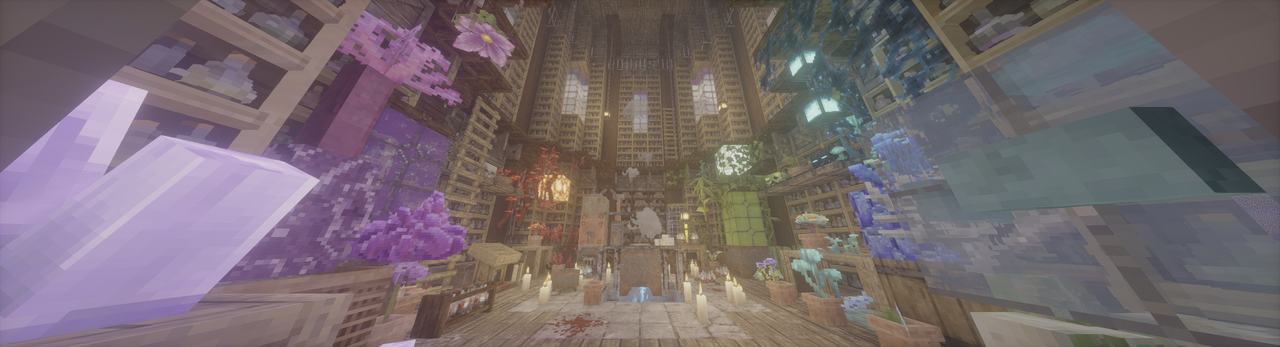 (Photon patched to HDR w/ Patrix, taken by mod's screenshot feature.)
What the mod have achieved
- Native HDR, both for scRGB and HDR10/PQ.
- UI color correction by a new render pass.
- Ingame config using Cloth Config API.
- Ingame HDR screenshot.
- Replay Mod HDR Video Export (need custom FFmpeg commandline, which can be found in config menu)
- Full Wayland IME fix (need IMBlocker).
For Users
[!IMPORTANT] Requires modded shaderpacks! https://github.com/rrtt217/Minecraft-HDR-Mod/wiki/HDR-Shaderpacks
- Adjust HDR Brightness values (Paper White, UI, Peak) with config menu. (Default keybind: F9)
- Take a HDR screenshot ingame. (Default keybind: F10)
- Supported platforms:
- Windows: Nvidia/AMD GPU generally run flawlessly. Intel GPU is supported since v2.1.0 with a DXGI fallback path and there's performance degradation (more info in v2.1.0 release note).
- Linux Wayland: AMD/Intel GPU generally run flawlessly. People using Nvidia GPU may encounter some problems/crashes, see the troubleshooting for a potential workaround.
- macOS: Supported but need more testing, bugs are expected. Also, shaderpack support on macOS is limited.
- Android/iOS: Not supported. If Mobile launcher developers are interested in the project, my glfw fork can be a starting point for HDR support in the future.
- Troubleshooting:
- ReShade is currently not compatible under default settings, failing to load and breaking sky.
- Enabling "Force Activate OpenGL-DirectX Interop" in config/advanced can improve compatibility with SpecialK and ReShade. Please make sure they only inject into DirectX 11 layer.
- Mods also messing with GLFW may be incompatible. (e.g. Ixeris)
- If your game is too bright/dark, try to adjust the custom brightness values yourself.
- If you're on Windows, don't forget to install the latest Visual C++ Redistributable.
- If your game crashes on NeoForge/Forge, disable earlyWindowControl in <game folder>/config/fml.toml
- If HDR is broken when shaders are enabled, please reset "Colorspace" setting in Iris/Oculus to "sRGB".
- Clean temp file if your game doesn't start or some features are broken (path can be found in log, %TEMP%/glfw on Windows and /tmp/glfw on Linux).
- For Linux Nvidia users, if your game can't start, or you feel too much banding ingame, here's a potential workaround (using Zink, so performance degradation is expected):
- Use these environment variables: export __GLX_VENDOR_LIBRARY_NAME=mesa export __EGL_VENDOR_LIBRARY_FILENAMES=/run/opengl-driver/share/glvnd/egl_vendor.d/50_mesa.json export MESA_LOADER_DRIVER_OVERRIDE=zink export GALLIUM_DRIVER=zink
- ONLY WORKS ON Mesa >= 26.0.0. Lower versions crash your game due to the lack of This PR.
- ReShade is currently not compatible under default settings, failing to load and breaking sky.
For Shader Packs
Wiki Tutorial
Macros
- HDR_MOD_INSTALLED
- HDR_ENABLED
Uniforms
- float HdrGameMinimumBrightness;
- float HdrGamePeakBrightness;
- float HdrGamePaperWhiteBrightness;
- float HdrUIBrightness;
Use these uniforms inside #if HDR_MOD_INSTALLED block.
Output
the output of the shader(aka. what is written to main render target in final pass) should have scRGB-nl encoding(Rec.709 primaries, sRGB (for negative numbers use −f(−x)) transfer function), and you should not use RGBA8F for scene color.
Credits
- Tom94, for glfw fork with color management;
- IMS212, for Iris shaders and original glfw patch idea;
- XgarhontX and some other fellows, for working on RenoDX Minecraft HDR and shader patches, and helping me to make color transform correct.
Copyright
The main HDR Mod repo is licensed under MIT. Bundled GLFW from Tom94's/mine fork is licensed under the zlib/libpng license.
Star History
Compatibility
Mod Loaders
Game Versions
Screenshots
Similar Mods
Mutant Iceologer
Woah this is one Buff Illager, Meet the Mutant Iceologer. This guy is a BEAST when it comes to fighting so be careful or...
More Quest Types
An FTBQuests Addon that adds 14~ new tasks and 11~ new rewards!
Options Profiles
A Minecraft mod that lets you load and save your options from in-game.

WoodenCog
Tfc - Create Compatibility mod
Overloaded Compressed Blocks
Compressed Blocks for Any Block
TFC Decoration
Add new Decorative blocks to TFC.


